
The Comprehensive Guide to Make.com
From basic triggers to complex AI-cognitive routing, discover why Make.com is the automation platform of choice for developers and businesses scaling in 2026.

If you’ve spent any time trying to scale a modern business, or just trying to claw back hours from your workweek, you’ve likely encountered the "automation wall." It's that frustrating moment when your disparate SaaS tools (CRMs, email marketing platforms, databases, AI models) refuse to talk to each other cleanly. For years, the default answer was Zapier. But as workflows become intensely complex, integrating advanced logic and multi-step AI reasoning, a newer standard has emerged. Welcome to Make.com.
1. What is Make.com? (The Visual Edge)
Make.com (formerly known to legacy users as Integromat) is a cloud-based visual automation platform. It operates on a simple premise: you should be able to design, build, and automate complex workflows without writing a single line of code, but with the power and flexibility of a developer.
While platforms like Zapier popularized linear, "If This Then That" trigger-based automations, Make introduced a fundamentally different paradigm: The Canvas.
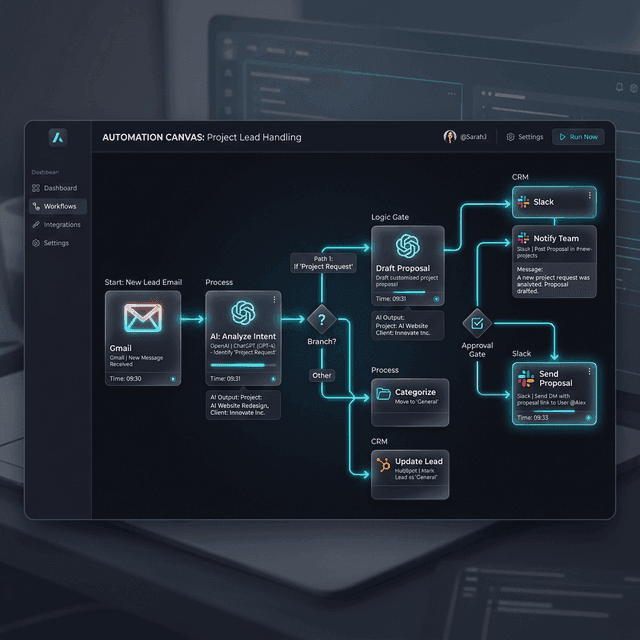
The visual canvas fundamentally changes how you understand your data flow. (Concept visualization).
On Make, you don't build a list of steps; you draw a map. You click, drag, and connect spherical "Modules" (representing apps like Slack, Stripe, or OpenAI) using paths. This isn't just an aesthetic UI choice; it's a cognitive upgrade. When an automation has 15 steps involving data splitting, filtering, and API calls, a linear list becomes impossible to debug. Make's visual canvas allows you to literally see where the data is flowing and where it stops.
The Core Vocabulary
- Scenarios: The Make equivalent of a "Zap." It's the complete workflow you build on the canvas.
- Modules: The individual nodes. An app integration (like Gmail) is a module.
- Triggers: The event that kicks off the scenario (e.g., "Watch for New Email").
- Actions: What the module does (e.g., "Create a Row in Google Sheets").
- Searches: A module that looks up existing data to be used later in the flow.
2. How Make.com Works in Practice
Building an automation on Make feels less like programming and more like playing with digital Lego blocks. The process generally follows a standardized flow that, once mastered, applies to almost any scenario:
- Select Your Trigger: Every scenario starts with a trigger. This could be an incoming Webhook (instant), a scheduled query of an RSS feed (every 15 minutes), or an app-specific event like a new Stripe charge. Make shines here with its "Instant" webhooks, which trigger the scenario the exact millisecond data hits the endpoint, rather than relying on polling intervals.
- Connect Modules: You drag a line from your trigger to your next app. Make boasts over 1,600+ pre-built native apps. But crucially, if an app isn't natively supported, Make’s generic HTTP module allows you to interact with any REST API on the internet as long as you have the documentation and API keys.
- Map the Data: When you connect module A to module B, a mapping panel opens. This allows you to drag dynamic data points (like `customer_email` or `purchase_amount`) from the first step and drop them into the fields of the second step.
- Add Logic & Transform: Data rarely arrives in the exact format you need. Make includes powerful built-in functions for regex parsing, math operations, date/time formatting (crucial for dealing with terrible API timestamp outputs), and array manipulation directly within the mapping fields.
- Test and Deploy: The definitive feature of Make is the "Run Once" button. You can execute a scenario with live data and watch animations pulse through the connecting lines. If an error occurs, the exact module turns red, and an execution log inspector shows exactly what the incoming data was and why it failed.
3. Deep Dive: The Logic Operators
Where Zapier often requires you to write custom Python or JavaScript to handle complex data structures, Make handles it natively with specialized logic modules. This is the inflection point where intermediate users become automation engineers.

The Router
A Router splits your automation into multiple paths. You can add "Filters" to the beginning of each path. For example, a new lead comes in. The Router pushes the data. If the filter sees `budget > $10,000`, it sends it down Path A to the VIP Sales Slack channel.
Iterators
APIs often return data in "Arrays" (a list of items). An Iterator takes that array and breaks it apart, running the rest of the scenario separate times, once for each individual item, ensuring granular processing of complex data sets.
Aggregators
The opposite of an Iterator. Imagine you used an Iterator to process 5 items, found their prices, and now you want to send *one* email with a summary. The Aggregator bundles those 5 processed items back into a single text block or array.
Error Directives
Automation breaks. APIs timeout. Make allows you to attach "Error Handler" paths to any module. If an API call fails, the error path can execute a "Rollback", sleep and "Resume", or push an alert to Discord and "Commit" the failure.
4. The 2026 Advantage: AI-Cognitive Routing
In 2026, automation is no longer just moving static data from Point A to Point B. The new paradigm is Cognitive Automation, injecting intelligence into the middle of the flow. Make.com's canvas is uniquely suited for this due to its ability to handle iterative loops and complex data structures returned by LLMs.

Make offers deep, official native integrations with top-tier foundation models, including OpenAI (GPT-4o, o1, o3-mini), Anthropic (Claude 3.5 Sonnet, Opus 4.6), Google Gemini, and open-source models via platforms like Perplexity, Groq, or Together AI.
Crucial AI Use Cases Built in Make:
- Unstructured to Structured Data Parsing: You receive a messy, rambling customer email. A scenario triggers, sends the text body to Claude with a system prompt demanding a strict JSON output matching your CRM schema (Name, Issue, Urgency 1-10). The AI module parses the text, returns the JSON, and Make maps it directly to a new Salesforce ticket.
- Sentiment-Based Routing: An incoming support ticket is instantly analyzed by a fast model (like Gemini Flash) for sentiment. If sentiment is "Angry" and urgency is "High," a Make Router bypasses the standard queue and alerts a senior manager via an automated phone call (via Twilio).
- Automated Research Agents: Combining Make's HTTP scraping tools with LLMs. A scenario triggers daily, scrapes competitors' pricing pages, feeds the raw HTML to an LLM to extract the price points, compares them to a master Google Sheet, and emails a daily executive brief of market movements.
- RAG Content Generation: Connecting Make's Pinecone/Weaviate modules to LLMs to pull company-specific context before auto-drafting replies to customer inquiries, ensuring the AI never hallucinates policy details.
Technical Dossier: Cognitive AI Routing & The Inference Cost Layer

In 2026, the most advanced Make.com users have moved beyond "Task" execution into Inference Management. By utilizing "Recursive Routing," scenarios can now judge their own output quality before finalizing an action.
- Self-Correction Loops: If an AI module returns data that doesn't match the desired JSON schema, Make's error handler captures the output and resubmits it to a more powerful model (like Claude Opus 4.6) for correction.
- Dynamic Model Selection: Scenarios now use "Cost-Aware Routers" to switch between Gemini Flash for simple parsing and GPT-5 for high-stakes creative generation, optimizing the inference-to-value ratio.
- Vector Memory Sync: Make acts as the "connective tissue" between live data streams and Vector Databases, ensuring your AI agents always have RAG-updated context in real-time.
Our Take: The Editorial View
Make vs. Zapier vs. n8n in 2026: The Cost Efficiency War.
When comparing Make to Zapier, the conversation always devolves into two factors: UI complexity and Cost.
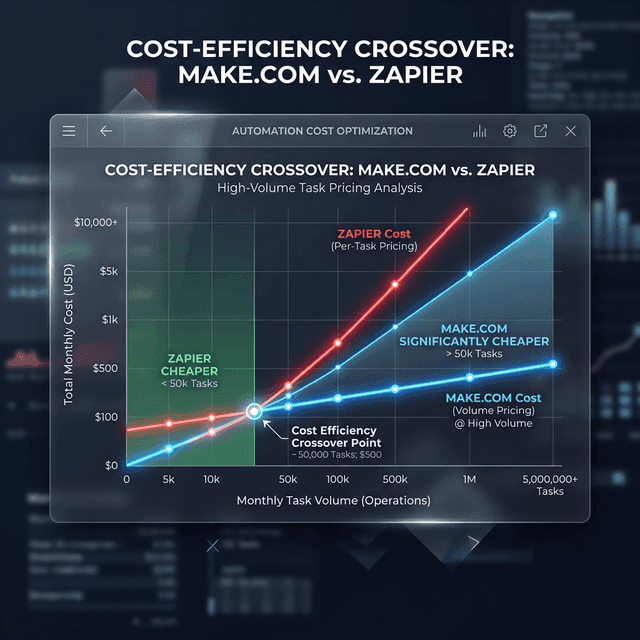
Zapier remains the undisputed king of approachability. If you need to connect Mailchimp to Google Sheets in 45 seconds, use Zapier. It requires zero technical thought. However, you pay a steep "convenience tax." Zapier bills per "Task" (a successful action). At scale, Zapier's pricing quickly becomes punitive, scaling into the thousands of dollars monthly for enterprise volumes.
Make requires you to think slightly more like a developer. You need to understand data structures (Arrays vs Collections) and know how to trace an execution log. However, the reward is massive cost arbitrage.
"We migrated a massive real estate lead generation system from Zapier to Make. On Zapier, the intricate logic required multi-zap splitting and cost $899/month. We rebuilt the exact same flow on Make.com's single canvas using Routers, utilizing about 60,000 operations. The monthly cost? $29. It is virtually impossible to justify Zapier at high volumes if you have an operator willing to learn Make."
Greg Dooley, Head of Digital Architecture
What about n8n? n8n is the rising star for hardcore developers because you can self-host it for free and write complex code blocks natively. While n8n is powerful, Make hits the perfect "Goldilocks Zone" between nocode usability and enterprise power, without the server maintenance headaches of self-hosting n8n.
5. High-Impact Use Cases for Businesses
Automation platforms are horizontal: they can do almost anything. But over the last few years, we've seen Make specialize in several high-ROI categories.
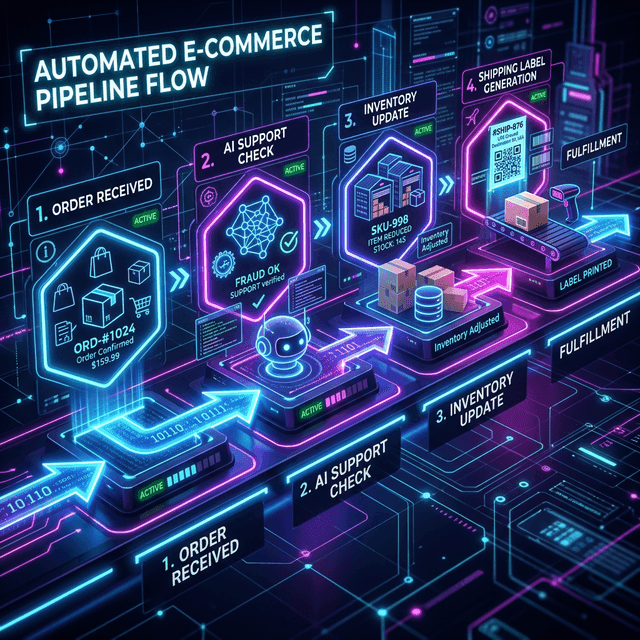
E-Commerce Ecosystems
Connecting Shopify to inventory management platforms that lack native APIs via custom webhooks. Automating post-purchase Drip campaigns, sending SMS notifications via Twilio, and auto-generating and printing shipping labels via Shippo logic.
Data Cleansing Pipelines
Ingesting data from messy, massive Webflow form submissions, utilizing Data Stores to check for existing records to prevent duplicates, formatting phone numbers to E.164 standard, and quietly pushing clean data to Airtable/HubSpot.
Marketing Content Engines
The "Autonomous Agency." Scraping RSS feeds of industry news, summarizing with Claude, generating a featured image with Midjourney v7 via API, assembling an HTML newsletter, and pushing to MailerLite, all triggered at 6 AM automatically.
Omnichannel Support Bots
Catching incoming queries from WhatsApp, Instagram DMs, and Zendesk into a central router. Using AI to classify the query type, and either drafting a human-in-the-loop response in Slack or auto-replying directly if confidence logic meets 95%.
6. Pricing Analysis (2026 Model)
Make's pricing is fundamentally operation-based. An "operation" is counted every time a module executes inside a scenario. If an automation has 5 steps and runs once, it costs 5 operations.
| Plan Level | Cost/Month (Annual) | Operations | Key Feature Unlocked |
|---|---|---|---|
| Free | $0 | 1,000 / mo | Unlimited Scenarios, 15 min execution interval. Perfect playground. |
| Core | $9 | 10,000 / mo | 1 min interval, unlimited active scenarios. Unbeatable value. |
| Pro | $16 | 10,000 / mo | Custom variables, Scenario Inputs, Full-text execution search. |
| Teams | $29 | 10,000 / mo | Multiple users, Teams roles, High-priority scenario execution. |
*Note: Operations on paid plans scale up linearly. You can buy 100,000 operations on the Core plan for ~$65/mo. Compare that to Zapier where 100K tasks runs near $900/mo.
7. The Verdict: Pros, Cons, and Final Thoughts
What We Love
- ◆ Unmatched Cost Efficiency: Scale complex operations for a fraction of competitor pricing.
- ◆ The Visual Canvas: Debugging branching logic visually is far superior to scrolling lists.
- ◆ Inherent Resilience: Error handling directives ensure automations don't silently fail.
- ◆ API Sovereignty: HTTP/OAuth modules connect to any endpoint on the web.
Where It Struggles
- ◇ The Cognitive Load: Understanding iteration and arrays takes time for new users.
- ◇ App Delta: Still smaller than Zapier’s 6,000+ app ecosystem, requiring more API knowledge.
- ◇ Mobile Gap: Purely a desktop building experience; no mobile editing currently exists.
- ◇ Support Tiering: Official response times vary significantly by plan level.
Final Thoughts: In 2026, automation is the infrastructure of modern business. If your automations are simple, straight lines connecting two apps: you might be fine sticking with simpler, more expensive tools.
But the moment you need a process to "think" (to branch, to loop through data, to parse LLM outputs, or handle errors gracefully) Make.com transitions from an optional tool to a mandatory operating system for your business architecture.
Ready to start building?
Make.com offers a generous free tier of 1,000 operations per month, allowing you to test the visual canvas and build your first AI-integrated scenario at zero cost.
Start Automating