

 AI Tools Review Editorial Team
We generate dozens of AI articles a week. One bottleneck we consistently hit was image chaos. A raw PNG from Midjourney is 1024x1024. A DALL-E 3 generated via API key might be 1792x1024. Integrating these into a responsive web design requires standardisation.
If you just upload the raw PNG as your hero image, you destroy your Lighthouse score (serving 3MB images to mobile users) and break your OpenGraph previews (which demand specific aspect ratios like 1200x630).
Our Goal:
One "Source of Truth" image → 4 Optimized Web Assets (Hero, Thumbnail, Social, Grid) automatically.
Frontier Models Comparison (2026)
Not all generators are created equal. Here is our breakdown of the best tools for web assets as of early 2026:
| Model | Best For | Dimensions | Cost/Access |
|---|---|---|---|
| Gemini (Native) | Speed & Integration | 1024x1024 | Included |
| DALL-E 3 | Prompt Adherence | 1024x1792 (Tall/Wide) | $0.04/img |
| Midjourney v7 | Artistic/Cinematic | Custom (--ar) | $30/mo |
| Flux 1.1 Pro | Photorealism | Custom | API |
| Recraft v3 | Vectors & Icons | Infinite SVG | Freemium |
The practical takeaway is that the generator is the least important part of the pipeline. Whichever tool you pick, the output lands in whatever aspect ratio that model happens to favour, at whatever resolution it happens to emit, in a format chosen for archival fidelity rather than for a mobile connection. Everything downstream of that is the same work regardless of which logo is on the generator. Our broader guide to AI image generation covers prompt craft; this piece is about what happens after the prompt.
Why AVIF, and What It Actually Saves
AVIF is the output format for every derived asset in this pipeline, and the reason is arithmetic rather than fashion. Against Alliance for Open Media benchmarks, AVIF lands roughly 50% smaller than JPEG at equivalent perceptual quality, and around 20% smaller than WebP. On a hero image that is the difference between a file that arrives before the reader scrolls and one that does not.
The old objection to AVIF was browser support, and by early 2026 that objection has effectively expired. WebP sits at roughly 96% global support and AVIF at roughly 95%. That residual gap is small enough that most teams serve AVIF directly, but if you cannot tolerate any miss at all, the fallback pattern is a <picture> element listing AVIF first, then WebP, then a plain <img> pointing at a JPEG. The browser takes the first source it understands and ignores the rest.
The one thing AVIF is not good for is your archive. Encoding is lossy by default and comparatively slow, and once you have thrown pixels away you cannot get them back. That is why the pipeline keeps a PNG source of truth and treats every AVIF as a disposable derivative: if you later need a 2560px wide variant, or a square crop you did not anticipate, you regenerate it from the PNG rather than upscaling a compressed asset.
Rule of thumb:
Source is lossless and large. Everything served to a browser is lossy and small. Never let those two categories touch.
The Core Web Vitals Maths
Largest Contentful Paint is the Core Web Vital that image weight most directly controls. It reports the render time of the largest image, text block or video visible in the viewport, measured from the moment the user navigated. Google's published thresholds are 2.5 seconds or less for a good score, between 2.5 and 4.0 seconds for "needs improvement", and anything beyond 4.0 seconds as poor.
Two details in that definition do the damage. First, the measurement is taken at the 75th percentile of page loads, segmented across mobile and desktop, so it is not your laptop on office wifi that decides the number. Second, the elements that can be the LCP candidate include <img>, <image> inside SVG, video poster frames and any block with a CSS background image. On a typical article page with a hero at the top, that is almost always your hero image.
Which means the entire Core Web Vitals conversation, for a content site, collapses into a single question: how many kilobytes is the first image and how early does the browser learn about it? Shipping a 3MB PNG hero fails that question no matter how well the rest of the page is built. Converting that same hero to a correctly sized AVIF is one of the cheapest performance wins available, and it is the reason automating the conversion matters more than picking the perfect generator.
Choosing Your Target Sizes
The four sizes in our config are not arbitrary. Each one exists because something downstream demands a specific shape.
- 1920x1080 hero. Sized for full-width display on an HD monitor at 16:9, which is the aspect ratio most article layouts assume. Going wider buys nothing on the vast majority of screens and costs bytes on all of them.
- 1200x630 social card. This is the figure Facebook's own sharing documentation recommends, with an absolute minimum of 200x200 and a target aspect ratio of about 1.91:1 to avoid cropping across devices. The file must stay under 8MB, which AVIF makes trivially easy.
- 400x300 thumbnail. Card grids and related-article rails never display an image at hero resolution, so serving one is pure waste. A dedicated 4:3 thumbnail keeps index pages light.
- 600x600 square. For grid layouts and any surface that wants a 1:1 crop without letterboxing.
If you add a fifth, make it a 2x hero for high-density displays rather than another aspect ratio. Retina phones will happily consume a 2560px wide source through a srcset, and because the file is AVIF the penalty is far smaller than the equivalent JPEG would be.
The Standard Naming Convention
Files should always share the slug of the article. This makes finding assets for /agent-swarms-explained trivial, you just look for files starting with that string.
The 1-Click Pipeline (Script)
We built a custom Node.js script using the sharp library to automate this. It takes a single source image and crops/resizes/converts it into all the required formats instantly.
$ node scripts/process-images.js public/media/articles/my-article/source.pngHere is the core logic if you want to implement it yourself:
const CONFIG = {
    hero: { width: 1920, height: 1080, format: 'avif', quality: 85 },
    thumbnail: { width: 400, height: 300, format: 'avif', quality: 80 },
    og: { width: 1200, height: 630, format: 'avif', quality: 85 },
    square: { width: 600, height: 600, format: 'avif', quality: 85 }
};

await sharp(source).resize(width, height).toFormat('avif').toFile(output);
Two quality settings, not one, is deliberate. The hero and social card sit at 85 because they are displayed large and any banding shows. The thumbnail sits at 80 because it is rendered at a few hundred pixels wide and nobody will ever see the difference, but the saving compounds across every card on every index page.
Running this as a script rather than a build-time transform is also deliberate. Assets are generated once, committed, and served as static files, so there is no image-optimisation service in the request path and no cold-start penalty the first time a page is shared. The trade-off is that adding a new size means re-running the script across the archive, which takes minutes rather than seconds once you have a few hundred articles.
Crops That Do Not Decapitate Your Subject
The single line of sharp above hides the decision that causes the most visible failures. When you resize a 1024x1024 square into a 1920x1080 landscape, something has to give, and sharp's fit option decides what.
| fit value | Behaviour | Use it for |
|---|---|---|
| cover | Preserves aspect ratio, crops to fill both dimensions | Heroes, thumbnails, social cards |
| contain | Preserves aspect ratio, letterboxes the remainder | Logos and diagrams you must not crop |
| fill | Ignores aspect ratio and stretches | Almost nothing |
| inside | Fits entirely within the box, never exceeding it | Capping a maximum size |
| outside | Smallest size that covers both dimensions | Pre-scaling before a manual crop |
cover is the right default, but on its own it crops from the centre, which is how you end up with a social card showing someone's chin. Sharp exposes two smarter strategies for exactly this case. Passing a position of entropy keeps the region with the most detail, and attention keeps the region sharp judges most likely to hold the viewer's eye, which in practice tends to favour faces and high-contrast subjects. For AI-generated artwork with a clear focal point, attention is usually the one that survives review.
Two further options are worth knowing. withoutEnlargement stops sharp from upscaling a source that is already smaller than your target, which is the honest behaviour when a generator has handed you something below 1920px wide. And the kernel option controls the resampling filter, with lanczos3 as the default and the best general choice for photographic content.
None of this removes the need to look at the output. Automate the conversion, but spend the ten seconds it takes to check that the 1200x630 card has not sliced the subject in half, because that crop is the one every social platform will show to people who never reach your site.
Live Tests: Same Prompt, Different Models
To verify this pipeline, we generated images using the same prompt across different tools.

Gemini (Native Tooling)
Original Source (1024x1024 PNG)
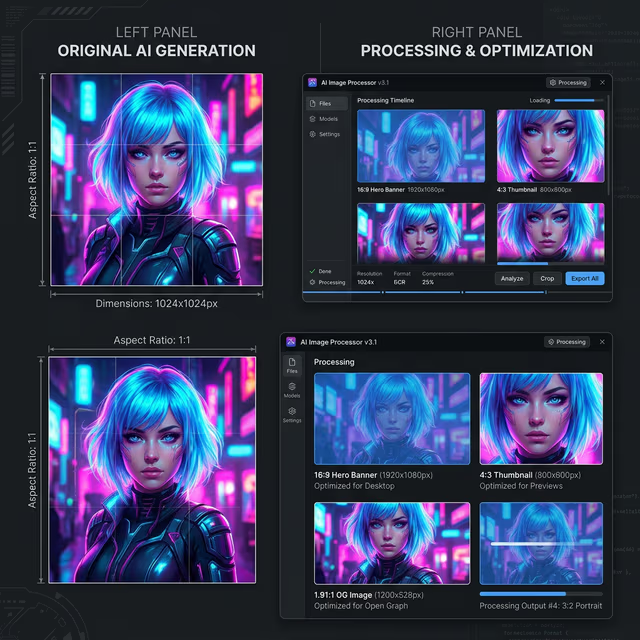
Auto-Processed Hero
Upscaled & Cropped (1920x1080 AVIF)
Five Pitfalls Worth Avoiding
- Treating the AVIF as the archive. The most expensive mistake in this pipeline is deleting the PNG once the derivatives exist. Six months later you will want a new size, and all you will have is a compressed 1200px file to upscale.
- Forgetting that the social card is a different image. A 16:9 hero cropped to 1.91:1 is not the same picture. Text that sits comfortably in the hero routinely falls outside the social crop, so anything you need people to read should live in the middle third.
- Skipping alt text because the image was generated. An AI-generated image still needs a description for screen readers and still contributes to how a page is understood. Write the alt text from what the image shows, not from the prompt you used.
- Hotlinking a generator's temporary URL. Model providers serve outputs from expiring URLs. Embedding one in a published article produces a page that looks fine on the day and broken a fortnight later. Download, process, commit.
- Ignoring licensing and provenance. Terms differ between generators and change over time, particularly for commercial use and for outputs that resemble a living artist's style. Record which model produced each source file alongside the asset; retrofitting that information later is close to impossible.
The first four are technical and cheap to fix. The fifth is the one that turns into a legal conversation, and the only reliable defence is a habit of writing down provenance at the moment of generation.
Conclusion
By spending 5 minutes setting up this pipeline, we save hours of manual Photoshop work for every article. More importantly, we guarantee that every page on our site loads instantly and looks perfect on Twitter, LinkedIn, and HD monitors.
Recommendation: Always save your "Source" as a high-quality PNG. You can always generate a smaller AVIF from a big PNG, but you can't go the other way around.