
 AI Tools Review Editorial Team
Claude for Excel has a 2.6 star rating on the Microsoft Marketplace. That number, on its own, looks terrible. But if you actually read the 114 reviews, a more complicated picture emerges. The people who got it working love it. One reviewer called it "sorcery." Another said it did a week's worth of financial modelling in a couple of hours. A finance professor with 30 years of experience said it brought his broken legacy spreadsheets back to life.
The problem is that a lot of people never got that far. Installation failures, 502 gateway errors, login issues with work vs personal accounts, and usage limits that ran out in minutes have left a trail of one-star reviews from people who paid for a Pro subscription and couldn't even open the add-in.
This article covers what Claude for Excel actually does, what real users are saying (good and bad), what the common problems are and how to fix them, and whether the tool is worth your money in its current state.
Key takeaway: When Claude for Excel works, it is genuinely impressive for financial modelling, data analysis, and spreadsheet automation. It understands multi-tab workbooks, tracks formula dependencies, and outperforms Microsoft Copilot according to most users who have tried both. But as of March 2026, installation and reliability issues mean you should expect some friction getting started. It requires a paid Claude plan starting at $20/£16 per month (Pro).
What Claude for Excel Actually Does
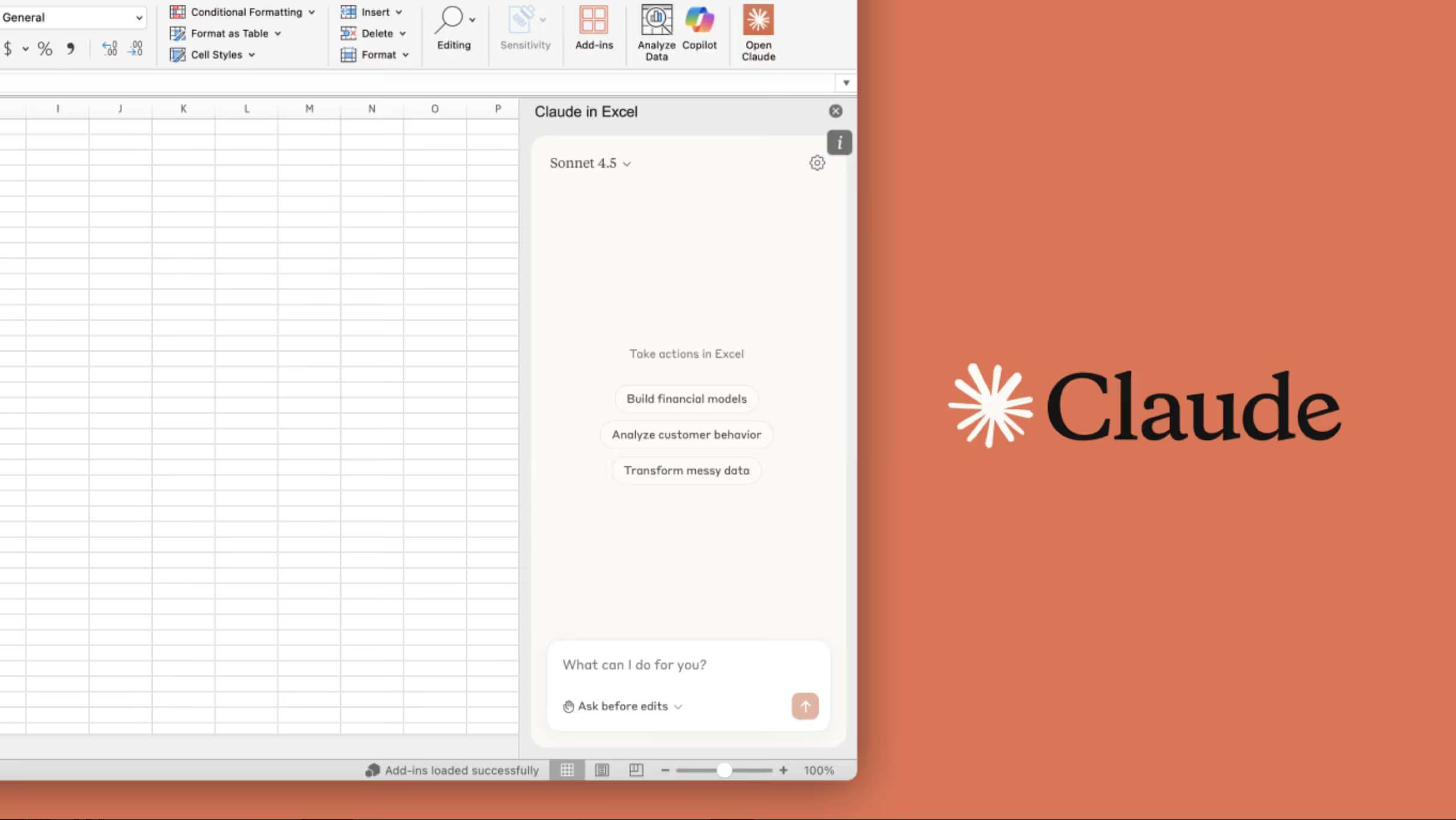
Claude for Excel is a Microsoft Office add-in that puts Claude directly inside your Excel workflow. It appears as a sidebar panel where you can chat with Claude about your open workbook. The key difference from just pasting spreadsheet data into regular Claude is that the add-in can read your entire workbook, understand the relationships between cells, tabs, and formulas, and make changes directly to your spreadsheet.
Core Capabilities
- Read and understand complex workbooks. Claude can navigate across multiple tabs, follow formula dependencies, and answer questions about specific cells with clickable citations that jump to the referenced cell. Ask "What assumptions drive the revenue forecast in Q3?" and it will trace through the logic and tell you.
- Update assumptions safely. When Claude modifies values, it preserves all formula dependencies and relationships. Every change is highlighted with explanations of what was altered and why. You can say "Increase growth rate by 2% and show the impact on terminal value" and it will update the inputs without breaking downstream formulas.
- Build models from scratch. Claude can create financial models, fill templates with data, and build out new analysis. Users have built three-statement models, DCF templates, SaaS metrics dashboards, and budget rework spreadsheets from natural language descriptions.
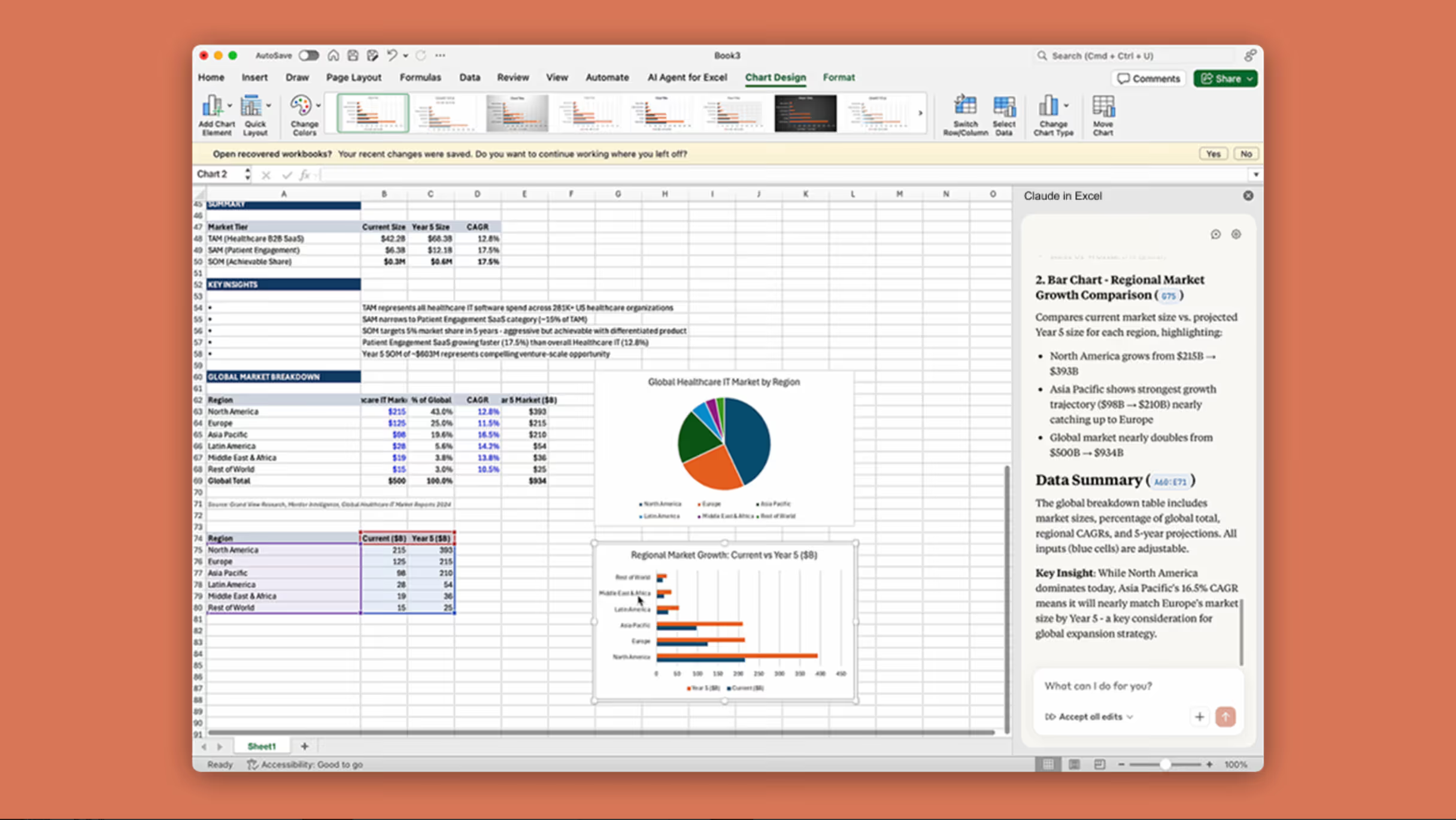
Debug errors. It can trace #REF!, #VALUE!, and circular reference errors back to their source and suggest fixes. Several reviewers specifically mentioned this as one of the strongest capabilities, rivaling the deep reasoning found in Claude Opus 4.6.
Native Excel operations. As of the February 2026 update, Claude can now handle pivot table editing, chart editing, conditional formatting, sorting and filtering, data validation, and finance-specific formatting like toggling gridlines and setting print areas. This is part of the broader Claude Code 2026 ecosystem update.

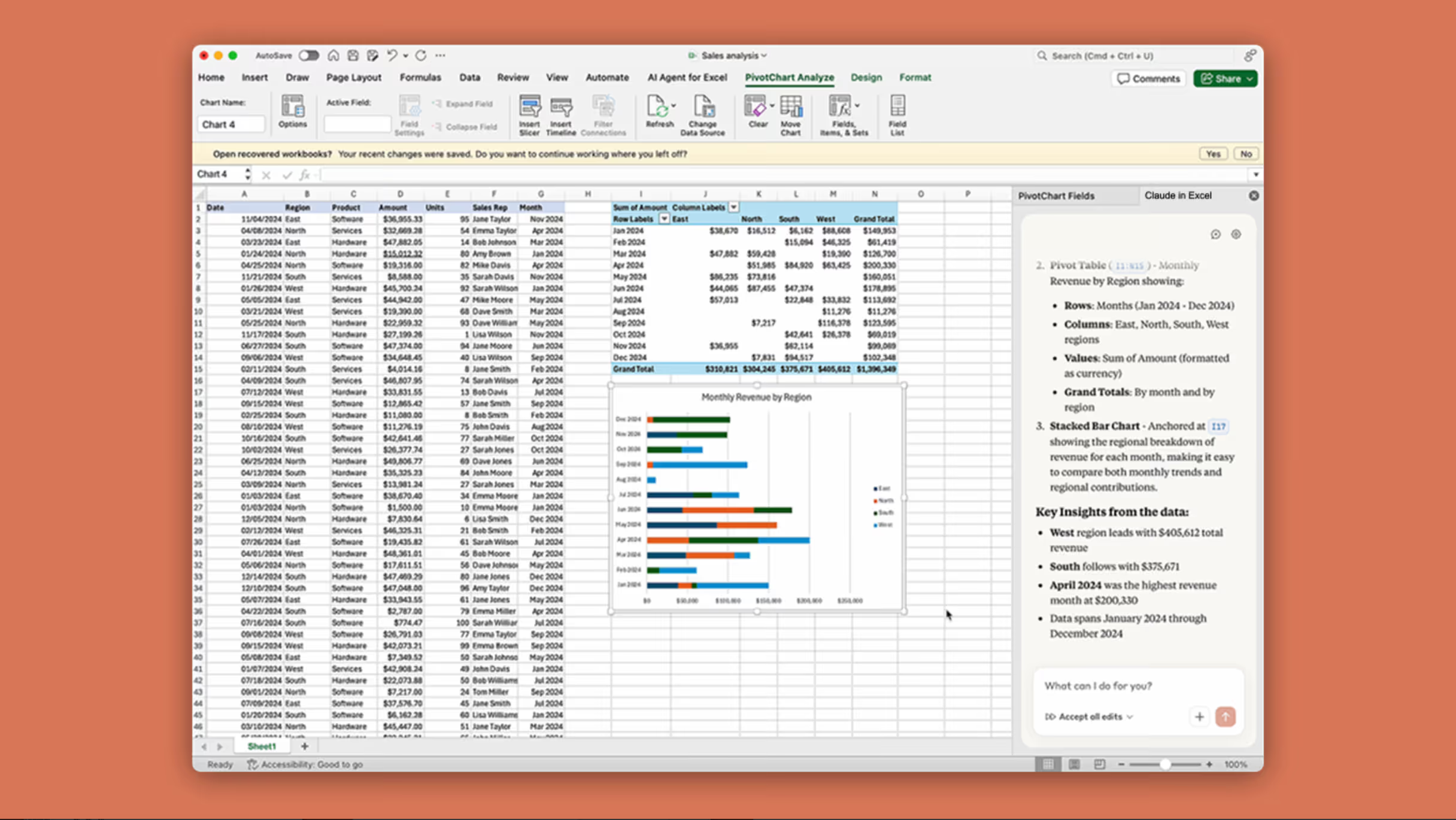
Connectors. Claude for Excel now supports MCP connectors to external data sources including S&P Global, LSEG, Daloopa, Pitchbook, Moody's, and FactSet. If you have already enabled connectors in your Claude Cowork settings, they work in Excel automatically.
Models Available
You can switch between Sonnet 4.6 and Opus 4.6 within the add-in. The general advice from users is to use Sonnet for routine tasks (it is faster and consumes fewer tokens) and switch to Opus for complex modelling work (it is smarter but burns through your usage limit much faster).
What Users Actually Think: The Good
The positive reviews tell a consistent story. When Claude for Excel works, it is significantly better than anything else available.
Financial Modelling
This is where the tool shines brightest. One Reddit user who builds complex financial models with circular references across 10+ sheets wrote: "This thing actually understands the files. Like really understands them. Not just surface level. It follows circular references, tracks dependencies, keeps up with formulas referencing other formulas. What normally takes me a week I'm now doing in a few hours."
A marketplace reviewer who works in finance described a similar experience: "The degree of Claude's understanding of my financial model was amazing. Almost instantly we were working together to take what I had created over many years to a much higher level of functionality. Claude created multi-nested conditional formulas that were difficult for me to understand. It occurred to me that I could ask Claude to explain them in sentence and paragraph form. Within seconds I had nearly two pages of detailed, well-organised explanation."
Another reviewer in startups put it more bluntly: "Every founder should be asking Claude for feedback and to do the actual spreadsheet work. I ask Claude for Excel to review a pro-forma, Claude says it needs improvements, I ask Claude to make those improvements across multiple tabs including a hiring plan, cash flow statement, balance sheet, and customisable assumptions. Total time: less than 20 minutes."

Better Than Copilot
This came up repeatedly. Multiple users went out of their way to say Claude for Excel is substantially better than Microsoft's own Copilot integration. One marketplace reviewer wrote: "Way better than Copilot. Seriously, Microsoft, how does this happen?" Another on Reddit said: "I've never gotten a single usable slide out of Copilot. Claude did it perfectly first try."
The consensus on Reddit was blunt. The top-voted comment in one thread read: "ChatGPT has some work to do." Another user who leads an IT department said: "Excel is not going away. Anthropic has the right strategy of integrating with it versus attempting to be a replacement for it."
Speed Improvements
The productivity claims are striking. One user said they "get about 6 months of work done every week now." Others reported building complete financial models in a single day that would normally take four or five days. This level of speed is characteristic of the new Claude Sonnet 4.6, which provides a near-instant response for data-heavy tasks.
What Users Actually Think: The Bad
The negative reviews cluster around a few specific issues, and they are worth understanding before you commit.
Installation Failures and 502 Errors
The single biggest source of one-star reviews is installation problems. In early February 2026, a wave of 502 Bad Gateway errors from the Microsoft Azure Application Gateway prevented many users from even downloading the add-in. This went on for over a week. Multiple reviews from 6-11 February all report the same error, and a few users noted that other Office add-ins were affected too, suggesting a Microsoft infrastructure issue rather than an Anthropic one.
If you hit this issue now, it appears to have been resolved. But it did serious damage to the marketplace rating since affected users left one-star reviews before ever using the product.
Login and Account Issues
Several users reported problems logging in with their work email vs personal email, or being unable to switch accounts once logged in. One reviewer described being stuck in an authentication loop: "Keeps telling me to log in, but every time I log in I just get taken back to the marketplace thing." Another enterprise user said the add-in kept trying to use their personal email instead of their work account.
There is a known workaround for organisations where admin-deployed add-ins do not appear: if "Let users access the Office Store" is disabled in your Microsoft 365 Admin Center, the add-in may not show up even after deployment. Anthropic provides manifest XML files as an alternative installation method.
Usage Limits
This is probably the most legitimate ongoing complaint. Claude for Excel consumes your Claude plan's usage limits, and it consumes them much faster than regular chat because each interaction involves reading the workbook, reasoning about it, and making multiple tool calls.
On the Pro plan ($20/£16 per month), several users reported hitting their limit within minutes. One wrote: "Maxed out my Pro plan usage limit in 5 minutes. Absolutely ridiculous." Another who tried to process bank statements said: "I did 2 table formatting tasks, 1 error check, and 1 real calculation request after which I got the 'limit exceeded' error with the work half done and spreadsheet a mess."
Anthropic is clearly aware of this. As of March 2026, they are running a double usage promo (through 19 March) that doubles limits for Claude for Excel across all paid plans. But longer term, heavy Excel users will likely need a Max plan ($100/£80 per month) or above.
The "Extra Inputs Are Not Permitted" Error
Around 14 February 2026, multiple users reported an error: "configurations.1.code_execution_20250825.use_web_search_purpose: Extra inputs are not permitted." This appeared on every prompt regardless of model choice. It was a bug that affected multiple users simultaneously and appears to have been fixed, but it generated a cluster of one-star reviews.
No VBA or Macros
Claude for Excel cannot create or run VBA macros directly. It will generate VBA code for you, but you have to copy and paste it into the VBA editor yourself. One reviewer noted: "Good for help and suggestions, but what I would really like is Claude being able to create VBA code. It will provide the code that I have to then paste into Excel. Not ideal, but I'm sure it may come in time."
Perpetual License Excel Not Supported
Excel 2016 and 2019 (perpetual/volume licence versions) are not supported. This generated complaints from users who do not have Microsoft 365 subscriptions. The add-in requires Excel on the web, Windows (Microsoft 365, build 16.0.13127.20296+), Mac (version 16.46+), or iPad (version 2.51+). Android is not supported.
Pricing: What Does Claude for Excel Cost?
Claude for Excel does not have a separate price. It is included with your Claude subscription. But you need a paid plan.
| Plan | Monthly Cost | Claude for Excel | Notes |
|---|---|---|---|
| Free | $0 (£0) | No | Not available |
| Pro | $20/month (£16/month) | Yes | Usage limits are tight for heavy Excel work |
| Max (Standard) | $100/month (£80/month) | Yes | Better for regular Excel use |
| Max (Advanced) | $200/month (£160/month) | Yes | Highest individual limits |
| Team | Per-seat pricing | Yes | Admin deployment available |
| Enterprise | Custom pricing | Yes | LLM gateway support, admin controls |
Important: Several early reviewers left angry reviews because the marketplace listing did not make it clear that a paid Claude account was required. One wrote: "Even though it says Free, after I installed it there was a message that only the paid versions can be used with Excel." This has since been made clearer in the listing, but it is worth knowing upfront: you cannot use Claude for Excel on the free Claude tier.
Enterprise and Team customers can also connect through an internal LLM gateway via Amazon Bedrock, Google Cloud Vertex AI, or Microsoft Azure, which means the add-in works without a direct Claude account.
How to Download and Install Claude for Excel
For Individuals
- Go to the Claude for Excel listing on the Microsoft Marketplace.
- Click "Get it now" to install the add-in.
- Open Excel, activate the add-in, and sign in with your Claude account.
- The shortcut Ctrl+Option+C (Mac) or Ctrl+Alt+C (Windows) opens Claude quickly.
Note for Polish users: Ctrl+Alt+C produces the letter ć on Polish keyboards, which means the shortcut clashes with typing. Several users have flagged this and requested the ability to change the shortcut.
For IT Admins
- Visit the Microsoft 365 Admin Center.
- Navigate to Settings > Org Settings > User owned apps and services. Ensure "Let users access the Office Store" is toggled on.
- Navigate to Settings > Integrated apps > Add-ins.
- Search for "Claude by Anthropic for Excel" in Microsoft AppSource.
- Deploy to your organisation or specific users.
If the toggle for Office Store access is disabled, use Anthropic's manifest XML files for deployment instead.
If It Won't Load
The most common fix for the add-in failing to load (infinite loading, "can't connect to catalogue" errors) comes from a marketplace reviewer:
- Close Excel completely.
- Delete everything in
C:\Users\[YourName]\AppData\Local\Microsoft\Office\16.0\Wef\ - Reopen Excel and try the add-in again.
Supported Versions
| Platform | Supported | Minimum Version |
|---|---|---|
| Excel on the web | Yes | N/A |
| Excel on Windows (Microsoft 365) | Yes | Build 16.0.13127.20296+ |
| Excel on Mac | Yes | Version 16.46+, build 21011600+ |
| Excel on iPad | Yes | Version 2.51+ |
| Excel on Android | No | Not supported |
| Excel 2016/2019 (perpetual licence) | No | Not supported |
Prompt Injection Risks: A Real Concern
Anthropic is unusually transparent about this. Their help documentation includes a detailed warning about prompt injection attacks in spreadsheets. The risk is that hidden instructions embedded in cells, formulas, or comments of an untrusted spreadsheet could trick Claude into taking unintended actions, like exporting sensitive data or modifying financial records.
Their testing identified scenarios where Claude for Excel could be manipulated to extract and share sensitive information, modify critical financial data, or perform destructive actions without verification.
The practical advice is straightforward: do not use Claude for Excel with spreadsheets from external, untrusted sources. Downloaded templates, vendor files, and data imports from unknown sources all carry risk. Stick to your own workbooks and files from trusted colleagues.
Claude does show confirmation pop-ups before executing potentially risky operations like external data fetching, dynamic references, and code execution. But the safest approach is to treat any spreadsheet you did not create yourself as potentially compromised.
Current Limitations
Beyond the installation and account issues, there are some genuine capability gaps to be aware of:
Not supported: Data tables, macros, VBA. Claude will write VBA code for you but cannot execute it directly within Excel.
Not recommended for: Final client deliverables without human review, audit-critical calculations without verification, replacing financial judgement and expertise, or models containing highly sensitive or regulated data without proper controls.
Data retention: Inputs and outputs are deleted within 30 days. Chat history is not saved between sessions, so each time you open the add-in you start fresh. This is different from regular Claude where conversations persist. Anthropic says saved chat history for Excel sessions is being worked on.
No audit logs: Claude for Excel is not currently included in Enterprise audit logs or the Compliance API. Observability and auditability are not available. This matters for regulated industries.
Auto-opening behaviour: Once you use Claude in a file, the add-in sidebar opens automatically every time you open that file. Several users have flagged this as annoying, and there is no obvious way to stop it without recreating the file.
Claude for Excel vs Microsoft Copilot for Excel
This comparison comes up constantly in reviews and Reddit threads, so it is worth addressing directly.
| Feature | Claude for Excel | Microsoft Copilot |
|---|---|---|
| Multi-tab understanding | Strong (cited as a key strength) | Weaker |
| Financial modelling | Excellent (purpose-built for finance) | Basic |
| Formula debugging | Traces dependencies across sheets | Surface-level |
| Change tracking | Highlights every cell changed | Less transparent |
| Presentation quality | Users say "miles ahead" | Widely criticised |
| VBA / Macros | Generates code (manual paste) | Limited |
| Cost | From $20/£16/month (Claude Pro) | Included with Microsoft 365 Copilot |
| Installation | Add-in (can be fiddly) | Native integration |
| Data privacy | 30-day deletion, no audit logs yet | Microsoft security framework |
| Overall user sentiment | "Game changer" / "Sorcery" | "Useless" / "Like Siri" |
The honest summary: if you can get Claude for Excel installed and working, it is substantially better than Copilot for serious spreadsheet work. The trade-off is that Copilot is natively integrated and just works, while Claude requires a separate subscription and has had more teething problems.
Tips from Real Users
These come from the marketplace reviews and Reddit threads rather than Anthropic's official documentation:
Use Sonnet for simple tasks, Opus for complex ones.
Multiple users noted that Opus consumes tokens much faster. One wrote: "Opus does phenomenal work but will consume your tokens quickly. Sonnet also works great, faster and costs you less tokens."
Have Claude log its actions.
You can ask Claude to create a separate logging tab that tracks what it does each turn. This is helpful for reviewing changes after the fact.
Review everything before saving.
Claude highlights all changes, but you should verify them. One reviewer described being initially impressed, then asking Claude for a critical reassessment, at which point it identified its own mistakes.
Start with simple prompts and build up.
Several users reported better results from iterative prompting rather than giving Claude one enormous instruction.
Consider the Max plan for heavy use. Pro plan limits are genuinely tight for serious Excel work. If you are going to use this regularly, the $100/£80 per month Max plan gives you substantially more headroom.
Who Should Use Claude for Excel
Strong fit
Financial analysts, FP&A teams, consultants who build models regularly, anyone who spends hours debugging formula errors across complex workbooks, and anyone already paying for a Claude Pro or Max subscription.
Weak fit
Casual spreadsheet users (the free Excel features or Copilot are probably sufficient), anyone on Excel 2016/2019 perpetual licences, organisations that need full audit trails and compliance logging right now, and anyone expecting VBA automation.
Wait and see
If you need Android support, saved chat history between sessions, or audit-compliant logging, these features are not available yet but are likely coming.
The Bottom Line: A 2.6 Star Rating That Deserves Better
The marketplace rating does not reflect the actual quality of Claude for Excel when it is working properly. Strip out the reviews from the 502 error wave, the "couldn't install" complaints, and the people who did not realise a paid account was required, and you are left with a product that finance professionals are calling a genuine game changer.
The positive reviews are specific and detailed. People describe concrete time savings, specific capabilities that no other tool offers, and genuine improvements to their work. The negative reviews are mostly about infrastructure problems, account management friction, and usage limits.
Anthropic clearly needs to fix the installation experience, improve the onboarding so people understand what is required before they commit, and either increase Pro plan limits or set clearer expectations about which plan level is practical for regular Excel use. The double usage promo running through mid-March suggests they know this.
But the underlying product is impressive.
If you work with complex spreadsheets and have a Claude subscription, it is worth trying. Just go in with realistic expectations about the setup process and usage limits.
Get the free guide: Claude vs ChatGPT, Gemini & Grok
A 20-page playbook covering everything you need to choose and use the big four AI models in 2026, full cost and feature comparisons, what each is best (and worst) at, and how-tos for images, vectors, building a website, Claude Code and more.