

 AI Tools Review Editorial Team
Quick Answer:
The Claude Team Premium seat ($125/month, approx £100) is best for professionals who need collaborative features, admin controls, and enterprise integrations within an organisation. Claude Max ($100-$200/month, approx £80-£160) is designed for individuals who need significantly higher personal usage limits without team management overhead.

Get the free guide: Claude vs ChatGPT, Gemini & Grok
A 20-page playbook covering everything you need to choose and use the big four AI models in 2026, full cost and feature comparisons, what each is best (and worst) at, and how-tos for images, vectors, building a website, Claude Code and more.
Why This Comparison Matters
If you're a heavy Claude user hitting your limits regularly, you've likely noticed two upgrade paths: getting a Premium seat on a Team plan, or subscribing to Claude Max as an individual. The pricing overlaps - Premium seats cost $125/month (approx £100) while Max ranges from $100-$200/month (approx £80-£160) - making this a genuinely difficult decision.
The key difference? Team Premium is about collaboration and organisational control. Max is about raw individual capacity.
Updated for 2026: the Team Premium seat has come down since the start of the year, from $150 to $125/month ($100/seat on annual billing, approx £100/£80). Standard seats are $25/month ($20 annual). That narrows the old gap with Max, the figures throughout this guide reflect the current rates.
Head-to-Head Comparison: Team Premium vs Max

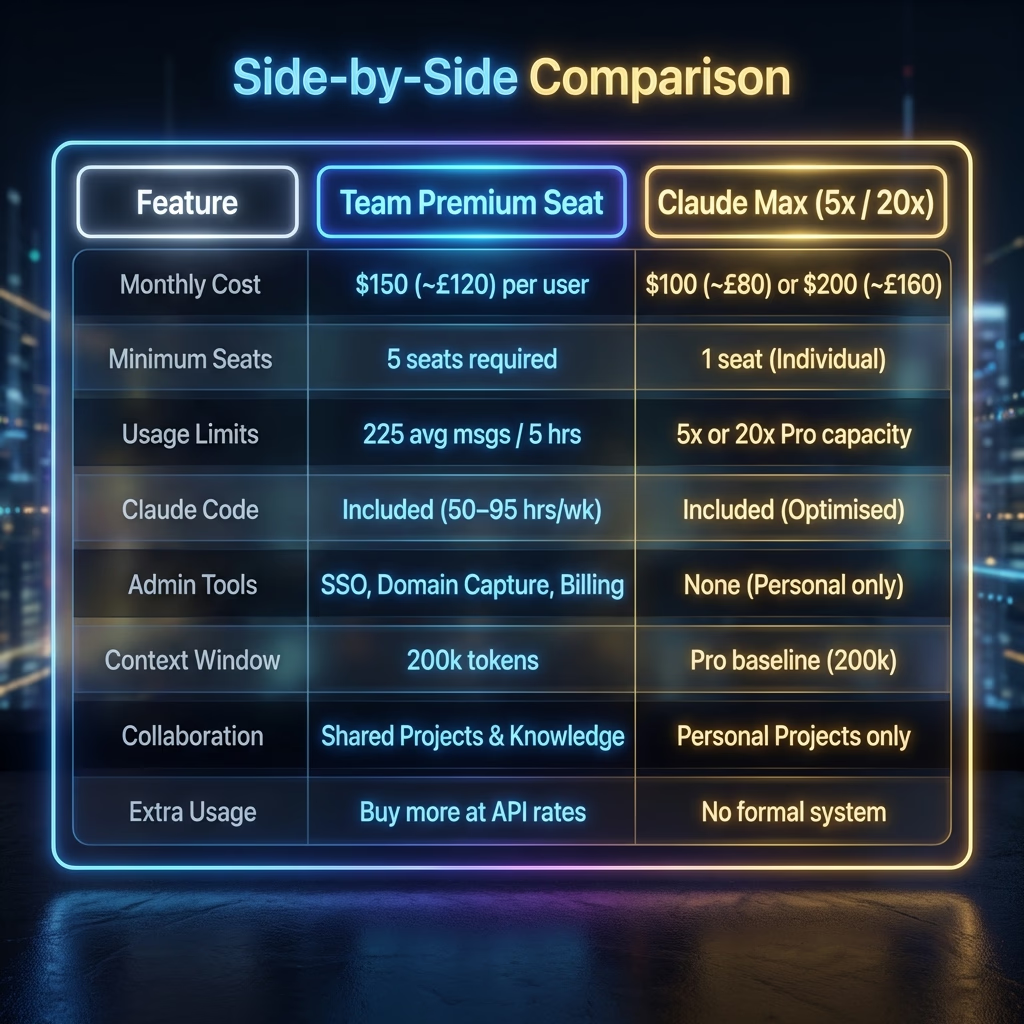
When comparing usage limits, it's important to understand the base "Pro" usage. The Pro plan has dynamic limits based on current demand. Max plans offer a guaranteed multiplier on top of this (5x or 20x). Team Premium seats operate differently - they have a fixed, higher baseline that is generally substantially higher than Standard Team or Pro seats, but not explicitly defined as a simple multiplier.
| Feature | Team Premium Seat | Claude Max 5× | Claude Max 20× |
|---|---|---|---|
| Monthly Cost | $125/seat (approx £100) | $100/month (approx £80) | $200/month (approx £160) |
| Billing | Annual or monthly | Monthly only | Monthly only |
| Usage vs Pro | Higher than Standard | 5× Pro usage | 20× Pro usage |
| Claude Code | ✓ Included | ✓ Included | ✓ Included |
| Priority Access | ✓ High-traffic priority | ✓ Highest priority | ✓ Highest priority |
| Workspace Integrations | Slack, Microsoft 365, Google | Limited | Limited |
| Enterprise Search | ✓ Cross-org search | ✗ Not available | ✗ Not available |
| Admin Controls | ✓ Full admin panel | ✗ Individual only | ✗ Individual only |
| Minimum Commitment | 5 seats minimum | None | None |
Usage Limits Explained
Understanding the actual usage you'll get is crucial for this decision. Both Team plan seat types and Max plans have different usage characteristics.

Team Plan Usage Limits: Standard vs Premium
Team and seat-based Enterprise plans offer session-based usage limits that reset every five hours. The number of messages you can send per session varies based on message length, file attachments, conversation length, and which model or feature you use.
| Plan and Seat Type | Est. Messages (per 5 hours) | Multiplier vs Pro |
|---|---|---|
| Claude Pro (Individual) | ~45 messages | 1x (Baseline) |
| Team Plan Standard | ~90 messages | ~2x Pro |
| Team Plan Premium | ~225 messages | ~5x Pro |
| Claude Max (Tier 1) | ~225 messages | 5x Pro |
| Claude Max (Tier 2) | ~900 messages | 20x Pro |
Important: Opus 5.5 Availability
Team plan members with Standard seats: Opus 5.5 consumes your weekly limit faster than Sonnet, so Anthropic recommends Sonnet 5 for everyday use.
Team plan members with Premium seats: Opus 5.5, Anthropic's current flagship since 22/09/2026, is your default model for the heaviest tasks.
Seat-based Enterprise plan members with Premium seats: Opus 5.5 consumes your weekly limit faster than Sonnet, so Anthropic recommends Sonnet 5 for everyday use.
Team Premium Seat Usage Details
Team Premium seats offer 225 messages every five hours with support for longer conversations, making this tier particularly generous for heavy Sonnet and Opus users.
Key usage details for Team Premium:
- Opus 5.5 is the default model for Team Premium seats
- Usage limits are per-member, not pooled across the team
- Claude Code weekly limits are 25% above the pre-promotion baseline since 14/09/2026, after the earlier +50% promotion ended
- Extra usage can be purchased if limits are reached
- Session-based limits reset every five hours

Claude Max Usage
Max plans multiply your Pro-level usage by either 5× or 20×:
Max 5× ($100/month)
- Approximately 50-200 prompts every 5 hours
- Generous Opus 5.5 access
- Higher output limits for all tasks
Max 20× ($200/month)
- Approximately 200-800 prompts every 5 hours
- Maximum priority during peak times
- Designed for "Claude as your primary work tool"
When to Choose Team Premium
Choose Team Premium if:
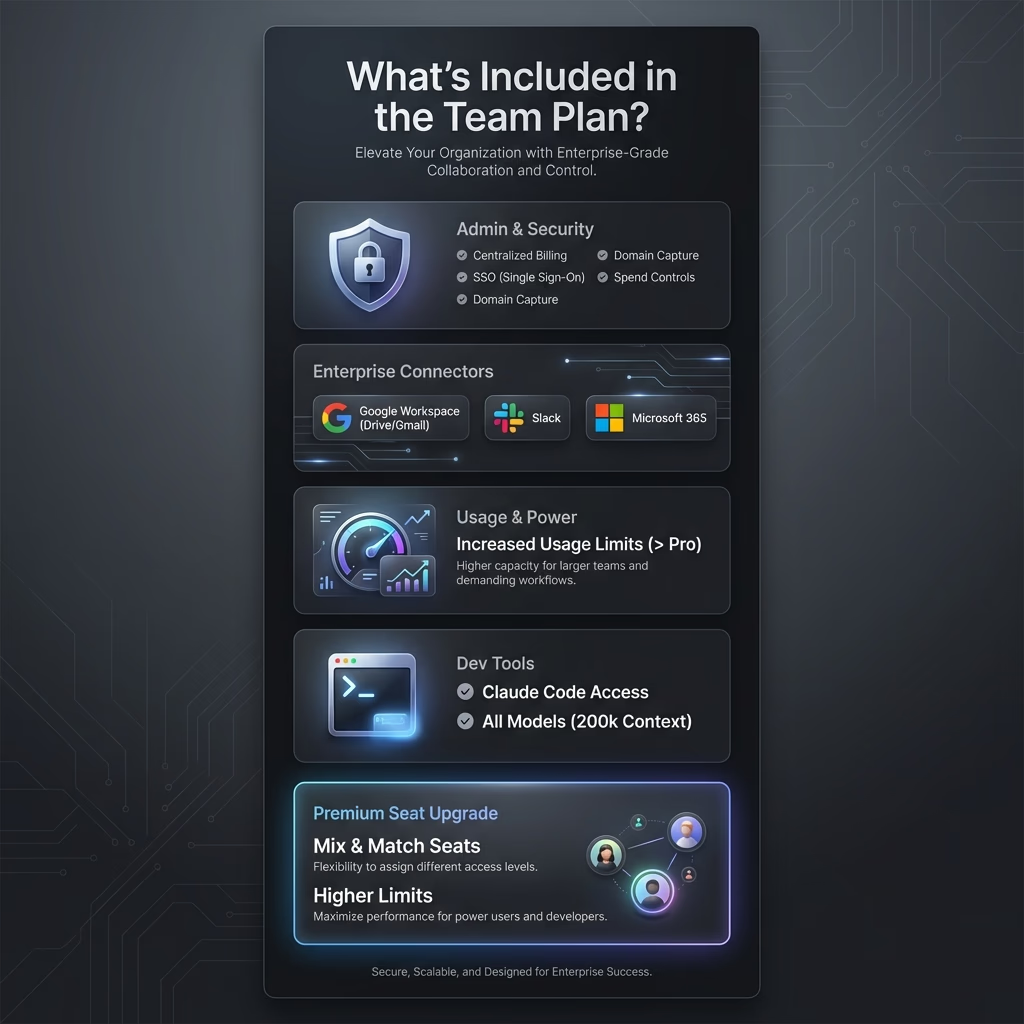
- You need enterprise integrations - Team plans include connectors for Microsoft 365, Slack, Google Workspace, and more.
- Your organisation requires admin oversight - Spend controls, user management, SSO, and domain capture are essential for businesses.
- You collaborate on projects - Team workspaces allow shared access to projects and knowledge bases.
- Enterprise search is valuable - Team plans include dedicated search capabilities across connected tools.
- Your company is already on a Team plan - Upgrading to Premium ($125/seat) is simpler than managing separate Max subscriptions.
Ideal for: Marketing managers, consultants within organisations, team leads, professionals in regulated industries.
When to Choose Claude Max
Choose Max if:
- You're an individual power user - Max is designed for people who use Claude as their primary productivity tool.
- You need maximum throughput - The 20× tier offers the highest individual usage limits available.
- You want earliest feature access - New features and models often launch on Max first.
- You work independently - Freelancers and solo developers benefit from Max's simplicity.
- You don't need team features - Max offers better value per usage dollar at the $100 tier if you don't need SSO or admin controls.
Ideal for: Solo developers, freelance writers, researchers, content creators.
Claude Code Comparison
Both options include Claude Code access, but implementation differs:
Team Premium:
- Claude Code bundled with Premium seats
- 50-95 hours of weekly Sonnet 5 usage
- Integrated with team admin controls
- Usage tracked at organisational level
Claude Max:
- Included at both $100 and $200 tiers
- Higher weekly hour limits at the $200 tier
- Full Opus 5.5 access for complex tasks
- Extended agentic workflows
For developers doing serious coding work, the Max 20× tier currently offers the most generous Claude Code limits. However, if you need your code assistant integrated with team workflows, Team Premium is the appropriate choice.
Cost Analysis: Which Offers Better Value?
Cost vs. Capacity Comparison
When we look at the "Price per 100 Messages", we can see the true efficiency of each plan. Max Tier 2 is clearly the most cost-effective for raw throughput, while Team Premium carries a premium for its enterprise features.
| Plan Tier | Monthly Cost | Est. Messages (per 5 hrs) | Price per 100 Messages |
|---|---|---|---|
| Claude Pro | $20 | ~45 | $3.70 |
| Team (Standard) | $25 | ~90 | $2.31 |
| Max (Tier 1) | $100 | ~225 | $3.70 |
| Team (Premium) | $125 | ~225 | $4.63 (Highest Unit Cost) |
| Max (Tier 2) | $200 | ~900 | $1.85 (Best Value) |
The "Premium" Reality Check
The Individual Value King: The Max Tier 2 ($200) is the best "bang for your buck" if you are a developer or researcher who works alone. You are paying the lowest "unit price" for the highest possible message volume.
The "Team Premium" Tax: You are paying $125 for the exact same message capacity as the $100 Max Tier 1 plan. Why pay the extra $25/month?
- Claude Code is the "Hidden" Product: Anthropic bundles this high-value tool because it consumes massive tokens in the background.
- The "Top-Up" System: Unlike Max plans which cut you off, Team Admins can enable "Extra Usage" to pay-as-you-go for overages, ensuring critical work never stops.
- Zero Data Training: A critical compliance requirement for many enterprises that individual Max plans do not guarantee.
Decision Matrix
- Standard Team ($25): Best for general business users (Marketing, HR, Sales).
- Team Premium ($125): Best for lead engineers only, or employees who must have Claude Code within a secure org.
- Claude Max ($200): Best for independent contractors or solo founders who need maximum raw output.
How Team Plan Billing Works
If you're considering Team Premium, understanding exactly how billing works is essential for budgeting. Here's the complete breakdown.
Team Plan Pricing Details
Team plans have a minimum requirement of five members. You'll be charged at the beginning of your billing cycle.
| Seat Type | Annual Billing | Monthly Billing |
|---|---|---|
| Standard | $20/month per member (approx £16) | $25/month per member (approx £20) |
| Premium | $100/month per member (approx £80) | $125/month per member (approx £100) |
Prices shown are for US customers and exclude applicable taxes. Visit claude.ai/upgrade to see current pricing for your location.
Proration Rules
Adding members or upgrading seats:
You will be charged the prorated amount immediately.
Removing members:
You will not receive an immediate credit or refund. The seat becomes available to assign to another member.
Billing Examples
Annual Plan Example
January 1 (subscription start): Your annual plan has 10 standard seats.
Amount charged: $2,400 ($20 × 10 seats × 12 months) due on January 1st.
April 1: You upgrade five standard seats to premium. Since there are 275 days remaining in your subscription year, the prorated cost is:
($100 × 5 seats × 12 months) × (275 days ÷ 365 days) = $4,520.55
Your payment method will be charged $4,520.55 on April 1st for the seat upgrades for the remainder of the subscription year. (Taxes not included.)
Monthly Plan Example
January 1 (first day of billing cycle): Your Team plan has 10 standard seats.
Amount charged: $250 ($25 × 10 seats) due on January 1st.
January 15: You upgrade five standard seats to premium. Since there are 16 days remaining in January, the prorated cost is:
($100 × 5 seats × 16 days) ÷ 31 days in January = $258.06
Your payment method will be charged $258.06 on January 15th for the seat upgrades in January. (Taxes not included.)
Important Note:
The "Projected total" displayed on your Billing page is not inclusive of taxes. Your actual charge will include applicable taxes based on your location.
For complete details on Team Plan billing, see the official guide: How is my Team plan bill calculated?

Can You Switch Between Plans?
- From Team to Max: You can leave an organisation and subscribe to Max independently. History transfers with your account.
- From Max to Team: Max subscriptions remain separate from Team seats. You'd need to cancel Max to use only the Team seat.
- Upgrading within Max: You can move from $100 to $200 tier mid-cycle (prorated).
- Upgrading within Team: Owners can upgrade seats from Standard to Premium at any time (prorated).
Extra Usage Options
Team Plans: Owners can pre-purchase extra usage. Individual spending caps can be set per user. Billed at standard API rates.
Max Plans: No formal extra usage system. Weekly caps apply. If you hit limits on Max 20×, you may need API access.
Summary: Making Your Decision

Team Premium ($125)
Admin & Integration Focus
- Need M365/Slack/Google integration
- Require admin controls & SSO
- Collaborate on shared projects
- Employer pays
Max 5× ($100)
Value & Individual Focus
- Independent professional
- Best individual value
- No team features needed
- Regular heavy usage
Max 20× ($200)
Power & Dev Focus
- Primary daily work tool
- Intensive coding tasks
- Maximum throughput needed
- Earliest feature access
Checked on 23 September 2026 against Anthropic's published pricing, current since Opus 5.5 became the default flagship on 22/09/2026. Claude pricing and features may change - check claude.com/pricing for current information.