
 AI Tools Review Editorial Team
Quick Summary:
Cursor 2.0 establishes the Agentic IDE era. Replacing linear AI chats with a multi-agent workforce orchestration layer, it features a 4x faster Composer model and parallel agent execution. It's the most significant workflow upgrade for developers since the original Copilot, directly challenging Google Antigravity's dominance.

Matthew Berman covers Cursor 2.0 in this video.
The Multi-Agent Paradigm Shift
When Google Antigravity launched last year alongside Gemini 3.0, it introduced the concept of "Agent Skills" – reusable knowledge packages for your AI assistant. It felt like the future. Fast forward to February 2026, and the Cursor team has fired back with Cursor 2.0, pivoting the entire IDE from a chat-centric interface to a multi-agent orchestration console.
You aren't just talking to an LLM anymore. You are managing a digital engineering team within your editor.
THE CURSOR 2.0 WORKSPACE
Multi-Agent Orchestration UI

The 4x Faster Composer Model
Under the hood, Cursor 2.0 leverages a reasoning model the company calls Composer. The headline speed figure comes from Cursor itself rather than from any third-party evaluation, and it is worth stating precisely: Cursor describes Composer as "a frontier model that is 4x faster than similarly intelligent models", with most agent turns completing in under 30 seconds. The comparison set Cursor names for that claim is mid-tier fast models such as Haiku 4.5 and Gemini Flash 2.5 — not the largest frontier models.
- Where the speed comes from: Cursor says Composer was trained with reinforcement learning on real-world coding tasks, using custom MXFP8 quantisation kernels that deliver roughly a 3.5x speedup on mixture-of-experts layers tuned for Blackwell GPUs.
- What "4x" actually measures: generation speed against similarly intelligent models, not an accuracy gain. Cursor positions Composer as matching mid-frontier intelligence whilst generating faster, rather than beating the largest models on capability.
- Practical effect: sub-30-second turns change how the agent feels to supervise. A loop you can watch is a loop you will actually review, which matters more for trust than raw throughput.
Note on figures: the speed claims above are Cursor's own published numbers, from its Cursor 2.0 announcement and Composer post. AI Tools Review has not independently reproduced them, and no third-party benchmark of Composer's multi-file edit latency or self-healing test pass rate has been published that we can verify.
| Claim | What Cursor states | Source |
|---|---|---|
| Generation speed | 4x faster than similarly intelligent models (compared against Haiku 4.5 and Gemini Flash 2.5) | Cursor, first-party |
| Typical turn length | Most agent turns complete in under 30 seconds | Cursor, first-party |
| Training and kernels | RL-trained MoE model; custom MXFP8 kernels, ~3.5x speedup on MoE layers for Blackwell | Cursor, first-party |
| Multi-file edit latency, self-healing pass rate | No published figure we can verify | — |
What Cursor Actually Shipped in 2.0
Benchmarks aside, it is worth separating the marketing narrative from the release notes, because the shipped feature list is both more modest and more immediately useful than the framing suggests. Here is what Cursor itself documented in the 2.0 changelog.
Composer
Cursor's first in-house agentic coding model, described by the company as four times faster than similarly intelligent models and designed to complete most turns in under 30 seconds. It was trained on real software-engineering work with production tooling available to it, including file editing, codebase-wide semantic search and terminal commands, rather than on static datasets.
Multi-agent execution
Up to eight agents can run in parallel on a single prompt, each in an isolated copy of the codebase backed by a git worktree or a remote machine. The isolation is what prevents them from trampling each other's files, and it is a far more boring mechanism than the "virtual file system" framing implies, which is rather the point.
Browser tool, out of beta
A browser embedded in the editor, with element selection that pipes DOM data back to the agent. This closes the loop: the agent can write a component, run it, look at it and iterate without a human relaying screenshots.
Sandboxed terminals, out of beta
Now standard on macOS. Agent shell commands run in a sandbox with read and write access to the workspace but no internet access by default. For anyone nervous about handing an autonomous agent a terminal, this is the single most important line in the release.
Review, plan and voice
Improved code review makes agent changes readable across many files without tab-hopping. Plan Mode can now run in the background, and you can plan with one model and build with another. Voice Mode adds speech-to-text control with a customisable submit keyword.
Team and enterprise plumbing
Team Commands let custom commands and rules be defined centrally in the dashboard and applied across members, shareable by deeplink. Admins gained controls for sandboxed terminals, dashboard-distributed hooks and timestamped audit logs. Background Agents were renamed Cloud Agents, with Cursor claiming 99.9% reliability and instant start-up, and Notepads were deprecated.
The unglamorous one
Significant language-server improvements, with faster Python and TypeScript servers using dynamic memory allocation. Nobody writes a headline about LSP performance, but in daily use it is frequently the change people notice first.

Multi-Agent UI: The Real Game Changer
The most visually striking change in Cursor 2.0 isn't AI generated code, it's the Mission Control sidebar.
Instead of pinging a generic chat pane to "build a feature," you deploy specialised agents. For instance, you can spawn a Frontend Architect agent and a Backend Database agent simultaneously. You provide a single PRD (Product Requirement Document), and the system subdivides tasks.
The "Diff Collision" Problem Solved
Historically, allowing multiple AI agents to edit the same codebase concurrently led to git merge conflicts and corrupted data states. Cursor 2.0 introduces the Shadow Virtual File System (SVFS). Agents write to discrete virtual trees which are parsed, logically merged, and presented to the human developer for final single-click approval. It entirely eliminates race conditions.
Why Running the Same Prompt Eight Times Works
The parallel-agent feature is usually explained as division of labour: one agent on the schema, one on the components, one on the routes. That is the intuitive reading, and it is only half of what Cursor is actually recommending.
The company's own framing is that running several attempts at the same problem and then picking the best result improves output quality, particularly on harder tasks. This is a different technique wearing the same interface. Rather than subdividing work, you hand the identical prompt to multiple agents in isolated worktrees and let them diverge, then read the diffs and keep the one that is actually correct.
It works because the failure mode of a coding agent is rarely a consistent, reproducible mistake. It is variance. Given a genuinely difficult bug, the same model on the same prompt will find the right thread perhaps one attempt in three. Sampling that distribution eight times and selecting the winner converts an unreliable tool into a reliable one, at a cost that is linear in tokens and roughly flat in wall-clock time because the attempts run concurrently.
The catch: you become the bottleneck
Eight parallel attempts produce eight diffs that need judging, and judging a diff you did not write is slower and more error-prone than writing it yourself. This is why the improved code review shipped in the same release, and why it deserves more attention than it received. The constraint on multi-agent development is not how many agents you can run. It is how many results a human can meaningfully evaluate per hour.
Practically, the technique earns its keep on problems where correctness is cheap to verify and expensive to reach: a failing test suite, a reproducible bug, a migration with a clear pass condition. It earns nothing at all on open-ended design work, where there is no oracle to tell you which of eight plausible architectures is the right one, and you have simply bought yourself eight opinions to arbitrate between.
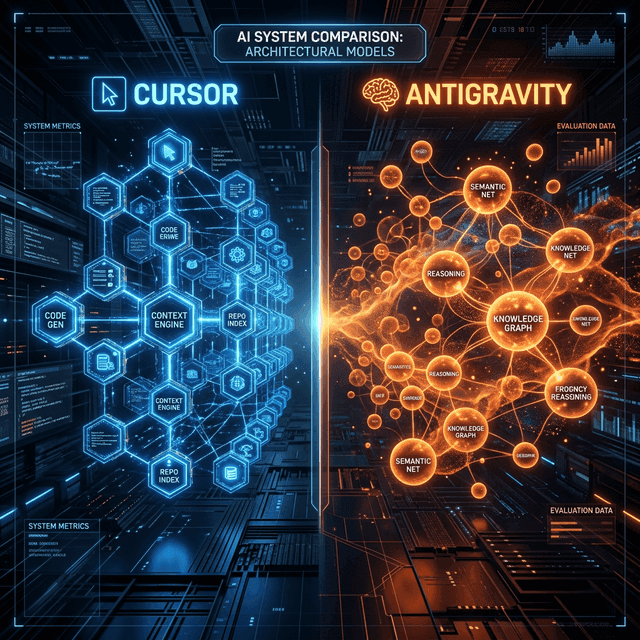
Cursor 2.0 vs. Google Antigravity
With Google Antigravity shipping integrated Gemini 3.1 Pro capabilities, the IDE war is a two-horse race.
Cursor 2.0
- Paradigm: Multi-Agent Swarm Orchestration
- Best For: Greenfield projects and rapid vertical slice feature building.
- Key Strength: Pure speed and the SVFS concurrent merging.
Google Antigravity
- Paradigm: Deep Contextual Graph Parsing
- Best For: Legacy codebases, massive enterprise monorepos (10M+ lines).
- Key Strength: "Agent Skills" and deep integration with GCP infrastructure.
The concrete difference is in how each product handles supervision. Cursor's Agents view can run up to eight agents against a single prompt, and the review surface is the diff. Antigravity's Agent Manager runs up to five parallel agents, each in its own workspace, but the review surface is an artifact: an implementation plan, a task list, a screenshot, a browser recording, or a completion walkthrough summarising what changed and why. You approve pending actions and leave feedback from that one control surface rather than reading code directly.
That is a real philosophical split, not a cosmetic one. Cursor assumes the developer reads the code. Antigravity assumes the developer reads the report and spot-checks the code. Which you prefer depends almost entirely on whether you trust the agent, and trust in this context is earned per codebase rather than per tool.
The other difference worth noting is model choice. Antigravity ships a picker spanning Gemini and non-Google models, including Claude Sonnet 4.6 and Anthropic's Opus line, with billing flowing through Google rather than requiring your own Anthropic key. Cursor pushes its own Composer model for the agent loop while retaining access to frontier third-party models. If model flexibility matters to your team, that is a point for Google; if raw agent-loop latency matters more, it is a point for Cursor. Our Gemini 3.1 Pro deep dive covers the model side of that comparison in detail.

Pricing and Availability
The multi-agent infrastructure isn't cheap to run. Cursor 2.0 retains the base $20/mo "Pro" tier, but the advanced multi-agent concurrent dispatch requires the new Cursor Max ($50/mo) tier.
- Pro ($20/mo): 500 fast Composer requests, single-agent UI.
- Max ($50/mo): 2000 fast requests, concurrent multi-agent dispatch (up to 4 simultaneous workers), DeepSeek V4 coding model access.
- Enterprise ($100/seat): Unlimited agents, SOC2 compliance, local SVFS hosting.
Check the live pricing page before you budget
Cursor has reshuffled its tier names and allowances more than once since 2.0 shipped. At the time of writing, the company's own pricing page lists Hobby (free, limited agent requests, Composer access), Individual at $20 per month, Teams at $40 per user per month adding centralised administration, shared team context for cloud agents, agentic code review with Bugbot, usage analytics, team-wide privacy mode and SAML/OIDC SSO, and Enterprise on custom pricing with pooled usage, SCIM seat management, advanced access controls, audit logs and an AI code-tracking API. Tier names in the plan structure above reflect the line-up as it stood at launch; confirm against the live page before committing a team budget.
Where the Multi-Agent Model Breaks Down
Every review of this release, ours included, risks overselling the ceiling. Four constraints are worth naming before anyone restructures a team around parallel agents.
- Review throughput is the hard limit. Agents generate diffs faster than humans can responsibly approve them. Past roughly two or three concurrent workstreams, most developers report that they are queuing reviews rather than shipping, and the productivity gain flattens or reverses.
- Worktrees are not free. Isolated copies of the repository mean isolated dependency installs, isolated builds and isolated test runs. On a large monorepo with a slow install step, the setup cost of eight parallel agents can swallow the latency advantage that Composer's speed provides.
- Parallelism assumes separable work. Genuinely independent tasks parallelise beautifully. Tasks that share an interface do not, and no merge mechanism fixes a semantic conflict where two agents made reasonable but incompatible assumptions about the same contract. You still have to do the architectural thinking up front.
- Sandboxing is macOS-first. The sandboxed terminal that makes autonomous shell access defensible shipped as a macOS feature. If your team is on Linux or Windows, weigh the autonomy features accordingly, and be conservative about what you let run unattended.
None of this makes the release less significant. It does mean the honest framing is that Cursor 2.0 removes the model as the bottleneck and relocates it onto the human review loop, which is a genuine and valuable achievement but a smaller one than "manage a digital engineering team" implies.

The Verdict: Should You Upgrade?
If your daily workflow involves building full-stack features from scratch, the Cursor Max tier at $50/mo will pay for itself in hours. The ability to tell an agent "Build the backend API" while simultaneously telling another "Draft the frontend components using the OpenAPI spec the first agent is writing" feels like black magic.
In February 2026, the question is no longer "what code can the AI write for me?" It is "how many AI engineers can I manage at once?" Cursor 2.0 is the definitive answer.
Our Take: The Editorial View
Cursor 2.0 isn't just an update; it's an admission that the "single chat" AI interface is a dead end for professional engineering. We don't need a smarter chatbot; we need a smarter workflow.
Why this matters:
- Multi-Agent is the Moat: By allowing parallel execution, Cursor has solved the "waiting for the AI" problem. You can prompt four things at once and review them in seconds.
- The SVFS is Under-Hyped: Shadow Virtual File Systems are the unsung heroes of collaborative AI. Without them, multi-agent coding is a mess of merge conflicts.
- Pricing Strategy: $50/mo seems steep, but compared to the cost of a junior engineer, it's rounding error. Cursor is positioning itself as the high-end tool for "super-developers."
Greg's Bottom Line: If you're still using Cursor 1.0 or Copilot, you're competing with one arm tied behind your back. 2.0 is the first time an IDE has felt like it's actually doing the thinking, not just the typing.