 AI Tools Review Editorial Team
Quick Answer:
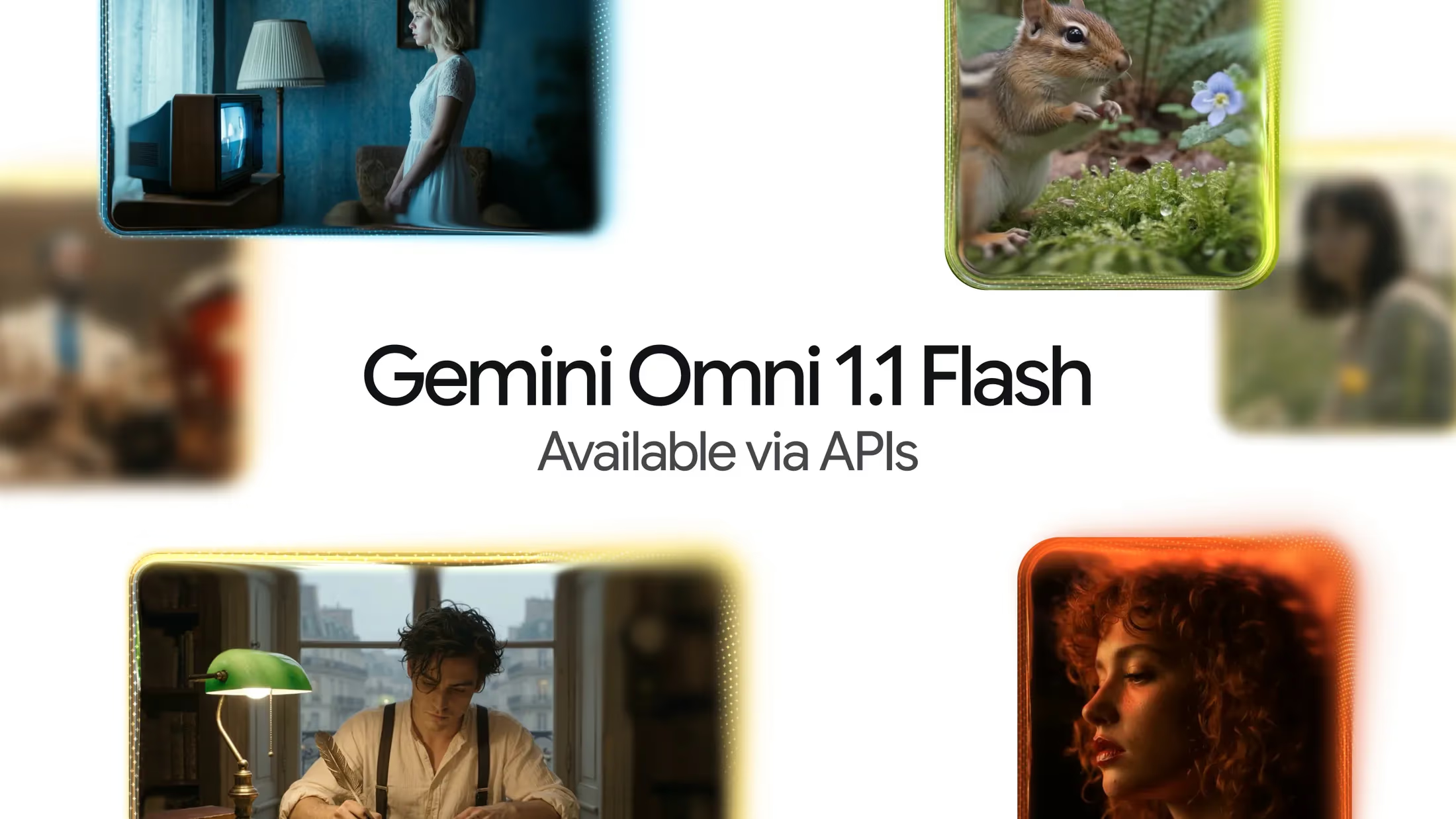
Gemini Omni 1.1 Flash is Google's updated video generation and editing model, released 27 August 2026 as a production-ready follow-up to the original Gemini Omni Flash. It adds scene extension (up to 40 seconds cumulative, referencing up to 10 seconds of prior context), first/last-frame interpolation for controlled camera moves, and tiered output from a cheap 360p draft mode ($0.03/second) up to native 4K upscaling ($0.30/second). It's live now in Google AI Studio, the Gemini Enterprise Agent Platform, Google Flow, and the Gemini app, and every clip carries Google's SynthID watermark for AI provenance.
Julian Goldie SEO called it “WILD” to his AI-tools audience within days of launch - and coming three months after the original Gemini Omni Flash debuted at I/O 2026, the 1.1 update is less a new model than Google finishing the job: turning a capable but rough video generator into something built around the actual workflow of iterating on a shot before committing to a full-resolution render.
This review is built from Google's own developer blog post, its Gemini API documentation, and Google DeepMind's model card for the Gemini Omni Flash family - the real specs, the real per-second pricing across every resolution tier, and an honest look at what Google itself flags as still restricted.
Julian Goldie's first-look coverage of Gemini Omni 1.1 Flash, filmed the day of Google's 27 August 2026 release.
Executive Summary
Gemini Omni 1.1 Flash is Google's multimodal video model - it accepts text, images, audio and video as input and produces high-resolution video with synchronised audio, with conversational, instruction-based editing rather than single-shot generation only. Google's own framing for the 1.1 release is explicitly about giving developers “more control”: longer, more consistent scene extension, precise start/end-frame direction, and a pricing structure built around cheap iteration before an expensive final render.
- Best for: developers and creative teams who need controllable, extendable AI video generation with a genuine draft-then-finalise workflow, via API or inside Google AI Studio, Flow, or the Gemini app.
- Headline numbers: up to 40-second cumulative video length, 360p-to-4K tiered output, $0.03-$0.30 per second depending on resolution, native audio generation, SynthID watermarking on every output.
- Defining trait: the 360p-preview-then-upscale pricing model - iterate cheaply, pay full price only on the version you actually keep.
- Main caveat: Google itself acknowledges ongoing limitations with consistency through edits, complex motion, and accurate on-screen text, and keeps voice-alteration during video editing deliberately restricted.
Lineage
Google introduced Gemini Omni during the I/O 2026 cycle (19 May 2026) as its dedicated video generation and conversational-editing model, distinct from the separate Veo line. The model opened to developers on 30 June 2026 via the Gemini API, Google AI Studio and the Gemini Enterprise Agent Platform under the API model ID gemini-omni-flash-preview, at public-preview status.
Gemini Omni 1.1 Flash, released 27 August 2026 under the API model ID gemini-omni-1.1-flash, is the general-availability, production-focused iteration - Google's own post frames it around developer control rather than a fundamentally new architecture, and it inherits the same underlying model card, safety review and SynthID watermarking approach as the original release rather than starting a new one.
What's New in 1.1
| Capability | Original Gemini Omni Flash | Gemini Omni 1.1 Flash |
|---|---|---|
| Scene extension context | References only the final second of the clip | References up to 10 seconds of prior context |
| Max cumulative length | Single generation, no extension | Up to 40 seconds via extension in 10-second steps |
| Frame control | Not supported | First/last-frame interpolation for controlled transitions |
| Output resolution | Fixed 720p | 360p draft / 720p / 1080p / 4K upscale |
| Pricing model | Flat per-second (720p only) | Tiered per-second, cheaper at draft resolution |
The scene-extension change is the most consequential for actual production use: a model that can only see the last second of a clip when extending it tends to drift - camera motion resets, lighting shifts, characters subtly change. Referencing a full 10 seconds of prior context is Google's stated fix for exactly that drift, aimed at preserving “character identity, lighting, and narrative context” across an extension rather than just visual similarity frame-to-frame.
Capabilities Deep Dive
Scene extension
Extension runs in 10-second increments, called either through natural-language prompting or an explicit "task": "extend" parameter inside video_config, generating a 3-10 second continuation appended to the end of the existing clip up to the 40-second cumulative cap.
First/last-frame interpolation
Developers can now supply two images - a starting frame and an ending frame - and have Gemini Omni 1.1 Flash generate the motion between them, tagged in the API via <FIRST_FRAME> and <LAST_FRAME> markers against uploaded source images. Google's framing is squarely production-oriented: smooth transitions, deliberate camera movement, and seamless loops, rather than the model improvising a full scene from a text prompt alone.
Resolution tiers and the draft workflow
Output is selectable via response_format across four tiers - 360p, 720p (the default), 1080p and 4K, with 1080p and 4K produced as upscales of the base generation rather than natively rendered at that resolution. Google pitches the 360p tier specifically as a fast, cheap way to iterate on a prompt - up to 60% faster generation and roughly a third of the 720p cost - before spending more to upscale only the take that actually works.
Aspect ratio and audio
Both 16:9 landscape (default) and 9:16 portrait are supported, and video generation includes synchronised audio natively rather than requiring a separate audio-generation pass - consistent with Gemini Omni's original positioning as a genuinely multimodal model rather than a silent-video generator with audio bolted on afterwards.
API and Developer Access
Gemini Omni 1.1 Flash is accessible under the model ID gemini-omni-1.1-flash through the Gemini API, with inputs supporting text prompts, images (JPEG/PNG, via base64 or the Files API), and previously-uploaded video for editing or extension (via Files API URI references, capped at 10 seconds per upload). Outputs larger than 4MB are returned as Google-hosted URIs rather than inline data - set via a "delivery": "uri" parameter - which requires polling the file's state until it reads ACTIVE before downloading the finished clip.
Beyond direct API access, Google lists Adobe Firefly, Figma Weave and Runway as third-party platforms that have integrated Omni Flash's generation and editing capabilities, alongside Google's own first-party surfaces: Google AI Studio, the Gemini Enterprise Agent Platform, Google Flow (for AI Plus, Pro and Ultra subscribers), and scene-extension inside the consumer Gemini app itself.
Safety, Watermarking and Restrictions
Google DeepMind's published model card for the Gemini Omni Flash family - which 1.1 Flash inherits rather than replacing with a new document - describes a standard pre-release safety process: automated and human evaluations run throughout training, dedicated human red-teaming aimed at deliberately surfacing weaknesses, automated red-teaming for safety assessment at scale, and ethics and safety reviews before release, all aligned with Google's AI Principles and its Generative AI prohibited-use policies.
The model card splits its mitigations into two categories: pre-training work (diverse synthetic captioning, intended to improve how well the model represents varied concepts fairly) and post-training work (production content-safety filters applied to both input prompts and generated video, which the card notes vary by region, plus SynthID).
SynthID is applied to every video Gemini Omni generates - an imperceptible digital watermark, invisible to viewers, that survives common transformations like re-encoding and resizing and can be checked programmatically to confirm a video's AI provenance. One capability the model card explicitly flags as restricted rather than fully shipped: Omni can technically alter a person's speech during video editing, but Google says this is deliberately held back “while developers work to understand responsible implementation” - a rare case of a lab naming a specific capability it has built but chosen not to fully release.
Real-World Reception
Coverage since launch has largely centred on the practical production value of the resolution tiers and longer extension window rather than raw generation quality claims. Trade coverage highlighted the 40-second cumulative length and the 360p-draft-to-4K-upscale pricing specifically as the headline production-workflow change, while creator coverage - including Julian Goldie SEO's video embedded above - tends to frame it around hands-on results: what the model actually produces from a single prompt, rather than the underlying architecture.
Pricing
Google's official per-second pricing for Gemini Omni 1.1 Flash, published on its developer blog, is tiered by output resolution:
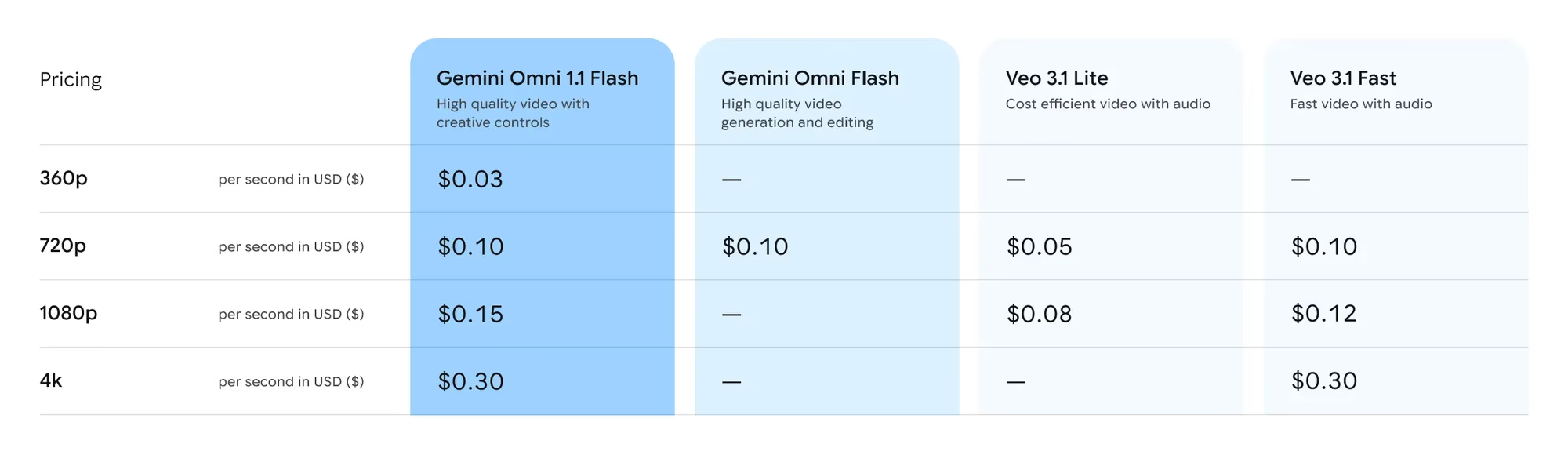
- 360p (draft): £0.022 ($0.03) per second - not available at all on the original Gemini Omni Flash or either Veo 3.1 tier.
- 720p: £0.074 ($0.10) per second - identical to the original Gemini Omni Flash's only tier, and matching Veo 3.1 Fast; Veo 3.1 Lite undercuts both at £0.037 ($0.05).
- 1080p: £0.111 ($0.15) per second - Veo 3.1 Lite is cheaper at £0.059 ($0.08) and Veo 3.1 Fast at £0.089 ($0.12); Gemini Omni Flash (original) and Veo 3.1 Lite's own 4K tier aren't offered at all.
- 4K: £0.222 ($0.30) per second - matching Veo 3.1 Fast's 4K price exactly; not offered on the original Omni Flash or Veo 3.1 Lite.
(GBP figures are approximate conversions and will move with the exchange rate; Google's dollar pricing is the definitive figure.) The practical read: a 10-second clip drafted at 360p costs $0.30 to preview, versus $1.00 to generate directly at 720p or $3.00 at 4K - meaning heavy iteration at draft resolution before committing to a final render is now explicitly the cheaper path Google has priced for, not just a theoretical option.
Limitations
- Acknowledged consistency issues: Google's own model card names ongoing challenges with “maintaining complete consistency throughout edits, generating scenes with complex motion, or rendering perfectly accurate text” - on-screen text and fast, complex motion remain weak points.
- 1080p and 4K are upscales, not native renders: the base generation happens at a lower resolution and is then upscaled, which is a different (and generally less detail-accurate) process than native high-resolution generation.
- Voice alteration deliberately restricted: Google has built but not fully released the ability to alter a person's speech during video editing, citing unresolved responsible-use questions.
- Video upload cap for editing: input videos for editing or extension are capped at 10 seconds when uploaded, separate from the 40-second cumulative output limit.
- Regional content-safety variation: the model card notes that content safety filters on prompts and output vary by region, so behaviour is not guaranteed to be identical worldwide.
How It Compares
Against Google's own Veo 3.1 line, Gemini Omni 1.1 Flash is not simply cheaper or more expensive across the board - it is priced competitively at 720p and 4K (matching Veo 3.1 Fast exactly at both) while Veo 3.1 Lite undercuts it at 1080p and 720p for teams that don't need Omni's specific editing and interpolation features. The meaningful differentiator is workflow: Veo is a more conventional generation model, while Gemini Omni is built around conversational, instruction-driven editing of existing footage and multi-step scene extension, positioned closer to a video editing copilot than a one-shot generator.
Against third-party video models like Seedance 2, the comparison that matters most for most teams is less about raw output quality and more about ecosystem integration - Gemini Omni 1.1 Flash ships with first-party support inside Google AI Studio, Flow and the Gemini Enterprise Agent Platform, plus third-party integrations already live in Adobe Firefly, Figma Weave and Runway, which is a wider immediate distribution footprint than most competing video models launch with.
Who Should Use It
Use it now if you need programmatic, controllable video generation with real editing capabilities - scene extension, frame-to-frame interpolation, iterative drafting at low cost before a final high-resolution render - and you're already working inside Google's ecosystem (AI Studio, Vertex-adjacent tooling, or one of the integrated third-party apps).
Consider alternatives if your workload is high-volume, lower-stakes generation at 720p or 1080p only, where Veo 3.1 Lite's lower per-second pricing wins on cost, or if you need voice-alteration during editing, which Google has explicitly held back from this release.
The Bottom Line
Gemini Omni 1.1 Flash is a maturity release more than a capability leap - the underlying model card, safety review and watermarking approach carry over unchanged from the original Gemini Omni Flash, and what actually shipped is a genuinely useful production workflow: draft cheaply at 360p, extend with real narrative continuity up to 40 seconds, control transitions with first/last-frame interpolation, and only pay full price when you upscale the take you're keeping.
Google is candid about what still doesn't work perfectly - complex motion, on-screen text, full consistency across edits - and has drawn an explicit, named line around voice alteration rather than shipping it quietly. For teams already inside Google's AI tooling, that combination of real production controls and transparent limitations makes it a credible default video model rather than a novelty.
Last updated: 31 August 2026. This review is based on Google's official 27 August 2026 developer blog post (blog.google), the Gemini API documentation (ai.google.dev), and Google DeepMind's published model card for the Gemini Omni Flash family; figures may be refined as further documentation lands.
Get the free guide: Claude vs ChatGPT, Gemini & Grok
A 20-page playbook covering everything you need to choose and use the big four AI models in 2026, full cost and feature comparisons, what each is best (and worst) at, and how-tos for images, vectors, building a website, Claude Code and more.