 AI Tools Review Editorial Team
Quick Answer:
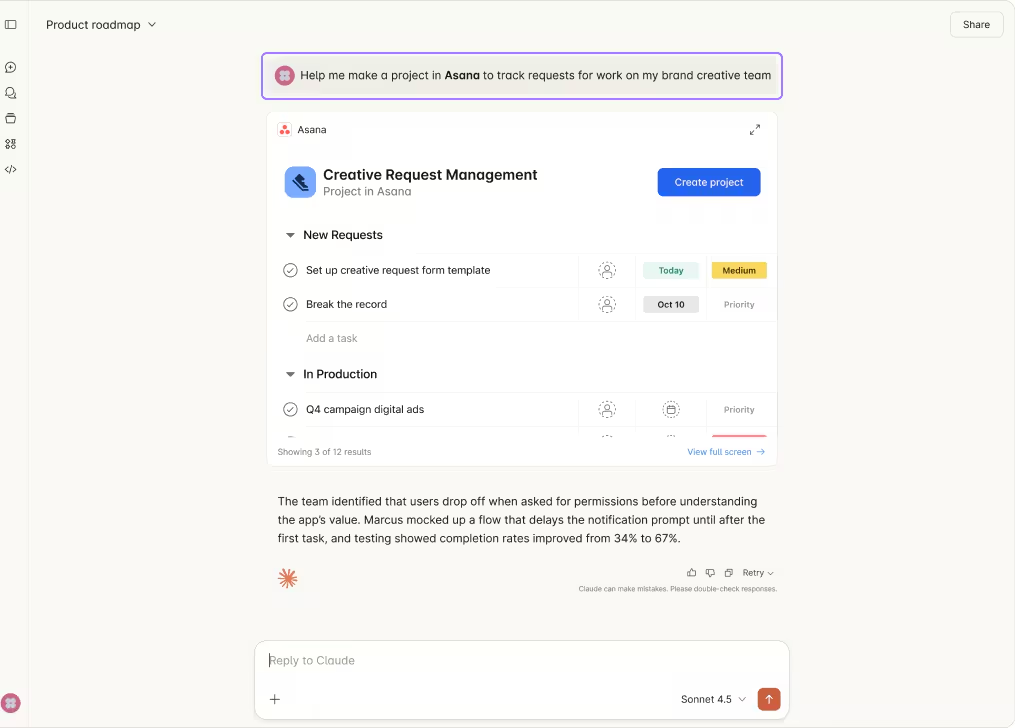
The Asana MCP connector gives Claude access to your Asana Work Graph: check the status of tasks, projects and portfolios, create and assign tasks, add them to projects and sections, update as work progresses, and kick off new projects - all from a single conversation. Asana publishes the connector officially with a Claude + Asana app page. Find it in the Claude Connectors Directory.
Asana is the system of record for a lot of cross-team initiatives. The connector lets Claude treat it that way too.
Status, blockers, assignments and new project scaffolds - asked and answered without leaving the chat.
Overview
Asana publishes an MCP server that allows AI assistants like Claude to access the Asana Work Graph - the network of projects, tasks, portfolios and the relationships between them. Once connected, Claude can interrogate that graph and take action across it from a single Claude conversation.
The current production server is the V2 endpoint at mcp.asana.com/v2/mcp, which Asana's developer docs describe as using OAuth authentication and Streamable HTTP transport - the modern MCP pairing. Asana deliberately doesn't publish a frozen tool list; the docs direct you to run the tools/list MCP command in your client to see the current tools and their parameters, which is a sensible posture for a surface that's still growing. Officially supported clients span both conversation and code: Claude and ChatGPT get dedicated Asana apps, whilst Claude Code, Codex, Cursor, VS Code and any MCP-compatible client that supports OAuth and Streamable HTTP connect to the same server directly.
What the Claude Connector Does
- Check status of tasks, projects and portfolios.
- Create tasks with specific details and add them to projects or sections.
- Assign and update tasks as work progresses.
- Kick off new projects with structured sections.
- Review work and portfolios across multiple initiatives.
MCP vs the Asana API
Asana has offered a mature REST API for years, and it remains the right choice for building custom integrations, syncing Asana into a data warehouse, or wiring up automations that run unattended. You manage a personal access token or an OAuth app, handle pagination and rate limits yourself, and write code against the resource model of workspaces, projects, sections, tasks and custom fields.
The MCP server sits at a different altitude. It is a managed, conversational surface built for AI agents: Asana hosts it, exposes a curated set of tools, and handles OAuth so Claude can read and write the Work Graph without you touching the REST endpoints. The trade-off is the usual one - the API gives you total control and is ideal for systems integration; MCP gives you speed and natural language and is ideal for the in-conversation agent loop. Teams frequently run both: the API for the nightly sync, MCP for "create the launch plan and assign it" in the moment. If you only need an agent to act on Asana as a human would, MCP is far less work than building against the API.
Real Use Cases
- Launch scaffolding: create a product launch campaign with sections for Positioning, Content Creation, Channel Activation and Performance Tracking - in one prompt.
- Status standup: "What's behind schedule across my portfolios this week?" - Claude pulls real data and answers.
- Triage and assignment: assign all design tasks in a project to the Design team based on their usual responsibilities.
- Blocker hunting: surface tasks marked blocked or overdue across teams.
- Cross-team check-ins: summarise progress for an executive update without manually opening every project.
A Worked Example: Launch in One Prompt
A pattern that recurs in user write-ups - scaffolding a cross-functional launch that would normally take a project manager an hour of clicking:
- You ask Claude: "Create a Q3 product launch project in the Marketing workspace with sections for Positioning, Content Creation, Channel Activation and Performance Tracking."
- Claude creates the project and the four sections in the correct workspace.
- You follow up: "Add the standard content tasks under Content Creation and assign them to the content team." - Claude creates the tasks, drops them in the right section and assigns owners.
- "Set due dates working back from a 15 September launch." - Claude back-schedules the tasks against the date.
- A week later: "What's behind schedule on the Q3 launch?" - Claude reads the project status and surfaces the slipping tasks.
- You close the loop in the same chat, reassigning or re-dating the at-risk items.
The entire arc - scaffold, populate, schedule, monitor, adjust - happens in conversation, against your real Work Graph, without opening Asana once. That is the difference between an agent that describes a plan and one that actually builds it.
Real-World Experience
Reception across Asana's official docs, MCP Manager's tutorial, StackOne's connector overview, Klavis's integration guide, Truto's automate-collaboration write-up and Composio's Claude/Cursor walkthrough has been consistent: the biggest, repeatable win is the death of context-switching. PMs spend less time gathering status and more time acting on it.
The honest counterpoint: like any write-capable PM connector, mass updates are risky. A bad "reassign all" prompt can scramble ownership. Scope tightly, especially in shared workspaces, and validate behaviour on a single project before going broad.
How to Set It Up
Asana runs a hosted remote MCP server. Note the version: the original V1 beta at https://mcp.asana.com/sse is deprecated and shuts down on 11 May 2026, and it is missing tools (notably create_task). New setups should point at the V2 server at https://mcp.asana.com/v2/mcp, which uses Streamable HTTP transport and OAuth.
Claude Code
Add the V2 server and complete OAuth:
claude mcp add --transport http asana https://mcp.asana.com/v2/mcpRun /mcp in a session to trigger the browser-based OAuth flow, then claude mcp list to confirm registration. If Asana rejects the redirect URI, pin the callback port (see Common Problems below).
Claude Desktop and claude.ai
Open Settings → Connectors, add a custom connector with the URL https://mcp.asana.com/v2/mcp, and authenticate to your Asana workspace. Pilot on a single project before exposing whole portfolios, then drive status, creation and assignment with natural-language prompts.
Security and Permissions
Authentication operates against your Asana account, so the agent inherits your Work Graph visibility. Inside that, scope what the connector can do, prefer read on shared portfolios while you pilot, and review bulk writes before automating them. Asana's existing permission and access model composes with the connector cleanly.
For organisations that want central control, the lever sits with admins: customers on Asana's Enterprise+ or Legacy Enterprise tiers can govern the MCP integration through Asana's app management, deciding whether the app is available in the workspace at all. Workspaces on other tiers don't get that self-service toggle - per the developer docs, they need to contact Asana Support to have the MCP app blocked. Worth knowing before a security review asks "can we switch this off?".
Common Problems and Fixes
Asana's MCP has had a bumpier rollout than most, largely because of the V1-to-V2 migration and a well-known OAuth quirk with Claude Code. These are the issues that dominate the forums.
OAuth "redirect_uri rejected" in Claude Code
This is the single most reported failure. Claude Code spins up a local HTTP server on a random port for the OAuth callback (for example http://localhost:40128/callback), and Asana's V2 app enforces strict redirect-URI matching - so the random port fails to match a registered URI and Asana returns invalid_request. The fix is to pin the callback port so it matches a pre-registered redirect URI:
claude mcp add --transport http asana https://mcp.asana.com/v2/mcp --callback-port 3030Use whatever port your Asana app has registered as http://localhost:PORT/callback. Pinning it makes every re-authentication deterministic.
create_task is missing
If Claude can read but not create tasks, you are almost certainly still on the deprecated V1 SSE server (mcp.asana.com/sse), which never exposed create_task. Remove it and re-add the V2 endpoint (mcp.asana.com/v2/mcp). Tokens issued for one server do not work with the other, so re-run OAuth after switching.
"This app is not available to your Asana workspace"
This appears when an OAuth app was scoped to "specific workspaces" but no workspace was actually selected, or you are authenticating with an account that isn't a member of the target workspace. Confirm at least one workspace is selected on the app, and sign in with an account that belongs to it.
Bulk writes scramble ownership
A loose "reassign all" prompt can rewrite task ownership across a project. Ask Claude to list the tasks it will change first, scope by section and assignee, and validate on a single project before running anything broad - especially in shared workspaces.
Pricing and Availability
The MCP server is included with Asana at no extra charge - connecting Claude does not add a licence fee, and the agent's actions count against your existing workspace exactly as your own would. What is gated is the underlying Asana functionality: portfolios, advanced custom fields and some reporting surfaces depend on your Asana tier (Starter, Advanced, Enterprise), so an agent on a lower plan simply won't see features that plan doesn't include.
The V2 server is generally available and hosted by Asana, so there is no infrastructure to run. Keep an eye on the migration deadline: once the V1 SSE endpoint is retired in May 2026, only the V2 endpoint will work, so move any older configs across well ahead of the cutoff.
Limitations
- Mass writes carry mass risk: review bulk assignment and reorganisation actions carefully.
- Plan-dependent features: portfolios and certain advanced fields depend on your Asana plan.
- Asana-shaped: excellent inside Asana, not a cross-system orchestrator.
Who It Is For
Project managers, PMOs, marketing ops and leadership teams running cross-functional initiatives in Asana. Anyone whose Monday morning is "what's the status of everything?" will recoup hours.
The Bottom Line
The Asana connector kills the most expensive PM tax: gathering status. Claude reads the Work Graph and answers, creates and assigns. For teams running real initiatives on Asana - especially across functions - it is one of the highest-leverage connectors available.
Pilot on a project, scope tightly, expand as trust grows. Browse more in the complete Claude Connectors Directory.
Sources: Asana (developers.asana.com, asana.com/apps/claude, asana.com/resources/claude-asana-integration), MCP Manager, StackOne, Klavis, Truto, Composio. Image: Asana. Last updated: June 2026.