 AI Tools Review Editorial Team
Quick Answer:
The Canva MCP connector securely connects Claude to your Canva account, letting it create new designs, modify existing ones, autofill brand kits and templates, search your design library, manage assets, and export across formats - all from natural-language prompts. On Canva Enterprise it can apply your brand colours, fonts and logos automatically. Find it in the Claude Connectors Directory.
The Canva MCP for Claude launched last July; since then millions of people have used Canva inside Claude to create, resize and summarise content from simple prompts.
For anyone shipping graphics, decks and brand assets at scale, it collapses two tools into one conversation.
Overview
The Canva MCP Server (also known as the Canva AI Connector) is Canva's official implementation of the Model Context Protocol. It securely connects AI assistants like Claude to your Canva account so they can create, modify, search and export designs - all without you leaving the chat.
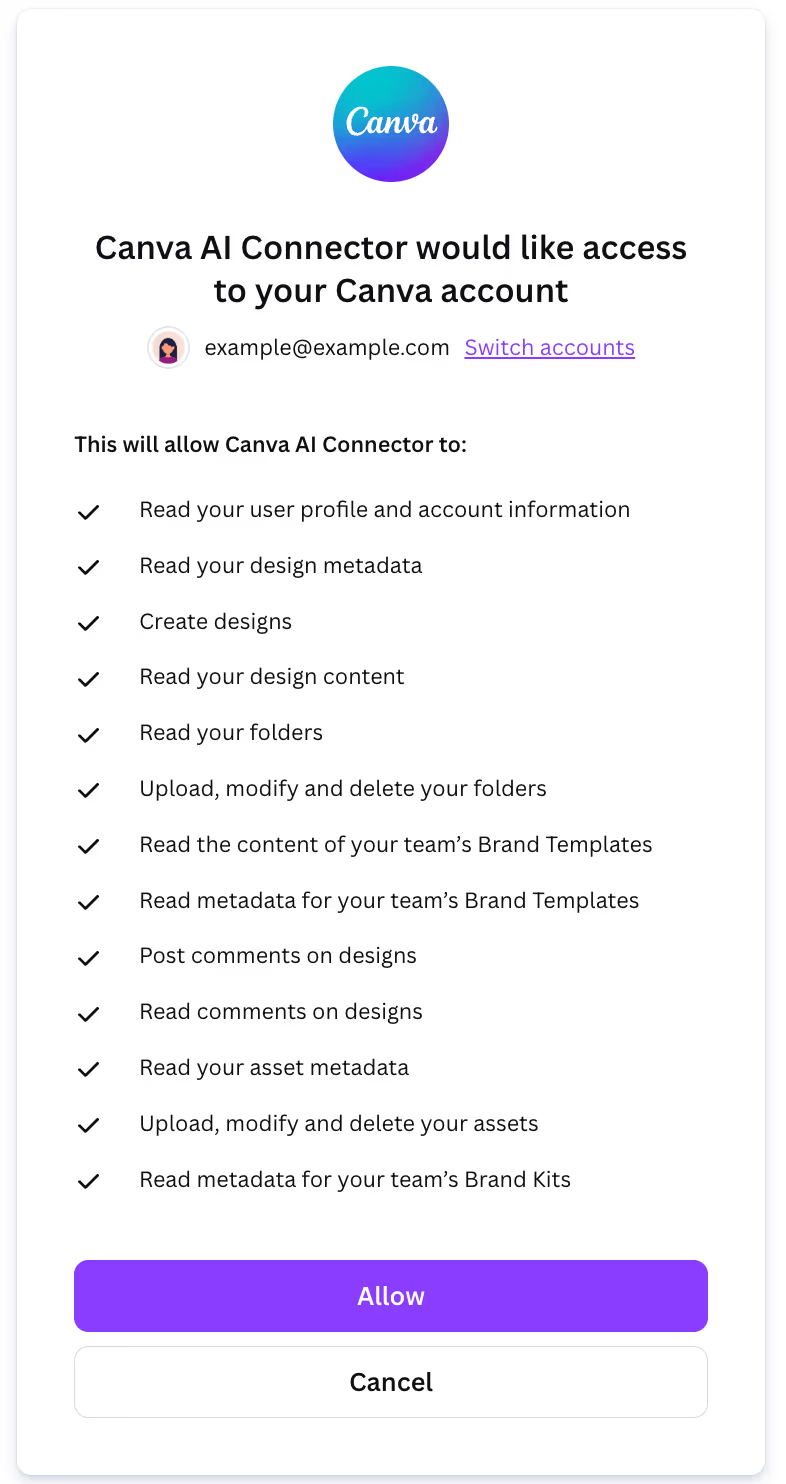
Under the hood it is a hosted remote server at https://mcp.canva.com/mcp, authenticated by an OAuth consent step in which you explicitly allow the Canva AI Connector to access your account. Canva's developer docs summarise the core tool surface as the ability to create new empty designs, autofill templates with your content, find your existing designs and export them as PDFs or images - and list a broad set of supported clients: Claude (via connectors or the MCP server on Desktop), Claude Code, ChatGPT (in beta, paid plans only), Gemini CLI, plus Cursor and VS Code in Agent mode.
What the Claude Connector Does
- Create new designs - presentations, posts, posters, infographics.
- Modify existing designs and resize across formats.
- Autofill templates with structured content.
- Search and summarise across your Canva workspace.
- Manage assets and folders.
- Export across PNG, JPG, PDF, PPTX and MP4.
- Comment on designs to drive collaboration.
Brand Kits and Templates
On Canva Enterprise, the MCP exposes brand kits, brand templates and autofill, so Claude can apply your brand colours, fonts and logos automatically when it generates designs. Practically, that means a single prompt can produce a batch of variants - social post, LinkedIn banner, slide cover, email header - that already look like yours.
MCP vs the Canva Connect API
Canva has long offered the Connect API - a REST interface for programmatically creating designs, autofilling templates, exporting assets and reading folder structure. If you are building a product feature or a scheduled pipeline (for example, generating a thousand localised variants overnight), the API is the right tool: you own the auth, the retries and the throughput, and you wrap it in your own logic.
The MCP server is built for the agent path instead. Rather than mapping calls to endpoints, Claude is handed tools - create design, autofill, search, export, comment - and picks the right one from a plain-English request. The MCP layer also handles OAuth and respects what your Canva account can already see, so there are no credentials to wire in. The trade-off is determinism: a program calling the API does exactly what you coded, whereas an agent interprets intent, which is faster for ad-hoc work but needs review for anything published.
In practice, reach for the Connect API when the work is high-volume and repeatable, and the MCP connector when it is conversational and one-off. Teams that ship a lot of content often run both.
Real Use Cases
- Solo creator workflow: draft the copy in Claude, ask Claude to generate the graphic, get the PNG, ship the post - one conversation.
- Format multiplication: one source design becomes the social post, LinkedIn banner, slide cover and email header. Pro-tier resizing turns this into a real multiplier.
- Branded campaign variants: generate batches of on-brand assets for a single campaign in one pass.
- Presentation drafting: Claude builds a deck from your brief, autofilling a brand template.
- Asset hunting: "Find me the social posts we made for the Q4 launch" - and Claude searches your library.
Real-World Experience
Canva's own newsroom highlights millions of users on the Claude connector, with presentations as the most common output, followed by social posts, posters and infographics. Community guides from theCLICK, a2a-mcp.org, Mejba.me and others walk through real workflows. The strongest praise is for closing the "writing-then-laying-out" loop into one prompt.
The most honest caveat - well-articulated in commentary like Amit Kothari's "500 documents a week and none of them look like yours" - is that without a brand kit, AI-generated designs drift away from brand. The Enterprise brand-kit support is what fixes that; outside Enterprise, you lean more on hand-tweaked templates.
How to Set It Up
There are two routes, depending on whether you want a no-code connector or a developer MCP server.
Option 1 - Click-to-connect (no code)
- In Claude, open Settings → Apps & Connectors, find Canva and follow the prompts to connect.
- Start a new chat, click the connector icon, and activate Canva for that session (there's a per-conversation toggle, handy for focus and security).
- Authenticate to your Canva account when prompted - each user authenticates individually.
- Start prompting - "Make a 1080×1080 launch graphic for X, use the Acme brand kit".
Option 2 - Developer MCP server
If you work in Claude Code, Cursor or VS Code and want Canva inside your dev workflow, run the local MCP server. You'll need git, Node.js 22.16 or later, npm and a supported MCP client. Add the server to your client config using the Canva CLI, following the docs at canva.dev/docs/mcp. When you first use a Canva tool, you'll be prompted to log in and allow access.
On Enterprise plans, make sure your brand kits and templates are configured first so Claude can apply them automatically.
Security and Permissions
The connector operates against your authenticated Canva account - it can only access workspaces, designs and brand kits your account has access to. The risk surface is mostly accidental design modification or accidental exports, not data exfiltration. Scope access on team plans, and review what writes the agent makes during pilot.
Common Problems and Fixes
- Designs don't match your brand: outside Enterprise, the brand-kit, brand-template and autofill tools aren't exposed, so output drifts off-brand. Either upgrade for brand-kit automation or point Claude at a specific hand-built template each time.
- Connector active but tools don't fire: the per-conversation toggle means Canva can be connected globally yet disabled for the current chat. Click the connector icon and activate Canva for that session.
- Dev MCP server won't start: the local server needs Node.js 22.16 or later, per Canva's docs. An older Node is the most common cause - check
node --versionand upgrade before retrying the Canva CLI setup. - Login prompt loops: each user must authenticate individually, and the OAuth window must finish. If tools keep asking you to log in, complete the "allow access" step in the browser before returning to the client.
- Export format unavailable: some exports and resizing depend on your Canva plan. A failed PPTX or MP4 export can mean the format isn't on your tier rather than a connector fault.
- Accidental edits to live designs: the connector writes to your real workspace. During a pilot, work in a dedicated folder so an over-eager prompt can't modify production assets.
Pricing and Availability
The connector itself is free - there is no separate charge to link Claude and Canva. What you can do is governed by your Canva plan: basic create, modify and export work on free and Pro tiers, while the high-leverage brand-kit, brand-template and autofill automations are Canva Enterprise features. Certain resize and export formats are also plan-gated.
The Canva AI Connector launched in mid-2025 and has since been used by millions inside Claude. On the Claude side, the one-click connector follows Anthropic's normal plan requirements; the developer MCP server works with any Claude Code access.
Canva's developer docs add useful nuance on both sides of the pairing. On the Canva side, basic account access works on any Canva plan, whilst the autofill tools sit behind Canva Enterprise and design exports require a paid plan. On the Claude side, the click-to-connect connector route requires a paid Claude plan - but the docs note the MCP server method works without one, which makes the manual server setup the budget path for free-tier Claude users who still want Canva in their workflow.
Limitations
- Brand fidelity needs Enterprise: the most powerful brand-kit automations are Enterprise-tier features.
- Creative judgement still matters: AI generates, you direct - good prompts still win.
- Plan-dependent features: some tools (resize, certain exports) depend on your Canva plan.
Who It Is For
Solo creators, coaches and consultants who ship content under their own brand, and marketing teams that produce campaign assets in volume. Anyone whose work currently bounces between Claude and Canva will feel the benefit immediately.
The Bottom Line
The Canva connector collapses the writing-and-designing loop into one conversation. Solo creators get end-to-end output without context-switching; marketing teams get one-pass branded campaign variants. With brand-kit support on Enterprise, the outputs finally look like your brand.
Configure your brand kits, point Claude at them, and ship. Browse more in the complete Claude Connectors Directory.
Sources: Canva (canva.com newsroom, canva.dev/docs/mcp), theCLICK, a2a-mcp.org, Mejba.me, MindWiredAI, Amit Kothari. Image: Canva. Last updated: June 2026.