 AI Tools Review Editorial Team
Quick Answer:
Claude Code v2.1.224, released 7 August 2026, lets separate Claude Code sessions message each other directly. Two new tools power it: ListAgents discovers which other sessions a given session can reach, and SendMessage delivers a plain-text message to one of them by name. Claude writes and addresses the message itself; you never call either tool. Messages carry text only, never conversation history, files or permissions, and the receiving session's own permission prompts still apply to anything the message asks for. It works on macOS and Linux (not native Windows), same-machine messages never touch Anthropic's servers, and cross-machine messages route through Remote Control.
Anyone who runs more than one Claude Code session at once, one per worktree, one per repo, one watching a long migration, knows the drill: find the other terminal, explain what just happened, switch back. Anthropic's newest Claude Code release removes that step entirely.
Here is exactly what shipped, how the two new tools behind it work, the security model that stops it becoming a liability, and where it fits against Hermes Agent's own answer to the same problem shipped the same month.
Julian Goldie SEO's first look at the update, covering the cross-session messaging change.
Summary
Cross-session messaging shipped in Claude Code v2.1.224 on 7 August 2026. It lets Claude deliver a message from one of a user's Claude Code sessions to another, so that when a change in one session breaks what another is building on, Claude can warn that session before the user notices, and when one session settles a question another is blocked on, Claude can send the answer across, all without the user copy-pasting between terminals.
Two tools do the work. ListAgents lets Claude discover which other sessions it can reach: subagents inside the current session, other local sessions on the same machine, cloud sessions on Claude Code on the web, and sessions on other machines reachable via Remote Control. SendMessage delivers a piece of plain text to one of those sessions by name. Anthropic built firm guardrails around both: a message can never approve a permission prompt, change configuration, or execute a command on the receiving end, and the receiving session's own permission rules still apply to anything the message's content asks Claude to do.
- Best for: anyone running multiple concurrent Claude Code sessions, parallel worktrees, a long migration plus an interactive session, or sessions split across machines, who wants findings handed over automatically instead of manually.
- New tools:
ListAgents(discovery) andSendMessage(delivery), both called by Claude, never by the user directly. - Platforms: macOS and Linux (including WSL 2); not available on native Windows, Bedrock, AWS Claude Platform, Google's Agent Platform, or Microsoft Foundry.
- Main caveat: text only, no file or context transfer, same-machine only by default unless Remote Control is connected for cross-machine reach.
What Shipped, Officially
Anthropic's own Claude Code documentation describes the feature plainly: "Cross-session messaging lets Claude deliver a message from one of your Claude Code sessions to another. When a change in one session breaks what another is building on, Claude can warn that session before you notice. When one session settles a question another is blocked on, Claude can send the answer across." A message, per the documentation, "is a piece of text one Claude writes to another, never conversation history or files." To move an entire conversation or its context instead of a short message, Anthropic points users to resuming a session rather than messaging one.
The feature requires Claude Code v2.1.224 or later and, when a session meets the requirements, messaging is simply on, there is nothing to separately enable. The same SendMessage tool also powers messaging to subagents and agent-team teammates within a single session or team; this article covers messaging between a user's independent, separately started sessions specifically.
How Cross-Session Messaging Works
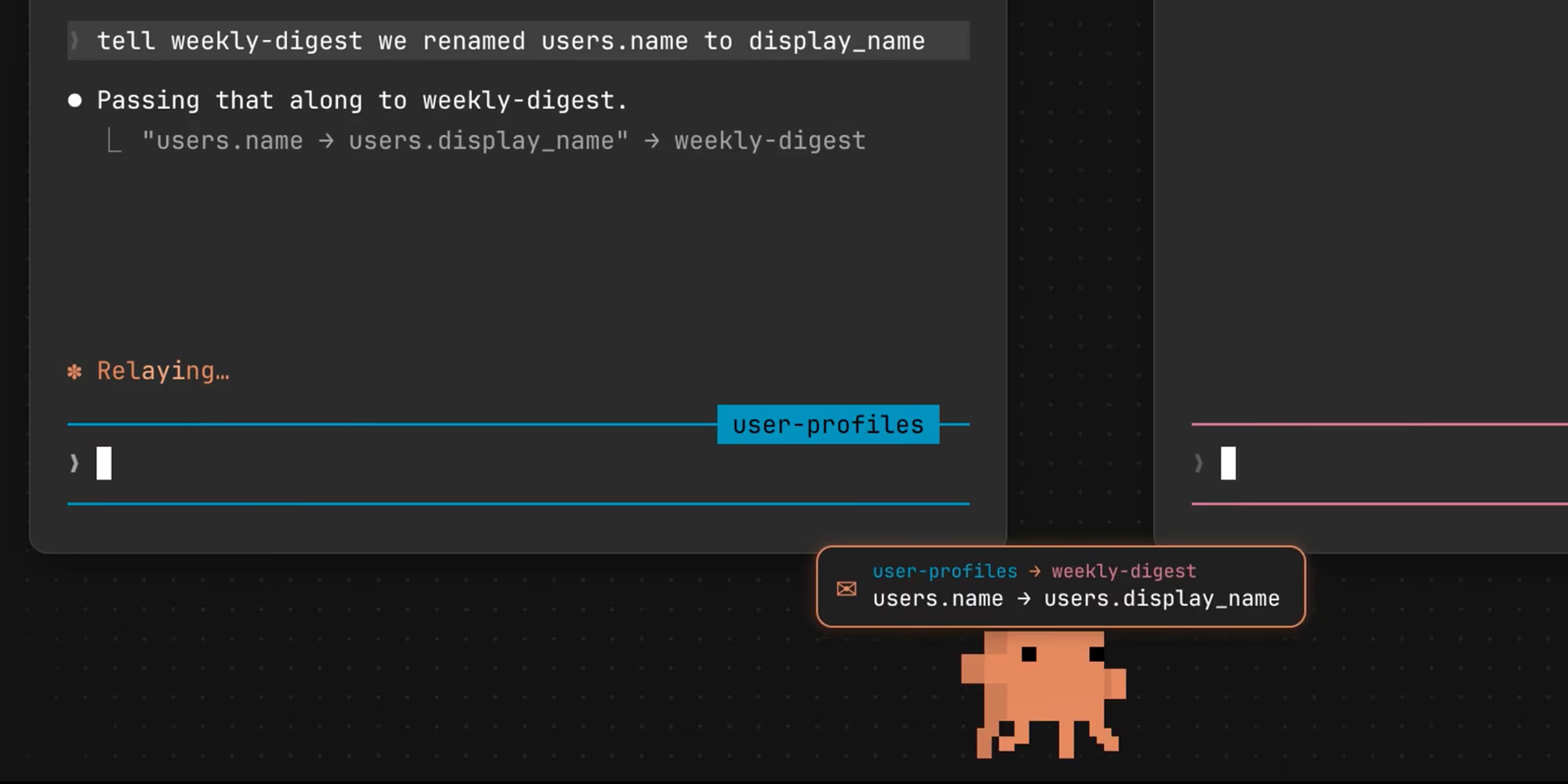
A user never runs either tool by hand. Instead, a user tells Claude what the other session should know or do, and Claude writes the actual message and decides which session to send it to. Anthropic's documentation gives two example prompts: "Ask the session running in my other terminal whether the migration finished" (Claude discovers the target and asks), and "Explain what we just did to the session working on the payments API" (Claude writes the summary itself, so the exact wording varies each time).
To see what Claude can reach without sending anything, a user can run the /list-agents command (aliased /peers), which lists every reachable session by the name it answers to, that name is exactly where Claude addresses a message. The listing covers subagents running inside the current session, other local sessions on the same machine (including background sessions, but only once a session has bound its own inbox socket), cloud sessions on Claude Code on the web when the current session has cloud access, and Remote Control sessions on other machines while connected.
Message delivery timing is designed not to interrupt active work: the receiving Claude reads an incoming message between tool calls during an active turn, so a running tool call is never cut off mid-execution, and if the receiving session is idle, Claude Code simply starts a new turn with the message. Once delivered, a message counts toward usage exactly like a prompt the user typed themselves, and the receiving Claude can reply the same way (with one exception, covered below, for one-way cross-machine messages).
The Four Official Use Cases
Anthropic's documentation lists four intended patterns:
- Hand over a finding: when one session discovers a breaking change or makes a decision, Claude summarises it for the session working on the affected area, instead of the user re-explaining it there.
- Coordinate parallel worktrees: when sessions work the same repository in separate worktrees, Claude can tell the other sessions what landed.
- Get status from long-running work: have a migration or test run report back to the session a user is watching, or ask for status from there directly.
- Message across machines: reach a session on another machine or on the web, provided Remote Control is connected.
Anthropic is also explicit about when not to reach for this feature: to continue one conversation in a different terminal or hand its full context to a new session, use session resume instead; for a coordinated team of sessions Claude itself spawns and supervises, use agent teams; to watch and steer many sessions from one place, use agent view; to steer a session from a phone or another device rather than have sessions talk to each other, use Remote Control; and to push external events like CI results or chat messages into a session, use channels. Cross-session messaging is specifically for independent sessions a user starts and steers themselves.
A closer look at team-facing Claude Code and Claude Skill workflows from the same week.
The Permission and Security Model
The single most important design decision in this feature is that a message from another session can never substitute for the user's own consent. When session A messages session B, Claude Code tells B's Claude explicitly that the message came from another session, not from the user, and restricts what it can do accordingly: it cannot approve anything, meaning it can never answer a pending permission prompt on the user's behalf; it cannot change configuration, Claude is instructed never to modify permission settings, CLAUDE.md, or other settings just because another session asked; commands embedded in a message's text, such as /compact, arrive as inert plain text and are never executed automatically; and if acting on the message's content requires a permission the receiving session does not already have, the exact same permission prompt a user would see for any other work still fires.
Permission boundaries also stay strictly per-session in the other direction: Claude is instructed never to ask another session to perform an action that was denied or blocked in its own session, or that its own permission settings would block, routing that work back to the user instead. Combined, these rules mean cross-session messaging is designed as a pure information-sharing channel: sessions can tell each other things, but no session can use another as a permission-bypass proxy.
Messaging Across Machines and the Web
Where a message travels, and whether it passes through Anthropic's servers, depends entirely on where the target session runs. A message to another session on the same machine travels over a per-session local socket and never reaches Anthropic's servers at all. A message to a session on another of a user's machines travels through Anthropic's servers, arriving via that machine's Remote Control connection. A message to a session on Claude Code on the web also travels through Anthropic's servers, straight to the cloud session.
Starting a fresh conversation with a session on another machine (rather than only replying to one that already messaged you) requires Claude Code v2.1.225 or later, one point release after the feature's initial launch, and the target session must already appear in the local listing. Same-machine delivery relies on each session registering itself in files on disk and binding its own inbox socket there, which is also why a session running inside a container and a session on the host machine cannot reach each other (different filesystems), while two sessions inside the same container, including on a self-hosted runner, still can. For anyone who wants an extra layer of control, setting isolatePeerMachines to true forces explicit user approval before any message leaves the current machine at all, even in a mode that otherwise skips ordinary permission prompts.
Controlling Inbound Messages
The crossSessionInbound setting governs what a session does with messages arriving from other sessions, with three explicit values: accept delivers every message straight to Claude; hold shows a notice for each arriving message without delivering it, releasing held messages later if an accept setting comes to apply; and refuse silently drops every incoming message.
When no explicit value applies, Claude Code falls back to a sensible default based on both sessions' permission modes: if the receiving session is one that normally prompts for permissions, incoming messages are delivered automatically, and only held for approval if the sending session identifies itself as one that bypasses permission prompts; if the receiving session itself bypasses permission prompts, incoming messages are held for approval by default, and delivered automatically only when the sender also bypasses. When a message is held, Claude Code shows an approval dialog with the sender and a text preview, offering Approve (delivers that one message) or Deny/dismiss (drops it), with unanswered dialogs expiring after five minutes by default. A session can hold at most 100 undelivered messages before the oldest are dropped.
Organisations that want to disable the feature entirely can do so centrally via managed settings, combining permission deny rules for the SendMessage and ListAgents tool names with a crossSessionInbound value of refuse, which stops both outbound sending/listing and inbound delivery without any visible change appearing in an affected session's own status output.
Limitations and Known Gaps
- Text only, nothing structural: messages carry plain text alone, never conversation history, files, or the sender's permissions; moving real context still requires resuming a session instead.
- No native Windows support: the feature is macOS and Linux (including WSL 2) only, and also unavailable on Bedrock, AWS Claude Platform, Google's Agent Platform, or Microsoft Foundry.
- Cross-machine reach depends on Remote Control: messaging a session on a different physical machine only works while that machine is connected via Remote Control; starting (rather than replying to) a cross-machine conversation additionally requires v2.1.225.
- Message loops are throttled, not prevented outright: Claude Code rate-limits repeated messages per sender, drops identical repeats arriving in a short window, and caps a session's queue of unread accepted messages at 50, which stops runaway loops but means very chatty coordination patterns can still hit friction.
- Feature-flag dependent: setting certain privacy/telemetry environment variables (such as
DISABLE_TELEMETRYorDO_NOT_TRACK) can turn off the underlying feature-flag evaluation the capability depends on, silently disabling messaging for that session.
Real-World Use vs the Docs
The documentation's own worked example is a good illustration of how understated this feature is meant to be in daily use: a user renames a database column in one session and simply says "tell weekly-digest we renamed users.name to display_name," and the other session receives a plain-text notice it can act on immediately, no context-switch, no re-explaining the schema, no risk of the second session finding out about the breaking change only after it has already failed a run against the old column name.
The honest caveat is that this is a coordination feature, not an autonomy feature: it does not make Claude Code sessions collaborate on a shared plan the way agent teams (a distinct, separately documented feature for a coordinated group of sessions Claude itself spawns and supervises) do. Two independently started sessions with cross-session messaging still each need a human steering them; the feature simply removes the manual copy-paste step between them when one has something the other needs to know. For genuinely autonomous multi-agent coordination without a human in the loop for each session, agent teams or, on the open-source side, Hermes Agent's new A2A protocol are the more direct comparison points.
Pricing and Access
Cross-session messaging is not a separate paid add-on: it is a Claude Code capability available to any user on Claude Code v2.1.224 or later, on a supported platform (macOS or Linux), subject to the standard Claude Code plan and usage limits that already apply to the account. Once a message is delivered, it counts toward usage the same way a typed prompt does, so heavy cross-session coordination consumes the same token budget as any other Claude Code activity rather than incurring a distinct charge. Anthropic has not published a separate price for the feature because there isn't one; access is purely a version and platform gate, not a billing tier.
How It Compares
The most direct comparison this month is Hermes Agent's Agent-to-Agent (A2A) v1.0 protocol, shipped in Nous Research's Herald Release less than a week later. The two solve related but distinctly scoped problems: Claude Code's cross-session messaging connects a user's own independent Claude Code sessions to each other, on the same machine or across Remote Control, using a proprietary mechanism internal to Claude Code. Hermes' A2A is a standard, open protocol explicitly designed so heterogeneous agents on entirely different stacks, not just multiple copies of the same tool, can discover and talk to each other. Claude Code's approach is narrower but immediately useful the moment a user runs more than one session; Hermes' approach is broader in ambition but its real-world value depends on how many other agents and platforms adopt the same open standard.
Within Anthropic's own product line, cross-session messaging also sits alongside, but is distinct from, agent teams (a supervised group of sessions Claude spawns itself) and Remote Control (steering one session from a phone or another device). A user coordinating sessions they started themselves reaches for messaging; a user wanting Claude to spin up and manage a whole team of sessions reaches for agent teams instead.
Who Should Use It
Use cross-session messaging if you regularly run more than one Claude Code session at once on macOS or Linux, whether across parallel worktrees on the same repo, a long-running migration alongside interactive work, or sessions split between a local machine and Remote Control, and you are tired of manually relaying what one session learned to another.
It won't help much if you only ever run one Claude Code session at a time, or if you're on native Windows without WSL 2, where the feature isn't available at all yet.
The Bottom Line
Cross-session messaging is a small-sounding feature with an outsized effect on anyone who already works across multiple concurrent Claude Code sessions: it removes a specific, recurring piece of manual friction, relaying findings between terminals, without introducing a new autonomy or permission risk, because the guardrails (no auto-approval, no config changes, no silent command execution) are built into the feature from the ground up rather than bolted on afterward.
It also marks another data point in a trend that is becoming hard to miss across the agent-tooling field this month: Claude Code shipping proprietary cross-session messaging and Hermes Agent shipping an open A2A protocol, in the same week, both converging on the same underlying insight, that a single agent working in isolation is increasingly the exception rather than the rule.
Last updated: 11 August 2026. Sourced from Anthropic's official Claude Code documentation for cross-session messaging, and independent reporting on the v2.1.224 release.
Get the free guide: Claude vs ChatGPT, Gemini & Grok
A 20-page playbook covering everything you need to choose and use the big four AI models in 2026, full cost and feature comparisons, what each is best (and worst) at, and how-tos for images, vectors, building a website, Claude Code and more.