 AI Tools Review Editorial Team
Quick answer:
Claude Code's desktop app now has a built-in, tabbed web browser, shipped 6-10 July 2026 as part of Anthropic's Week 28 update (versions 2.1.202-2.1.206). Press Cmd+Shift+B (macOS) or Ctrl+Shift+B (Windows) to open it. Claude can read, click and interact with any external site the same way it already tests your local dev server (docs, issue trackers, third-party APIs) with two extra safety layers: classifier review of every write action in every permission mode, and a domain allowlist check outside Auto and Bypass modes. It uses a clean browser profile with none of your logins, which is the key difference from the separate Claude in Chrome extension.
Claude Code has been able to preview and test your own running app in a browser pane for a while. What shipped in Week 28 is different: Claude can now open any site (a library's documentation, a competitor's checkout flow, a Figma file, a GitHub issue thread) inside that same pane, and read, click and interact with it the way a person would, without you having to alt-tab out to a separate browser window.
That sounds small, but it closes a real gap in how coding agents work. A model that can browse the web and act on what it finds is qualitatively more useful for research-heavy engineering tasks than one that can only see the files in your repository, and it is also a meaningfully bigger permission surface to get right. Here is exactly what shipped, how Anthropic scoped the safety model around it, and where it fits next to Claude's existing Chrome extension.
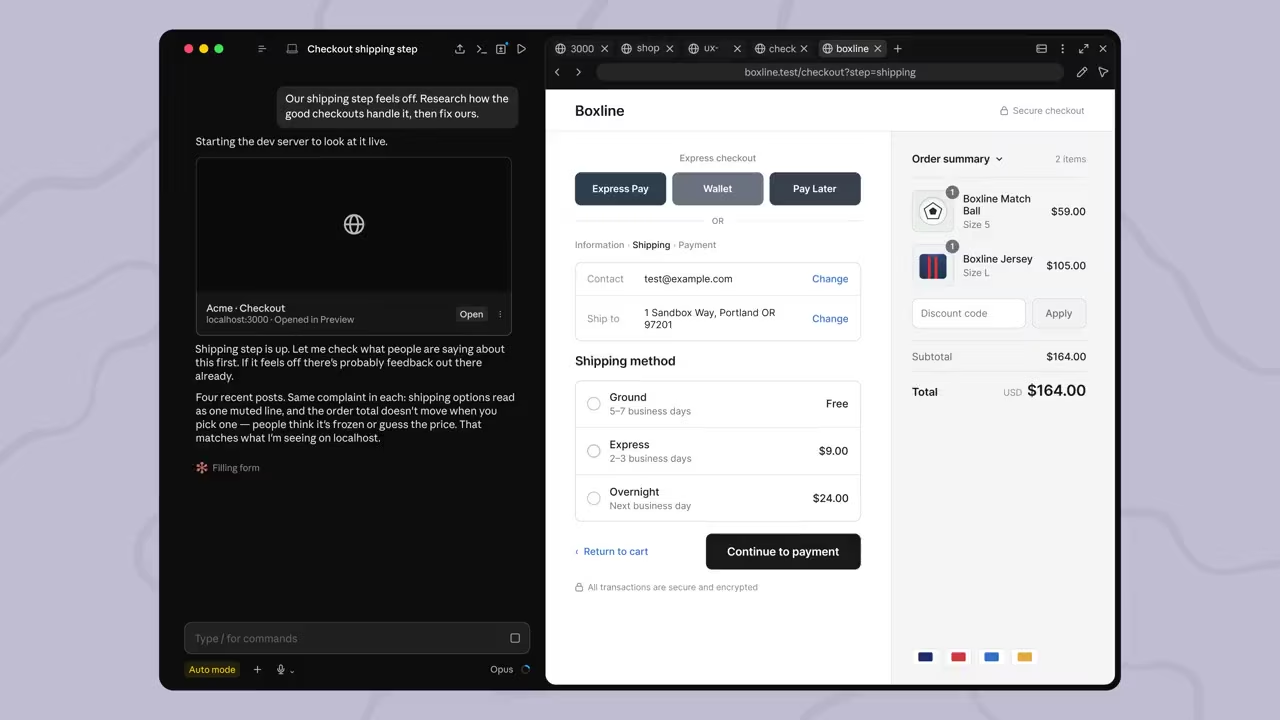
Note: this article is based on Anthropic's official Claude Code Week 28 changelog and desktop documentation. Screenshots below are frames from Anthropic's own official product demo video, published alongside the changelog. AI Tools Review has not independently tested the feature in a live Claude Code session.
Summary
- Shipped 6-10 July 2026 as the headline feature of Claude Code's Week 28 update, across releases v2.1.202 through v2.1.206.
- One shortcut, one pane. Cmd+Shift+B / Ctrl+Shift+B opens a tabbed Browser pane that sits alongside chat, diff, terminal and file panes in the Claude Desktop app's Code tab.
- Same tools Claude already uses to test your app (reading page text, clicking, filling forms, navigating) now work on any external site, not just your local dev server.
- Two extra safety layers specifically for external sites: safety-classifier review of every write action in every permission mode, and a domain allowlist check outside Auto and Bypass modes.
- Clean profile by design. The Browser pane has none of your saved logins or history, for sites requiring your identity, Anthropic points you to the separate Claude in Chrome extension instead.
- Organisation-level controls exist to disable Claude's tools on external pages, or block external navigation entirely, independent of individual user settings.
- Not the only Week 28 featuren/a
/doctorbecame a self-healing setup checkup the same week, alongside several smaller agent-safety and UX improvements.
What shipped, officially
Anthropic's own description, from the official Claude Code Week 28 digest, is worth quoting directly: "Claude Code on desktop now has a built-in browser. Claude can pull up docs, designs, or any other site, and read, click through, and interact with pages the same way it does with your local dev server previews. The browser is sandboxed and configurable: you choose whether browsing sessions persist, and safety classifiers review actions on external sites."
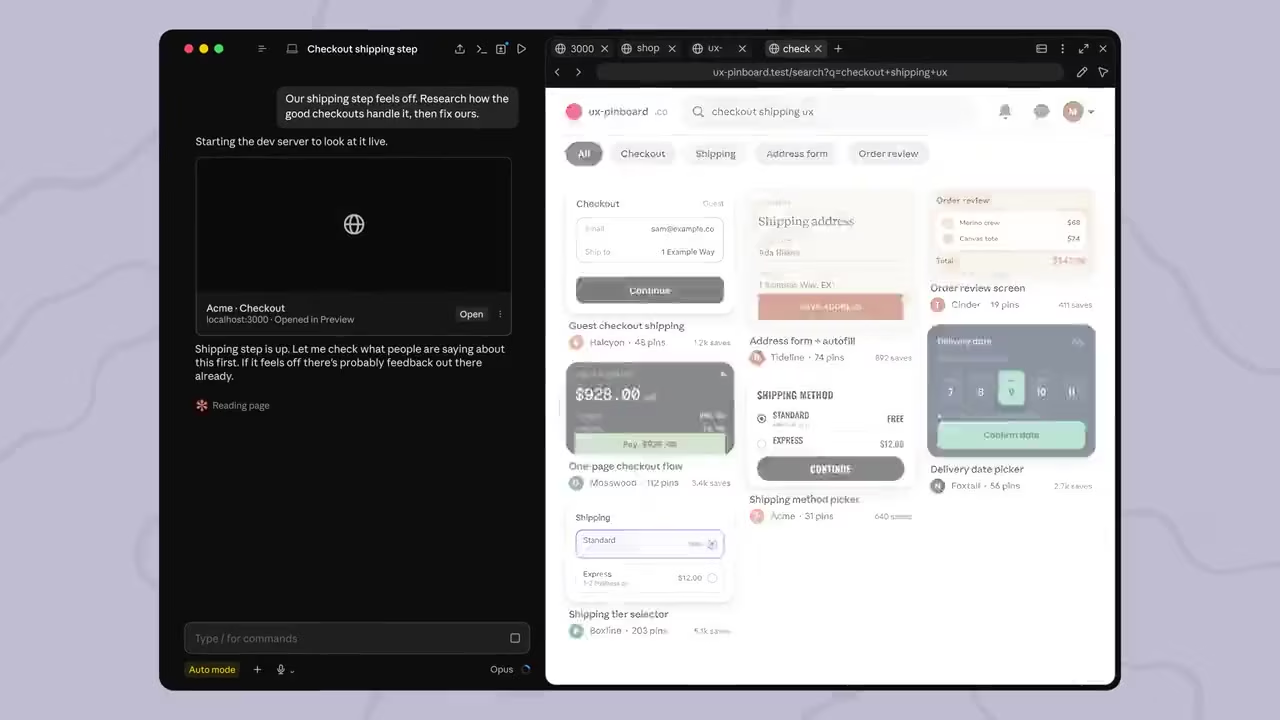
That single paragraph captures the whole feature: it is the same tool-calling machinery Claude already used to verify your own app's changes (taking screenshots, reading the DOM, clicking elements, filling in forms) extended to work on the open web instead of only your project's localhost preview. The feature released as two of the two headline items in the Week 28 digest, alongside an overhaul of the /doctor command (covered below).
How the Browser pane works
Opening it
Press Cmd+Shift+B on macOS or Ctrl+Shift+B on Windows inside the Code tab, or choose Browser from the Views menu. The pane is tabbed, so you can have your running app's preview open in one tab and a documentation site or design reference open in another, arranged next to the chat pane in whatever layout you prefer: the Code tab's panes (chat, diff, browser, terminal, file, plan, tasks, subagent) can all be dragged and resized freely.
Two ways external links open
Click a link Claude shares in chat, and a chooser offers two options: Open in app, which loads it in the Browser pane, or Default browser, which hands it off to your regular system browser. Holding Cmd (macOS) or Ctrl (Windows) while clicking skips the chooser and opens directly in your system browser. You can also sign in to sites from inside the pane, including pop-up OAuth flows like "Sign in with Google."
What it can do once open
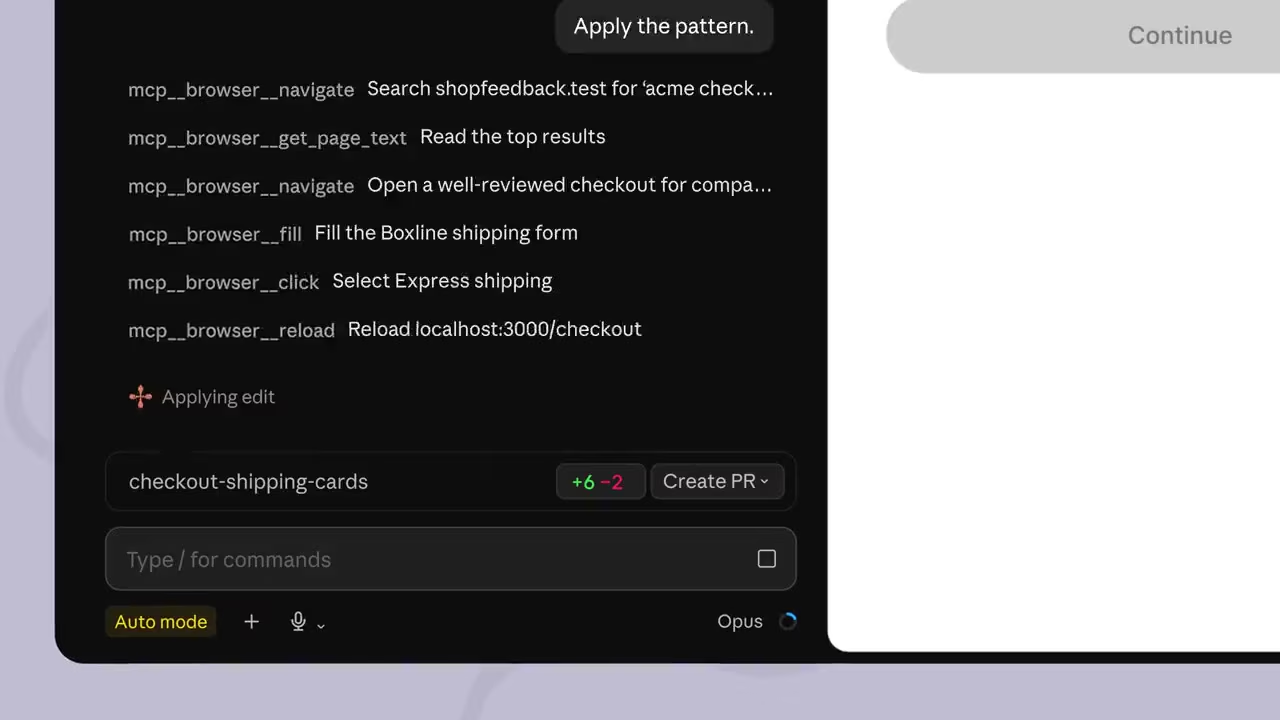
Inside the Browser pane, Claude can navigate to a URL, read the rendered page text, click elements, fill in form fields, and reload, the same primitive tool set it already used against your own local preview, now pointed at any reachable site. In the example above, a real session used exactly that sequence, navigate, get_page_text, navigate again, fill, click, reload, to research how other checkout flows handle a shipping-method step, then apply the same UX pattern to a local project's code.
The permission and safety model
Letting an agent click and type on the open web is a materially bigger risk surface than letting it edit files in a project you already trust, and Anthropic's documentation is explicit that external browsing gets extra scrutiny on top of Claude Code's existing permission modes (Manual, Accept edits, Plan, Auto mode, and Bypass permissions).
- Classifier review on every write action, in every mode. The same safety classifiers Auto mode uses elsewhere review Claude's write actions on external pages, clicking and typing, regardless of which permission mode you are in. If a classifier flags an action, you get a permission prompt even in Bypass permissions mode, which otherwise skips prompts entirely.
- A domain allowlist check outside Auto and Bypass. In Manual, Accept edits and Plan modes, Claude must also pass a domain allowlist check before navigating to a new site.
- Per-site approval, including subdomains. The first time Claude acts on an external site, a permission card appears with three choices: Allow once, Always allow, or Deny. Always allow saves the approval for that specific site on your device (revocable in Settings); each subdomain needs its own separate approval.
- Hard limits even on approved sites. Anthropic states plainly that Claude will not purchase items, create accounts, or bypass CAPTCHAs without explicit user input, no matter how permissive your settings are.
Local dev servers and your own project files are exempt from this extra scrutiny, Claude's existing auto-verify behaviour (screenshotting and testing your own app after edits) keeps working without new prompts, since that traffic never leaves your machine's own preview.
Browser pane vs the Chrome extension
Anthropic already shipped a separate Claude in Chrome extension, and the desktop Browser pane is deliberately not a replacement for it: the two are built for different jobs. The Browser pane runs on a clean profile, separate from your personal browser, with none of your saved logins, cookies, or history. Anthropic's own guidance is to use it for building and testing your app, and for visiting sites that don't require your identity.
The Chrome extension, by contrast, shares your actual browser's logged-in session state: Anthropic's guidance is to reach for it specifically when you want Claude to act as you inside accounts you're already signed into. Both surfaces run on what Anthropic describes as the same underlying safety model, and the Browser pane inherits the same site allowlist and blocklist controls an organisation has already configured for the Chrome extension, so admin policy applies consistently across both.
Admin controls for organisations
Two managed settings give administrators graduated control over external browsing, separate from what individual users configure for themselves:
browserExternalPageTools, turns off Claude's tools on external pages specifically. Users can still navigate to external sites manually inside the pane, but Claude can no longer read or act on what's open there.disableBrowserExternalNavigation, the stricter option. Blocks all external navigation in the Browser pane entirely, for the user and Claude alike, including sites already on an organisation's allowlist. Localhost dev servers and local file previews keep working regardless.
Used together, Anthropic's framing is: use browserExternalPageTools if you want people to keep browsing freely without Claude acting on their behalf, and disableBrowserExternalNavigation if you want to remove external sites from the picture altogether.
The rest of Week 28
The browser was one of two headline features Anthropic shipped that week. The other was a rebuild of /doctor (aliased /checkup), which changed from a read-only diagnostic report into a command that can actually fix what it finds: checking installation health, flagging unused skills, MCP servers and plugins against their context cost, deduplicating local CLAUDE.md files against ones already checked into the repo, proposing trims to CLAUDE.md content Claude could otherwise infer from the codebase, and flagging slow hooks, reporting findings first and asking for confirmation before changing anything.
A run of smaller changes shipped the same week under "Other wins," several of which are directly relevant to agent safety: auto mode now blocks tampering with session transcript files and asks before running rm -rf on a variable it can't resolve from context, and background task notifications now explicitly state that no human input has occurred, a specific defence against fabricated in-transcript approvals being acted on by an agent reading its own history. Other changes: /cd gained directory-path autocomplete matching /add-dir; /commit-push-pr now auto-allows git push to a repo's configured push remote beyond just origin; background agents upgrade in the background right after a Claude Code update instead of a slow upgrade on next attach; and auto-update binary downloads now stream to disk, cutting the updater's peak memory use by roughly 400MB.
Real-world use cases
Research before you build
The clearest use case, and the one shown in Anthropic's own demo, is competitive or design research folded directly into an implementation task: asking Claude to look at how other products handle a specific flow, a checkout step, an onboarding sequence, a pricing page, and apply the pattern to your own code, without you manually screenshotting reference sites and pasting them into chat.
Living documentation lookups
Library and API documentation changes faster than any model's training data. A Browser pane that can navigate to the current docs for a package, read the actual current API surface, and act on it closes a gap that previously required either stale training knowledge or manual copy-pasting into the chat.
Debugging against a live third-party site
For integration work (testing how your app behaves against a third-party API's actual web console, or verifying an OAuth flow end to end), Claude can now drive both sides of the interaction inside one pane, rather than you relaying results back and forth between two separate windows.
Availability and requirements
The feature is part of the Claude Desktop app's Code tab, available on macOS and Windows (Claude Desktop v1.2581.0 or later for the full pane-layout system the Browser is part of), and on Linux in beta via apt or a .deb package. It shipped across Claude Code releases v2.1.202 through v2.1.206 during the week of 6-10 July 2026. As with the rest of the Code tab, it works with local, remote (cloud), SSH, and, on Windows, WSL environments, though the integrated terminal pane is local-sessions-only.
How it compares
Browser-capable coding agents are becoming table stakes rather than a differentiator: see our explainer on AI browser automation agents for the wider landscape. What distinguishes Anthropic's implementation is the explicitness of the permission model: a documented, named safety-classifier layer specific to external write actions, a separate domain allowlist gate, and two independent managed settings for organisations to dial back exactly how much of it is exposed. That is a more granular control surface than most competing coding agents publish for their own browser-automation tools, and it mirrors the same safety model Anthropic already applies to the Claude in Chrome extension rather than inventing a second, inconsistent one.
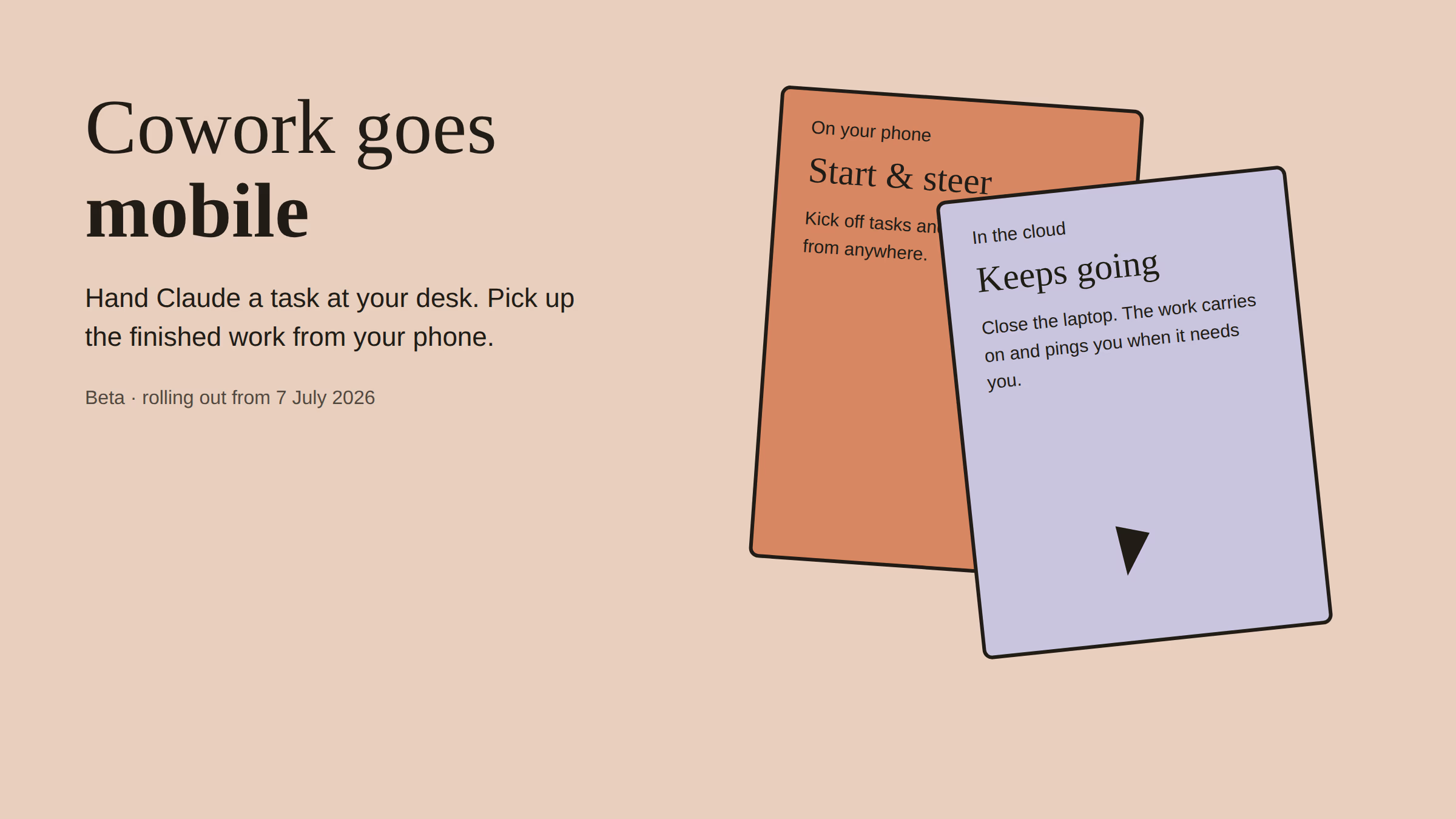
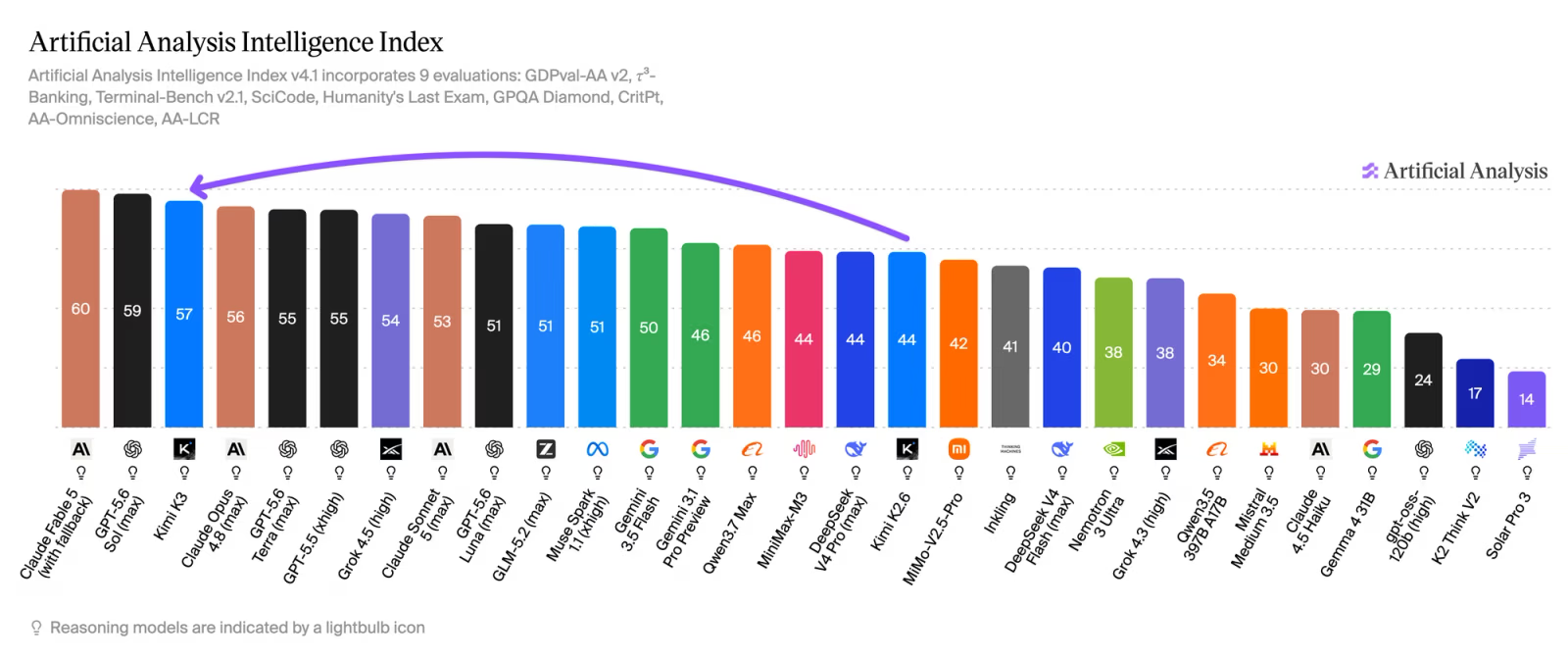
It also arrives the same month Anthropic shipped the Claude Cowork mobile beta, part of a broader push to make Claude Code's Desktop app the primary interface rather than the terminal-only CLI: see our Claude Fable 5 review for how the underlying model performs on the agentic and coding benchmarks this browser tooling is built to support.
Who should use it
Good fit: developers already using Claude Code's Desktop app for frontend or full-stack work, where competitive research, current documentation lookups, or third-party integration testing are a routine part of the job. Teams that want browsing capability without extending it into users' logged-in personal accounts will also prefer the Browser pane's clean-profile design over the Chrome extension for this specific use case.
Poor fit, or needs configuration first: regulated environments where any agent-driven external navigation needs to be reviewed before rollout: use the managed settings covered above to scope it appropriately before enabling broadly. Anyone needing Claude to operate inside their own logged-in accounts should reach for the Claude in Chrome extension instead, not the Browser pane.
The bottom line
The built-in Browser pane is a genuinely useful, well-scoped addition to Claude Code's Desktop app: it turns a capability Claude already had for your own project (reading, clicking, and verifying a live page) into something that also works on the open web, gated by a permission model that is more explicit than most competing tools publish. It is not a replacement for the Claude in Chrome extension, and Anthropic is clear about which of the two to reach for depending on whether you need your own logged-in identity.
For teams already standardised on Claude Code's Desktop app, this closes a real workflow gap, research and implementation no longer require switching windows. For anyone rolling it out at organisation scale, read the admin-controls section above before enabling it broadly, and decide up front whether browserExternalPageTools or the stricter disableBrowserExternalNavigation setting fits your risk tolerance.
This article is based on Anthropic's official Claude Code Week 28 changelog and Desktop application documentation.
Last updated: 18 July 2026, eight days after the Week 28 release shipped. Check Anthropic's changelog for any updates to the permission model in subsequent releases.
Get the free guide: Claude vs ChatGPT, Gemini & Grok
A 20-page playbook covering everything you need to choose and use the big four AI models in 2026, full cost and feature comparisons, what each is best (and worst) at, and how-tos for images, vectors, building a website, Claude Code and more.