 AI Tools Review Editorial Team
Quick Answer:
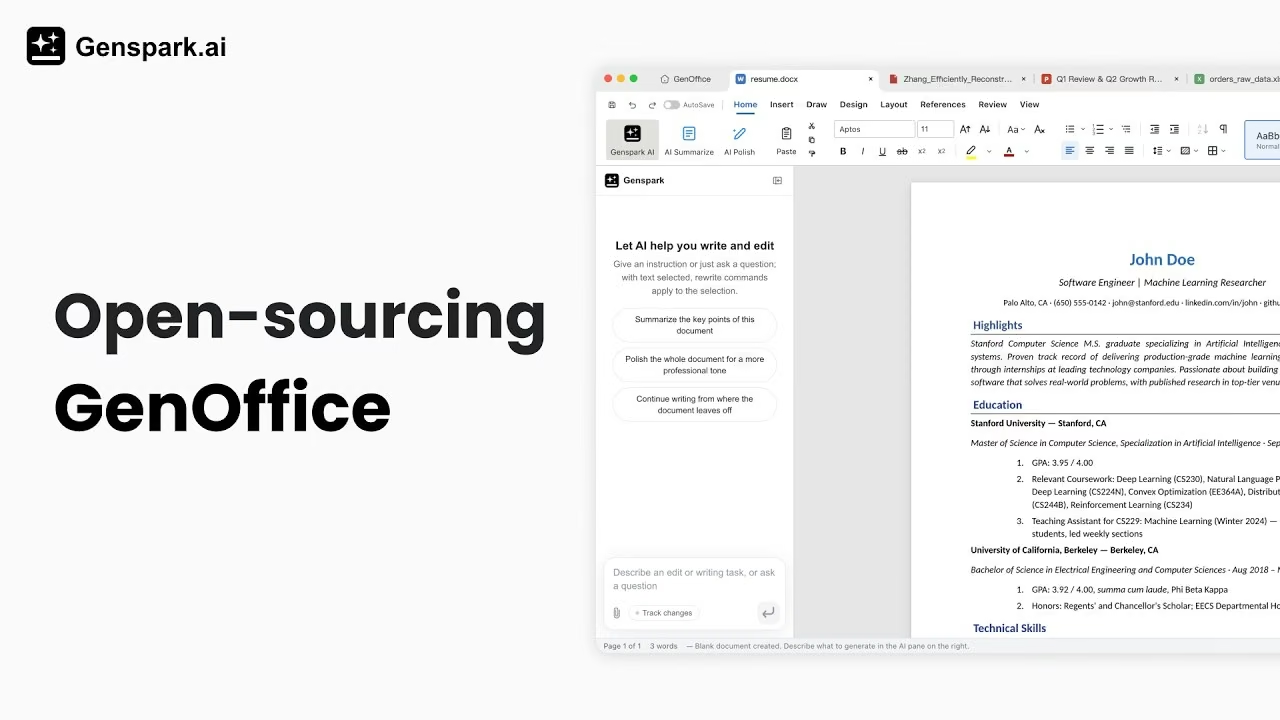
GenOffice is Genspark's free, open-source AI office suite - a word processor, spreadsheet, presentation editor and PDF tool, released under the Apache License 2.0 on 3 August 2026. It runs as five Electron apps on macOS, Windows and (as of days later) Linux, edits real .docx / .xlsx / .pptx / .pdf files with a "byte-preserving" save that only touches the paragraphs you actually edit, and bakes a Genspark AI panel into every editor. The editing tools themselves are free with no watermarks; the AI features run through a signed-in Genspark account and consume credits. Genspark says the whole Alpha was built by one engineer in one week for roughly $10,000 in model tokens.
Genspark has spent 2026 building an AI workspace around a persistent memory layer called SecondBrain - Gmail, calendars, CRM data and now a $179 hardware recorder, all feeding one Super Agent. GenOffice is a different kind of move: instead of another layer on top of the browser, it's a native desktop office suite, given away for free, with the source code public.
Here is what actually shipped, how the AI features work under the hood, what the security documentation says about the risk of letting an AI agent edit your files, and how it stacks up against Microsoft 365, Google Workspace and the open-source alternatives that got there first.
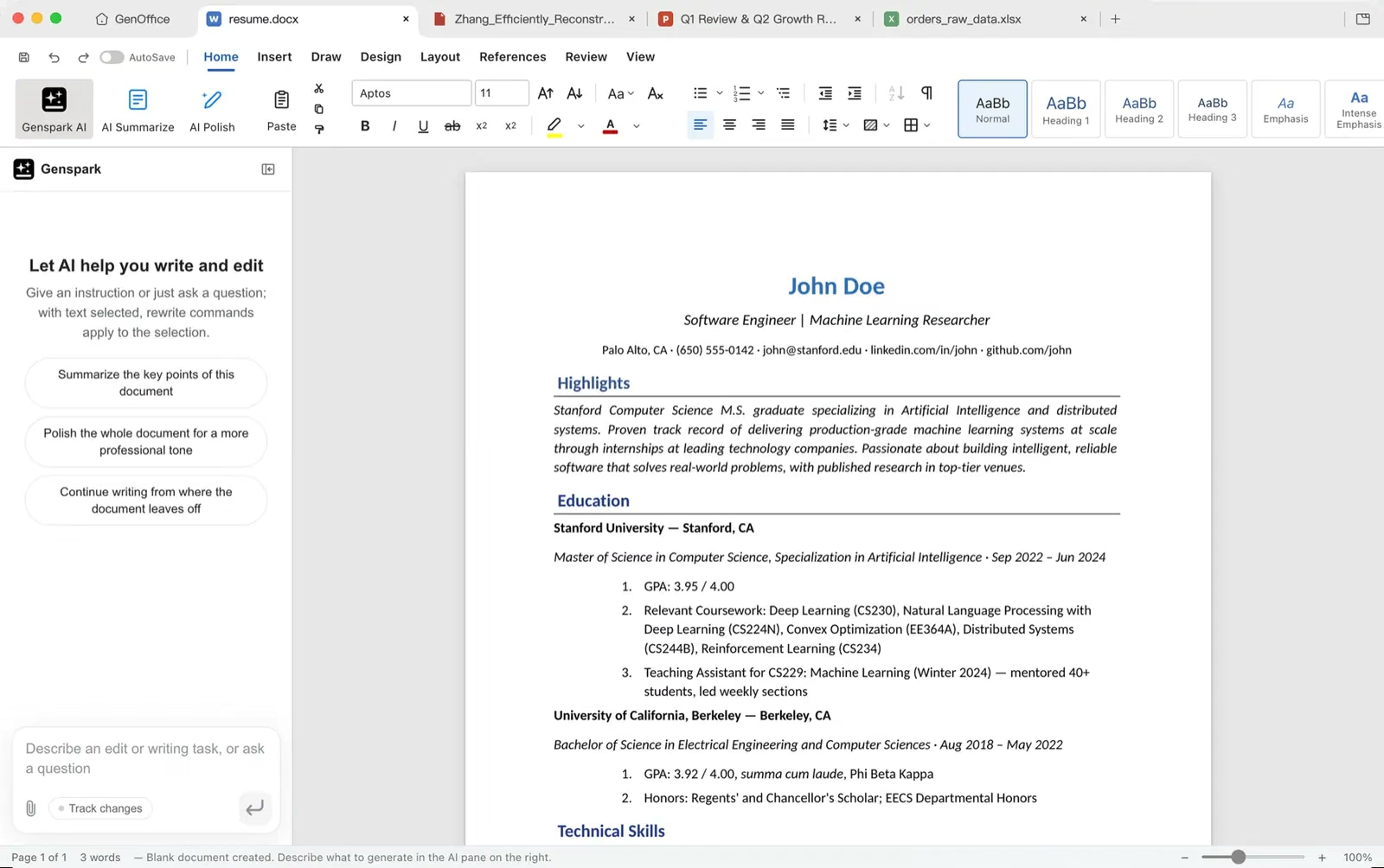
A hands-on first look at GenOffice's four editors, its file-handling claims, and the alpha-stage limitations worth knowing before switching over.
Summary
GenOffice is Genspark's open-source answer to a specific complaint about AI-office tooling: most AI writing and spreadsheet assistants either live inside a browser tab or bolt a chatbot onto the side of an existing editor, and neither approach gives you a native app that opens a real .docx file, edits it, and hands it back without breaking the layout. GenOffice's pitch is that AI editing is a first-class citizen of the app rather than an add-on, while the underlying file handling is engineered specifically to survive round trips through Microsoft's own formats.
It is also unusually transparent about what it is: an Alpha, built fast, with a public security-threat model, an Apache-2.0 licence that explicitly permits commercial forks, and a README that reads more like an engineering document than marketing copy. That candour is refreshing in a category prone to overclaiming, but it also means buyers should treat the "free Microsoft Office replacement" framing some coverage has used with real caution.
- Best for: individuals and small teams who want a free, native, AI-assisted editor for Word/Excel/PowerPoint/PDF files and are comfortable with alpha-stage software.
- Headline numbers: Apache-2.0 licence, five Electron apps, built by one engineer in one week for ~$10,000 in tokens, over 1,000 GitHub stars within 48 hours of launch.
- Defining trait: a byte-preserving save path - only the paragraphs, cells or slides you touch are regenerated; everything else in the original file survives untouched.
- Main caveat: AI features require a Genspark account and run on credits, and there is no real-time multi-user co-editing yet.
What Is GenOffice?
GenOffice is described in its own repository as "an AI-native office suite for macOS and Windows: a word processor, a spreadsheet, a presentation editor and a PDF tool." Structurally, it is five Electron applications sharing one engine layer: apps/docs, apps/sheets, apps/slides, apps/pdf, and apps/shell, the last of which provides the home screen, tabbed hosting of the other four editors, and auto-update.
Genspark open-sourced the project under the Apache License 2.0 on 3 August 2026, with one carve-out: the repository's ee/ directory is reserved for future enterprise modules and is covered by a separate GenOffice Enterprise Licence. The GenOffice and Genspark names and logos remain trademarks of Genspark's parent company, Mainfunc, Inc., which the Apache licence does not grant permission to reuse - so forks are free to modify and redistribute the code commercially, but have to ship their own branding.
The Origin Story: One Engineer, One Week
Genspark's own account of GenOffice's build is blunt to the point of being a marketing risk: the team's launch post describes one engineer, one week, and roughly $10,000 in AI model tokens to produce the Alpha. Coverage from MarkTechPost, which reviewed the launch on 3 August, treated that figure as the story's hook - a full office suite, four apps deep, produced at a fraction of the engineering headcount a project like this would traditionally require.
The GitHub repository backs up the "fast" part of that claim with real numbers: created on 31 July 2026, it had accumulated 1,046 stars and 151 forks by 4 August - three days after the repository went public and one day after the wider announcement. Reception has been driven at least in part by the free, ad-free, no-watermark pitch landing at a moment when most AI productivity tools are adding paid tiers rather than removing them.
Genspark itself is not a small operation behind this experiment. The company, based in Palo Alto and founded by veterans of Microsoft, Google, Meta, YouTube and Pinterest, reported a $250 million annualised run rate, more than 7,000 business clients and a $2.6 billion valuation around its Workspace 6.0 launch in July 2026. GenOffice reads as a fast, low-cost side bet from a well-funded team already building the SecondBrain memory layer that its other products lean on - not a scrappy solo project with no backing.
The Byte-Preserving Round Trip
The single most specific engineering claim in GenOffice's documentation is how it avoids the classic failure mode of non-Microsoft editors: open a .docx file, make a small edit, save it, and watch spacing, styles or embedded objects subtly shift. GenOffice's approach, per its own architecture notes, works like this:
- On open, the original
.docxis archived by hash and never touched directly. - A component called
docx-engineparses the top-level elements ofword/document.xmlinto a block tree, where every block (paragraph, table, etc.) is anchored by adocxIndexplus the original XML slice. - Editing happens in a TipTap-based streaming editor, with dirty tracking flagging exactly which blocks changed - whether the edit came from you or from the AI panel.
- On save, only the dirty blocks are converted into new OOXML fragments, referencing only styles that already exist in the document, and spliced back into the original
document.xml. - Every untouched block keeps its original bytes, and every other file inside the .docx zip archive is copied over verbatim.
Genspark calls this a "paragraph patch" model, and applies the same philosophy - source file as ground truth, edits as narrow patches - across Sheets and Slides too. The stated payoff is that opening and re-saving a file in GenOffice should never break its layout when it's reopened in real Microsoft Word, because GenOffice is deliberately avoiding a full re-serialisation of the document on every save.
It's worth being precise about what this claim is and isn't: it is GenOffice's own documented design, not an independently benchmarked guarantee. No third-party lab has published a systematic fidelity comparison against Word, LibreOffice or Google Docs' own .docx round trip as of this writing - but the architecture itself is a genuinely different strategy from the "parse everything, re-render everything" approach most competing editors take, and it directly targets the failure mode users complain about most.
Capabilities Deep Dive
Docs
The .docx word processor supports the byte-preserving round trip described above, plus a paginated view whose line metrics are built to reproduce the original document's layout, and support for tracked changes, comments, styles, equations and ink annotations. AI editing is block-granular, with version snapshots and diffs so changes the AI panel makes can be reviewed and reverted at the paragraph level rather than as one undifferentiated rewrite.
Sheets
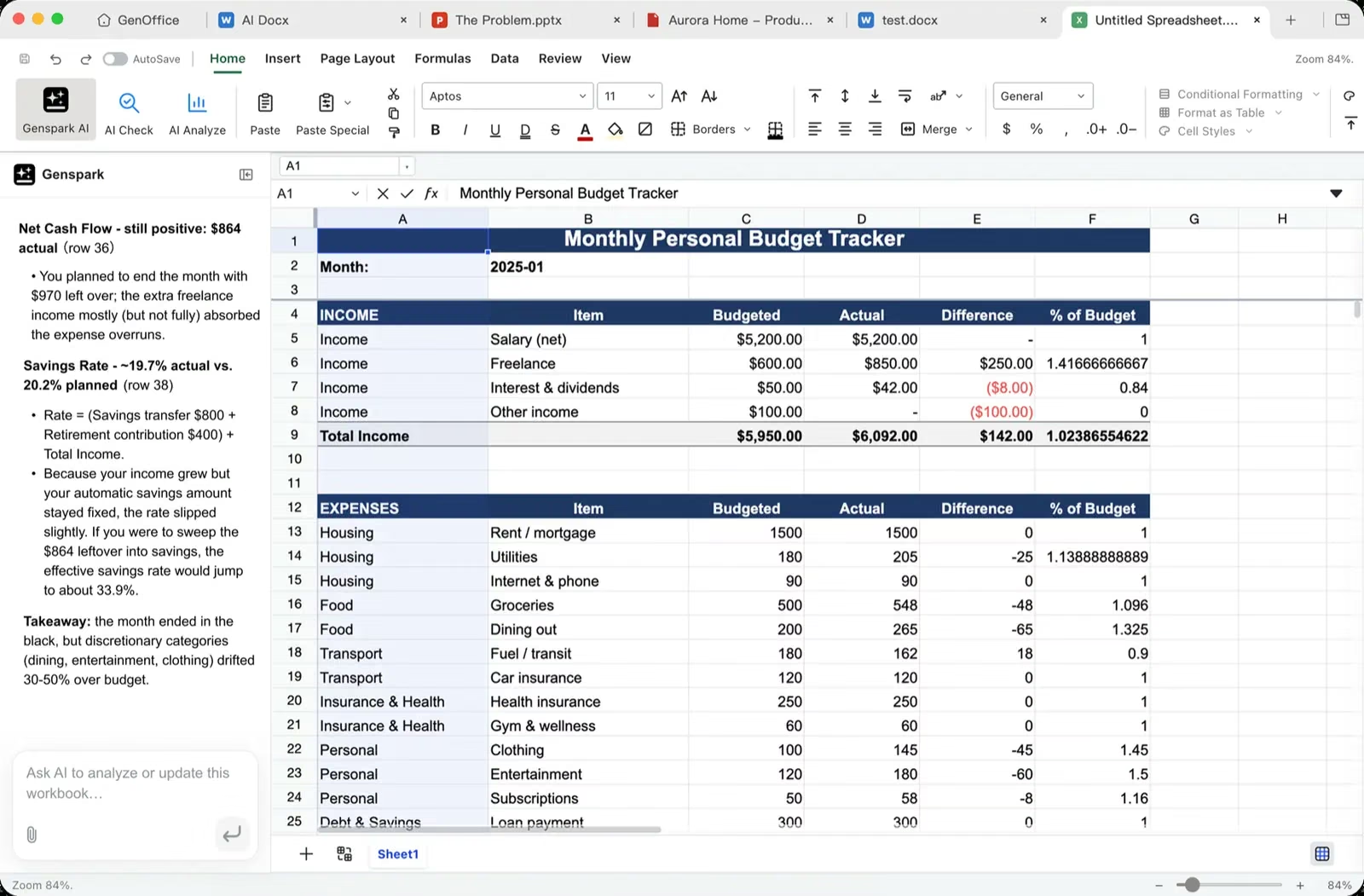
GenOffice Sheets builds its interface on the open-source Univer core (also Apache-2.0), with a large layer of in-house extensions on top. Critically, .xlsx import and export run through an in-house Rust sidecar using the calamine and IronCalc libraries - a separate, compiled process rather than a pure-JavaScript parser, which matters for both performance and formula-compatibility on large workbooks. Charts are rendered in-house with Konva, and the app supports pivot tables, slicers, conditional formatting and formula tracing.
Slides
Slides uses an in-house .pptx parse, render and edit engine covering masters, charts, cropping, ink annotations and text shaping via HarfBuzz metrics - the same text-layout library used by browsers and design tools to get font kerning and line-breaking right. Like Docs and Sheets, edits apply as narrow patches over the source file rather than a full re-export.
The PDF app is built on the widely used pdf.js and pdf-lib libraries, adding annotations, forms, outlines, stamps, signatures, page operations (splitting, merging, reordering) and printing support.
Engine packages
Underneath all four apps sit a set of pure-TypeScript, unit-tested engine packages with no Electron dependency: docx-engine, pptx-engine, pptx-render, file-parse (text extraction for AI attachments), agent-core (the shared AI agent loop), ai-provider (model backend abstraction and streaming) and ai-search (Genspark auth plus web/image search tools). Keeping this logic outside Electron means it can, in principle, be tested and reused independently of the desktop shell.
The AI Layer: What It Actually Does
Every app embeds the same Genspark AI panel, but the interaction model differs by document type. In Docs, it is block-granular editing: select text or give an instruction, and the AI proposes changes as diffs against specific paragraphs, which can be reviewed and reverted individually rather than accepted as an opaque full-document rewrite. In Sheets, Slides and PDF, it is framed as a tool-calling agent operating over document state - reading the workbook, slide deck or PDF's current structure and calling specific editing tools rather than freely regenerating the file.
There is no local model option: every app signs in to a Genspark account and routes model calls through Genspark's service side, so no API key is stored on the device. That is a deliberate trade-off - it keeps setup simple and avoids users needing their own OpenAI or Anthropic key, but it also means the AI features are unavailable offline and tied permanently to Genspark's infrastructure and credit system, unlike the editing engines themselves, which run entirely locally.
Security Posture
For Alpha-stage software, GenOffice's published SECURITY.md is unusually detailed, and it is worth reading as a signal of how seriously the team is treating the specific risk of an AI agent with write access to your files. Every document window runs with Electron's renderer hardened - contextIsolation: true, nodeIntegration: false, sandbox: true - and IPC payloads passing between the renderer and main process are schema-checked, with Sheets validating end-to-end using zod. External links are routed through a single safeExternalUrl gate that only allows http/https URLs, rejecting file:, javascript: and other custom schemes outright.
Two specific AI-content threat models get their own documented mitigations:
- Slides layout scripts - generated by the AI to lay out a slide - are parsed with the Acorn JavaScript parser and evaluated inside a constrained AST interpreter, never with
eval,Function, a VM context or a worker. That interpreter has no ambient globals, no network access, no IPC bridge and no timers, plus statement and call-depth limits, so a malicious or malformed layout script has essentially nothing to reach out to. - AI-generated HTML in the PPTX export pipeline is rendered inside a hidden
BrowserWindowtreated as fundamentally untrusted: no preload script, no IPC surface, driven only throughexecuteJavaScriptunder a watchdog timeout that kills it if it hangs.
The project also publishes a third-party notices file confirming all runtime dependencies are MIT, Apache-2.0 or OFL licensed, including the bundled fonts (Liberation, Carlito, Caladea, and Noto CJK subsets) used to approximate Microsoft's default typefaces without licensing them directly.
Platforms and Installation
GenOffice launched on 3 August 2026 with signed installers for macOS (Apple Silicon, macOS 11+) and Windows (x64, Windows 10+) only - the MarkTechPost review that day explicitly listed the lack of Linux and mobile support as a limitation. That changed within days: the project's README now lists Linux builds too, a .deb package for Debian/Ubuntu (installable via apt) and a portable AppImage for other x86_64 distributions, both requiring glibc 2.34 or newer (Ubuntu 22.04+) and, for the AppImage, the FUSE 2 runtime.
Building from source requires Node 20+, npm 10+, and a Rust toolchain specifically for the Sheets app's xlsx sidecar - a reminder that, despite the Electron/TypeScript surface, part of the stack is compiled rather than interpreted. There is still no mobile app and no browser-based version; GenOffice is a native desktop suite only.
Pricing and Credits
Genspark's own framing is direct: "GenOffice is free for everyone, ad-free. All the editing tools you'd expect, no strings attached." That covers the core word processor, spreadsheet, presentation editor and PDF tool, with full .docx/.xlsx/.pptx fidelity and no watermarks.
The AI features are where the free model has a cost: they require a Genspark account and consume Genspark credits per the company's existing platform pricing, the same credit system that meters SecondBrain, Super Agent and Genspark's other AI products. Feedback and bug reports run through a dedicated GenOffice group chat on GenTeam (Genspark's collaboration layer), with Genspark offering 1,000+ credits to active contributors as an incentive to help harden the Alpha.
Limitations
- Explicitly Alpha: Genspark itself labels the release Alpha, not beta or stable; expect rough edges and rapid, potentially breaking changes.
- No real-time co-editing: nothing in the documentation describes multi-user simultaneous editing in the way Google Workspace or Microsoft 365 offer natively - GenOffice is, at launch, a single-user desktop editor.
- AI features are cloud-dependent and metered: despite being open source, the AI panel requires a Genspark account and consumes credits; there is no option to plug in your own API key or run inference locally.
- No enterprise admin layer yet: the
ee/directory reserved for future enterprise modules is empty of features today, and regulated organisations should expect procurement and data-protection review before deployment given the alpha status and cloud-routed AI path. - Fidelity claims are self-reported: the byte-preserving round trip is a genuinely distinctive architecture, but no independent lab has yet published a systematic comparison of real-world document fidelity against Word, LibreOffice or Google Docs.
- Young project, fast-moving target: the repository is days old at the time of writing, with version numbers and even platform support (Linux arrived after the initial launch) changing within the first week - specifics here may already be out of date by the time you read them.
How It Compares
GenOffice sits in an unusual middle ground between three existing categories:
- Microsoft 365 / Google Workspace: both are mature, subscription-priced (or ad-supported), and both have invested years into real-time multi-user collaboration, enterprise admin controls and mobile apps - all of which GenOffice currently lacks. What GenOffice offers instead is zero cost, no vendor lock-in on the file format itself (it edits native .docx/.xlsx/.pptx rather than converting them into Google's proprietary format), and AI editing built into the core interaction model rather than layered on as a Copilot or Gemini side panel.
- LibreOffice / OnlyOffice: these are the closest structural peers - free, open-source, native desktop suites that also prioritise Office-format fidelity. Both are considerably more mature, with years of format-compatibility fixes and, in OnlyOffice's case, real-time co-editing. Neither has AI editing built in as deeply as GenOffice does; that's GenOffice's main point of differentiation, at the cost of a much younger, less battle-tested codebase.
- Genspark's own AI Workspace: Genspark already offers browser-based Docs, Sheets and Slides tools inside its wider AI Workspace 6.0 platform, feeding the same SecondBrain memory layer as GenMail and GenTeam. GenOffice is a parallel, native-desktop bet rather than a replacement for that browser suite - it trades SecondBrain's cross-app memory integration for local file ownership, offline editing of the documents themselves, and an open-source codebase.
In short: GenOffice is not yet a like-for-like Microsoft 365 replacement for a collaborative enterprise team, but it is a genuinely novel entrant in the free/open-source desktop-office category - the first of that group built AI-first rather than having AI bolted on after the fact.
Who Should Use It
Try it if you want a free, native desktop editor for Word/Excel/PowerPoint/PDF files with AI editing built into the core workflow, you're comfortable with alpha-stage software and occasional rough edges, and you don't need real-time multi-user collaboration.
Skip it for now if you need mature real-time co-editing, an enterprise admin console, mobile access, or a fully offline AI pipeline with your own model key - Microsoft 365, Google Workspace, or a combination of LibreOffice/OnlyOffice with a separate AI assistant will serve those needs better today.
The Bottom Line
GenOffice is a legitimately interesting experiment: a well-funded AI company giving away a native, open-source office suite, built fast, documented candidly as an Alpha, and engineered around a specific, credible answer to the format-fidelity problem that has dogged every Microsoft Office alternative for two decades. The security documentation in particular stands out for taking AI-agent-with-file-access risk seriously rather than as an afterthought.
It is not, today, a reason for an established team to drop Microsoft 365 or Google Workspace - the collaboration and enterprise features aren't there yet, and Genspark says as much itself. But for anyone who wants a free, AI-assisted desktop editor for their own documents and doesn't need real-time collaboration, it's worth installing and judging on its own terms, with the understanding that both the software and this review will likely be out of date within weeks.
Last updated: 7 August 2026. This review is based on Genspark's official GenOffice repository and blog post, MarkTechPost's launch-day technical coverage, and independent hands-on coverage; version numbers and platform support are changing rapidly during the project's Alpha phase and may have moved on since publication.
Get the free guide: Claude vs ChatGPT, Gemini & Grok
A 20-page playbook covering everything you need to choose and use the big four AI models in 2026, full cost and feature comparisons, what each is best (and worst) at, and how-tos for images, vectors, building a website, Claude Code and more.