 AI Tools Review Editorial Team
Quick Answer:
The GitLab MCP connector lets Claude read repository files, list and filter issues, manage merge requests (including diffs, comments and approval status) and query CI/CD pipelines. Authentication is OAuth-based and Claude acts with your existing GitLab identity, not elevated rights. It's documented in GitLab's official docs and ships in the Claude Connectors Directory.
Most engineering teams' day-to-day is "what's in the MR, what's in the pipeline, what's blocking ship?". The GitLab connector gives Claude direct, authenticated access to all of it.
The result: Claude as a credible reviewer and triage partner - not from screenshots, from the source.
Overview
With the GitLab Model Context Protocol server, you securely connect AI tools to your GitLab instance. Claude Desktop, Claude Code and other MCP-compatible tools can then access your GitLab data and perform actions on your behalf. The connector is part of GitLab Duo's official MCP server documentation, and Anthropic and GitLab have published joint material on shippable Claude Code + GitLab workflows.
As of GitLab 18.6 the server is documented as Beta and is offered on GitLab.com, Self-Managed and Dedicated, on the Premium and Ultimate tiers. The endpoint sits at https://<gitlab.example.com>/api/v4/mcp. The published tool roster leans heavily towards reads - get_issue, get_merge_request, get_merge_request_commits, get_merge_request_diffs, get_merge_request_pipelines, get_pipeline_jobs, get_job_log, get_workitem_notes, search, search_labels and semantic_code_search - alongside a deliberately small set of writes: create_issue, create_merge_request, create_workitem_note and manage_pipeline, the last of which can list, create, retry, cancel or delete CI/CD pipelines.
What the Claude Connector Does
Core capabilities include:
- Read repository files - browse code with context, not from a copy-paste.
- List and filter issues - by project, label, state, assignee.
- Manage merge requests - list open MRs, read diffs and comments, check approval status.
- Query CI/CD pipelines - fetch pipeline status and recent runs (the
get_merge_request_pipelinestool is commonly used to check that an MR's pipeline is green before merge).
Real Use Cases
- Pre-review for humans: have Claude summarise an MR's intent, flag risky changes and check pipeline status before the human reviewer opens it.
- Issue triage: ask Claude to summarise open issues in a project or surface duplicates.
- Pipeline triage: when CI is red, have Claude pull the diff plus pipeline state to start root-causing immediately.
- Cross-project search: find all the issues referencing a feature flag or library version.
- Local-to-MR loop: Claude Code uses the connector to fetch MR context as it works on a branch.
Automated MR Review
A whole class of Claude skills builds on this connector to automate the pre-review process. They extract MR details from a URL, sync local branches, perform a deep analysis of code changes with context-aware inspection, and use the GitLab MCP to publish structured inline comments categorised by severity - from critical security vulnerabilities down to stylistic improvements. The result is a structured, actionable report and a clear recommendation for approval.
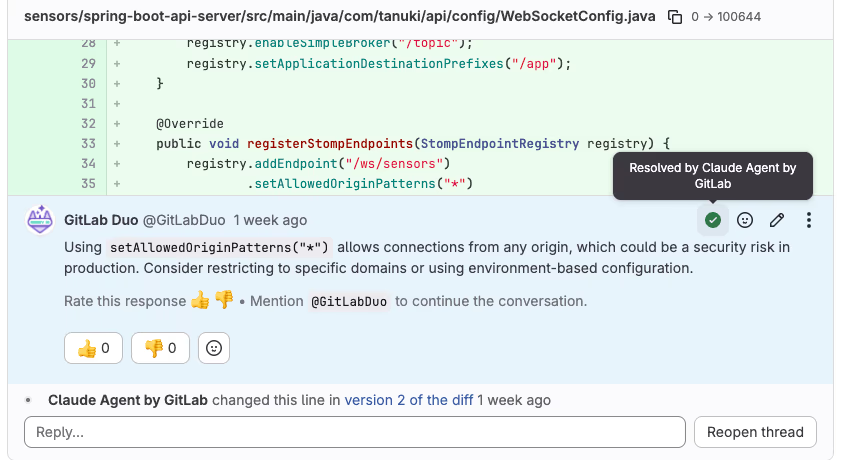
GitLab's own walkthrough takes this a step further: you can enable the Claude Agent by GitLab from a project's AI > Agents menu, then mention or assign its service account on an issue or MR. The agent picks up GitLab Duo Code Review feedback, works on it in a background session, commits the fix and posts a summary comment - with each resolved review thread marked as handled by the agent, as shown above.
This pattern - human reviewer steps in already informed by a thorough AI pre-pass - is one of the most defensible AI-in-the-loop workflows in engineering today.
Real-World Experience
GitLab's own blog highlights three workflows that ship with Claude Code + GitLab, and community write-ups (Merge.dev, MCP Market skills, the Claude Plugin Hub) document patterns ranging from simple MR summarisation to full pre-review skills. Reviewers and engineers consistently praise the connector for being context-aware - it reads the real code and real pipeline, not approximations - which is what makes its analysis credible.
The client coverage is also broader than the Claude-centric framing suggests. GitLab's documentation publishes setup instructions for Cursor, Claude Code, Claude Desktop, Gemini Code Assist and the Gemini CLI, GitHub Copilot in VS Code, Continue, Kiro and OpenAI Codex, and Zed - so a mixed-tooling engineering organisation can standardise on one server for every assistant. On the protocol side, GitLab 18.7 documents support for both the 2025-03-26 and 2025-06-18 MCP protocol specifications, with HTTP the recommended transport (a stdio fallback via mcp-remote requires Node.js 20+). That release cadence matters in practice: the server moved from Experiment to Beta in GitLab 18.6, and the tool roster has grown release by release, so what your instance exposes depends directly on which GitLab version it runs.
How to Set It Up
GitLab's official MCP server lives on your GitLab instance and authenticates with OAuth 2.0 Dynamic Client Registration - so the AI tool registers itself as an OAuth app on first connect, you approve the scopes in the browser, and it receives an access token. No personal access token to copy. For GitLab.com the server endpoint sits under your instance URL; for self-managed instances it is your own host.
In Claude Code, add it from the terminal (swap in your instance host):
claude mcp add --transport http gitlab https://gitlab.com/api/v4/mcpIn Claude Desktop, open Settings → Developer → Edit Config (or add it under Connectors) and point a server entry at the same endpoint. Approve the OAuth flow when prompted. Claude then inherits your GitLab identity and visibility. Start with read tasks - summarise an MR, triage issues - then layer in write actions such as posting review comments once you trust the output.
Common Problems and Fixes
- Tier gating: the official GitLab Duo MCP server depends on your subscription tier and may need to be enabled by an admin. If the server will not connect, confirm Duo and the MCP feature are turned on for your group.
- Self-managed version skew: the MCP server arrived in recent GitLab releases. On an older self-managed instance the endpoint may not exist - check your version, or use a community server such as
zereight/gitlab-mcpwith a project access token instead. - OAuth callback failures: DCR needs the AI client to complete a browser redirect. Behind a strict proxy or VPN the callback can fail silently; retry on a network that allows the redirect.
- "It can't see my project": the agent only sees what your account sees. If a project is missing, it is a visibility/permissions issue on your GitLab user, not the connector.
- Noisy review comments: automated MR review skills can over-comment. Tune the severity threshold so only meaningful findings get posted.
Security and Permissions
OAuth-based access means Claude operates with your existing GitLab permissions - no elevation. The connector expands context inside the AI tool but does not bypass GitLab visibility controls. The right hygiene is standard: scope per-project where possible, watch what the agent posts when you enable write actions, and treat MR comments as you would any other automated review tooling output.
GitLab's documentation adds one warning worth taking literally: "You're responsible for guarding against prompt injection when you use these tools. Exercise extreme caution or use MCP tools only on GitLab objects you trust." The threat is concrete - issue descriptions, MR comments and job logs are all attacker-writable text that the agent ingests as context, so a malicious issue on a public project could attempt to steer the model. On public or open-contribution projects, keep the agent read-only and review its conclusions before acting on them.
Limitations
- Identity-bound: the agent inherits your permissions - it cannot see what you cannot.
- Write actions need care: inline review comments are visible to your team; make sure you are happy with the agent's tone and policy.
- Edition-dependent: the official server is gated to the Premium and Ultimate tiers, so Free-tier groups cannot use it.
- Still Beta: GitLab's docs label the MCP server Beta as of GitLab 18.6, so the tool surface and behaviour may change between releases.
- Feature-flagged extras:
semantic_code_searchrequires a feature flag to be enabled before it appears in the tool list.
Pricing and Availability
The MCP server itself is part of GitLab Duo and carries no separate per-call charge - you pay for your GitLab plan, with the server available on the Premium and Ultimate tiers across GitLab.com, Self-Managed and Dedicated, and some agentic Duo capabilities require a paid tier or a Duo add-on. The connector works against GitLab.com and self-managed instances alike. The open-source community server (zereight/gitlab-mcp) is free and authenticates with a personal or project access token, which is a useful fallback if your instance pre-dates the official server or you want token-scoped access rather than full OAuth identity.
Who It Is For
Engineering teams that run on GitLab. The biggest wins are for teams that struggle to keep up with MR review volume and want a thorough, sourced pre-pass before a human dives in. Solo developers also benefit from a code-aware AI that lives inside their actual GitLab projects.
The Bottom Line
The GitLab connector turns Claude into a context-aware reviewer and triage partner inside your real engineering workflow - reading the code, reading the pipeline, and acting with your own GitLab identity. The combination of OAuth-bound access and automated MR pre-review is among the most defensible AI-in-the-loop patterns engineering teams have today.
Pair it with Claude Code, scope to your projects, and let the agent do the boring read-everything work before review starts. Explore more in the complete Claude Connectors Directory.
Sources: GitLab (docs.gitlab.com/user/gitlab_duo/model_context_protocol/mcp_server, docs.gitlab.com tutorials, about.gitlab.com/blog), github.com/zereight/gitlab-mcp, Merge.dev, Composio, Claude Plugin Hub. Image: GitLab. Last updated: June 2026.