
 AI Tools Review Editorial Team
Quick Answer:
The Hugging Face connector links Claude to the Hugging Face Hub - the largest open repository of AI models, datasets and demos. With it, Claude can search and explore models, datasets, Spaces and papers, read model cards, search the documentation in natural language, and run inference through hosted Spaces. It turns Claude into a knowledgeable guide to the open-source AI ecosystem. Find it in the Claude Connectors Directory.
The Hugging Face Hub is where open AI lives - hundreds of thousands of models, datasets and demos. The connector gives Claude a key to it.
That changes Claude from a model that knows about open AI into one that can actively search, read and run it for you.
Overview
The Hugging Face MCP Server connects an MCP-compatible AI assistant - Claude Desktop, claude.ai, and others - directly to the Hugging Face Hub. Once connected, your assistant can search and explore Hub resources and use community tools without leaving the chat, CLI or editor.
For anyone working with open models, this is a meaningful upgrade: instead of switching to a browser to hunt for the right model or dataset, you ask Claude, and it queries the Hub directly and returns titles, owners, download counts and links.
Under the hood, the open-source server (huggingface/hf-mcp-server) is unusually flexible about how clients connect: it supports STDIO, Streamable HTTP and a stateless JSON mode of Streamable HTTP, with the HTTP service exposed at the /mcp path. Authentication follows the Hub's standard token model - per the project's documentation, "requests are serviced with the HF_TOKEN received in the Authorization: Bearer header", with a configurable default token when no header is sent. The documentation tools are first-class citizens too: hf_doc_search queries Hugging Face's library documentation semantically, and hf_doc_fetch pulls the matching page into context, which is what makes "how do I use this feature?" answers grounded rather than remembered.
What Is Hugging Face?
Hugging Face is the central hub of the open machine-learning community. Its Hub hosts an enormous library of pre-trained models, datasets and interactive demos (called Spaces), along with research papers and documentation. It is where most open models are published and discovered, and it has become essential infrastructure for AI developers and researchers worldwide.
That scale is exactly what makes the connector useful: the Hub is vast, and a knowledgeable assistant that can search and summarise it saves real time.
What the Claude Connector Does
The connector exposes the Hub's capabilities as callable tools through the Model Context Protocol. In practice, that means Claude can:
- Search and explore models, datasets, Spaces and papers on the Hub.
- Read model cards - the documentation that describes a model's capabilities, training and licence.
- Search the documentation with natural-language queries.
- Run inference and community tools through MCP-compatible Gradio apps hosted on Spaces.
Because Spaces can be selected and exposed as tools, the connector is extensible: you can give Claude access to specific demos or utilities hosted on the Hub and have it call them as part of a task.

Real Use Cases
- Model selection: "Find me the top open text-to-speech models with a permissive licence" - Claude searches the Hub and compares the candidates.
- Dataset discovery: locate datasets for a task, read their cards, and check size and licensing before you commit.
- Documentation lookup: ask how to use a library or feature and get an answer grounded in the official docs.
- Running demos: execute a hosted Space - say, an image or audio model - directly from the conversation rather than setting it up yourself.
- Research scouting: surface relevant papers and the models that implement them.
Real-World Experience
Developers who work with open models have welcomed the connector as a genuine workflow improvement, particularly the ability to search the Hub and read model cards without context-switching to a browser. Tutorials from the community (Composio, Fastio and others) walk through wiring it into Claude and other MCP clients, and the official Hugging Face documentation positions it as a first-class way to bring the Hub into agentic workflows.
The strongest praise is for discovery and grounding: instead of guessing about a model from memory, Claude can fetch the real model card and current download numbers, which makes its recommendations far more trustworthy. The ability to actually run Spaces - rather than only describe them - is what elevates it from a search tool to an execution tool.
How to Set It Up
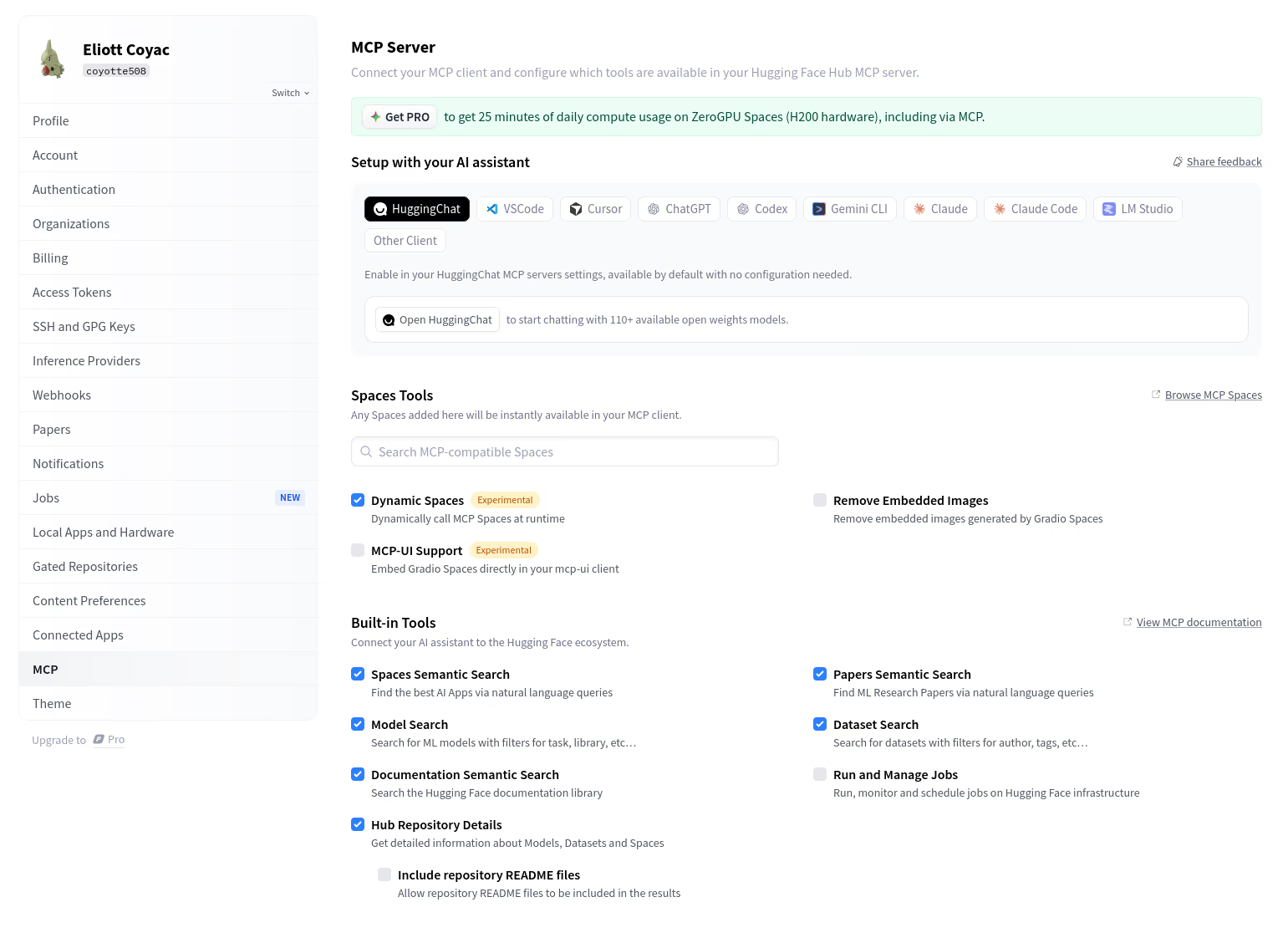
The official server lives at https://huggingface.co/mcp (source: github.com/huggingface/hf-mcp-server) and supports both STDIO and Streamable HTTP transports, with seven built-in tools you can enable or disable per client.
Option A: Claude Desktop / Claude.ai gallery
- Open Settings → Connectors and add "Hugging Face" from the gallery.
- Authenticate with your Hugging Face account when prompted.
- Optionally select which Spaces you want exposed as runnable tools.
- Ask Claude to search the Hub or run a Space.
Option B: Generate a client-specific config
Visit https://huggingface.co/settings/mcp while signed in. The page generates a ready-to-paste configuration snippet for your specific client (Claude, Cursor, VS Code and others), including your token. For Claude Code, the remote server adds in one line:
claude mcp add --transport http huggingface https://huggingface.co/mcp --header "Authorization: Bearer hf_your_token"Create the hf_... token under Settings → Access Tokens on the Hub. A read token is enough for search and discovery; you only need write or inference scopes if you intend to run Spaces or gated models.
Common Problems and Fixes
- 401 / unauthorised on connect: your
hf_...token is missing, expired or lacks scope. Regenerate it at Settings → Access Tokens and re-add the connector. - No tools appear after connecting: the seven built-in tools can be toggled off. Check the tool list at
huggingface.co/settings/mcpand enable search, model and Space tools. - A Space won't run as a tool: only MCP-compatible Gradio Spaces expose tools. If a Space isn't built for MCP, Claude can describe it but not execute it - look for Spaces that advertise tool support, or use the community
evalstate/mcp-hfspaceserver. - Gated or private model returns nothing: you must have accepted the model's licence on the Hub and hold a token with access; otherwise the Hub hides it from search.
- Inference times out or queues: heavy Spaces on free hardware cool down or queue. Duplicate the Space to your own account with paid hardware for reliable runs.
- Too many tools flood context: disable the built-in tools you don't need so the model isn't choosing among dozens of options.
Pricing and Availability
The Hugging Face MCP server is free, and search, discovery and reading model cards cost nothing. What can cost money is compute: running inference through Spaces on paid hardware, or using the Inference API/Endpoints beyond free allowances, bills against your Hugging Face account. A free Hub account is enough to use the connector for everything except heavy hosted inference.
Security and Permissions
The connector is primarily read and search oriented - exploring the Hub and reading documentation are low-risk operations. The main thing to be deliberate about is which Spaces you expose as runnable tools, since those execute code on your behalf. As with any connector, grant access to only the Spaces and capabilities a task needs, and review what each tool can do before enabling it.
The token is the whole security boundary: each request is served with the hf_... token presented in the Authorization: Bearer header, so whatever that token can reach - private repos, gated models you have accepted, organisation resources - the agent can reach too. Mint a fine-grained read token for everyday discovery work and keep write- or inference-scoped tokens for the sessions that genuinely need them, exactly as you would with any other Hub API credential.
Limitations
- Hub-scoped: it works with Hugging Face resources, not arbitrary external model providers.
- Inference depends on Spaces: running a model requires a hosted Space, and heavier workloads may need appropriate compute.
- Discovery, not training: the connector excels at finding and running models; full training pipelines need dedicated tooling.
- Timeouts are real: the server's calls to the Hub API time out after 12.5 seconds by default (
HF_API_TIMEOUT), and inactive HTTP sessions are closed after 300 seconds - long-running Space invocations need patience or a duplicated Space on faster hardware. - Image-heavy Space output: Gradio tools can return image content blocks; the server documents a
?no_image_content=trueURL flag to strip them when your client or context budget cannot handle inline images.
Who It Is For
The Hugging Face connector is for developers, ML engineers and researchers who work with open models and datasets - and for anyone who wants Claude to be a credible guide to the open-source AI ecosystem. If your work touches open models at all, it is one of the most useful connectors in the directory.
The Bottom Line
The Hugging Face connector turns Claude into a fluent navigator of the open-AI ecosystem - searching the Hub, reading real model cards, and even running demos on your behalf. For developers and researchers, it removes a constant context-switch and makes Claude's model and dataset recommendations genuinely grounded.
It is one of the standout entries in the Claude Connectors Directory for anyone building with open models.
Sources: Hugging Face documentation (huggingface.co/docs/hub/hf-mcp-server), Composio, Fastio. Image: Hugging Face. Last updated: June 2026.