 AI Tools Review Editorial Team
Quick Answer:
Manus Plan Mode, launched 22 July 2026, adds a review step before Manus starts building anything. Type / and select Plan (or tap + on mobile), and instead of immediately generating a website, app or slide deck, Manus produces an editable Markdown document outlining its intended goals, steps and constraints. Nothing gets built until you confirm or dismiss that plan. It is free for every Manus user on web and mobile from launch, it can be switched on mid-task to scope the next phase of an already-running build, and it puts Manus in the same "plan-then-execute" category as Claude Code's and Cursor's own planning modes: aimed here at a broader, less code-literate audience building landing pages, apps and content rather than reviewing a code diff.
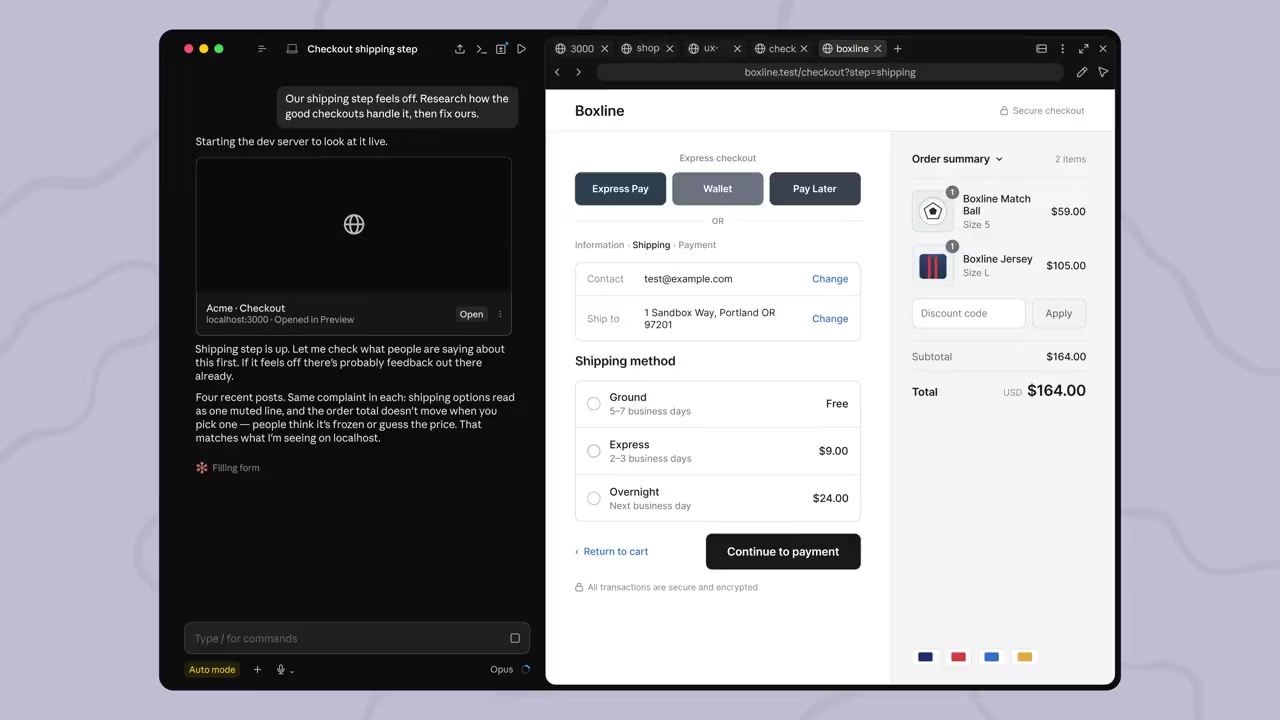
Manus's pitch since its 2025 launch has been "give it a task, walk away, come back to finished work." That pitch has a well-known failure mode: the agent builds fast, builds confidently, and sometimes builds the wrong thing: the wrong layout, a missing payment integration, an audience the brief never actually specified. Plan Mode is Manus's answer to that failure mode, and it arrives three months after Manus became part of Meta.
Here is what actually shipped, how the review step works end to end, and where it sits against the planning features already built into Claude Code, Cursor and other agent products.
Julian Goldie SEO covers Manus Plan Mode in this video.
Summary
Plan Mode is a feature Manus AI announced on its official blog on 22 July 2026, live immediately for every user on web and mobile. It targets a specific, well-understood failure pattern in autonomous agents: you write a short prompt, the agent runs for a while, and when it finishes you discover it made a decision early on (a layout choice, a missing feature, a wrong assumption about the audience) that you would have corrected in seconds if anyone had asked. Manus's own framing is blunt about this: "the problem isn't capability. It's alignment."
Plan Mode inserts a checkpoint. Activated manually, it makes Manus pause, run a feasibility pass over the request, ask clarifying questions if the brief is thin, and then produce a structured Markdown plan the user can read, rewrite by hand, or ask Manus to revise. Only after the user clicks Confirm does Manus start producing the actual website, app, deck or document, and the confirmed plan becomes the specification Manus follows for that stage of work.
- Best for: non-technical and semi-technical users building websites, apps, slide decks or content plans in Manus who want to catch a wrong assumption before an hour of build time is sunk into it.
- Headline mechanic: manual activation, editable Markdown plan, "will not execute until you confirm or dismiss."
- Defining trait: a plan-then-execute checkpoint built for product and content tasks (websites, apps, decks) rather than specifically for reviewing source-code diffs.
- Main caveat: it is optional and manual, a user who skips it gets the same "prompt and hope" experience Manus has always offered.
What Manus Is
Manus is a general-purpose autonomous AI agent, originally built by a Chinese startup and launched publicly in March 2025 to widespread comparisons with DeepSeek's earlier breakout moment. Rather than being scoped to one task type, Manus takes a single natural-language brief and independently plans, browses, writes code, generates images and slides, and assembles a finished artefact (a website, a research report, a spreadsheet, a small app) largely without further hand-holding. It ships as a web app, a browser operator, and native desktop and mobile apps.
The company's ownership structure changed materially in 2026: Meta's planned acquisition was initially blocked by Chinese regulators in April 2026, but Manus confirmed in July 2026 that it had in fact joined Meta, continuing to operate its existing products while folding into Meta's broader push into enterprise and consumer AI agents. Plan Mode is the first major product announcement to carry the "Manus is now part of Meta" banner on the company's blog, making it a useful early signal of product direction under the new ownership: more structure and reviewability, not a change in Manus's core "hand it a brief, get a finished artefact back" model.
Why Manus Built Plan Mode
Manus's own announcement is unusually candid about the problem Plan Mode exists to solve, and it is a problem familiar to anyone who has used an autonomous coding or building agent: "you write a prompt. You wait while Manus builds a full website. When it finishes, you realize it picked the wrong layout, missed the payment integration, or targeted the wrong audience. You spend the next hour correcting it message by message." That correction cycle (one small clarifying message at a time, against an already-built artefact) is slow specifically because the misalignment happened at the very start, and every subsequent build decision compounded it.
Manus frames the fix as an old idea borrowed from software and design practice rather than a novel invention: "align on the work before the work begins," the same principle behind a project kickoff document or a design review. What is new is applying it inside a single-prompt AI agent, where the entire point of the product has historically been to skip exactly that kind of upfront scoping conversation.
There is also a business logic to the timing. Manus confirmed in July 2026 that it had formally joined Meta, and features like Plan Mode read as an early signal of what "Manus under Meta" prioritises: not a change to the core one-prompt-to-finished-artefact model, but a maturing of the guardrails around it. A product aimed at increasingly non-technical users, the audience Meta's own consumer AI push is built around, needs a way to prevent expensive, confusing mistakes without asking that audience to become better prompt engineers. A plain-English, editable plan document is a lower-friction fix than expecting every user to learn to write a longer, more precise brief.
How Plan Mode Works, Step by Step
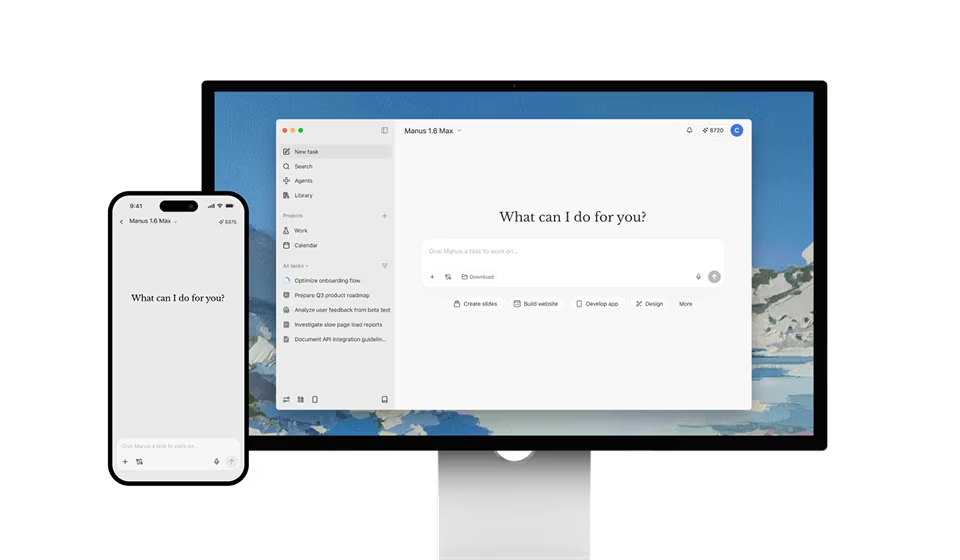
The activation is deliberately manual. On the web app, typing / in the task box and selecting Plan from the command menu switches the next request into planning mode; on mobile, the same is done by tapping the + icon and choosing Plan Mode. Manus is explicit that this is opt-in behaviour by design: "your quick tasks stay quick." A one-line request that does not need scoping, like asking Manus to summarise a document, is not forced through an extra review step.
Once active, Manus evaluates the request. If the brief is missing information it judges necessary (a target audience, a required integration, a data structure), it asks clarifying questions before generating anything. If the path is already clear, it produces the plan immediately: a Markdown document laying out goals, steps and constraints in plain, editable text, not a proprietary format locked inside the interface.
From there, the user has three options: click into the document and rewrite any part of it by hand, ask Manus in natural language to revise specific sections, or confirm it as-is. This loop can repeat as many times as needed. Manus's own language on the enforcement point is unambiguous: "Manus will not execute until you confirm or dismiss the plan," and until that happens, no code is written and no existing website, slide deck or video the user already has is touched.
A detail that separates Plan Mode from a simple "confirm before you start" dialog is that it is not limited to the beginning of a task. It can be switched on mid-build: if Manus is already partway through constructing something and the user wants to pause, regroup and scope the next phase before continuing, activating Plan Mode stops the current work, generates a plan for what comes next, and waits for approval before resuming. Manus frames this as a natural way to work in stages: let it finish phase one, then plan phase two before it begins, rather than trying to specify an entire multi-phase build in the original prompt.
Capabilities Deep Dive
One prompt is still enough
Manus is explicit that Plan Mode is not meant to shift the burden of detailed prompt-engineering onto the user. A single sentence, "Build a landing page for my SaaS product", is still a complete starting point; the plan itself is where Manus expands that brief into a target audience, a hero-copy angle, a component stack and integration choices (payments, analytics), which the user then edits rather than having to specify up front. In Manus's own example, a user might glance at the generated plan and change one line, prioritising developer sign-ups over enterprise demo requests, then confirm, and Manus builds the correctly-targeted site on the first pass rather than the generic one.
Surfacing hidden structure, not just layout
Manus positions the feature as being most valuable in development-shaped tasks specifically because those are where unstated assumptions cause the most rework. Its own example is a data-modelling case: asked to "build a task manager with user accounts and a database," Plan Mode maps out the data schema, the authentication flow and the API routes before any of it is built, giving the user a chance to catch something like a flat table where a relational join is actually needed, a mistake that is cheap to fix in a plan document and expensive to fix after the app is already wired together.
Scoped edits to live work
The same mechanism extends to incremental changes on an existing Manus-built asset. Asking Manus to "add a testimonial section and change the CTA on my live site" produces a plan showing exactly where the new section will sit and which existing components it touches, so the user can confirm the change is scoped correctly before Manus edits a site that is already live, rather than discovering after the fact that the update broke an unrelated part of the layout.
Part of a broader iteration toolkit
Manus frames Plan Mode as one piece of a wider set of tools aimed at lowering the cost of getting something wrong: version rollback if a change does not work out, the ability to duplicate a site to experiment risk-free on the copy, and branching during the planning stage itself to explore more than one requirement path before committing to one. Individually modest, together they read as Manus trying to close the gap between "impressive one-shot demo" and a tool people trust with iterative, ongoing work.
Real-World Use vs the Announcement
The honest caveat with any "review before you build" feature is that it only helps if people actually use it, and Plan Mode's manual, opt-in activation cuts both ways. It means quick one-off tasks are not slowed down by an unwanted extra step, which is the right default for a product whose core appeal is speed. But it also means the exact users most likely to skip it (those in a hurry, or new enough to Manus that they do not yet know the feature exists) are the same users most likely to hit the misalignment problem Plan Mode was built to solve in the first place. Whether Manus eventually nudges Plan Mode toward on-by-default for larger or more structurally ambiguous requests is a reasonable thing to watch for in a future release.
It is also worth being precise about what the plan actually reviews. Manus generates the plan using the same underlying reasoning that will later execute it, so Plan Mode catches misunderstandings between what the user meant and what Manus inferred, the class of error the announcement's own examples focus on, but it is not an independent second opinion checking Manus's plan for feasibility against, say, real-world engineering constraints outside its training or a genuinely novel technical requirement. A plan that looks coherent and confident can still be built on a wrong premise if the underlying model misjudged something in the first place; Plan Mode reduces communication-gap errors, it does not eliminate model-capability errors.
Pricing and Access
Plan Mode itself carries no separate price tag. Manus's announcement states it is "live today for every Manus user on both web and mobile," and nothing in the post ties the feature to a specific paid tier or introduces a dedicated credit surcharge for using it. That is consistent with Manus's existing pricing shape, where the company sells task-based credits across free, Starter, Pro and Team plans rather than gating individual product features behind separate add-on fees.
In practice, the planning step itself should be a comparatively small credit cost relative to the build it precedes, Manus is generating a Markdown document during planning, not compiling a finished website or running a full agent loop, though Manus has not published an exact separate credit figure for the planning pass itself, and the build that follows confirmation still consumes credits under Manus's standard model. Anyone on a metered plan should treat Plan Mode as a way to avoid wasting credits on a misdirected build, rather than assuming the plan review is entirely free of any consumption.
Limitations and Open Questions
- Manual, not default: Plan Mode has to be actively invoked; users who do not know it exists, or who are in a hurry, get the same unreviewed build behaviour Manus has always had.
- Same model, same blind spots: the plan is generated by the same system that will execute it, so it catches communication gaps between prompt and interpretation, not independent, adversarial feasibility checking.
- No independent benchmark yet: Manus's announcement is a product blog post, not a study: there is no published, independently verified figure yet for how much Plan Mode actually reduces rework time or credit spend in practice.
- Credit cost of the planning pass is unspecified: Manus has not published an exact separate credit cost for generating a plan versus a direct build, making it harder to budget precisely on a metered plan.
- Built primarily around Manus's own build workflows: the strongest examples in Manus's own materials are websites, apps and live-site edits; how well it generalises to less structured requests (research reports, open-ended content work) is less clearly demonstrated.
How It Compares
"Plan before you execute" is not a new idea in agentic tools generally: it is the same principle behind Claude Code's plan mode and Cursor's equivalent feature, both of which let a developer review an agent's intended approach to a codebase change before any files are touched. What differs is the audience and the artefact. Claude Code and Cursor's planning features are built for engineers reviewing something close to a technical task list against an existing codebase; Manus's Plan Mode is built for a broader, more product-oriented user (often building a website, app or deck from nothing), reviewing a plain-language Markdown brief rather than a structured, code-aware task breakdown.
Against other single-prompt "give it a brief, get a finished artefact" agents, Plan Mode is a meaningful differentiator precisely because so few of them offer any equivalent checkpoint, most either build immediately or require the user to front-load a much longer, more detailed prompt to reduce the odds of misalignment. Manus's bet is that a short prompt plus a mandatory-feeling (if technically optional) review step beats asking casual users to write increasingly elaborate prompts up front, which tracks with how the company has generally tried to keep its core interaction simple while adding structure around the edges rather than inside the prompt itself. It also sits alongside the wider agentic-safety trend covered in our look at multi-agent systems, where a human checkpoint before autonomous execution is increasingly treated as a default expectation rather than a power-user option.
It is also worth placing Plan Mode against the open-source, model-agnostic agent harnesses this site tracks, like Hermes Agent. Hermes' recent Quicksilver release focused on speed and safety plumbing (faster cold starts, an independent LLM reviewer checking risky commands) rather than a plan-review step for the build itself. Manus's Plan Mode solves an adjacent but distinct problem: not "is this command safe to run," but "is this the right thing to build in the first place." A power user chaining agent harnesses together could reasonably want both: Hermes-style command-level safety checking for what an agent is about to execute, and Manus-style plan-level review for what an agent has decided to build. The two are complementary rather than competing approaches to the same underlying trust problem.
Who Should Use It
Use Plan Mode if you are building anything with real structure (a multi-page site, an app with a database, a live site you are editing rather than starting fresh) where a wrong early assumption would cost real rebuild time, or if you are new enough to Manus that you would rather see its intended approach in plain English before it starts producing files.
Skip it if your task is genuinely quick and low-stakes (a one-off summary, a small tweak with no ambiguity), where the extra review step adds friction without meaningfully reducing risk of a wrong result.
The Bottom Line
Plan Mode is not a flashy new capability so much as an admission, dressed up as a feature: autonomous agents that build fast and confidently will sometimes build the wrong thing, and the cheapest place to catch that is before a single file is written. Manus's implementation (manual activation, an editable Markdown plan, a hard "will not execute until confirmed" rule, and the ability to re-plan mid-task) is a sensible, low-friction version of an idea that Claude Code and Cursor have already validated in a more code-centric context.
The open question is adoption, not mechanics: a feature this useful only helps the people who remember to turn it on. For anyone already building non-trivial things in Manus, there is little reason not to reach for / and Plan before a build with any real structure to it: the cost is a few minutes of review, and the alternative is the same hour of message-by-message correction Manus built this feature specifically to avoid.
Last updated: 24 July 2026. Sourced from Manus AI's official blog post "Introducing Plan Mode: A New Way to Work with Manus," published 22 July 2026.
Get the free guide: Claude vs ChatGPT, Gemini & Grok
A 20-page playbook covering everything you need to choose and use the big four AI models in 2026, full cost and feature comparisons, what each is best (and worst) at, and how-tos for images, vectors, building a website, Claude Code and more.