 AI Tools Review Editorial Team
Quick Answer:
The Snowflake-managed MCP server lets Claude ask questions of your governed Snowflake data in natural language - powered by Cortex Analyst (NL-to-SQL) and Cortex Search (semantic retrieval over unstructured documents). Crucially, the same role-based access, masking and row-level security that govern your tables automatically govern the MCP - no separate permission model. Connect agents to your proprietary data and to 750+ live datasets from the Snowflake Marketplace. Find it in the Claude Connectors Directory.

Snowflake-managed MCP Server
Cortex Analyst · Cortex Search · 750+ Marketplace datasets
Most enterprises spend years building data governance only to be told to throw it away to do AI. Snowflake's MCP refuses the trade.
Instead of exporting governed data out so Claude can read it, the MCP brings Claude inside the governance boundary.
Overview
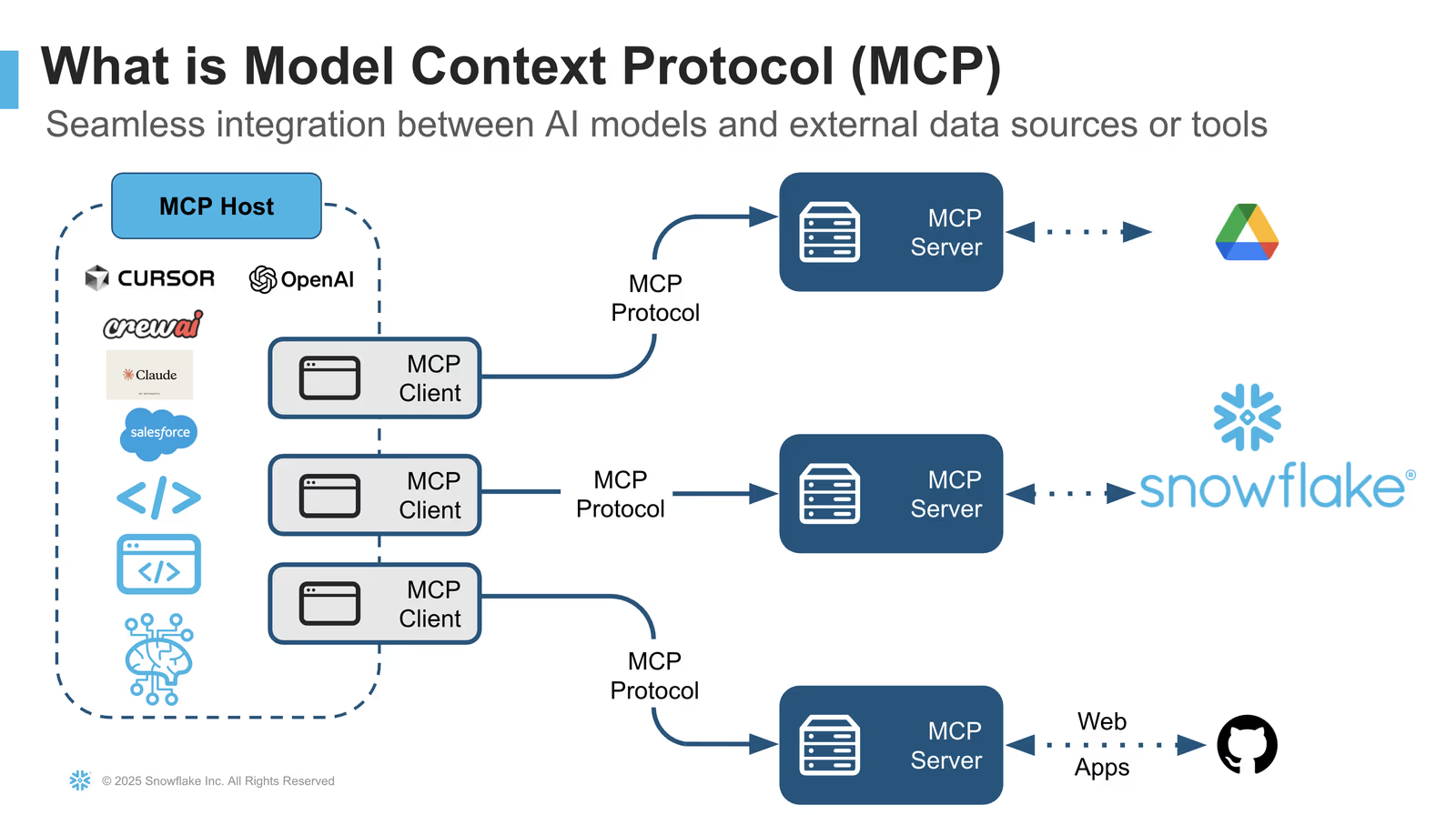
The Snowflake-managed MCP server is a standardised bridge that lets AI agents - including Claude - securely retrieve and reason over Snowflake data without you deploying separate infrastructure. It's the connector for one of the most consequential AI data-access decisions an enterprise can make: does the AI come to the data, or does the data go to the AI?
Snowflake's answer is unambiguous - the AI comes to the data - and the MCP is how that answer is operationalised.
Concretely, each managed MCP server is a schema-level object exposed at /api/v2/databases/{database}/schemas/{schema}/mcp-servers/{name} on your account URL, and you compose it from five documented tool types: CORTEX_SEARCH_SERVICE_QUERY for unstructured search, CORTEX_ANALYST_MESSAGE for natural-language-to-SQL over semantic views, SYSTEM_EXECUTE_SQL for direct query execution (with an optional read-only mode), CORTEX_AGENT_RUN for invoking agents with reasoning traces, and GENERIC for your own UDFs and stored procedures. Authentication uses Snowflake's built-in OAuth 2.0 (recommended) or a programmatic access token, and a caller needs USAGE on the server itself plus the usual privileges on each underlying service - SELECT on semantic views for Analyst, USAGE on a search service, warehouse permissions for SQL.
The Design Choice That Matters
For regulated industries the most important sentence in Snowflake's MCP documentation is this: the same role-based access controls, masking policies and row-level security that govern your data tables automatically govern your MCP server. No separate permission model to maintain. No "AI bypasses governance" exception that the security team has to sign off later.
That single design choice is what makes the connector deployable in financial services, healthcare, media and other regulated settings. It means the audit story for an agentic workflow is the same as the audit story for the underlying tables - the controls you've already invested in apply automatically.
What the Claude Connector Does
Through the MCP, Claude can:
- Ask analytical questions in plain English against your governed tables (Cortex Analyst).
- Semantically search across your unstructured corpora - PDFs, transcripts, documents (Cortex Search).
- Orchestrate SQL the Analyst generates and inspect the results inline.
- Consume semantic views, so the model reasons over your business model, not raw column names.
- Manage objects where you allow it - tables, views, warehouses - through the Snowflake-Labs/mcp open-source server.
- Reach the Marketplace - bring external datasets into the same conversation as your internal ones.
Cortex Analyst and Cortex Search
Two Cortex capabilities do most of the work behind the connector.
Cortex Analyst translates natural-language requests into SQL queries against governed data. The user asks "what's the month-over-month change in customer churn by segment?", the Analyst produces SQL, runs it inside Snowflake, and returns the results. Claude sees the question, the SQL and the answer - so it can explain, follow up and refine.
Cortex Search handles the other half of an enterprise's information: the unstructured stuff. Contracts, support tickets, research notes, transcripts. The MCP exposes search over those corpora so Claude can pull the right document into a conversation alongside the SQL result.
Together they let Claude answer questions that mix structured and unstructured context - "How much revenue is tied to the contracts up for renewal that mention 'service credit'?" - in a single session, governed end to end.
The Marketplace Multiplier
The MCP can also connect agents to over 750 live, ready-to-query datasets from the Snowflake Marketplace - data from providers including FactSet, MSCI and The Associated Press. That's a real multiplier: instead of building data ingestion pipelines for every external source you want Claude to reason over, you bring them into Snowflake via the Marketplace, where they sit alongside your proprietary tables under the same governance.
For financial services in particular - benchmarks, ratings, news - that combination is exactly the agentic context that has previously been impossible to deliver without compromising on governance.
Real Use Cases
- Analyst self-service: "What's the month-over-month change in customer churn by segment?" - Cortex Analyst generates the SQL, returns results, Claude explains.
- Board prep: "Show me revenue trends by segment over the past 12 months, identify anomalies, and draft talking points." End-to-end in one conversation.
- Churn investigations: Analyse customer churn patterns, identify common characteristics, and suggest retention strategies - all without leaving Claude.
- Contract review: Cortex Search retrieves contracts mentioning specific clauses; Cortex Analyst quantifies the revenue exposure.
- External + internal context: Combine FactSet or AP Marketplace data with your own pipeline data in one query.
A Worked Example: Churn in Plain English
A walk-through that recurs in user write-ups:
- An analyst asks Claude: "What's the month-over-month change in customer churn by segment over the last six months?"
- Cortex Analyst translates the question into SQL, against your governed tables, using your semantic views.
- The SQL runs inside Snowflake - your data never leaves the boundary.
- Claude returns the results, explains the methodology, and flags the segments showing acceleration.
- The analyst asks a follow-up: "Pull the support tickets from those segments mentioning 'pricing'."
- Cortex Search retrieves the relevant unstructured documents, also under governance.
- Claude synthesises: structured churn data plus the qualitative narrative from tickets, in one session.
Real-World Experience
Reception across Snowflake's own blog and press releases, InterWorks ("Governed Natural Language Access to Snowflake Data via Claude Desktop"), Decision Foundry, Medium write-ups by Snowflake Builders and others has been notably enterprise-positive. The repeated theme: this is the first AI data-access pattern that doesn't ask security and compliance to look the other way.
Honest counterpoint: governed AI access is only as good as your governance. Teams whose Snowflake permissions, semantic models and masking policies are messy will reflect that in the agent's outputs. The MCP rewards the governance work; it doesn't replace it.
How to Set It Up
There are two routes: Snowflake's managed MCP server (zero infrastructure, configured in your account) and the open-source Snowflake-Labs/mcp server you run yourself for broader object management. Most teams should start with the managed server.
Self-hosted server (Snowflake-Labs/mcp)
The open-source server runs with uvx and reads a YAML file describing which Cortex services and SQL permissions to expose. A minimal Claude Desktop entry looks like this:
{
  "mcpServers": {
    "snowflake": {
      "command": "uvx",
      "args": [
        "snowflake-labs-mcp",
        "--service-config-file", "/path/to/configuration.yaml",
        "--connection-name", "my_connection"
      ]
    }
  }
}
The configuration.yaml declares four groups - agent_services, search_services (Cortex Search), analyst_services (Cortex Analyst semantic views) and other_services (the SQL statement types you permit, such as select-only). Authentication uses a named connection from your standard Snowflake config, so no credentials sit in the MCP block.
Managed server
For the managed server, follow Snowflake's Cortex Agents MCP documentation to enable it in your account, then connect Claude over the published endpoint and complete authentication. Expose only the semantic views and search services the team should query. The managed server returns complete (non-streaming) responses and works against Cortex's newer semantic views - not the older semantic-model YAML files, which you should migrate first.
Security, Governance and Audit
The whole pitch lives here. Because the MCP inherits Snowflake's RBAC, masking and row-level security automatically, the agent can only see what the authenticated user can see. Audit logs treat agentic queries as queries; existing governance tooling continues to apply.
Practical advice: invest in semantic views and verified queries so the Analyst stays accurate, document the masking and RLS that affect AI-served queries, and run a sample audit during pilot. The MCP rewards mature data discipline.
Common Problems and Fixes
The Snowflake MCP is robust, but a few sharp edges trip up first-time setups - most of them in connection config and the managed-vs-self-hosted distinction.
Underscores in the account hostname break the connection
This is the single most common failure. Snowflake account identifiers that contain underscores must use hyphens in the host portion of the connection - acme-marketing-test, not acme_marketing_test. An underscore produces a confusing TLS or DNS error that looks unrelated to naming. Convert every underscore to a hyphen in the account URL and the connection succeeds.
"No semantic model found" on the managed server
The managed server does not support the legacy semantic-model YAML files that older Cortex Analyst setups used. If Analyst returns nothing, migrate those definitions to Snowflake semantic views and point the connector at those. The self-hosted server is more forgiving here, which is one reason teams pilot with it first.
Hitting the 50-tool ceiling
A single MCP server is capped at 50 tools. Exposing many Cortex Search and Analyst services plus object-management operations can exceed that. The fix is to split the surface across more than one MCP server - for example one server for analytics services and another for object management - rather than cramming everything into one config.
Empty or wrong answers from Cortex Analyst
NL-to-SQL quality follows your semantic layer. If the Analyst generates SQL against the wrong columns, the semantic view lacks the synonyms, descriptions or verified queries it needs. Enrich the semantic view rather than re-prompting - the model reasons over the model you give it.
No streaming responses
The managed server returns complete responses rather than streaming tokens, so long analytical answers arrive in one block after a pause. This is expected behaviour, not a stall - size warehouses appropriately for the query weight.
Pricing and Availability
There is no separate licence for the MCP server itself - both the managed and open-source servers come with your Snowflake account. What you pay for is the underlying compute and Cortex usage the agent triggers: warehouse credits for the SQL that Cortex Analyst runs, and Cortex Analyst and Cortex Search consumption, all metered on Snowflake's standard credit model. An agent that runs many analytical queries consumes warehouse credits just as a human analyst would, so factor Cortex pricing into pilot planning.
Marketplace datasets follow their own terms - many of the 750+ listings are free to query, while premium providers (FactSet, MSCI and similar) require a subscription or share agreement. The MCP capability is available to Snowflake accounts in the regions where Cortex is supported; check the Cortex Agents documentation for the current regional list.
Limitations
- Snowflake-shaped: brilliant inside Snowflake, not a generic database connector.
- Quality follows governance: messy semantic models lead to brittle NL-to-SQL.
- Cortex-dependent: the magic is the Cortex layer, not raw SQL.
- Cost: Cortex usage has its own pricing - factor it into pilot planning.
- Documented hard limits: responses from SQL and generic tools are truncated at 250 KB, each server is capped at 50 tools, and only non-streaming responses are supported.
- Role model: sessions run under the user's DEFAULT_ROLE with no secondary-role support, so plan role design accordingly.
- Regional gaps: the managed server is not supported in government regions, and Cortex Analyst works against semantic views only - legacy semantic-model files are unsupported.
Who It Is For
Enterprise analytics, finance, healthcare and media teams running on Snowflake who want AI access without re-doing governance. Mid-sized data teams who already use Cortex will feel an immediate jump in what's possible with Claude. For organisations that haven't yet committed to Snowflake's semantic layer, the MCP is a strong reason to.
The Bottom Line
The Snowflake MCP is the connector that lets regulated enterprises do agentic AI without making security swallow a compromise. Cortex Analyst handles structured questions; Cortex Search handles unstructured ones; the Marketplace adds external context - and all of it stays inside the governance boundary by design.
For Snowflake-first data teams, it is one of the most strategically important connectors in the directory. Explore the rest in the complete Claude Connectors Directory.
Sources: Snowflake (docs.snowflake.com/en/user-guide/snowflake-cortex/cortex-agents-mcp, snowflake.com/en/blog/managed-mcp-servers-secure-data-agents, snowflake.com press releases), github.com/Snowflake-Labs/mcp, InterWorks, Decision Foundry, Snowflake Builders Blog. Image: Snowflake. Last updated: June 2026.