
 AI Tools Review Editorial Team
Quick Answer:
Tripo AI (tripo3d.ai) is an image-to-3D and text-to-3D model generator: upload a photo, sketch or set of multi-view images and it reconstructs a textured 3D mesh, with base geometry appearing in as fast as 2 seconds according to the company. Built on its latest Tripo Algorithm 3.0 pipeline, it can output up to 2 million polygons in high-detail Ultra mode, or a clean, artist-friendly quad mesh (500-25,000 polygons) for game engines, complete with 8K PBR textures, automatic part segmentation and auto-rigging for humans, animals and stylised characters. Exports cover GLB, USD, FBX, OBJ, STL and 3MF, feeding directly into Blender, Unreal Engine, Unity, Maya, ZBrush or a 3D printer. There is a genuinely free tier (200 credits/month, non-commercial), with paid plans from £16 ($20)/month unlocking commercial rights. The real caveat, one Tripo's own documentation openly acknowledges, is that outputs, especially complex organic characters, often need manual topology and UV cleanup before they're truly production-ready.
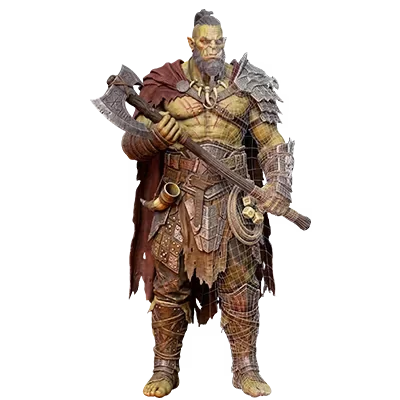
A photo of an orc holding an axe goes in. Roughly two seconds later, a rotatable 3D mesh comes out, one you can retexture, rig, drop into a game engine, or send straight to a 3D printer. That is the pitch behind Tripo 2.0, the image-to-3D generator that creator Matt Wolfe covered this week under the headline "This AI Turns Insane Ideas Into 3D Objects", and it is a pitch worth taking seriously enough to check against the company's own specifications rather than repeating uncritically.
This review pulls together what Tripo AI actually states about its own technology, real pricing from its live pricing page, independently reported user feedback, and the limitations the company's own blog is unusually candid about, so you know what you are actually getting before you spend a credit.
Matt Wolfe's original coverage of Tripo 2.0, demonstrating image-to-3D generation and export to Blender, Unreal Engine and 3D printing.
Executive Summary
Tripo AI is a hosted AI 3D model generator built around a single core capability: turning a 2D image (or a short text prompt, or several images of the same object from different angles) into a 3D mesh with materials, in a workflow measured in seconds rather than hours. The company says its platform has produced over 200 million 3D models for more than 20 million creators, and it carries a 4.7/5 rating from 219 reviews on G2, with the great majority of those reviews five-star.
- Speed: Tripo states base geometry can generate in as fast as 2 seconds, with the wider homepage claiming full models "in under a minute"; texturing, rigging and Ultra-mode refinement extend that.
- Detail: up to 2 million polygons in high-detail/Ultra mode, or a clean 500-25,000 polygon quad mesh for real-time engines, with 8K PBR texture maps.
- Inputs: single image, multi-view images, or a text prompt.
- Outputs: GLB, USD, FBX, OBJ, STL and 3MF, plus automatic part segmentation and auto-rigging.
- Pricing: a genuine free tier (non-commercial), paid plans from £16 ($20)/month for commercial rights.
- The catch: Tripo's own documentation acknowledges topology, seam and cleanup issues common to the whole AI-3D-generation category, not unique failures of this one tool.
What Is Tripo AI, and How Does It Work?
Tripo AI is a web platform (with an accompanying API) built specifically for AI-assisted 3D content creation. Rather than being a general-purpose image or video model that happens to touch 3D, its entire product surface, generation modes, credit system, export pipeline, is organised around one job: getting from a 2D reference to a usable 3D asset as quickly as possible. The company's own tagline puts it plainly: "Create 3D Models in Seconds."
At a high level, the pipeline works by reconstructing 3D geometry from the visual cues in an input image (or images), then applying learned priors about plausible object structure to fill in the parts of the object the camera never saw, the back of a character's head, the underside of a shoe. Once a base mesh exists, separate stages handle texturing, which bakes physically based (PBR) materials onto the surface, and optional post-processing like part segmentation, retopology into a cleaner mesh, and auto-rigging for characters. This multi-stage approach, geometry first, then texture, then optional refinement, is standard across the image-to-3D category and is broadly how competing tools like Meshy and Rodin are also structured; Tripo's differentiation is mostly in how fast and how automated each stage is, and how tightly integrated the export options are.
The current underlying model, announced by Tripo AI as Tripo Algorithm 3.0 (marketed in places as "Tripo v3.0 Ultra"), is described by the company as improving on prior versions in three areas: higher-resolution geometry capable of capturing fine surface detail like embedded text, micro-patterns and engravings; support for more complex "arbitrary" topology, including non-manifold or freeform structures that simpler mesh-generation approaches struggle with; and materials that are better aligned with modern PBR rendering workflows, so they respond more naturally to lighting once imported into a game engine or renderer. Tripo's own release notes claim sharper edges and cleaner topology than earlier versions, with fewer of the tangled or uneven polygons that plagued earlier AI mesh generators.
One figure worth being precise about: several third-party articles describe Tripo Algorithm 3.0 as having "over 200 billion parameters", while at least one other source puts an earlier Tripo 3.0 model at roughly 20 billion parameters. Tripo AI's own official release announcement for Algorithm 3.0 does not publish a parameter count at all. Given that direct contradiction and the absence of a primary source confirming either number, we are not stating a specific parameter count as fact here, if you see one repeated elsewhere, treat it as an unverified estimate rather than a documented spec.
It is worth distinguishing what Tripo does from adjacent but different categories of AI 3D tool. Tripo generates individual objects, characters, props, products, from a reference image; it is not a "world model" that generates explorable environments the way World Labs' Atlas or Tencent's WorldClaw aim to. Those tools are trying to solve a much larger, still largely unsolved problem, coherent, editable, navigable 3D scenes. Tripo's scope is narrower and, partly as a result, considerably more mature and reliable as a shipping product today.
Capabilities Deep Dive
Single-Image Generation
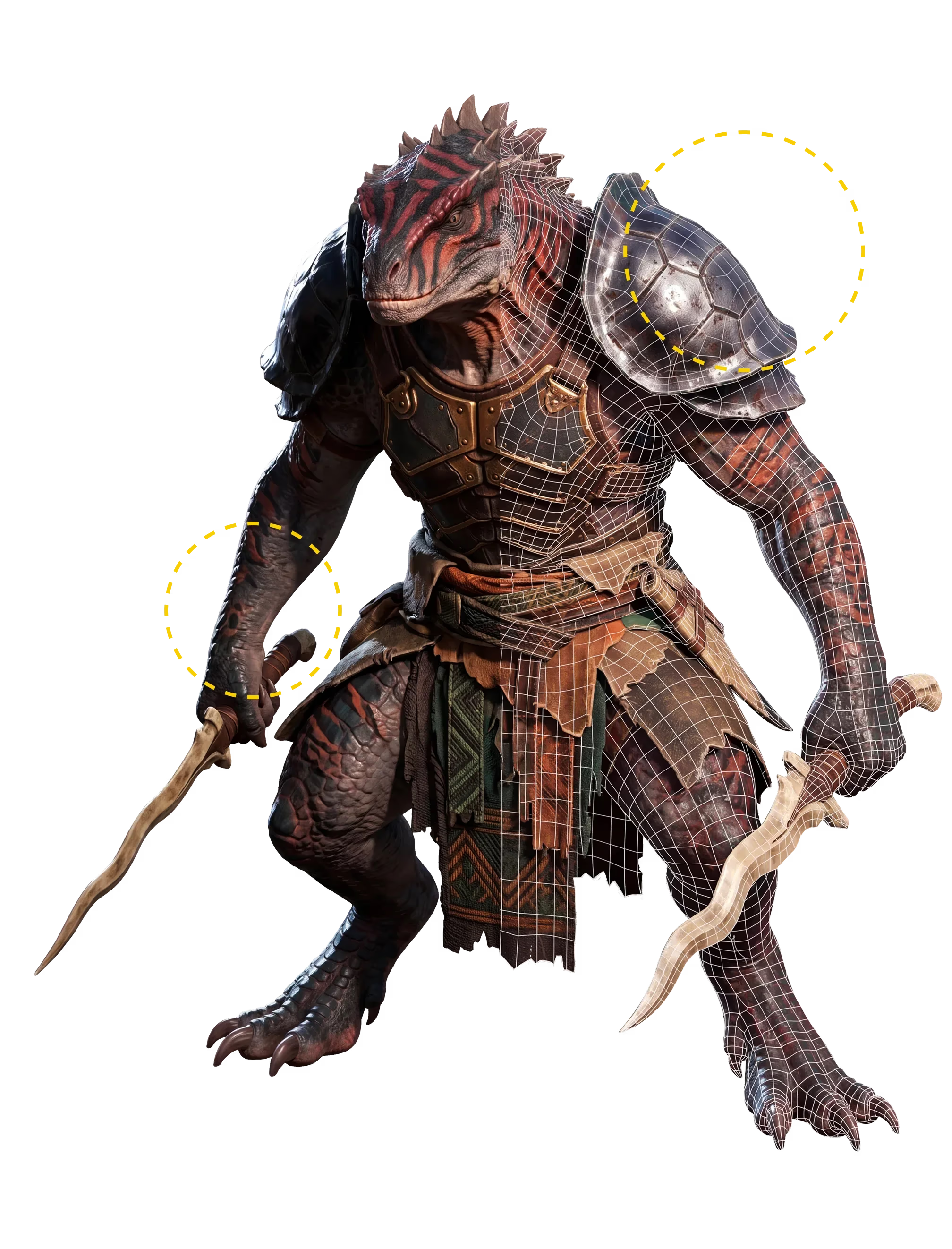
The core, headline workflow: upload one photo or sketch, and Tripo reconstructs a full 3D object from it, inferring the geometry of surfaces the camera couldn't see. This is the mode Matt Wolfe's video demonstrates, and it is genuinely the fastest path from idea to model. Because a single image gives the system the least amount of visual information to work with, it is also the mode most reliant on the underlying model's learned priors, meaning results on unusual objects, or objects photographed at odd angles, can be less predictable than with more constrained inputs. Many users generate their source image with a dedicated image model first; Tripo works with any image, but tools built for clean, well-lit product or character renders, such as Leonardo.Ai, are a common first step in that pipeline precisely because a cleaner, better-lit input image tends to produce a cleaner mesh.
Multi-View Mode
Rather than a single image, multi-view mode accepts several images of the same object from different angles. Tripo does not publish exact technical figures on how many views are optimal or the precise accuracy gain this provides, but the underlying logic is intuitive: more viewpoints give the reconstruction less to infer and more to directly observe, which should reduce guesswork on surfaces like the back of a character or the underside of a product. One user testimonial featured on Tripo's own site describes multi-view mode as taking longer but delivering "details I can't get anywhere else", consistent with a workflow that trades speed for accuracy. This mode is the closest analogue to traditional photogrammetry, without needing dozens of photos or specialist software.
Text-to-3D
Alongside image inputs, Tripo also accepts a plain text prompt and generates a 3D object directly from the description, no reference image required. This is useful for early concepting or for objects that don't have a convenient real-world reference photo, but it inherits the same fundamental limitation every text-to-image or text-to-video model has: the output reflects the model's interpretation of your words, not a specific object you had in mind, so it typically takes more iteration to land on a precise result than starting from a reference image does.
Rigging & Animation
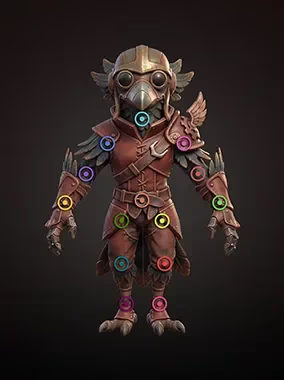
Once a character mesh exists, Tripo can automatically detect and place joints and bones, for humans, animals and stylised, non-human characters alike, without the manual skeleton setup and weight painting that rigging traditionally requires in Blender or Maya. The resulting rig is described by Tripo as compatible with Blender, Maya, Unity, Unreal Engine and Mixamo, meaning a generated, rigged character can be dropped into an existing animation pipeline and driven with standard humanoid animation clips. This is one of the more genuinely time-saving features on offer: manual rigging is a skilled, time-consuming task even for experienced 3D artists, and automating a first-pass skeleton, even one a rigger later refines, removes a real bottleneck.
Texturing & Retopology
Generated meshes are textured automatically using an AI texturing pass that Tripo says produces an 8192×8192 (8K) BaseColor map alongside 4096×4096 Normal and ORM (Occlusion/Roughness/Metallic) maps, the standard map set a PBR rendering pipeline expects. Separately, Tripo offers two distinct geometry outputs depending on your goal: a "High Detail" or Ultra mode mesh optimised for maximum fidelity (up to 2 million polygons, better suited to hero assets, cinematic renders or 3D printing), and a "Smart Mesh" option that produces a clean, quad-dominant, game-ready topology in the 500-25,000 polygon range, the retopology work a technical artist would otherwise do by hand to make a dense scan usable in a real-time engine. Choosing the right mode for your use case matters more than it might sound: a 2-million-polygon Ultra mesh will look better in a still render but will tank frame rates if imported directly into a game engine without further optimisation.
Output Quality & Real-World Testing
It would be easy to take Tripo's marketing images, which are, understandably, curated best-case examples, at face value. It is more useful to look at what Tripo's own technical documentation says about where AI-generated 3D models typically fall short, because the company publishes unusually candid guidance on exactly this topic across its blog and tutorials.
The topology issues Tripo documents are common across the entire image-to-3D category, not unique to this tool: automatically generated meshes tend toward uniformly dense polygon distribution, spending as many polygons on a flat, featureless surface as on a highly detailed one, rather than concentrating detail where it's needed the way a human topology artist would. On organic, characterful models, edge loops frequently don't follow anatomical structure, which matters enormously for animation, because edge flow that fights the direction a joint actually bends creates pinching and distortion once the character moves. In complex areas like fingers, ears or overlapping fabric, pinched vertices and n-gons (faces with more than four sides) are common, and both can cause visible artifacts if the mesh is later subdivided or deformed.
Texturing has a parallel issue: seams. Textures are painted onto a UV map, essentially a 2D unfolding of the 3D surface, and if that unfolding is messy or the seams land in visible locations, the result is visible discontinuities and stretched-looking textures where two UV islands meet. Tripo's own guidance material is explicit that this is predictable and largely a consequence of decisions made during generation, and that the most effective mitigation is choosing cleaner, better-composed input images and using in-platform correction tools before export, rather than trying to fix seams after the fact in an external editor.
None of this means the tool doesn't work, it means the honest framing is closer to "an extremely fast way to get a strong first draft" than "a replacement for a 3D artist", for anything beyond simple props or game-ready background assets. That framing is echoed in independent user reviews: on G2, where Tripo (listed there as Tripo Studio) holds a 4.7 out of 5 rating from 219 verified reviews (83% five-star, 14% four-star, and notably no reviews below three stars), the most consistent praise is for speed, approachability and usefulness for prototyping, portfolio pieces, gifts and experiments from photos or text. The most consistent criticism centres on a desire for more control, stronger presets and templates, and improvements to mesh consistency, several reviewers note that some outputs still need cleanup before they're truly finished. That is a reasonably rare combination for a review aggregate: overwhelmingly positive, with specific, credible, unresolved feature requests rather than vague complaints, which is itself a useful signal about how the tool actually performs in practice.
Pricing
Tripo AI runs on a monthly credit system: each generation, and each additional action like retexturing or Ultra-mode refinement, consumes credits from your plan's monthly allowance, with a single base generation typically costing in the region of 25 credits. There are four tiers, taken directly from Tripo's own pricing page:
- Free — £0 ($0)/month. 200 credits/month (roughly 13 models), one concurrent generation task, standard queue priority, public-only models, and limited storage and exports. Outputs are licensed CC BY 4.0 and restricted to non-commercial use.
- Pro — £16 ($20)/month. 3,000 credits/month (roughly 200 models), 10 concurrent tasks, higher queue priority, private models, batch generation, seven-day edit history, unlimited storage, and, importantly, commercial use rights.
- Max — £71 ($90)/month. 25,000 credits/month (roughly 1,660 models), 100 concurrent tasks, dedicated queue priority, permanent edit history, unlimited free retries, a small allowance of free "Pro Refine" credits, unlimited 8K texture access, and early access to beta features.
- Team — £43 ($55) per seat/month, billed with a minimum seat count. 90,000 pooled credits, 200 concurrent tasks, dedicated priority, a shared workspace with shared assets, and centralised billing and administration, plus everything included in Max.
Annual billing is available across the paid tiers at a discounted effective monthly rate. For anyone who only needs occasional models and doesn't require commercial rights, the free tier is genuinely usable, 13 models a month is enough to experiment properly. The line that actually matters for most professional use is the jump from Free to Pro: that is where commercial licensing kicks in, and without it, technically, none of your free-tier outputs are cleared for use in a paid product, a client project, or anything you intend to sell, including a 3D-printed object made for resale. Additional credits beyond a plan's monthly allowance can be purchased separately, in packages ranging from roughly £8 ($10) for 1,000 credits up to £790 ($1,000) for a bundle of 100,000 credits plus a 30,000-credit bonus.
Integrations & Export Workflow
The breadth of export formats is one of Tripo's more practically useful features, because it means the platform doesn't lock you into one downstream tool. Supported export formats are GLB, USD, FBX, OBJ, STL and 3MF, covering essentially every major 3D application and game engine in current use. On the software side, Tripo lists compatibility with Blender, Maya, 3ds Max and ZBrush; on the real-time engine side, Unity, Unreal Engine, Godot, Cocos and Roblox. Tripo's site also displays logos for companies including Sony, NetEase Games, ByteDance, Bambu Lab, Creality, Anycubic, Stability AI, Scenario, HTC and Tencent, which the company presents as users or partners; we have not independently verified the scope of each relationship, so treat that as Tripo's own claim rather than a confirmed enterprise customer list.
3D printing is treated as a first-class workflow rather than an afterthought. Beyond the direct STL and 3MF export, Tripo's automatic part segmentation feature is specifically useful here: it splits a complex model into logical, separable components, which matters because many desktop 3D printers have a build volume too small to print a large or intricately shaped model as one solid piece. Segmenting a model into printable parts, historically a manual, fiddly step in most 3D printing workflows, happening automatically saves real time for hobbyist and small-batch print users. The presence of 3D printer manufacturers Bambu Lab, Creality and Anycubic among the logos on Tripo's homepage is a reasonably strong signal that this workflow has real traction in that community, even allowing for the caveat above about unverified partnership depth.
Limitations
- Topology still needs human judgement for complex or animated characters. Uniform polygon density, non-anatomical edge flow, and pinched vertices around fingers, ears and overlapping geometry are documented issues, not unique to a bad generation.
- Texture seams are a real, predictable cost of automatic UV unwrapping. Cleaner, better-lit input images reduce this; complex or oddly-lit source photos make it worse.
- Free-tier outputs are non-commercial (CC BY 4.0). Anyone planning to sell a print, ship a game asset, or use a model in client work needs at least the Pro plan.
- No official parameter count or full-pipeline generation-time figure. Third-party estimates for Tripo Algorithm 3.0's parameter count conflict with each other and are not confirmed by Tripo's own announcement; treat any specific number you see elsewhere with caution.
- Multi-view mode's precise accuracy gains aren't quantified. Tripo doesn't publish exact figures for how many views are optimal or how much reconstruction error multi-view input actually reduces versus a single image.
- Partner and customer logos on Tripo's site are Tripo's own claim. We have not independently confirmed the scope or nature of relationships with the companies whose logos appear on the homepage.
How It Compares
Image-to-3D generation is now a genuinely competitive category, and Tripo isn't the only credible option, nor does it try to be the best at everything. Drawing on independent comparison write-ups and industry roundups (rather than a controlled test we ran ourselves), a few consistent patterns emerge.
Meshy AI is frequently rated the most consistently production-ready of the group, with clean mesh output, strong automatic texturing, and broad export compatibility with Blender, Unity and Unreal Engine; it's often named a top pick specifically for 3D printing workflows. Rodin AI tends to win on raw geometric detail and is particularly noted for hyper-realistic virtual human generation, at the cost of typically needing more manual refinement before the result is truly finished, better suited to artists comfortable doing that cleanup themselves. Luma Genie is free to use with daily generation limits and stands out for creative, organic and fantastical shapes, fantasy creatures and artistic forms rather than technical precision, but its free outputs, like Tripo's, are restricted to non-commercial use.
Tripo's own positioning in these comparisons is consistent: it is repeatedly cited as the fastest of the group and the one with the lowest-friction path from idea to usable model, backed by one of the largest public asset libraries in the category. For game developers specifically, several independent roundups recommend Tripo for its speed and native, engine-friendly quad-mesh output. In short, if raw speed and an approachable, low-setup workflow matter most, Tripo is a strong default; if maximum out-of-the-box geometric fidelity is the priority and you have the skill to refine a mesh yourself, Rodin is worth evaluating; and if broad, dependable production-readiness across formats is the priority, Meshy is the name that comes up most often as the safe, general-purpose choice.
Who Should Use It
Indie game developers and technical artists get the most immediate value: Smart Mesh's quad-dominant, game-ready topology and native engine export (Unity, Unreal, Godot) can turn a concept sketch into a placeholder or even near-final background asset in minutes rather than hours, and auto-rigging removes a genuinely tedious manual step for humanoid or creature characters.
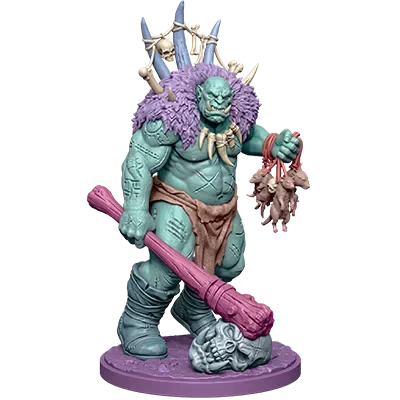
Tabletop and 3D-printing hobbyists are well served by the direct STL/3MF export and automatic part segmentation for multi-piece prints, turning a favourite character illustration or a product photo into a printable miniature without needing to learn dedicated 3D modelling software first.
Product designers and prototypers can use image-to-3D generation to quickly visualise a concept in three dimensions from reference photos or sketches, useful for early-stage pitches and mockups, though anything headed for manufacturing will still need proper CAD work downstream.
Professional character artists and studios working on hero assets, close-up cinematics, or anything requiring animation-ready topology should treat Tripo's output as a fast first draft rather than a finished asset, budgeting time for manual topology and UV cleanup, exactly as Tripo's own documentation recommends.
The Bottom Line
Tripo AI does what its marketing says it does: it turns an image into a usable, exportable 3D model, genuinely fast, and it has clearly found real traction, a 4.7/5 rating across 219 G2 reviews and claimed usage north of 200 million generated models are not small numbers for a category this technically demanding. The export breadth (six formats, every major engine and 3D application) and the direct 3D printing workflow, complete with automatic part segmentation, are legitimately useful and well thought through.
The honest caveat, one the company's own documentation doesn't try to hide, is that "fast, usable 3D model" and "finished, production-ready asset" are not always the same thing, especially for complex organic characters headed for animation or close-up rendering. Simple props, game background assets and 3D-print miniatures are where Tripo's speed advantage translates most directly into finished work with the least cleanup. For anything more demanding, it's best understood as a genuinely excellent way to get a strong first draft in seconds, not a replacement for a 3D artist's final pass.
Last updated: 8 September 2026. Sourced from Tripo AI's official site (tripo3d.ai), including its homepage, pricing page, image-to-3D feature page, and its official blog post announcing Tripo Algorithm 3.0 / Tripo v3.0 Ultra, plus Tripo's own published guidance on common AI 3D generation failure modes and topology issues, independent G2 review data for Tripo Studio, independent comparison coverage of Tripo versus Meshy, Rodin and Luma Genie, and Matt Wolfe's video "This AI Turns Insane Ideas Into 3D Objects".