 AI Tools Review Editorial Team
Quick Answer:
On 25 August 2026, Anthropic merged Claude's chat memory and Claude Cowork's memory into one shared memory, updated live as you talk instead of summarised after the fact. Everything Claude remembers now shows up as a list of editable, deletable Topics in Settings > Memory. Sensitive subjects - health, religion, politics, race, ethnicity, gender identity - stay out of memory by default, with an explicit toggle if you want them included. The update is on by default for Free, Pro and Max users across web, desktop and mobile; Team and Enterprise admins control it at the organisation level.
“Claude's memory just got a HUGE upgrade,” is how Julian Goldie SEO put it to his audience within days of the change going live - and for once the hyperbole undersells a genuinely structural fix. Until 25 August 2026, Claude's memory was split: what it learned about you in chat stayed in chat, and Claude Cowork, Anthropic's cloud-agent product, kept a separate memory of its own. Anthropic's own announcement calls this out directly - the fragmentation meant re-explaining the same context twice depending on which surface you happened to be using.
This article covers exactly what changed, built from Anthropic's own product-announcement blog post, its Help Center documentation, and real screenshots of the new Topics interface - what it looks like, how the privacy controls actually work, who gets it, and where the gaps still are.
Julian Goldie's walkthrough of the new unified memory system, filmed in the days after Anthropic's 25 August 2026 rollout.
Executive Summary
Anthropic's own framing for this release is blunt about the problem it fixes: “Starting today, the memory you use in chat is the same as in Claude Cowork. Now, wherever you work with Claude, it starts from what it already knows about you.” That is a product-architecture change, not a new AI capability - Claude is not smarter or more capable at reasoning because of this update, but the context it carries between different parts of the product is now consistent for the first time.
- Best for: anyone who regularly moves between chatting with Claude and handing off longer-running tasks to Claude Cowork, and is tired of re-explaining project context, team names, or preferences twice.
- Headline change: one shared memory across chat and Cowork, updated live during conversations, organised into named, editable Topics rather than an opaque running summary.
- Defining trait: full user control - every topic can be read, edited by instruction, or deleted individually, and sensitive subjects are excluded unless you explicitly opt them in.
- Main caveat: memory is per-account, not per-project or per-workspace, so context you'd rather keep separate (a client project vs. personal admin, say) currently lands in the same shared pool unless you manage it manually through the Topics list.
What Changed on 25 August 2026
Before this update, Claude Cowork - Anthropic's product for handing Claude longer, cloud-run tasks rather than staying in an interactive chat - had its own memory, separate from the one built up in ordinary chat conversations. Anthropic's announcement post, titled “Claude's memory works everywhere, and you decide what's in it”, describes three changes shipping together on 25 August 2026:
- One memory across Claude Cowork and chat - the two surfaces now read from and write to the same store, instead of maintaining separate context.
- Memory updates as you chat - Claude now adds topics to memory during a conversation, rather than generating a summary once the conversation ends.
- See and edit your saved memories - a new Topics list in Settings > Memory replaces the previous, less transparent memory store.
This landed the same week as two other Cowork-focused announcements from Anthropic - Claude Cowork's own built-in browser (26 August 2026) and Claude in Chrome reaching general availability (26 August 2026) - part of a broader push to make Cowork feel like a single continuous workspace rather than a collection of separate tools.
How the New Memory Works
The mechanical change that matters most is the shift from summarise-after to update-live. Previously, Claude generated a memory summary once a conversation ended - meaning anything you mentioned wouldn't reliably show up until that summarisation step ran. Now, Anthropic's own example is specific: “Mention that your project deadline moved to September, and your next conversation already knows without you having to say ‘remember this.’” The practical effect is that memory capture happens continuously during the conversation itself, not as a batch job afterwards.
You retain a manual override either way: you can pause memory entirely or reset it at any time from Settings > Memory, which wipes it back to empty rather than requiring you to delete topics one by one.
The Topics Interface: See and Edit Everything
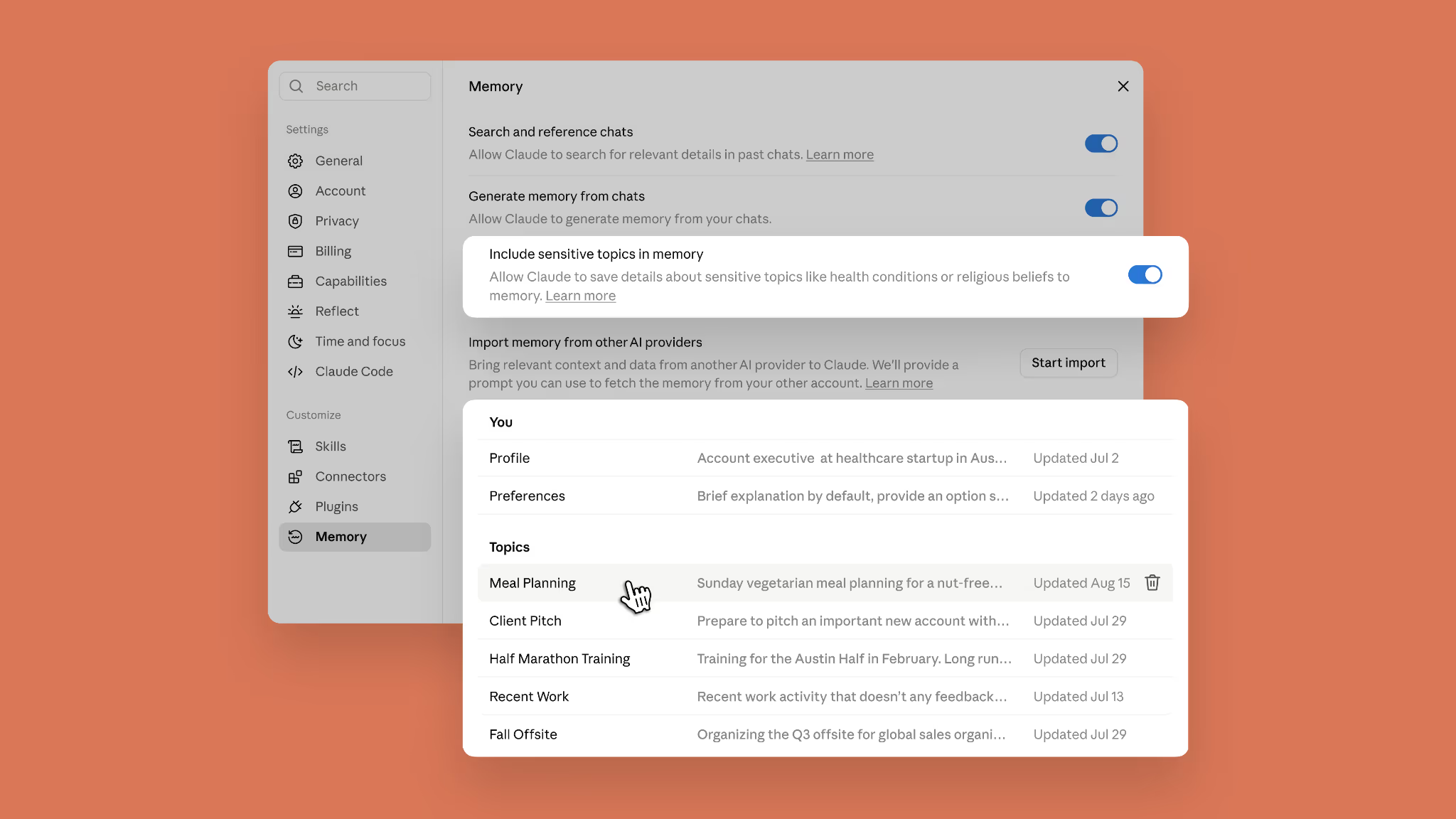
Where earlier versions of Claude's memory were effectively a black box, the new Settings > Memory screen lays everything out as a list of short files. A “You” section holds two standing entries - Profile and Preferences - and below it, a “Topics” section lists every subject Claude has picked up from your conversations as its own named row: things like “Meal Planning”, “Client Pitch”, “Half Marathon Training” or “Fall Offsite” in Anthropic's own screenshots, each with a one-line preview and a last-updated date.
Clicking into any topic opens a full detail view - a short Summary line, a bulleted Details section, and a text box (“Tell Claude what to change or remove”) for editing the entry by plain instruction rather than hand-editing raw text. Anthropic's own example shows a “Meal Planning” topic storing a weekly $250 grocery budget, a nut allergy, a vegetarian preference, dinners for four people five nights a week, and a note that ingredients need to be available in Austin, Texas - a genuinely granular level of stored context.
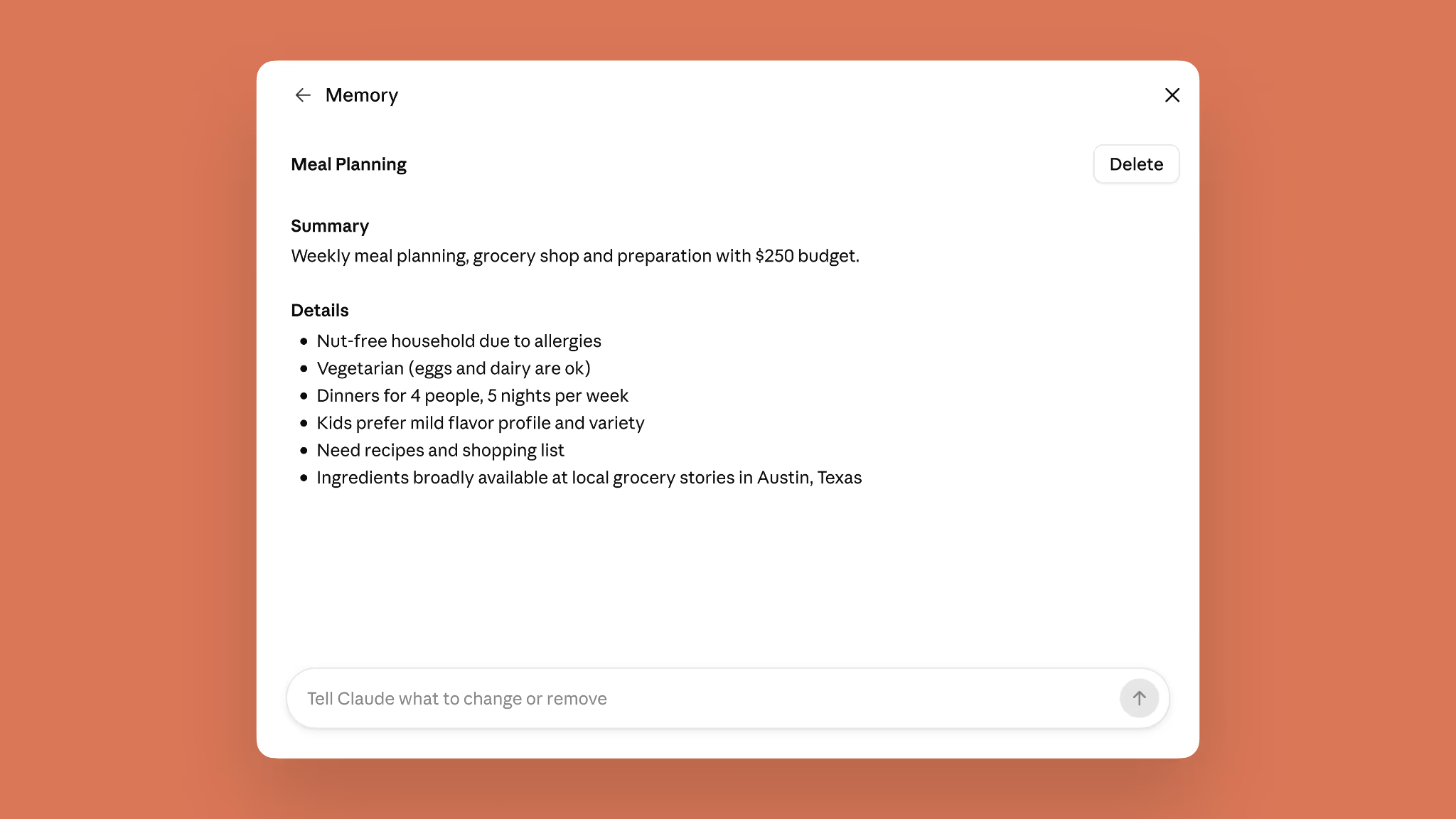
Anthropic's pitch for keeping these files short and topic-scoped rather than one giant memory blob is that corrections propagate cleanly: “correct your company's old name in one file and every conversation from then on gets it right,” rather than needing to hunt through a single sprawling memory document.
One Memory, Chat and Cowork Together
The headline use case Anthropic leads with is handoff between chat and Cowork without re-briefing. “Ask Cowork to draft an update for your manager, and it already knows who that is and how she likes updates written,” the announcement reads. “Brainstorm the agenda in chat for a conference you're organizing; when Cowork builds the budget and logistics doc, it knows the headcount, the city, and the speakers. Explain once in chat how your team defines its metrics, and every quarterly business review deck Cowork builds after that uses them, with no rebriefing.”
That direction runs both ways: context Cowork picks up while executing a cloud task also flows back into ordinary chat conversations, rather than staying locked inside the Cowork session that generated it. This is the specific fragmentation problem several outlets flagged at launch - TechCrunch's coverage was headlined around Cowork “finally” remembering what users told it in chat, framing it as catching up to a gap users had already noticed.
Privacy and Sensitive Topics
The closest thing this update has to a safety section is its handling of sensitive personal data, and Anthropic is specific about where the line sits. By default, Claude does not add health conditions, race, ethnicity, religious beliefs, political views, gender identity, “and other similar areas” to memory at all. A toggle in Settings > Memory - “Include sensitive topics in memory” - lets you opt in if you'd rather Claude remembered something like a gluten allergy for meal planning instead of re-explaining it every time.
Turning that toggle on is not retroactive and not silent: Claude shows a notice every time it saves something under the sensitive-topics setting from that point forward, and you can switch the toggle back off whenever you want. A separate, harder boundary sits underneath the toggle entirely - Anthropic says Claude will not store certain categories in memory even with sensitive topics enabled: government ID numbers (including US Social Security numbers), criminal history, immigration status, or anything that would violate its Acceptable Use Policy. Claude is designed to tell you when it can't save something into memory for one of these reasons rather than silently dropping it.
Availability and Rollout
| Plan / account type | Status at launch (25/08/2026) |
|---|---|
| Free, Pro, Max | Memory on by default, web/desktop/iOS/Android |
| Sensitive-topics toggle | Off by default for all individual users |
| Team / Enterprise | Admin-controlled at org level; off per-user until individually enabled |
| Mobile (iOS / Android) | Requires updating to the latest app version |
Anthropic's guidance for finding the controls is simple: go to Settings > Memory to turn memory on or off and manage exactly what Claude remembers, on any plan where the feature is available.
Real-World Reactions
Coverage across tech press in the days after launch converged on the same two threads: relief that the chat/Cowork split was fixed, and interest in the transparency of the new Topics UI specifically. Engadget's headline led with the cross-session unification directly (“Claude's memory now works across both chats and Cowork sessions”), while SiliconANGLE and 9to5Mac both foregrounded the privacy angle - the ability to inspect, edit and delete individual memory topics, and the explicit exclusion of sensitive subjects by default. Creator coverage, including Julian Goldie SEO's video embedded above, tends to frame it more practically: less time spent re-explaining who's on a team or what a project's deadline is, whichever Claude surface you happen to be using that day.
Limitations
- Account-wide, not project-scoped: memory is shared across your whole account rather than separated by project or workspace, so keeping a client's context apart from your own admin currently means manually managing the Topics list rather than relying on automatic separation.
- No published accuracy or drift data: Anthropic has not disclosed how often memory entries become stale or inaccurate over time, or how aggressively old topics are pruned versus retained indefinitely.
- Retroactive limits on the sensitive-topics toggle: turning sensitive-topics memory on only affects what gets saved going forward - it will not backfill sensitive context from before you enabled it, which is a privacy plus but can mean re-explaining things you assumed were already covered.
- Team/Enterprise rollout is admin-gated: organisation admins must enable memory at the account level before individual members can use it at all, so availability inside a company will lag behind consumer plans until IT or an admin acts.
How It Compares
ChatGPT and Gemini both ship their own memory systems with broadly comparable user controls - a settings page where you can view, edit or delete what's stored, and toggles that govern what gets remembered going forward. What sets this specific Anthropic update apart is not the memory concept itself but what it unifies: Cowork is Anthropic's cloud-agent product for longer-running, multi-step tasks, and closing the gap between its memory and ordinary chat memory addresses a fragmentation problem that is specific to having both a conversational assistant and a separate agentic product under one brand. Neither OpenAI nor Google currently markets a directly equivalent cloud-task product with its own previously-separate memory store to unify in quite the same way.
Within Anthropic's own product line, this pairs naturally with Cowork's built-in browser (announced the following day, 26 August 2026) and the general availability of Claude in Chrome - together, the three updates read as a coordinated push to make Cowork feel less like a separate cloud tool and more like a continuous extension of the chat you already have open.
Who Should Turn This On
Turn it on and use it if you regularly switch between chatting with Claude for quick questions and handing off longer tasks to Claude Cowork - project management, recurring reports, research that spans multiple sessions - and you're currently re-explaining the same background context every time you switch surfaces.
Be deliberate about the Topics list if you use Claude for genuinely separate contexts you don't want blending together - freelance client work alongside personal admin, for instance - since memory is account-wide rather than project-scoped; periodically reviewing and deleting stale or misfiled topics in Settings > Memory is the current workaround. Leave the sensitive-topics toggle off unless you have a specific, ongoing use for Claude remembering health, belief, or identity-related details, given it applies to everything going forward rather than letting you approve entries case by case.
The Bottom Line
This is a plumbing fix presented honestly as a plumbing fix: Anthropic isn't claiming Claude got smarter, it's closing a specific, previously-annoying gap where the same product remembered you differently depending on which door you walked through. The Topics interface is a genuine step up in transparency over the memory systems most chat assistants ship - short, individually editable, individually deletable files beat an opaque running summary every time you need to correct something.
The privacy design holds up to scrutiny on its own terms too: sensitive categories excluded by default, an explicit and reversible opt-in with per-save notices, and a harder floor underneath that toggle for identification numbers and legally sensitive categories. The open question Anthropic hasn't addressed yet is scoping - whether project- or workspace-level memory separation is coming, for users who want more structure than one account-wide pool of Topics.
Last updated: 31 August 2026. This article is based on Anthropic's official 25 August 2026 announcement (claude.com/blog), its Help Center documentation, and screenshots from Anthropic's own product materials; features may change as the rollout continues.
Get the free guide: Claude vs ChatGPT, Gemini & Grok
A 20-page playbook covering everything you need to choose and use the big four AI models in 2026, full cost and feature comparisons, what each is best (and worst) at, and how-tos for images, vectors, building a website, Claude Code and more.