 AI Tools Review Editorial Team
Quick Answer:
Anthropic has built a Chromium-based browser directly into Claude Cowork, rolling out the week of 26 August 2026 to Pro, Max and Team plan subscribers on the desktop app (Enterprise gets it immediately). It opens in a side panel when a task needs the web, and is completely separate from both your personal browser and the existing Claude Chrome extension: Claude cannot see your tabs, bookmarks or saved passwords unless you explicitly import logins into it, site by site. Banking, email and single sign-on sites are excluded by default, and Anthropic has carried over the same prompt-injection defences used in Claude in Chrome - though the company is candid that the risk "cannot be fully eliminated".
For the past year, giving Claude access to the web inside Cowork meant handing it your actual browser through the Claude Chrome extension - your tabs, your logins, your history. As of 26 August 2026, that is no longer the only option. Claude Cowork now ships with its own browser, one Claude drives entirely on its own, that never touches your personal one unless you tell it to.
This is a sourced explainer of what changed, how the built-in browser actually works, what Anthropic says it can and cannot see, and how it stacks up against the cloud browsers ChatGPT and Gemini shipped in the same week.
Sources checked for this article include Anthropic's official Cowork built-in browser announcement, The New Stack's hands-on coverage of the feature and the related Chrome extension update, and TechCrunch's reporting on Cowork's shared-memory update from the same week.
A hands-on comparison of Claude Cowork's new browser against ChatGPT's browsing update, including real prompts for account audits and research tasks.
Executive Summary
- Rolling out the week of 26 August 2026 to Pro, Max and Team plans on the Claude desktop app (macOS, Windows, Linux); Enterprise gets it immediately with admin controls.
- Opens in a side panel inside Cowork when a task needs the web - Claude navigates, reads and fills forms directly, no personal browser required.
- Fully separate from your own browser. No access to your tabs, bookmarks or saved passwords unless you explicitly import logins, site by site.
- Banking, email and SSO sites excluded by default, alongside the same prompt-injection defences used in the existing Claude in Chrome extension.
- Desktop-app only. There's no equivalent for Claude.ai users without the desktop app installed.
- Shipped the same week as ChatGPT's cloud browser and an agentic upgrade to Google's Gemini Live - all three labs moved on agentic browsing within days of each other.
What Actually Shipped
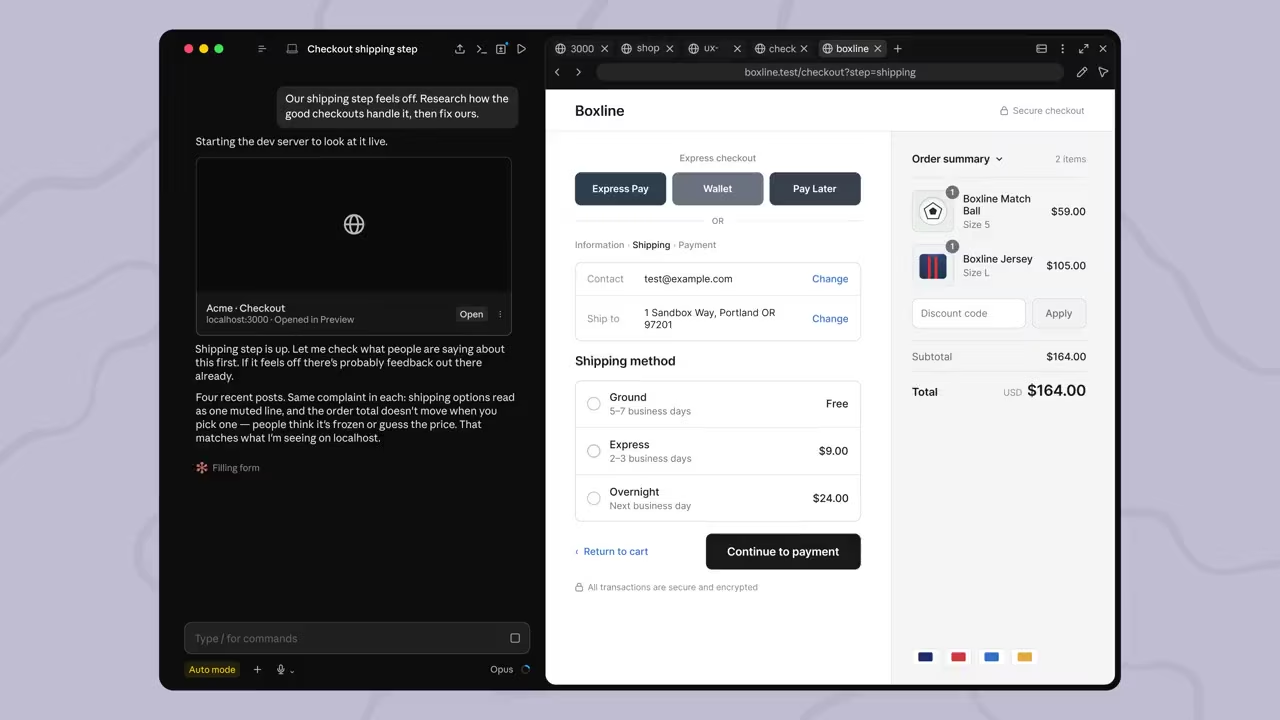
Anthropic's own announcement is precise about what this is: Claude now has an integrated browser within the Cowork desktop app that lets it independently navigate websites, read pages, click links and fill forms, without accessing the user's personal browser. When a task needs web interaction, a browser window opens in Cowork's side panel and Claude drives it directly, extracting information and completing web-based actions as it works.
The timing is not a coincidence. As The New Stack's coverage points out, the original Claude Chrome extension launched exactly a year earlier, on 26 August 2025, and Anthropic had only just, roughly two weeks before this announcement, shipped a major update turning that extension into a full Cowork session in its own right. The built-in browser is the next step in the same trajectory: rather than routing every web task through your actual browser via the extension, Cowork now has web access it fully owns.
How the Built-In Browser Works
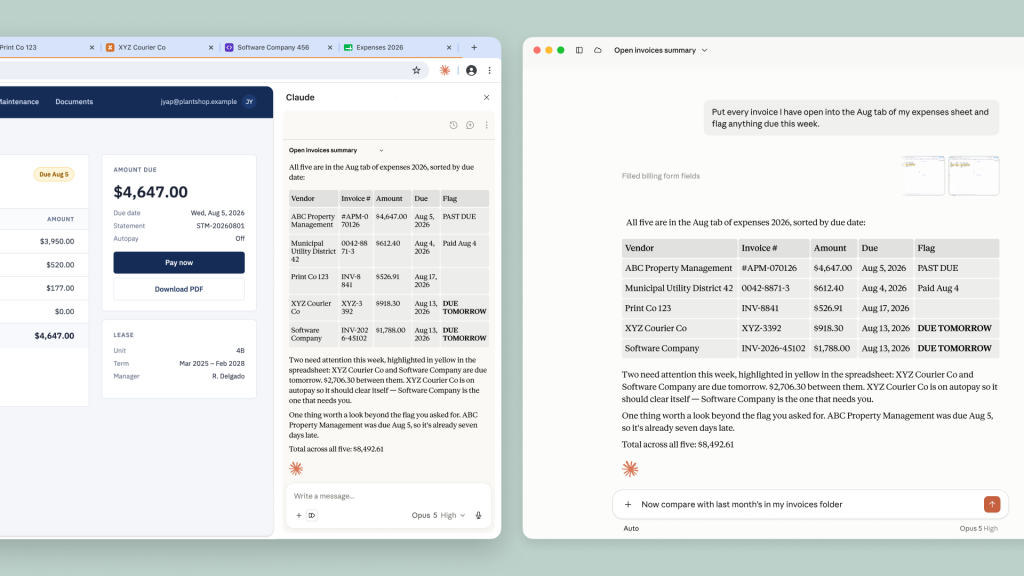
In practice, the browser behaves like a second, Claude-operated tab pane docked beside your conversation. Ask Cowork to research a competitor's pricing, and rather than describing what it found from training data or a generic search, it opens the panel, navigates to the site, and works the page directly - visible to you in real time as it happens, not as an opaque background process.
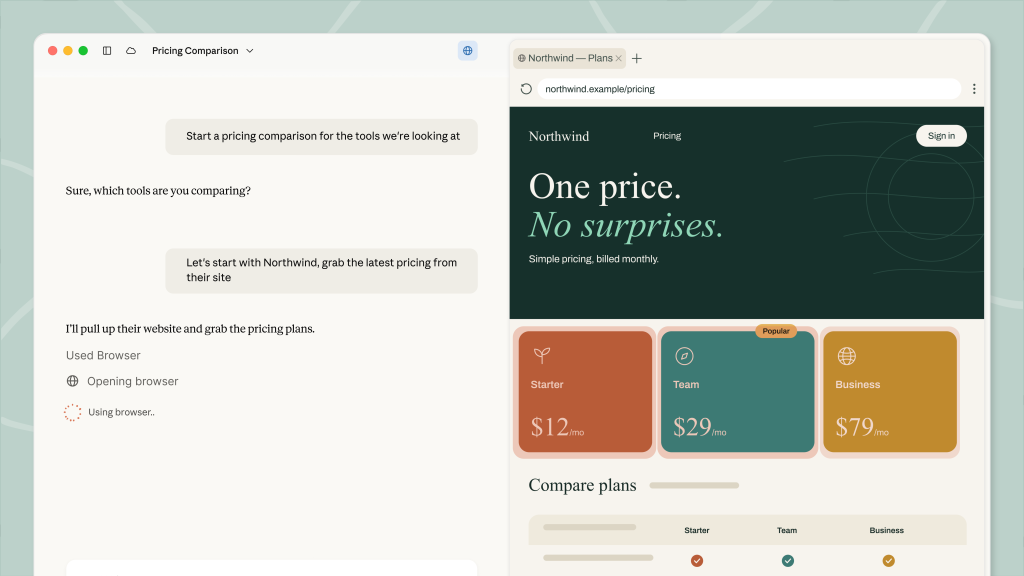
Anthropic's design goal, stated in its own materials, is to make workflows that previously required constant hand-off between chat and browser - "quickly take screenshots in the browser and discuss them with the model" is the phrase The New Stack's coverage highlights - materially easier once there's a dedicated browser living inside the same app as the conversation.
Built-In Browser vs the Chrome Extension
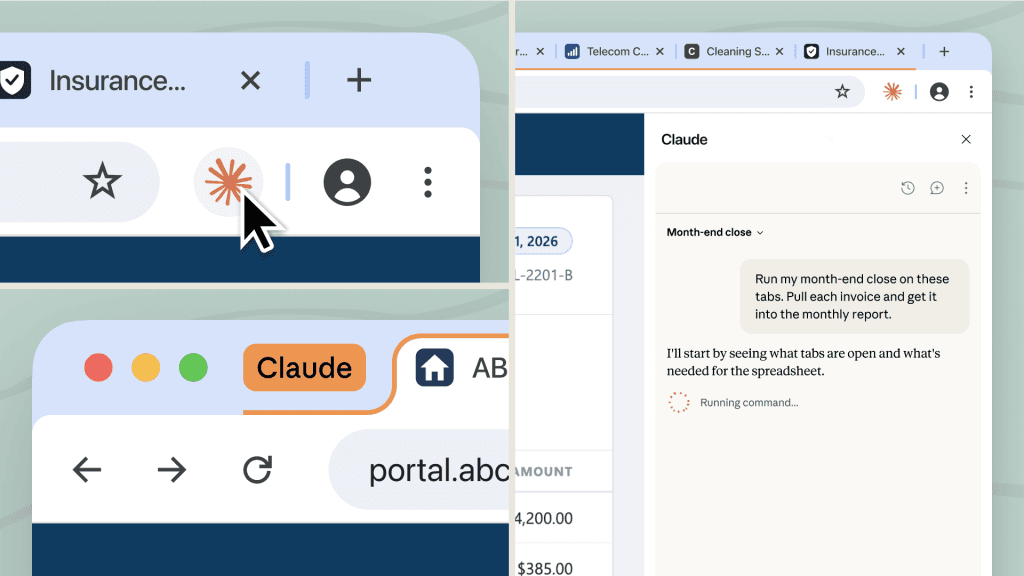
The Chrome extension and the new built-in browser now sit side by side as two different ways to give Claude web access, and they are not interchangeable. The extension runs inside your real browser: click the Claude icon in your Chrome toolbar and it opens a panel that can act on the tab you already have open, using whatever session you're already signed into. That's powerful, but it also means Claude is operating in the same browser context as your actual banking session, your actual email, your actual everything else.
The built-in browser is the opposite by design: a sandboxed instance that starts from nothing for every task, with no access to your existing sessions unless you deliberately import a login into it. That makes it the safer default for delegated, semi-autonomous tasks you want to hand off and walk away from - research, form-filling on unfamiliar sites, account audits - while the extension remains the better fit for quick, supervised actions inside tabs you're already using yourself.
An SEO-focused walkthrough contrasting the Cowork browser directly against the Chrome extension, plus a section on the prompt-injection risk.
Security Model: What Claude Can and Can't See
Anthropic's own line on this is unambiguous: "Claude never sees your tabs, bookmarks, or passwords. To stay signed in to your sites, you can bring your logins over site by site, from Chrome, Edge, or Firefox on macOS and from Firefox on Windows and Linux." That per-site import model is a deliberate friction point - it means Claude only ever has access to the specific sites you've chosen to hand it a session for, rather than blanket access to everything you're logged into.
On top of that, banking, email and single sign-on sites are excluded from the built-in browser by default, and the same prompt-injection defences Anthropic built for Claude in Chrome carry over here. Anthropic describes running checks that "review Claude's actions against what you asked for", intended to catch cases where a page tries to redirect Claude toward something other than the task it was given.
The Prompt Injection Risk, Honestly
Anthropic does not oversell this. Its own guidance is that users should start on trusted sites, because the underlying risk of a malicious page trying to manipulate an autonomous browsing agent "cannot be fully eliminated" - a more candid admission than most feature announcements offer. This is the same fundamental risk class covered in our piece on AI cyber evaluations reaching real systems: any agent that reads and acts on live web content is exposed to instructions hidden in that content, and a sandboxed browser with excluded sensitive-site categories reduces the blast radius of that risk without removing it entirely.
Availability, Plans and Rollout
The built-in browser began rolling out during the week of 26 August 2026 to Pro, Max and Team plan subscribers using the Claude desktop app on macOS, Windows or Linux, enabled by default as soon as it reaches an account - no separate opt-in toggle to hunt for. Enterprise plans get access immediately, alongside the admin controls those workspaces already expect for managing what Claude can and can't touch.
It is desktop-app only. Anthropic's announcement does not extend this to Claude.ai users on the web without the desktop app installed, which keeps the built-in browser distinct from the Chrome extension - the extension works for anyone running Chrome, regardless of which Claude surface they use it alongside.
Real-World Use Cases
The clearest use cases are exactly the ones shown in Anthropic's own materials: pulling a vendor's current pricing plans into a comparison table, auditing a subscription's billing details and renewal date without changing anything, and compiling data scattered across several already-open vendor portals into a single expense report. All three share a pattern - reading and organising information from live pages that would otherwise mean manually switching between several tabs yourself.
The SEO-specific angle Julian Goldie's coverage focuses on is a good illustration of the same pattern applied differently: competitor research and content-gap analysis that would normally mean opening a dozen tabs and copying data out by hand can now be handed to Cowork as a single instruction, with the browser doing the tab-switching itself.
A less obvious but genuinely useful pattern is form-heavy admin work on sites you rarely visit - renewing a domain, checking a utility account, submitting a supplier form - where the value isn't speed so much as not having to relearn an unfamiliar site's layout yourself. Because the browser starts with no session on a site you haven't imported, it also works well as a way to see exactly what a public-facing page shows a first-time, logged-out visitor, which is a genuinely different use case from anything the Chrome extension is well suited to, since the extension inherits whatever session you're already in.
Anthropic's materials also lean on the browser for lightweight monitoring tasks: periodically checking a page for a change, confirming a form submission went through, or pulling the same structured data point from several similarly laid-out sites in a row. None of these are individually dramatic, but together they describe the browser's actual niche well - not a replacement for how you personally browse the web, but a way to offload the specific, repetitive parts of browsing that were never really about judgement in the first place.
What This Means for Teams and Enterprise Admins
Enterprise workspaces get the built-in browser immediately rather than waiting through the same phased rollout as individual Pro, Max and Team users, alongside the admin controls those plans already expect for governing what Claude can access. That immediate availability, paired with a sandboxed browser that starts from zero access by default, is a meaningfully lower-risk default for organisations than the Chrome extension model, where Claude inherits whatever session an employee already has open in their real browser.
For IT and security teams evaluating rollout, the practical question is less "should we allow this" and more "which sites should employees be importing logins for". Because access is granted per site rather than blanket, the built-in browser gives admins a cleaner audit boundary than extension-based access does - a login either was or wasn't explicitly imported, rather than access being an implicit function of whatever the employee happened to be signed into that day. Teams handling regulated data should still treat the prompt-injection caveat as a real constraint on which categories of site are appropriate to import credentials for at all, regardless of how sandboxed the browser instance itself is.
How It Compares to ChatGPT and Gemini's Agents
Claude Cowork's browser shipped into a week when all three major labs moved on agentic browsing simultaneously. OpenAI retired its standalone Atlas browser on 9 August 2026 and rolled browser-based agentic capability directly into ChatGPT and Codex instead - a cloud browser that runs the actual browsing session on OpenAI's own servers rather than on the user's machine, available on Plus and Pro plans, with sign-in support and a WebMCP mechanism for sites that expose tools directly to agents. Google gave Gemini Live a voice-triggered integration with its Spark agent on the same day Anthropic announced its browser, 26 August 2026, letting a spoken instruction kick off multi-step background work across Docs, Sheets, Drive and the web - gated behind a Google AI Pro subscription.
The meaningful difference is less about what each agent can technically do - all three can now read pages, fill forms and complete multi-step web tasks with reduced supervision - and more about where the browsing happens and which product it's built into. Claude's version runs locally inside the Cowork desktop app as a sandboxed Chromium instance; ChatGPT's runs remotely on OpenAI's infrastructure; Gemini's is voice-first and routed through the separate Spark agent rather than a visible browser pane at all. For a fuller look at OpenAI's parallel approach to persistent, memory-backed agent context, see our explainer on ChatGPT's Computer History feature.
Limitations and Rough Edges
The per-site login import is a genuine bit of friction, by design - there is no bulk "sign me into everything" option, which is the right trade-off for safety but means the browser starts from zero access on any site you haven't already imported. It is also desktop-only, so anyone working primarily from Claude.ai in a browser tab, without the desktop app installed, does not get this feature at all yet.
And, as with every agentic browsing tool shipped so far across the industry, the prompt-injection risk is real and openly acknowledged rather than solved. Anthropic's own guidance to start on trusted sites is sound advice, but it is advice, not a guarantee - anyone handing genuinely sensitive, unsupervised, multi-step tasks to the browser should read that as a real constraint on what "walk away and let it work" safely means in practice today.
Who Should Use It
Worth trying now: Pro, Max, Team and Enterprise users already on the Cowork desktop app who regularly do research, competitor analysis, form-filling or data-gathering across sites - anyone who would benefit from delegating a multi-tab browsing task rather than doing the tab-switching themselves.
Stick with the Chrome extension for now: quick, supervised actions inside tabs you already have open and are actively watching, and anything on a site you have not yet imported a login for and don't want to set up separately. Wait or use the web app as normal: anyone on Claude.ai without the desktop app installed, since the built-in browser has no equivalent there yet.
The Bottom Line
The built-in browser is a sensible, deliberately narrower complement to the Chrome extension rather than a replacement for it - a sandboxed space for delegated web tasks that keeps Claude away from your actual browsing session by default, at the cost of a bit more setup friction when you do want it signed in somewhere. Anthropic's candour about the prompt-injection risk not being fully solvable is worth taking at face value rather than glossing over: start on trusted sites, import logins deliberately, and treat "walk away while it works" as a genuine but bounded convenience, not a guarantee.
Set against ChatGPT's cloud browser and Gemini Live's Spark integration, all three shipped in the same week, this is less a single company pulling ahead than the whole frontier converging on agentic browsing as a baseline feature. Which one is right for you will likely come down to which assistant you already live in day to day, more than any sharp capability gap between them today.
Last updated: 29 August 2026. Sourced from Anthropic's official Cowork built-in browser announcement, The New Stack's hands-on coverage of the feature and the Chrome extension update that preceded it, and TechCrunch's reporting on Cowork's shared-memory update. This article will be revised if Anthropic changes plan eligibility, regional availability or default settings.
Get the free guide: Claude vs ChatGPT, Gemini & Grok
A 20-page playbook covering everything you need to choose and use the big four AI models in 2026, full cost and feature comparisons, what each is best (and worst) at, and how-tos for images, vectors, building a website, Claude Code and more.