 AI Tools Review Editorial Team
Quick Answer:
OpenMuse is an MIT-licensed, self-hosted personal agent from CopilotKit. It gives an AI model a persistent Chromium browser, an optional sandboxed Linux terminal, a file workspace, Gmail and Google Calendar access and a durable background task worker, all driven from an Expo and React Native app on iOS, Android and the web. It is positioned as an open alternative to Meta's closed Muse agent. It is also explicitly alpha, built for a single owner, and you supply your own model keys and hosting.
Meta spent September persuading the world that everyone should have a personal AI agent that works while they sleep. CopilotKit, the company behind a popular open-source framework for putting agents into applications, answered within weeks with a different pitch: you can have that, but you can read the code, run it on your own machine and pick your own model.
This guide sets out what OpenMuse actually is, how it is put together, what the maintainers say it can and cannot do today, and how it compares with the closed agents from Meta, OpenAI and xAI. Where a detail has not been published, we say so rather than guess. The first video below is the creator coverage that prompted this piece.
Julian Goldie SEO walks through OpenMuse as an open-source agent with its own computer. Treat creator enthusiasm as a starting point and check the repository for what is actually shipped.
Executive Summary
What it is: OpenMuse is a personal-agent application, not a model. The repository describes it as "a personal agent with a browser, terminal, files, and work that keeps going", built with CopilotKit and the AG-UI protocol. You ask for an outcome, follow the plan, review the actions and come back to the result.
- Licence and status: MIT licence. The maintainers label it alpha. It was reported as launching on 22 September 2026 with 890 stars; at the time of our research the repository showed roughly 3.9k stars and 527 forks.
- Agent computer: a persistent Chromium profile you can take over, plus an optional non-networked Docker Linux workspace with a terminal and editable files.
- Connections: Gmail and Google Calendar through Google OAuth, with approvals for sends and event changes.
- Durability: a task worker that survives restarts, with pause, resume, cancel and retry controls.
- Client: one Expo and React Native codebase targeting iOS, Android and web.
- Models: bring your own key for OpenAI, Anthropic or Google, with an OpenAI-compatible option reported by reviewers.
Our view: OpenMuse is most valuable as a readable, forkable reference for how a trustworthy personal agent should behave: visible work, mandatory review of outside actions and no hidden retries. It is not yet a finished consumer product, and the maintainers say so. If you are a developer, it is a strong starting template. If you want something to hand to a non-technical relative, it is not that yet.
Why OpenMuse Exists
The personal-agent category crystallised quickly. Meta launched Muse in the US on 8 September 2026, running inside a per-user Secure VM with a separate Sentinel agent approving outbound actions; we covered the detail in our Meta Muse Secure VM and Sentinel review, and the small-business extension in Meta Muse for Small Business. OpenAI's always-on agents arrived as dots, which we unpick in OpenAI Dots Explained, and xAI shipped persistent cloud-computer agents in Grok Bot.
All three share a pattern: a hosted agent with its own computer, access to your accounts and the promise that it will keep working after you close the app. They also share a limitation. You cannot inspect how they decide, you cannot move them to your own infrastructure, and you are tied to the vendor's model.
CopilotKit has an obvious reason to build the open version. Its business is infrastructure for agent user interfaces, and OpenMuse works as a flagship demonstration of that stack. Reviewers have pointed out that this gives the project a commercial incentive to keep it maintained, though long-term sustainability is unproven at alpha stage. That is a fair reading: the incentive is real, but so is the dependency, because live mode uses CopilotKit's own Intelligence service for thread persistence.
The repository's own tagline also adds a phrase worth noting: "Compatible with any agent harness." The design intent is that the interface and the work surface should be separable from whichever agent loop sits behind them. A reviewer at ExplainX reported an OpenBot adapter included for interoperability; we could not independently confirm how complete that adapter is.
Architecture: How the Pieces Fit
The project wiki describes a distributed layout rather than a single app. Understanding it matters, because it determines what you need to host and what can fail.
| Layer | What it is | Required? |
|---|---|---|
| Client | Expo and React Native UI for iOS, Android and web | Yes |
| API server | Hono server hosting the CopilotKit runtime | Yes |
| Task worker | Durable background jobs, coordinated through SQL leases | Yes (hosted by the API by default) |
| Storage | PGlite (embedded) or PostgreSQL | Yes |
| Browser worker | Playwright service with persistent Chromium profiles | Optional |
| Linux computer | Docker container for terminal and files | Optional |
| Intelligence | CopilotKit service for rich thread persistence | Yes in live mode |
Two practical points follow. First, the task worker lives inside the API process by default, so the host must stay running for background work to continue. The wiki is blunt about this: the host must remain up. You can split the worker out by setting TASK_WORKER_ENABLED=false on the API and running the worker separately against a shared DATABASE_URL and data directory, but PGlite cannot be opened by two processes at once, so a split deployment means moving to PostgreSQL.
Second, the browser worker and the Linux computer are independent. You can run OpenMuse with neither, with just the browser, or with both. That modularity is helpful for cautious testing, because you can enable one capability at a time.
The wiki also documents a three-service deployment on Render: an API service with a 1GB disk, a static web client and a private browser service with its own 1GB disk. Database state and the signing key persist on disk, while chat threads held in CopilotKit Intelligence survive redeploys. We have not deployed it ourselves, so treat the Render details as the maintainers' description rather than our verified result.
What It Can Actually Do
The feature list is broad, so it helps to group it by what the agent can touch. The README and wiki describe chat with streamed events, inline result cards for email, browser, PDFs, plans and finances, document workflows, finance tracking and goals with change detection. ScriptByAI adds public-page monitoring for changes, text availability and price thresholds, and CSV import for spending summaries.
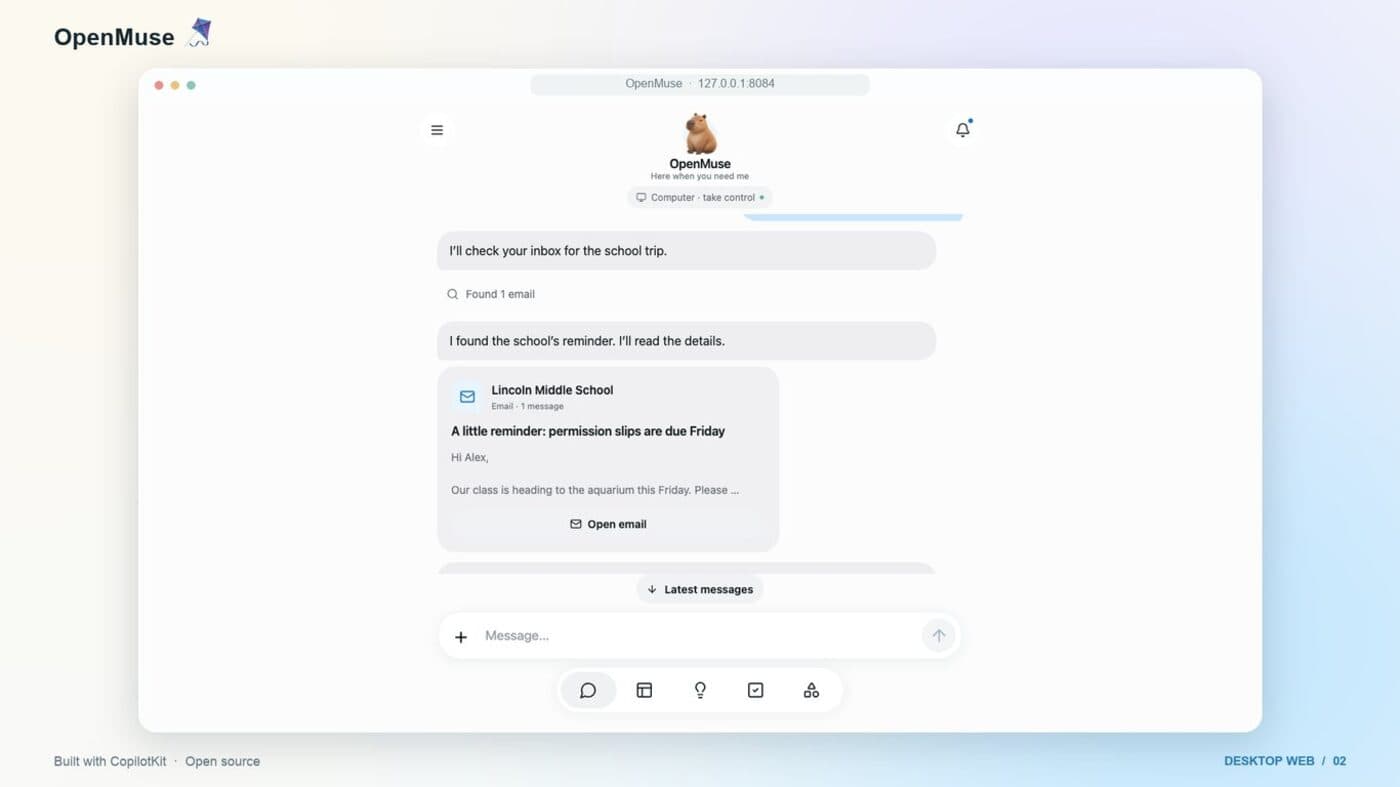
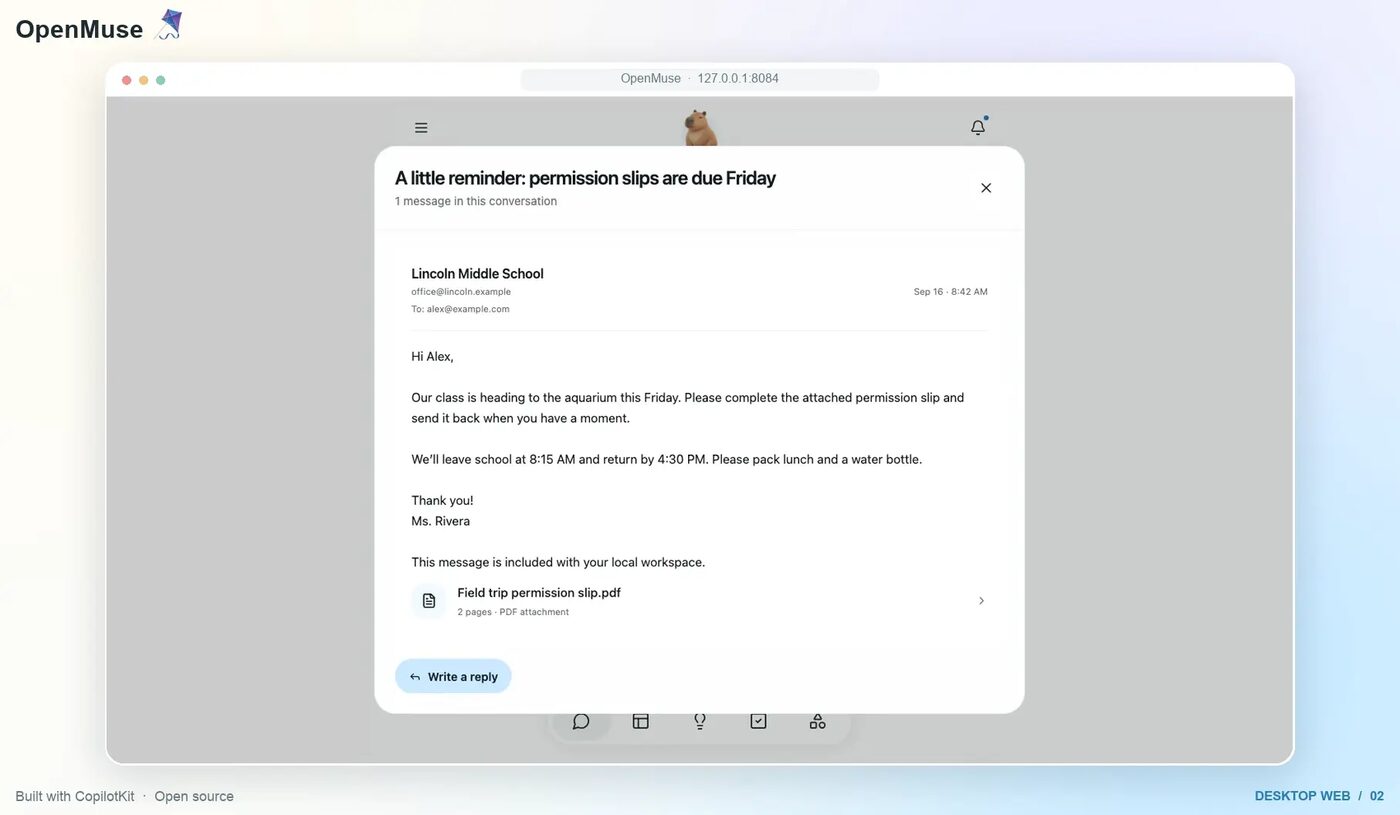
A typical flow, using the demo from the project artwork, is: you ask the agent to check your inbox for a school trip, it finds the reminder email, reads it, opens the attached permission-slip PDF, fills the form and proposes a reply for you to approve. The intent is that each step shows up as a visible card rather than disappearing into a black box.
The Persistent Browser
The browser is the centrepiece. It is a Playwright-managed Chromium instance with named profiles, so cookies and logins persist between sessions. You can view screenshots, download PDFs and take over the live console yourself, which matters for the awkward moments agents cannot handle: a captcha, a two-factor prompt or an unexpected pop-up.
The wiki says the worker runs as a separate service, by default on port 8790, authenticated with a WORKER_TOKEN of at least 32 characters. ScriptByAI reports a limit of three active sessions and 20 saved profiles, and warns that sites relying on WebSockets, service workers or pop-ups may fail. We have not verified those limits against the code. The same review is careful to describe the protection as "application-level protection around Chromium", which is honest: it is not a hardened virtual machine.
The Optional Linux Computer
For terminal work, you can enable a Docker container with COMPUTER_ENABLED=true. The wiki lists its boundaries:
- Commands run as a non-root user with a 30-second timeout.
- A persistent
/workspacevolume retains files; there are no host-directory mounts and no host credentials exposed. - Terminal networking is disabled. Web access goes through the browser worker instead.
- Reviewers add a read-only root filesystem and dropped capabilities; every command output and exit code is kept as a receipt.
The network-off design is the smartest choice in the project. The most common way an agent leaks data or pulls in something malicious is by running arbitrary network commands. Forcing web access through one monitored browser reduces that surface. The trade-off is that the agent cannot, for example, install packages from the terminal. There is also no graphical desktop; the roadmap lists that as not yet implemented.
Durable Tasks and Action Review
Most agent demos fail the moment a server restarts. OpenMuse stores task plans in the database and uses SQL leases so that an interrupted job can be picked up by a worker after a crash. The point is to avoid duplicated side effects, such as sending the same email twice.
The review model is the line we would underline. The wiki states: "No hidden retry occurs after an uncertain external write. Review its provider outcome before creating a replacement." In other words, if the agent is unsure whether Gmail accepted a message, it stops and asks you rather than guessing. Gmail sends and Calendar changes need a stored approval, completed actions leave receipts, and you can pause, resume, cancel or retry a task from the interface. That is a conservative, sensible default for a tool that can write to real accounts.
AG-UI and the Client
AG-UI is an open protocol for streaming agent events to a user interface: messages, tool calls, state changes and so on. OpenMuse uses it so the client can render what the agent is doing as it happens, rather than waiting for a final answer. This is what powers the activity feed, plan progress and inline cards.
The client is built with Expo and React Native, which means one codebase for iOS, Android and web. The local web client launches on port 8081 in the quick start, and a demo mode ships with fictional data so you can see the interface without any API keys, Google sign-in or Docker. Be aware of one caveat from reviewers: shipping a mobile build to the app stores needs platform-specific work beyond the provided scripts, so "runs on iOS and Android" means the code targets them, not that a store-ready app exists.
If you are building your own agent product, this is where OpenMuse earns its keep. The generative-UI patterns for cards, review sheets and live browser consoles are the sort of thing teams otherwise spend weeks designing.
Setting It Up
The README lists three prerequisites: Node 24 LTS, pnpm 11.19.0 and a CopilotKit Intelligence project key. The basic path, as summarised by ScriptByAI and the wiki, is to clone the repository, run pnpm install --frozen-lockfile, copy .env.example to .env, authenticate with the CopilotKit CLI, select a project and start the API with pnpm dev. The web client starts separately with pnpm dev:web.
The environment variables that matter most:
CPK_INTELLIGENCE_API_KEY: server-only project key, required for threads.MODELand a provider key: choose OpenAI, Anthropic or Google.AGENT_BACKEND=model: switches on the autonomous agent mode.WORKSPACE_MODE=live: defaults to sample data, so live use is an explicit step.OPENMUSE_ACCESS_KEY: shared access key of at least 24 characters.TOKEN_ENCRYPTION_KEY: 32 random bytes, base64-encoded, protecting stored credentials.- Optional:
BROWSER_WORKER_URL,WORKER_TOKEN,GOOGLE_CLIENT_ID,GOOGLE_CLIENT_SECRET,COMPUTER_ENABLEDandWEB_SEARCH_ENABLED.
Gmail and Calendar are the fiddliest part. You must create your own Google OAuth credentials, and ExplainX notes that the Google adapter is still awaiting live-account acceptance testing. Nothing here is a one-click install, and that is consistent with the project calling itself a template.
A sensible order for a first evening: run the demo with fictional data; add a model key and chat with sample workspace content; enable the browser worker for public pages only; and only then consider the Linux computer and Google OAuth. Do not point it at your main inbox on day one.
Security and Privacy Model
Giving an agent a browser and your email is a serious decision, so it is worth reading the stated model carefully. According to the project documentation:
- Google credentials are encrypted at rest using your
TOKEN_ENCRYPTION_KEY. - File URLs and browser console links use short-lived signatures.
- The default local mode listens on loopback only.
- The design is for a single owner protected by a shared access key. There is no multi-tenant authentication.
- For a remote host, the maintainers recommend HTTPS and restricted network access.
What this does not give you is just as important. There is no separate approval agent equivalent to Meta's Sentinel, no managed virtual machine per user and no independent audit that we could find. The browser protections are, in the words of one reviewer, application-level. If the machine hosting OpenMuse is compromised, so are the tokens on it.
The practical rules are therefore the ones you would apply to any self-hosted service holding credentials: run it on a machine you control, keep it off the public internet or behind a VPN, use a dedicated Google account or tightly scoped OAuth consent for testing, rotate the access key, and read the approval prompts rather than clicking through them. For UK users, remember that connecting a work or client mailbox makes you responsible for that data under UK GDPR. A personal test account avoids the question entirely.
Prompt injection remains the unsolved problem for any browsing agent: a web page can contain text that tries to redirect the model. OpenMuse's review gates on external writes are the main mitigation, and they are a good one, but they only help if you read them.
OpenMuse vs Meta Muse
The names invite comparison, and the maintainers have invited it, but the products are in different places. Meta's Muse is a polished, hosted consumer service; OpenMuse is an alpha template you operate.
| Dimension | OpenMuse | Meta Muse |
|---|---|---|
| Hosting | Self-hosted by you | Meta's cloud (per-user Secure VM) |
| Licence | MIT, auditable | Proprietary |
| Model | Your choice (OpenAI, Anthropic, Google) | Meta's Muse Spark models |
| Outbound-action control | Stored approvals for Gmail and Calendar writes | Separate Sentinel agent checks actions |
| Purchases | No autonomous checkout | Purchases via one-time virtual cards |
| Connectors | Gmail and Calendar today; more planned | Broader, including business apps |
| Maturity | Alpha, single owner | Launched product (US) |
| Cost | Free code; you pay model and hosting | Free tier plus paid tiers |
Reviewers who tested the comparison note that OpenMuse currently lacks several things Meta Muse offers: autonomous purchases, a wide connector catalogue, image generation, a dedicated Secure VM and voice. That list reflects the reviews and roadmap we read, and Meta's own feature set may have moved since our earlier coverage.
The honest framing is trade-offs, not winners. With OpenMuse you gain transparency, control over data location and freedom to swap models. You lose the polish, the broader integrations, the managed security and the zero-maintenance experience. If your concern with Muse is trust in Meta, as we discussed in the Secure VM review, OpenMuse moves that trust onto your own server and your own operational discipline, which is better only if you are good at both.
OpenMuse in the Wider Agent Landscape
The open-source agent space is crowded. Nous Research's Hermes Agent is a well-known open agent, and we explain it in Hermes Agent Explained; the later release coverage in Hermes Agent OS and subagents is a useful example of how creator branding can blur what a project actually shipped. OpenMuse sits at a different layer. Hermes is an agent runtime; OpenMuse is a complete application around an agent, including mobile UI, durable tasks and review flows. The "any agent harness" tagline suggests the two could in principle be combined, though we have not seen a documented Hermes integration.
A second creator video this week compared several of these systems directly. It is a good illustration of how quickly the category is being sorted by marketing rather than evidence, so take the verdicts as opinion.
Julian Goldie SEO compares xAI's Grok Bot, OpenAI's dots and Hermes Agent. Useful context for where OpenMuse fits, though it does not cover OpenMuse itself.
Against the closed trio, the differences are structural. OpenAI's dots and xAI's Grok Bot are bundled into paid subscriptions and run on the vendor's models. They are available to buy today, and in OpenAI's case region restrictions apply to UK Pro users, as our dots article explains. OpenMuse has none of those commercial limits, but it also has no company running it for you. For a hosted point of reference for the same "agent with its own computer" idea, see our Manus tool page.
Costs and Licensing
The code is MIT-licensed, which means you can use, modify and redistribute it, including commercially, provided you keep the licence notice. The running costs fall into three buckets:
- Model usage: billed by whichever provider you choose. Agentic browsing can consume many tokens per task, so set spending limits with your provider before you start.
- Hosting: a small server or your own machine. The wiki's Render layout uses Standard-plan services, but we are not quoting prices because plans change.
- CopilotKit Intelligence: required in live mode. ExplainX describes it as a subscription requirement; we found no published pricing in the sources we reviewed, so verify the terms on CopilotKit's site before depending on it.
That third item is the one to watch. An MIT licence covers the code, not the hosted service the code depends on. If thread persistence is critical to you, ask whether you can run without it, and what happens to your conversation history if terms change.
Limitations and Open Questions
- Alpha quality: the maintainers say so. Expect breaking changes and rough edges.
- Single owner: no multi-user authentication, so it is not suitable for teams or families sharing one instance.
- Roadmap, not product: health, bank and social connectors, device push, voice, generated executable tools and automatic reservations or payments are planned. Graphical desktops, autonomous checkout and multi-user bridging are listed as not implemented.
- PDF forms: reviewers report support for AcroForms only, with no OCR for scanned documents.
- Google adapter: awaiting live-account acceptance testing, per ExplainX.
- Mobile distribution: app-store builds need extra platform work.
- No published benchmarks: we found no task-success rates, latency figures or reliability data for OpenMuse. Any claim that it "matches" a commercial agent is unsupported.
- Independent security review: none that we could locate.
- Dependency on CopilotKit Intelligence for live-mode threads.
We also want to flag how thin the independent evidence is. Most of what has been written about OpenMuse restates the repository, and the star count has moved quickly, which tells you about interest rather than quality. Until more people run it for weeks and report failures, assume your experience may differ from the demos.
Who Should Try It
- Developers building agent products: the strongest fit. Read the code, borrow the review and task-durability patterns and fork it.
- Privacy-minded technologists: worthwhile if you are comfortable running servers and want to avoid handing credentials to a big platform.
- Teams evaluating agent UX: useful as a working reference for generative UI and approval flows.
- Non-technical users: wait. Setup involves environment files, OAuth credentials and servers.
- Businesses with client data: do not connect production mailboxes to an alpha, single-owner tool. Pilot with test data and involve whoever owns compliance.
The Bottom Line
OpenMuse is a credible and unusually thoughtful open-source answer to the personal-agent wave. Its best ideas are not flashy: show the agent's work, keep a persistent browser you can take over, cut off terminal networking, and never retry an uncertain external write without asking. Those are the habits you want in anything that can touch your inbox.
It is not yet a replacement for Meta Muse, OpenAI dots or Grok Bot, and it does not claim to be. It is a template, an alpha and a statement of intent. Try the demo, read the code, test with a throwaway account, and decide after a few weeks rather than a few minutes. We will update this article as the project, its connectors and independent reviews develop.
Sources
- CopilotKit/OpenMuse on GitHub: README, licence and roadmap.
- OpenMuse project wiki: architecture, environment variables, browser worker, Linux computer, task worker and security notes.
- ScriptByAI: OpenMuse, Open-Source Meta Muse Alternative: feature breakdown, limits and the screenshot reproduced above.
- ExplainX: OpenMuse open-source personal agent: comparison with Meta Muse, caveats and launch details.
- AlphaSignal: CopilotKit open-sources OpenMuse: release summary and the hero image.
- Julian Goldie SEO on YouTube: creator coverage of OpenMuse.
Meta Muse details referenced here come from our earlier coverage: Meta Muse Agent Review.
Last updated: 04/10/2026. Sourced from the CopilotKit OpenMuse repository and wiki plus independent write-ups. OpenMuse is alpha software and details may change; we have not run it in production.
Get the free guide: Claude vs ChatGPT, Gemini & Grok
A 20-page playbook covering everything you need to choose and use the big four AI models in 2026, full cost and feature comparisons, what each is best (and worst) at, and how-tos for images, vectors, building a website, Claude Code and more.