 AI Tools Review Editorial Team
Quick Answer:
On 13/11/2026 Anthropic published "Building always-on agents", a best-practice guide by William Hu for agents that work in the background without being prompted. Its core idea is that an always-on agent is mostly asleep: it wakes for short runs when something happens, does the work and saves its state. Anthropic says every such agent needs five pieces around the normal agent loop: an event inbox that starts runs, timers for follow-ups and schedules, memory stored outside the worker, permissions that control what it can do unattended, and an outbox for what it tells you. The best advice in the guide is the last line: start quiet and earn the user's attention over time.
Every major lab now sells an agent that keeps working after you close the tab: Claude Duet, Grok Bot, OpenAI's cloud agents, Hermes and OpenClaw. What none of them had published, until now, was a plain blueprint for how such a thing should be built. Anthropic's new guide fills that gap, and it is refreshingly unglamorous. It is mostly about database tables, schedulers and knowing when to stay silent. Here is what it says, what it leaves out, and how to use it to build your first background agent.
This explainer is based on Anthropic's guide on claude.com, Anthropic's Claude Managed Agents documentation, and Bart Slodyczka's video walkthrough of the guide. Where we add our own recommendations, such as the invoice chaser design and the UK compliance checklist, we say so. For the product side of the same idea, see our explainers on Claude Duet, Grok Bot and Hermes Agent.
Bart Slodyczka breaks down the five pieces in Anthropic's guide, an invoice-chaser example, mistakes to avoid and how to build a first always-on agent.
Executive Summary
- What it is: "Building always-on agents", a best-practice guide from the Claude Platform team, written by William Hu and published on 13/11/2026.
- Core idea: an always-on agent "is not actually 'always on'". It sleeps, wakes for a short run when an event arrives, works inside a session, writes state back and sleeps again.
- Same loop, different scaffolding: the agent loop is the same one used in any Claude agent. What changes is the architecture around it, which Anthropic breaks into five primitives.
- The five primitives: event inbox, timers, memory, permissions and outbox.
- Biggest risk: permissions. A run holds the user's access and, by design, runs unattended. Anthropic recommends a credential proxy, auto-mode style classifiers and deferred tool calls for approvals.
- Biggest product lesson: volume. An agent that messages too often becomes noise. Anthropic's advice is to build evals for message volume and to "start quiet".
- What it does not cover: retry policies, rate limits, quiet hours, cost figures or named business use cases. You will have to design those yourself.
What an Always-On Agent Actually Is
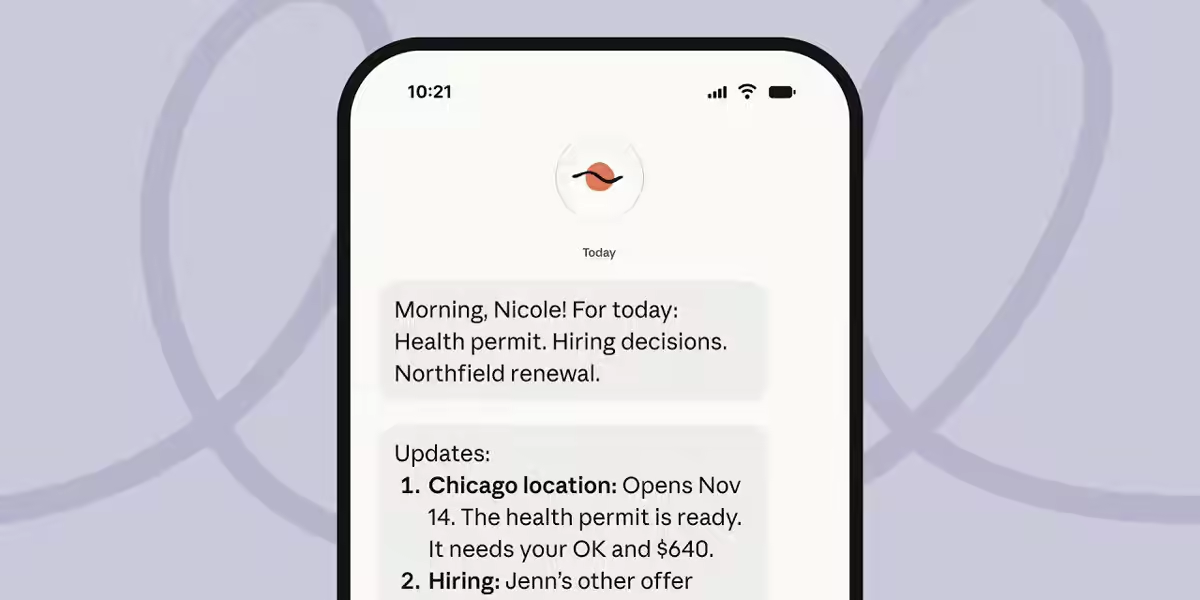
Most people meet AI agents through a chat window. You type a request, the agent works, it replies, and nothing happens until you type again. Anthropic's guide describes a different shape: agents that are stateful (they carry context across many sessions) and proactive (they act without someone supervising each step). Think of an assistant that triages your inbox overnight, chases a supplier on Thursday if they have not replied, and only messages you when something genuinely needs a decision.
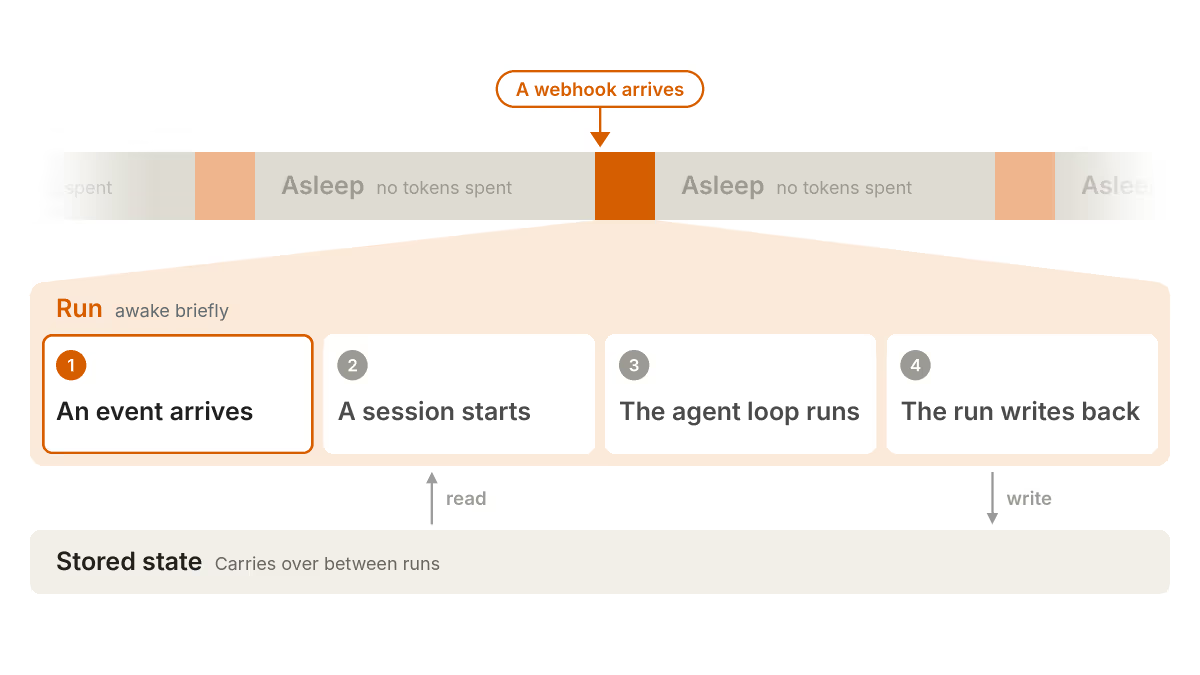
The guide's most useful correction is to the name itself. An always-on agent is not a model sitting in a loop burning tokens all day. It spends almost all of its time asleep, costing nothing. Something then wakes it: a webhook from another system, a timer it set earlier, a background job finishing, or a message from you. That starts a run. The run opens or resumes a session (the transcript of messages and tool calls), loads stored state, works through the agent loop, writes back what it learned, and ends. The cycle repeats indefinitely. In Anthropic's words, that is "what makes the agent feel like it's always on".
This framing matters for anyone building or buying. It tells you where the cost is (in runs, not in idle time), where the risk is (in what a run can touch while you are not watching), and where the engineering is (in the plumbing that decides when to wake up and what to remember).
Why Now?
Anthropic gives two reasons this pattern has become practical: models now show better judgement, and long-running tasks have become cheaper. Both are needed. An agent that works unattended has to decide for itself whether an email is urgent or whether a change in a spreadsheet matters. That is a judgement problem, not a reasoning-benchmark problem. And an agent that wakes dozens of times a day has to be cheap per run, which is where prompt caching and smaller models come in.
The timing also follows the products. In the past month alone we have covered Claude Duet, Anthropic's own always-on assistant, the Grok Bot 1.0 launch with Team Bots, OpenAI's cloud agents API, Gemini Spark and Meta's Muse agent. The guide reads like Anthropic writing down the architecture lessons behind that wave so that developers can build their own rather than rent someone else's.
The Five Building Blocks
The guide is organised around five primitives. None is exotic. Most are ideas that backend engineers have used for decades (queues, schedulers, idempotency keys, outbox tables) applied to an AI agent. That is the point: the hard part of an always-on agent is mostly ordinary systems engineering.
1. The Event Inbox
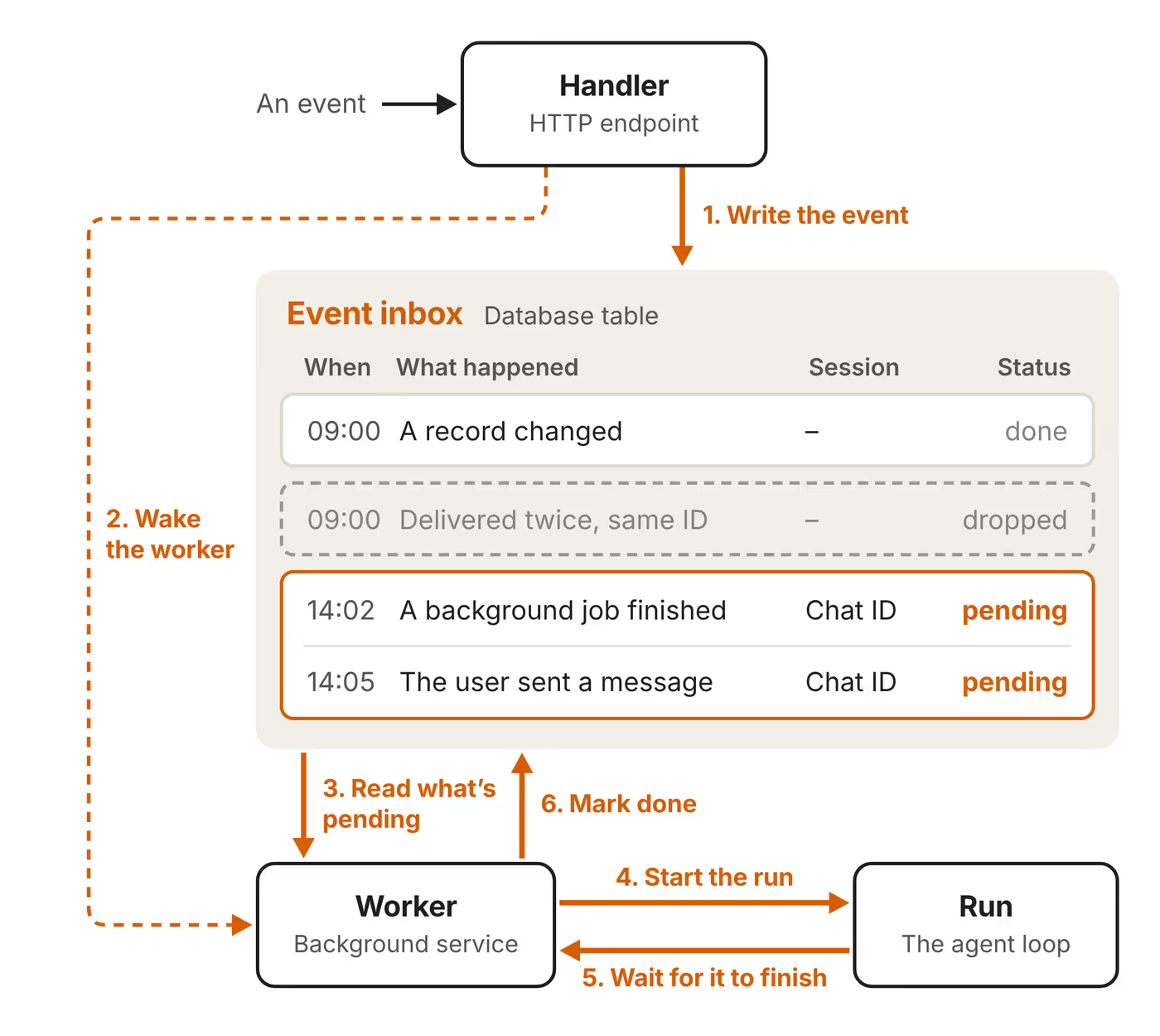
Everything starts with the inbox. It is a durable list of events, usually a database table, with three parts: an HTTP handler that receives events and writes them down, the table itself, and a background worker that reads pending events and starts runs. Events can come from webhooks, schedules, background jobs and the user.
Anthropic's rules for the inbox are worth copying exactly:
- Acknowledge quickly. The handler should write the event and return straight away. Slower checks, including screening for prompt injection, happen later inside the run.
- Deduplicate. Webhooks are often delivered twice. Events can be deduplicated using unique identifiers from the source, so the same event never triggers two runs.
- Make the inbox the source of truth. Each event has a status. If a worker crashes mid-run, a replacement worker can pick the same event up and retry it.
- One active worker per inbox. Two workers on the same inbox can duplicate or overwrite each other's work. Anthropic recommends one inbox per user, which you can split further if you need parallelism.
- Batch. If several events are pending, the worker can merge them into one run, so the agent replies once instead of three times.
2. Timers
An agent that only reacts is not proactive. Timers give it a sense of time. Anthropic separates two kinds:
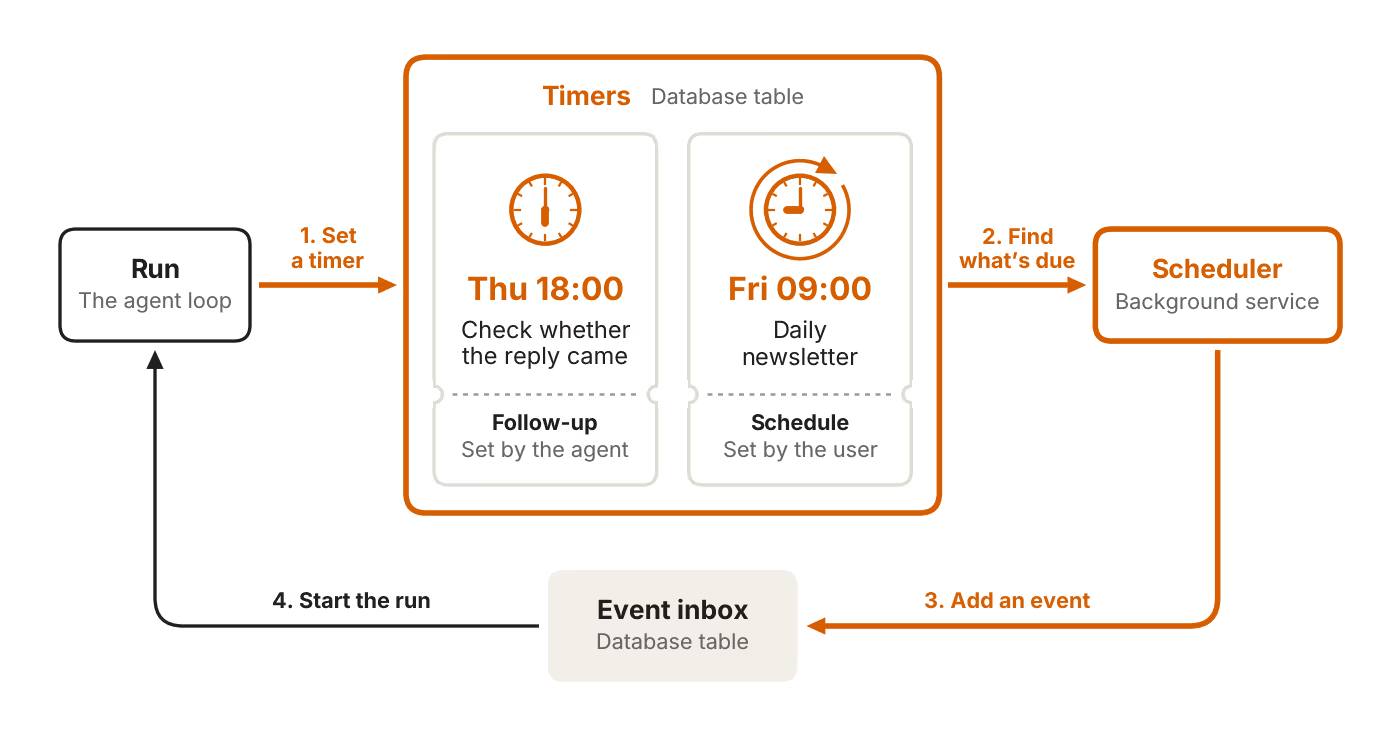
- Follow-ups are deadlines the agent sets for itself, such as "check on Thursday at 18:00 whether the reply came". Once it fires, it is marked done.
- Schedules are recurring tasks the user sets, such as a daily newsletter. They track their recurrence and get a new due time after each firing.
The design detail that matters is that timers do not start runs directly. They live in their own durable store, separate from the inbox. A scheduler polls that store at a fixed interval, and anything due becomes a new event in the inbox. That keeps one path into the agent. Every run, whatever woke it, goes through the same deduplication, batching and single-worker rules.
The guide does not discuss cancelling timers. In practice you will need it: if the supplier replies on Wednesday, Thursday's follow-up should either be cancelled or check the reply and do nothing. The simplest approach is the second one. Let the timer fire and have the run check its memory before acting.
3. Memory
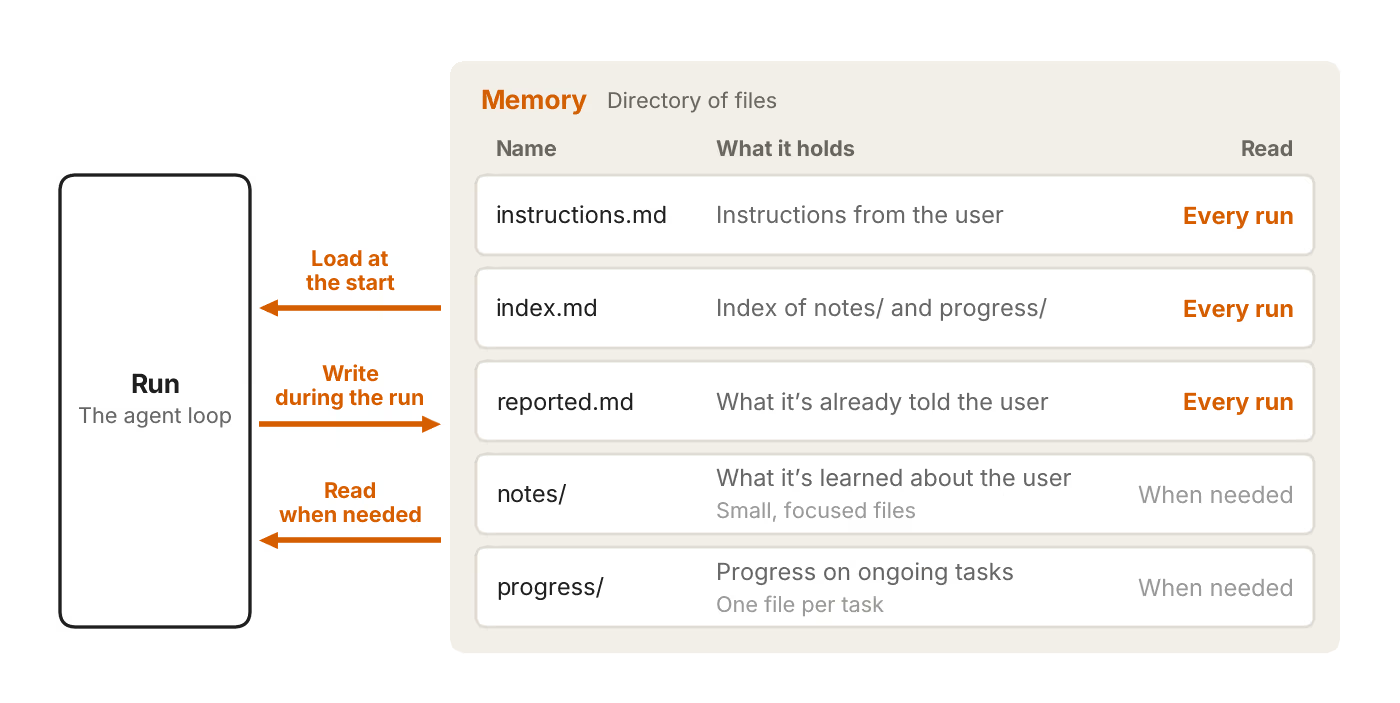
Because each run is short and the worker may be replaced at any time, memory has to live outside the worker. Anthropic models it as a directory of files mapped to durable storage such as a database or object store. This is the same file-based approach as the memory tool in Anthropic's Messages API and the auto memory in Claude Code.
The guiding rule is short and good: memory "should only hold what the agent can't look up again". If the information lives in your issue tracker or CRM, store a pointer to it, not a copy. Copies go stale; pointers do not.
The guide splits memory into four categories:
| Category | Example file | What it holds | When it is read |
|---|---|---|---|
| User instructions | instructions.md | Standing instructions from the user | Every run |
| Index | index.md | An index of the notes and progress folders | Every run |
| Past messages | reported.md | What the agent has already told the user, so it does not repeat itself | Every run |
| User notes | notes/ | Preferences, role and corrections, in small focused files | When needed |
| Task progress | progress/ | One file per ongoing task: what is done and what is left | When needed |
Two further ideas stand out. First, dreaming: a separate process that reviews past sessions, replaces outdated memories and finds patterns across runs. Anthropic's Managed Agents documentation lists dreaming as a limited research preview. Second, context hygiene. Each run loads the system prompt, tool definitions and memory before it reads a single event, so Anthropic says to keep that overhead lean and use prompt caching to cut its cost. Long sessions can be compacted or replaced with a new session, but "both approaches lose detail", so anything that must persist belongs in memory, not in the transcript.
4. Permissions
Anthropic is blunt that this is the highest-risk area. A run "holds the user's access and, by design, operates unattended". A chat agent that misreads an instruction wastes your time. An unattended agent that misreads one can email a client, delete a file or pay an invoice while you are asleep.
The guide recommends three layers:
- A credential proxy. Credentials never enter the agent's environment. A proxy outside it adds them to outgoing requests. If the agent is tricked into revealing secrets, it has none to reveal.
- Classifiers on risky actions. Anthropic points to Claude Code's auto mode, which "uses classifiers to review higher-risk actions and block the ones they identify as dangerous". The guide still says the most important decisions need a person.
- Deferred tool calls. A hook can defer a tool call. The run ends with the session saved mid-call, and the request goes to the user, possibly as an interactive card built with MCP Apps. Their answer arrives as a new inbox event and resumes the session. Meanwhile the worker is free to handle other events.
Deferred calls are the clever part. They turn "ask the human" from a blocking pause into just another event. The agent does not sit idle holding a connection open for hours while you are in meetings.
5. The Outbox
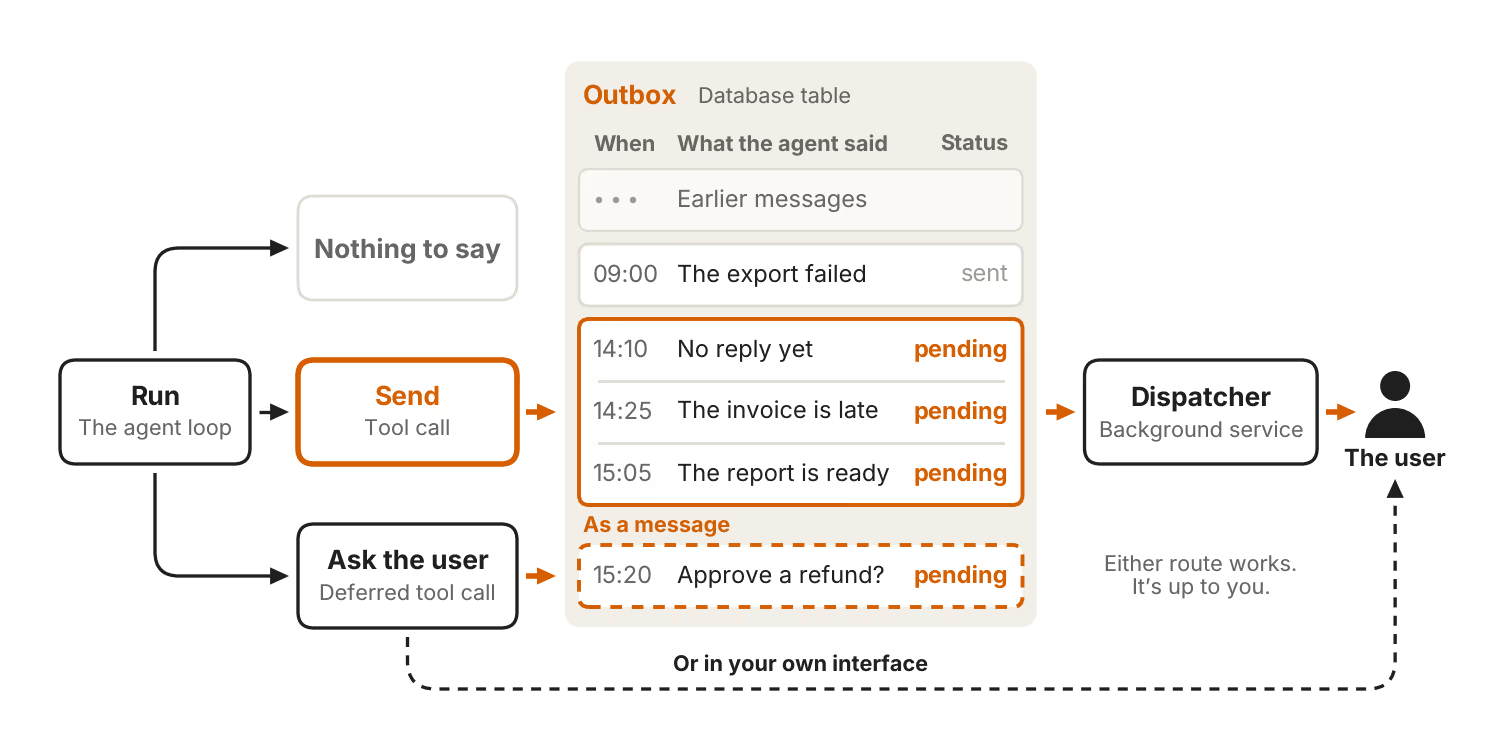
Because the work happens in the background, the user should not get a streamed transcript. They should get "the outcome and a few details". Every run ends in one of three ways: send a message, send nothing, or make a deferred call asking for input.
A formal outbox is a table of outgoing messages plus a dispatcher, a background service that reads pending messages, decides what to deliver and sends it. Anthropic says you only need this if you want pacing or error recovery. For many agents a simple "send" tool is enough.
The guide's closing advice lives here. Build evals to tune how much the agent says, because "an agent that sends too many becomes noisy". Then "start quiet and then earn more of the user's attention over time". Anyone who has switched off a too-chatty notification will recognise the wisdom.
How the Pieces Fit Together
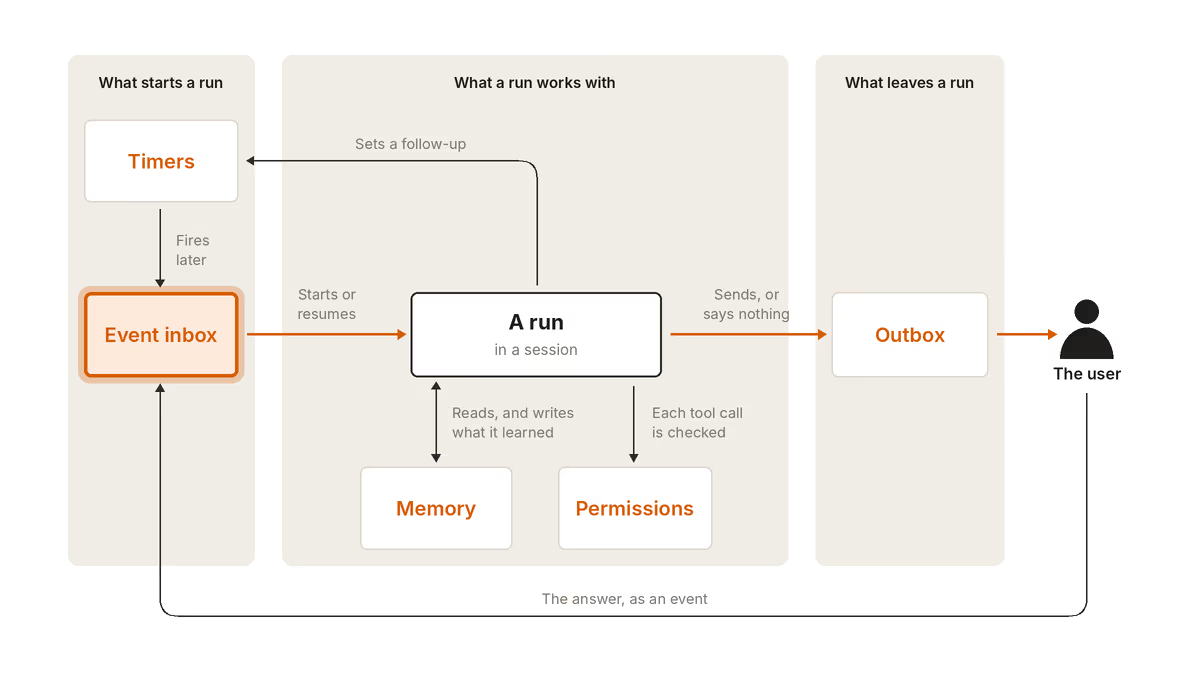
Put together, the architecture is a loop with one entrance and one exit. Events (from the outside world, from timers or from you) land in the inbox. The worker picks them up and starts or resumes a run in a session. The run reads and writes memory, and each tool call passes a permission check. The run can set a follow-up timer for later. When it finishes, it either sends something through the outbox or stays silent. When you reply, your answer becomes a new event in the inbox, and the cycle continues.
The diagram at the top of this page (from Anthropic's guide) shows this in three columns: what starts a run (timers and the inbox), what a run works with (memory and permissions), and what leaves a run (the outbox). If you remember one picture from the guide, make it that one.
The design has several properties that are easy to miss. There is only one way in, so every event gets the same deduplication and safety screening. Runs are short and stateless apart from memory, so a crash costs one retry, not a corrupted agent. And idle time is free, which makes it economical to have an agent that only needs to act a few times a week.
When an Event Arrives Mid-Run
A real agent will regularly receive a new event while it is still working. A user sends a correction, or a second webhook fires. Anthropic does not prescribe one answer. It lists three options: "push it to the next run, fold it into the current run, or interrupt and restart".
| Option | Best when | Risk |
|---|---|---|
| Push to the next run | The new event is unrelated or low priority | The current run may act on outdated information |
| Fold into the current run | The event adds context to the same task, such as a follow-up message | Harder to implement; the agent must notice new input mid-loop |
| Interrupt and restart | The event changes the task, such as "stop, do not send that" | Wasted work; side effects already taken are not undone |
The table is our summary, not Anthropic's. Our recommendation for a first build: default to the next run, and treat explicit user corrections as an interrupt. Claude Managed Agents already supports sending extra user events to steer a running session or interrupt it, so on that platform the fold-in option is not much extra work.
Worked Example: An Invoice Chaser
Anthropic's guide stays deliberately generic. Bart Slodyczka's video uses an invoice chaser to make it concrete, and Anthropic's own outbox diagram includes an "invoice is late" message. Here is how we would map the five pieces onto a chaser for a small UK business. This design is ours, built on the guide's pattern.
- Inbox: your accounting software sends a webhook when an invoice is issued, paid or becomes overdue. The handler stores each one using the invoice ID plus event type as the deduplication key.
- Timers: when an invoice is issued, the run sets a follow-up for the due date. A weekly schedule on Monday at 09:00 triggers a summary of everything outstanding.
- Memory:
instructions.mdholds your tone and escalation rules (polite reminder at 7 days late, firmer at 21, flag to you at 30).progress/holds one file per overdue invoice recording which reminders were sent. It stores the invoice ID, not the invoice, because the accounting system is the source of truth. - Permissions: the agent can read invoices and draft emails freely. Sending to a client is a deferred call for the first month, until you trust it. It never gets permission to change amounts or issue credit notes. Email credentials sit behind a proxy.
- Outbox: you get one Monday message, not one per invoice, plus an immediate message only when a client disputes an invoice or an invoice passes 30 days.
Notice how much of the value comes from the boring parts. Deduplication stops a client receiving two reminders because a webhook was retried. The progress file stops the agent sending the 7-day reminder again on day 8. The quiet outbox stops you muting it in week two.
Common Mistakes to Avoid
The guide implies its warnings rather than listing them. Combined with the mistakes section of Bart Slodyczka's walkthrough and our own experience testing agents, these are the ones to watch:
- Letting timers start runs directly. You lose deduplication and the single-worker guarantee, and two runs can collide.
- Running more than one worker per inbox. This is the classic cause of duplicate emails and overwritten memory.
- Copying data into memory. Store pointers. Copied CRM records will be wrong within a week.
- Bloated always-loaded memory. Every run pays for what loads every run. Keep the top-level files short and push detail into on-demand notes.
- Relying on the transcript as memory. Compaction loses detail. Anything important must be written to memory explicitly.
- Giving the agent raw credentials. Use a proxy, so a prompt-injected agent cannot leak your keys.
- Talking too much. The most common product failure. Start with a daily digest and add real-time alerts only for things the user has shown they care about.
- Skipping evals. Without them you cannot tell whether a prompt change made the agent better or just louder.
How to Tell If It Is Working
Anthropic's explicit measurement advice is about message volume: build evals so you can tune how often the agent speaks. That is a good start, but a background agent needs a slightly wider scorecard. We suggest tracking these from day one:
| Metric | What it tells you | How to collect it |
|---|---|---|
| Messages sent per user per day | Whether the agent is becoming noisy | Count outbox rows |
| Messages acted on | Whether what it sends is useful | Replies, clicks or approvals per message |
| Approval rate on deferred calls | Whether it proposes the right actions; a high rate suggests you can loosen permissions | Approved versus rejected deferred calls |
| Duplicate or repeated actions | Whether inbox and memory are working | Compare against reported.md and progress files |
| Cost per run | Whether memory and tools are too heavy | Token usage per run, cache hit rate |
| Failed or retried runs | Reliability of tools and integrations | Event status in the inbox |
The simplest test of all: after two weeks, would the user be annoyed if you switched it off? If not, it is either too quiet to be noticed or too noisy to be welcome.
Build or Buy: Tooling Options Compared
The guide is a pattern, not a product, and it never names a product to build on. Here is how the options map onto it as of 16/11/2026.
| Option | What you get | What you still build | Best for |
|---|---|---|---|
| Messages API or Claude Agent SDK | The model and an agent loop you control | All five primitives, sandbox and hosting | Teams wanting full control |
| Claude Managed Agents (beta) | Hosted agent loop, cloud or self-hosted sandbox, stateful sessions, steering and interrupts, scheduled deployments, prompt caching and compaction | Inbox, deduplication, timers beyond cron, outbox and approval UI | Developers who want the pattern without running sandboxes |
| Claude Duet | Anthropic's finished always-on assistant | Nothing; limited customisation | Individuals on Claude plans |
| Grok Bot | Hosted cloud computer, Team Bots, scheduled routines, approvals | Nothing; you configure Bots | Teams already on xAI or Cursor plans |
| Hermes Agent and OpenClaw | Open-source personal agents with memory, schedules and messaging | Hosting and security hardening | Tinkerers who want any model and self-hosting |
| Zapier or similar automation tools | Triggers, schedules and integrations | Memory and judgement live in the model step | Simple, well-defined workflows |
A practical note on Managed Agents. Anthropic's documentation says it is in beta, requires a beta header, and is not eligible for Zero Data Retention or HIPAA cover, except for the self-hosted version. Sessions are stateful and transcripts persist until you delete them. That fits the always-on pattern well, but check it against your data policy. If you are new to this area, our explainers on OpenClaw, Hermes Agent and Claude Cowork show the same ideas in finished products, and our agent economics analysis explains why per-run cost matters so much.
AI Advantage demonstrates Claude running scheduled tasks on its own, a simpler form of the timer primitive in Anthropic's guide.
Security and Prompt Injection
An always-on agent reads untrusted content constantly: emails from strangers, web pages, documents, other agents' output. Each one is a chance for prompt injection, where hidden instructions try to make the agent act against you. Anthropic's guide places injection screening inside the run rather than in the inbox handler, which keeps the handler fast.
Memory adds a second risk. If an injected instruction gets written into memory, it can persist and affect every future run. A sensible mitigation is to give the agent read-only access to reference material it does not need to edit, and to review what it writes to memory. Recent incidents show the stakes: we have covered hallusquatting attacks on agents, the Cathedral red-team breach and the Hugging Face agent breach.
Our checklist for a first deployment:
- Give the agent its own accounts with the narrowest scopes possible, not your personal login.
- Put every credential behind a proxy and rotate them.
- Start read-only. Add write actions one at a time, each behind a deferred approval at first.
- Never let content from an email or web page write directly to
instructions.md. - Log every tool call with the event that triggered it, so you can trace any action back.
- Review
notes/regularly, or let dreaming do it and review its changes.
UK GDPR and Compliance
The guide is written for a global audience and does not mention data protection. For UK organisations, an always-on agent raises the usual questions in sharper form, because it processes personal data continuously and without a person in the loop. This is general guidance, not legal advice:
- Lawful basis and transparency. If the agent reads customer or staff emails, your privacy notice should cover AI-assisted processing.
- Automated decisions. UK GDPR restricts solely automated decisions with legal or similarly significant effects. Keep a person on decisions such as refusing credit or escalating a debt to collection, which deferred tool calls make easy.
- Data minimisation. Anthropic's "store pointers, not copies" rule helps here. Less personal data in memory means less to secure and delete.
- Retention. Sessions and memory persist by design. Set retention periods and make sure deletion requests reach the agent's memory store and any hosted session transcripts.
- International transfers. Check where your provider stores sessions and memory, and whether your data processing agreement covers it.
- DPIA. A background agent with access to email and customer systems is a good candidate for a data protection impact assessment before rollout.
How to Start This Week
You do not need all five pieces on day one. A sensible order is:
- Pick one narrow job with a clear trigger and a clear outcome: a morning digest, an invoice chaser or a support-ticket triager.
- Build the inbox first, with deduplication and one worker. It is the foundation for everything else.
- Add three memory files: instructions, an index and a list of what you have already reported.
- Use a simple send tool, not a full outbox. Send at most one digest a day.
- Make every write action a deferred approval. Loosen only when the approval rate shows it is safe.
- Add timers once the agent needs to follow up on its own.
- Write evals for message volume and correctness before you change the prompt.
If you would rather not run infrastructure, try the pattern in a product first. Claude Cowork, Claude Duet or Grok Bot will show you what a well-behaved background agent feels like before you build your own. For the models to run it on, see our Claude Opus 5.5 review and the Fable 5.2 and Mythos 5.2 guide.
The Bottom Line
Anthropic's guide is valuable because it takes the mystery out of always-on agents. Strip away the marketing and Claude Duet, Grok Bot and the rest are an agent loop wrapped in five well-understood pieces: an inbox, timers, memory, permissions and an outbox. Most of the hard engineering is in idempotency, scheduling and access control, not in the model.
The guide has gaps. It names no business use cases, gives no cost figures, and leaves retries, rate limits and timer cancellation to you. But its two big ideas will save most builders from the two most common failures. Treat permissions as the highest risk, because the agent acts while you sleep. And start quiet, because an agent people mute is an agent that has failed. If you are building a background agent in 2026, read the original, then build the inbox first.
Last updated: 16/11/2026.
Sources
- Anthropic (William Hu), "Building always-on agents", claude.com, 13/11/2026: claude.com/resources/articles/building-always-on-agents. All diagrams on this page are from this guide.
- Anthropic, Claude Managed Agents overview (documentation): platform.claude.com/docs/en/managed-agents/overview
- Bart Slodyczka, "Anthropic Just Explained How to Build Always-On Agents (Master It In 10 Minutes)", YouTube, 15/11/2026.
- AI Advantage, "Claude can now run tasks on its own! (Claude Routines)", YouTube.
- UK Information Commissioner's Office, guidance on automated decision-making and profiling: ico.org.uk