
 AI Tools Review Editorial Team
Quick Answer:
On 10/11/2026 Anthropic launched Claude Sheets and Claude Whiteboards (beta), made Claude Dashboards generally available as Claude Data, and upgraded interactive connectors so apps such as Adobe, Atlassian, Box, HubSpot and Notion open as full tools inside Claude. Claude Meetings, which puts Claude into a video call, is next. Sheets, Whiteboards and Data are on all paid plans; Team plans get them switched on by default, Enterprise admins must enable Sheets and Whiteboards.
For three years the pattern with AI assistants has been the same: ask Claude for something, then copy the answer into the tool where the real work happens. This week Anthropic tried to end that. Spreadsheets, whiteboards and dashboards now live inside Claude, your team can edit them together, and the apps you already use can open in a panel beside the chat with Claude working in them. Here is what each piece does, who gets it, and where the limits are.
This guide is built from Anthropic's three launch posts, its help centre documentation on interactive connectors, and reporting from TechCrunch and Engadget. It follows our October guide to Claude Dashboards and Motion, which this launch renames and extends, and complements our complete Claude connectors directory. Where Anthropic and the press differ, as they do on Claude Meetings, we say so.
Julian Goldie walks through Sheets, Whiteboards and Data, the Dashboards rename, who gets access and the admin setting that decides whether they appear.
Executive Summary
- Claude Sheets (beta): spreadsheets with tabs, formulas, formatting and drop-downs that Claude builds from a prompt and edits cell by cell, highlighting each change. Exports to .xlsx and CSV.
- Claude Whiteboards (beta): a shared board for team brainstorming. Claude groups notes by theme, drafts action items per person, and can turn the board into a doc or deck, or send it to Lucid, Miro or Vani by Zoho.
- Claude Data (generally available): the renamed Claude Dashboards. Adds certified metric definitions and live sharing (both beta), data stories, narrated videos, design systems, caching and tracked changes.
- Interactive connectors, upgraded: supported apps now open beside the chat or full screen, signed in to your own account, and Claude can edit inside them with your approval.
- Claude Meetings (coming soon / beta): Claude joins a video call as a visible participant, takes notes, builds a whiteboard and updates documents live. Google Meet first.
- Admin defaults: Team plans have Sheets, Whiteboards and Data on. Enterprise has Sheets and Whiteboards off, and Data switches on by default on 19/11/2026.

The Big Picture: Claude Becomes an Office Suite
Anthropic's framing is explicit. "We've seen Claude Code change how developers work," the main announcement begins, and the goal is "to bring that magic to every team". In Claude Code, the context Claude needs sits in the codebase. For everyone else, Anthropic notes, "context sprawls across emails, apps, and drives". The launch attacks both halves of that problem: new places to create work inside Claude, and deeper hooks into the apps where work already lives.
The new artifact types join Claude's existing ability to create documents, slide decks and designs, and Claude Motion (beta), which turns content into short animations. Because Claude carries context across all of them, Anthropic's pitch is that "an idea can carry over from a whiteboard to a spreadsheet to a dashboard, without the need to reiterate the details".
TechCrunch puts the competitive context bluntly: the launch comes "just a few weeks after OpenAI unveiled a series of workplace tools", as both companies "compete to turn their products into office suites of sorts to take on Microsoft and Google". Engadget's headline went further: "Anthropic takes on Google and Microsoft with Claude Sheets". Meta is in the race too, with its Muse agent building mini-apps on the fly. Our ChatGPT Work explainer covers OpenAI's version.
Claude Sheets
Claude Sheets is a spreadsheet that Claude and your team build together. You can start with a prompt as simple as "a campaign tracker" or "a hiring budget", and Claude generates a working sheet with multiple tabs, formulas, formatting and drop-down menus.
What it does well
- Edits in the cells. Claude makes changes directly and "outlin[es] each new edit so you can track changes". That visible diff is the key trust feature; you can see exactly what the AI altered.
- Real collaboration. Share a sheet and everyone with edit access can work in it alongside Claude.
- Exits. Export to .xlsx or CSV, move to Claude for Excel, or continue in partner tools: Airtable, Asana, monday.com and Smartsheet. Engadget adds that Anthropic's Google Workspace plugin is supported.
What it is not (yet)
Anthropic is candid: "For now, sheets have simple spreadsheet functionality, but we are working on adding more. When you need the full functionality of Excel, you can export your file." Do not expect pivot tables, macros or the depth of a financial model in Excel. Sheets is for trackers, budgets, simple models and shared lists, the 80% of spreadsheet use that rarely touches advanced features. Finance teams who need more should look at Claude for Finance and Claude for Excel.
A practical UK example
A small marketing agency could ask Claude Sheets for a monthly client retainer tracker in pounds: one tab per client, hours logged against a budget, a VAT column at 20%, a drop-down for status and conditional formatting when hours exceed 90% of the retainer. That is a five-minute job in Sheets that would take most people half an hour to build by hand, and the team can then update it together without re-prompting.
Claude Whiteboards
Whiteboards fixes a specific annoyance. "Many people use Claude as a thought partner," Anthropic writes, "but brainstorming with it has typically meant copy-pasting the results elsewhere." Now the brainstorm can happen on a shared board inside Claude.
- Talk it through: describe a messy plan out loud and Claude turns it into a board with a timeline, owners and dates.
- Run a retro: everyone adds notes, Claude groups them by theme and drafts action items for each person.
- Focus on a region: drag a box around any part of the board and ask Claude about just that section.
- Move on: turn the board into a doc or deck, or bring it into Lucid, Miro or Vani by Zoho.
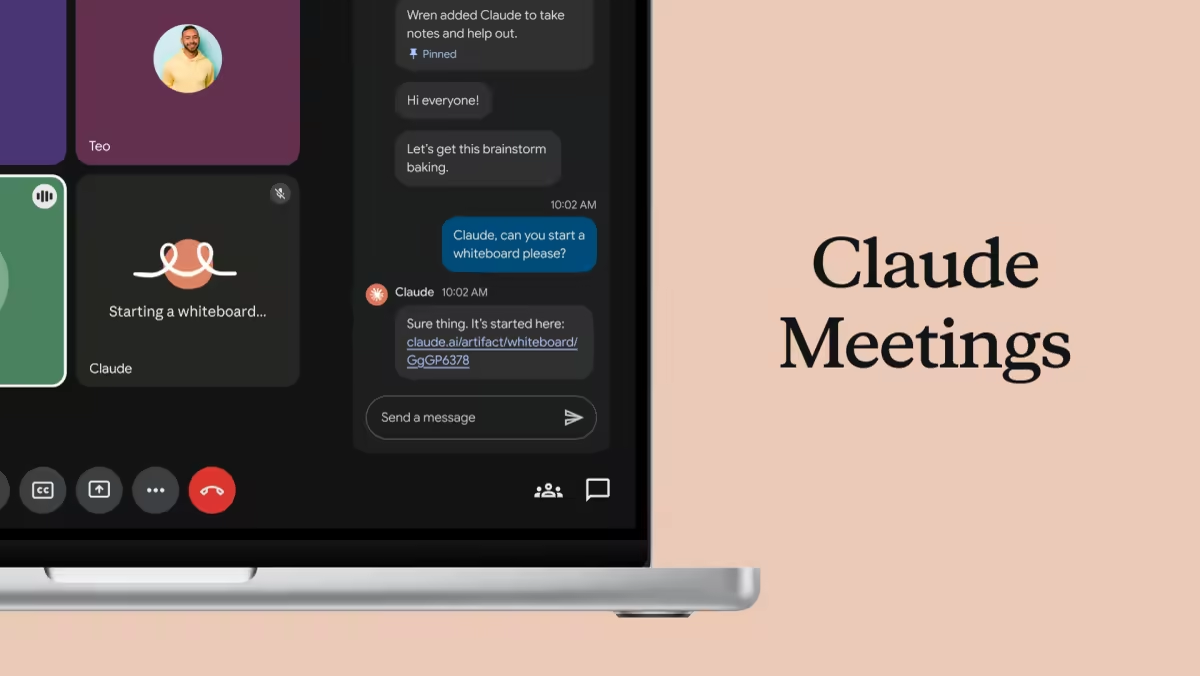
TechCrunch notes Whiteboards also work inside Claude Meetings, so the board builds while people talk. Anthropic's own Meetings artwork, below, shows exactly that: a participant asks Claude in the meeting chat to start a whiteboard, and Claude replies with a link to a new board artifact.
Claude Data (formerly Dashboards)
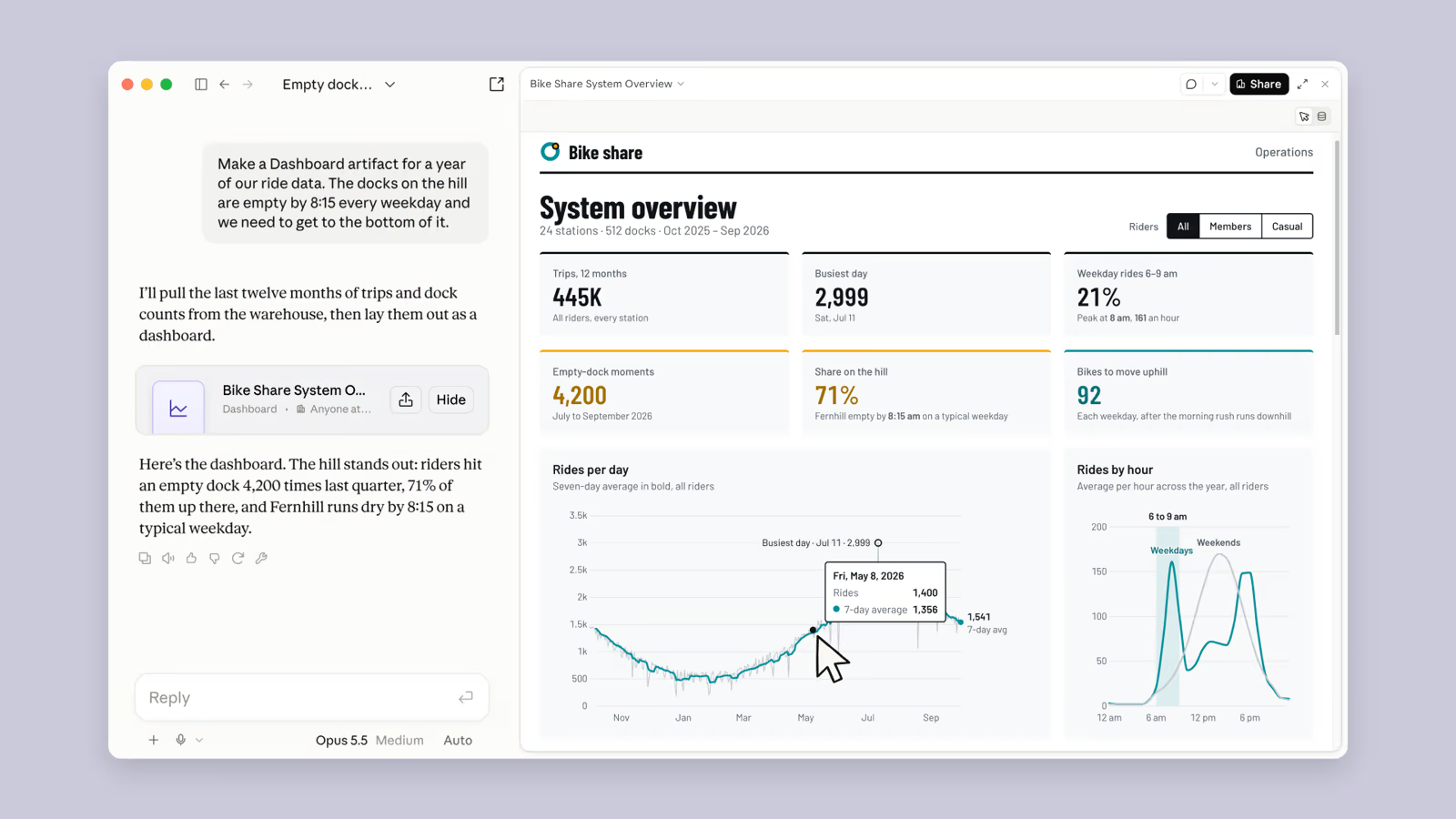
Claude Dashboards launched in beta in October, letting teams ask questions of company data in tools such as Amazon Redshift, BigQuery and ClickHouse. We covered that launch in detail in our Dashboards and Motion beta guide. It is now generally available under a new name, Claude Data, because, in Anthropic's words, "the way companies use their data is broader than dashboards".
| New in Claude Data | What it does | Status |
|---|---|---|
| Certified definitions | Data teams certify the queries everyone should use; charts built on them carry a "certified" badge | Beta |
| Data stories and narrated videos | Claude drafts written stories or narrated videos from your metrics for you to review before sharing | Available |
| Live sharing | Colleagues see current numbers in a shared dashboard even without access to the underlying connectors; they cannot run other queries with your access | Beta |
| Design systems | Dashboards match your organisation's look and feel | Available |
| Caching | Dashboards no longer reload fully each time; refresh cadence set per dashboard | Available |
| Tracked changes | See who edited what and roll back to any version | Available |
Certified definitions solve the oldest problem in self-service analytics: three people building three dashboards with three different definitions of "active customer". Letting the data team lock the canonical query, and badging every chart built on it, is the right design. Live sharing is the other quietly important feature: it means a finance director can share a current revenue dashboard with the board without giving anyone warehouse credentials.
Claude Data needs a data connector such as a warehouse or CRM. Anthropic lists Amplitude, Mixpanel, Omni, PostHog and Sigma as partners, and the main announcement mentions Snowflake and Salesforce.
Claude Meetings
Claude Meetings is where reporting diverges. Anthropic's own posts say it is "coming soon". TechCrunch reports it "is launching in beta on Team and Enterprise plans" and works with Google Meet at launch, and Engadget also describes it as available to Team and Enterprise customers. Check what your own account shows.
What it does is consistent across sources. You add Claude to a call as a visible participant. As people talk, it can draft the plan being discussed, map a timeline on a whiteboard, answer questions in the meeting chat, and pull information from connected apps, such as last year's figures. Afterwards, notes, action items and anything Claude created are available in claude.ai.
Privacy guardrails
Anthropic has built in sensible defaults. Claude identifies itself as a participant and posts a notice in the meeting chat. It "won't join a call with outside guests unless an admin allows it, and it leaves if one joins anyway". For UK organisations, that matters under UK GDPR: recording and processing a meeting with external parties without clear notice is the kind of thing that creates complaints. Even with these defaults, tell participants at the start and check your own data-protection policy. If you are comparing options, see our explainer on ChatGPT's meetings record mode.
Julian Goldie walks through Anthropic's Adobe, Confluence and Box demos of full-app interactive connectors and how to turn them on.
Interactive Connectors: Your Apps Inside Claude
Interactive connectors are not new. Anthropic launched them earlier in 2026 as small live views of tools in the conversation, such as an Asana board you could tick off inline. What changed on 10/11/2026 is scale: where a connector supports it, you can now open the whole tool beside your conversation or full screen.
- Claude works in your open tool. Ask it to change a page, row or file and approve its actions the same way you approve any connector action. Changes appear live.
- The full app, signed in as you. For Confluence or Notion that means the real editor, not a preview.
- Open without prompting. Launch a connected tool directly from Claude's navigation.
- Pin favourites. Pin tools to the sidebar and the + menu. Pins are saved per browser, so a pin on the web will not appear in Claude Desktop.
Which apps work today
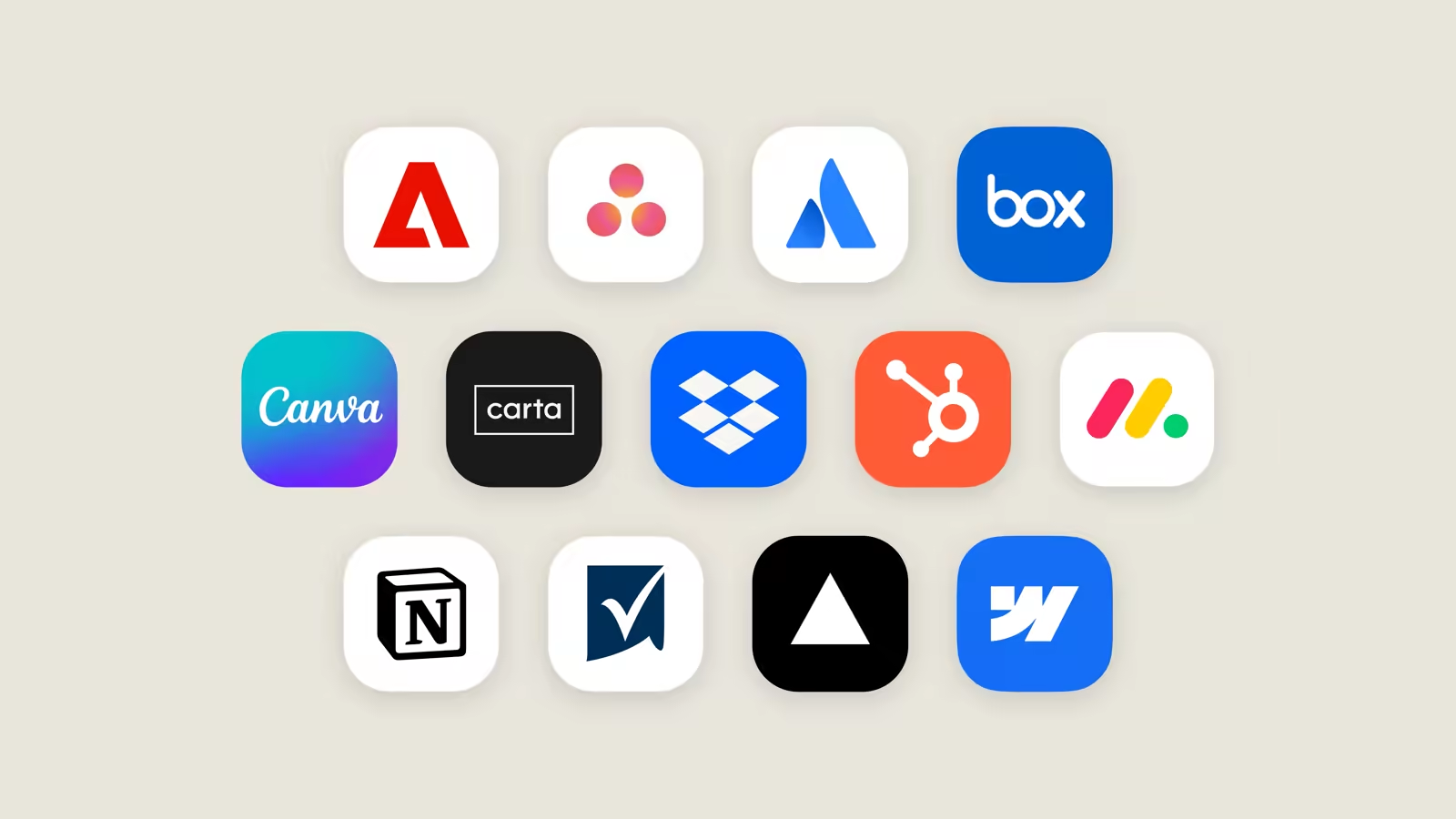
Anthropic says it is starting "with a small group of tools from our directory, including Asana, Canva, Carta, Dropbox, monday.com, Smartsheet, Vercel, and Webflow", and gives worked examples for five more:
| App | What Claude can do inside it |
|---|---|
| Adobe | Retouch, edit and add effects to photos; highlight, edit and redact PDFs |
| Atlassian (Confluence) | Open a page beside the chat, write and edit, review changes live |
| Box | Revise a file and compare versions side by side before keeping changes |
| HubSpot | Prioritise pipeline tasks and follow-ups, then act on them |
| Notion | Create a doc or database and build it as you chat |
Figma, Harvey and Shopify are building integrations. Separately, plugins from Salesforce (beta), NetSuite and Workday (beta) arrive with built-in skills for sales call prep, financial analysis and HR tasks. Claude Marketplace now lists more than 9,000 connectors and plugins, including community-built ones. For individual tools see our pages on Notion AI and Canva AI.
The rollout is on the web and Claude Desktop, on all plans, as part of the "new Claude experience" that brings chat and Cowork together. The help centre notes the side panel and full-site views are not on Claude Mobile yet. Our Cowork browser guide explains the new experience.
Under the Hood: MCP Apps
Interactive connectors run on MCP Apps, the open extension to the Model Context Protocol that lets an MCP server bring its own interface into an AI application. Anthropic stresses portability: "An MCP App you build isn't limited to Claude and can run in any AI application that supports the extension."
Until now, MCP Apps in Claude mostly appeared as inline views. Claude now supports more of the extension, including app tools and embedded sites, so a developer's full app can run inside Claude. Developer support is in public preview.
The help centre describes three presentation modes: inline cards for quick confirmations, a side panel that stays open as you chat, and full screen for complex work, with the conversation input still available. When no connector interface fits, Claude falls back to generating its own custom visuals.
For developers this is the most strategically important part of the launch. If MCP Apps becomes a de facto standard, a SaaS company can build one embedded interface and have it appear in Claude and any other host that adopts the extension. Building an interactive connector for the Claude directory carries additional design, security and testing requirements.
Plans, Rollout and Admin Settings
| Feature | Status | Plans | Default |
|---|---|---|---|
| Claude Sheets | Beta | All paid plans | On (Team); off (Enterprise) |
| Claude Whiteboards | Beta | All paid plans | On (Team); off (Enterprise) |
| Claude Data | GA (certified queries, live sharing in beta) | All paid plans; needs a data connector | On (Team); on from 19/11/2026 (Enterprise) |
| Full-app interactive connectors | Rolling out | All plans, web and desktop, new Claude experience | On where connector tools are allowed |
| Claude Meetings | Coming soon (Anthropic) / beta (press) | Team and Enterprise | External guests blocked unless an admin allows |
| Claude auto-connect | Beta | Eligible Team and Enterprise | Admin one-time set-up |
The artifact toggles live in Organization settings > Artifacts. Interactive connector tool calls can be disabled separately in Organization settings > Connectors, without disabling the connector's text-based tools. If an Enterprise team reports that Sheets "isn't there", this is almost always why, a point Julian Goldie's video makes too.
Sheets, Whiteboards and Data work on web, desktop and mobile. Anthropic does not list a separate price; they are included in paid plans. For plan pricing in pounds see our Claude pricing guide.
Security and Control
Giving an AI write access to Confluence, HubSpot and your file store raises obvious questions. Anthropic's answers:
- Existing permissions: Claude works within the permissions of each connected tool, and admins can restrict a connector, for example allowing Claude to read Slack but not send messages.
- Approval: actions in an open tool are approved the same way as any connector action.
- Sandboxing: in-chat views run in sandboxed iframes with strict Content Security Policies. Communication uses auditable JSON-RPC, and servers must predeclare external domains.
- No purchases: transactions through a connector's in-chat views are not supported.
- Enterprise controls: encryption in transit and at rest, audit logs and a Compliance API that works with more than 100 security tools including Splunk and CrowdStrike, and per-product and per-connector access rules with granular spend limits.
- Isolated sessions: in the new Claude experience on Enterprise, each cloud session runs in its own isolated virtual machine, with connector credentials kept outside it.
The residual risk is prompt injection. A malicious instruction hidden in a Confluence page or shared file could try to steer Claude while it has edit rights. Keep approval prompts on for write actions, and be cautious about connecting tools that contain content from outside your organisation.
What Early Customers Report
Anthropic's announcement includes customer examples. They are vendor-selected, but the specific numbers are worth noting:
- Anthropic legal: built a Slack-based review tool that draws redlines from the team's playbook, cutting marketing reviews from three days to 24 hours.
- Gusto: one commercial legal team member built a tool in a few hours that turns negotiated terms into signature-ready contracts; turnaround went from over a week to hours.
- Advantage Solutions: its FP&A team cut about 10 hours of slides, commentary and validation per forecast cycle to under 30 minutes.
- Datadog: product managers move from idea to brief, PRD and testable prototype faster.
- HubSpot users: live dashboards pull from HubSpot ahead of calls, and follow-up emails are drafted within 30 minutes of a call ending.
The common thread is that none of these teams writes code. That is the real story of this launch: Anthropic wants non-technical experts to build their own tools the way developers do in Claude Code.
Limitations
- Sheets is basic. Anthropic says so. Heavy modelling still belongs in Excel.
- Two of the three are beta. Expect changes and occasional rough edges in Sheets and Whiteboards.
- Few full-app connectors. The list is short at launch, and each developer chooses what its connector supports.
- Not on mobile. Full-app views and pinning are web and desktop only for now.
- Meetings is Google Meet first. Teams and Zoom users wait.
- Requires the new Claude experience. If your account or organisation has not been moved over, you will not see the connector changes.
- Data needs a connector. No warehouse or CRM, no Claude Data.
How It Compares with ChatGPT, Gemini and Copilot
Every major assistant is converging on the same idea: the chat window becomes the place where documents, data and apps meet. The approaches differ.
| Assistant | Approach | Read more |
|---|---|---|
| Claude | Native artifacts (Sheets, Whiteboards, Data) plus third-party apps embedded via MCP Apps | This guide |
| ChatGPT | Workplace tools for visualising company data and building presentations, launched weeks earlier | ChatGPT Work |
| Gemini | Agentic features inside the existing Workspace apps (Docs, Sheets, Gmail) | Gemini in Workspace |
| Microsoft Copilot | AI inside Office apps, plus an always-on agent | Copilot Autopilot |
Google and Microsoft bring AI to the office suite; Anthropic is bringing the office suite to the AI. Claude's advantage is that it is neutral: it can open Notion, Confluence and Box side by side. Its disadvantage is depth, since Sheets will not match Excel or Google Sheets for some time. On the model side, the same week saw Google make Gemini 4 Carbon generally available, pitched heavily at spreadsheet and report generation.
Who Should Use It
- Small teams on Claude Team: everything is switched on. Try Whiteboards for your next retro and Sheets for a shared tracker this week.
- Enterprise admins: decide before 19/11/2026 whether Claude Data should switch on by default, and pilot Sheets and Whiteboards with one department first.
- Data teams: certified definitions and live sharing are the reason to look at Claude Data now.
- Heavy Confluence, Notion or Box users: full-app connectors remove most of the copy-paste between Claude and your knowledge base.
- SaaS developers: build an MCP App once to appear in Claude and other compatible hosts.
- Not yet for: complex spreadsheet modelling, Teams or Zoom meeting capture, or mobile-first workflows.
The Bottom Line
This is Anthropic's most significant product launch for non-developers this year. Individually, Sheets and Whiteboards are modest betas. Together with Claude Data, Meetings and full-app connectors, they change where work happens: you no longer have to leave Claude to finish what Claude started, and you can bring your other apps into the same window.
The shrewdest part is MCP Apps. By building on an open extension rather than a proprietary plug-in system, Anthropic makes it cheap for every SaaS company to show up in Claude. If that takes hold, the question for office workers will stop being which suite to use and become which assistant to open first. Start small, keep approval prompts on, and check your admin settings.
Sources
- Anthropic: More ways to work with Claude (10/11/2026).
- Anthropic: Introducing Claude Whiteboards, Claude Sheets, and Claude Data.
- Anthropic: Your apps can now open in Claude.
- Claude Help Center: Use interactive connectors in Claude.
- TechCrunch: Anthropic launches Claude Meetings.
- Engadget: Anthropic takes on Google and Microsoft with Claude Sheets.
- Creator coverage: Julian Goldie (three new tools), Julian Goldie (apps inside Claude), Julian Goldie (six new features) and AI Revolution.
- Images: Anthropic announcement artwork and partner graphic, and Anthropic's Claude Meetings image as published by TechCrunch, compressed to AVIF.
Last updated: 12/11/2026. Feature availability varies by plan and rollout; we will update this guide when Claude Meetings becomes broadly available.
Get the free guide: Claude vs ChatGPT, Gemini & Grok
A 20-page playbook covering everything you need to choose and use the big four AI models in 2026, full cost and feature comparisons, what each is best (and worst) at, and how-tos for images, vectors, building a website, Claude Code and more.