 AI Tools Review Editorial Team
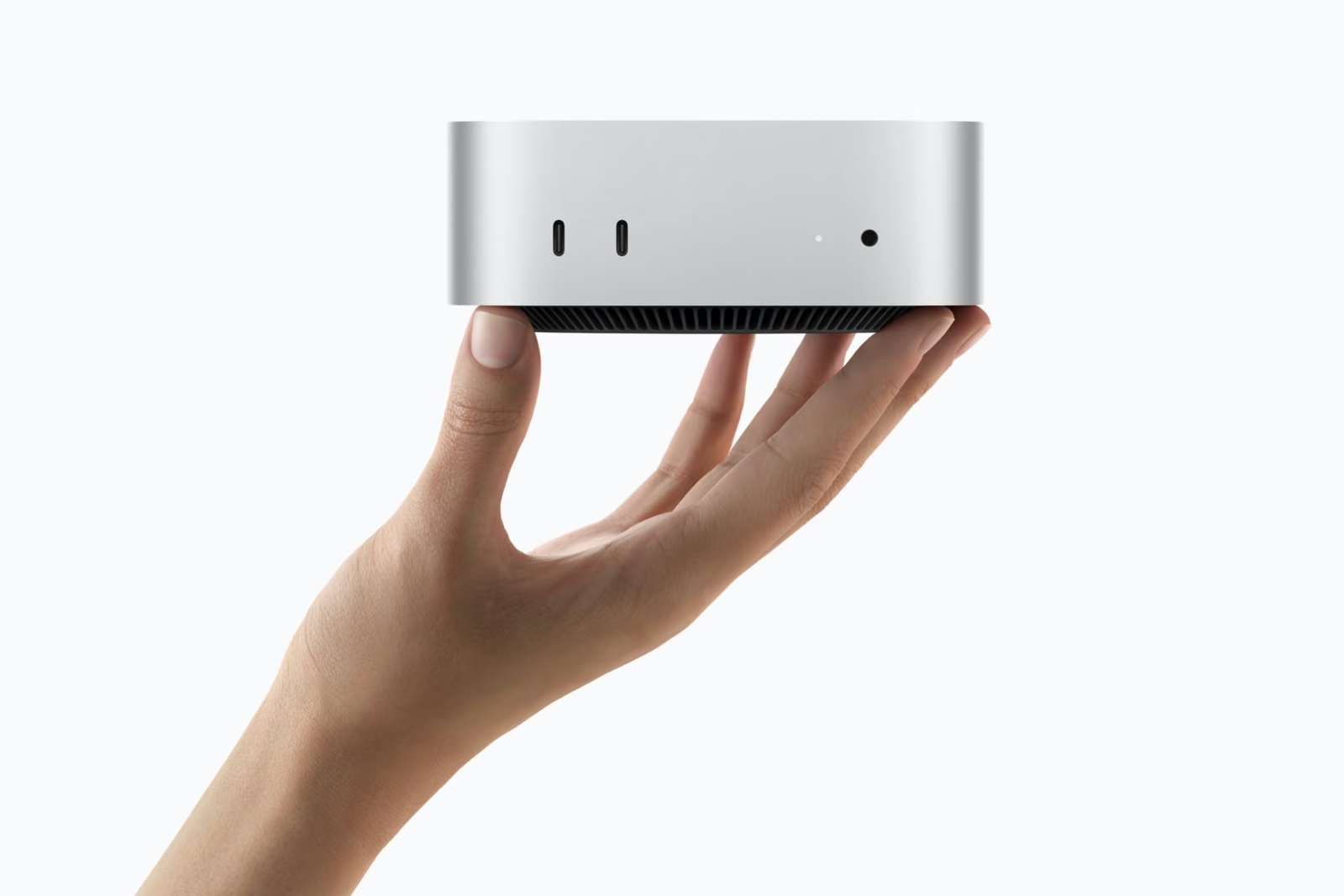
Apple launched the M6 Mac mini on 25/08/2026 and put it on sale on 22/09/2026, pitching it explicitly as "an always-on agentic device". That framing matters, because the Mac mini has quietly become the default box for people running OpenClaw, Hermes Agent and local LLMs at home. The question most buyers are now asking is simple: is the base 16GB model enough, or do you need to pay for 24GB?
This guide answers that with arithmetic rather than vibes. It separates what Apple has officially confirmed from what reviewers have measured, walks through the memory maths for quantised models, lists which real, downloadable open models fit in each configuration, and explains when renting a model in the cloud is simply the better deal.
Sourcing note: specifications, bandwidth figures, performance claims and base prices below come from Apple's own Newsroom announcements and Apple UK tech specs and store pages, checked on 29/09/2026. Tokens-per-second numbers come from named independent reviewers and are labelled as such. Model sizes come from the actual files on Hugging Face. Where we estimate something ourselves, we say so.
Bart Slodyczka tests both the 16GB and 24GB M6 Mac minis against his M4, explaining prefill versus decode and why unified memory decides how much context you can run.
Executive Summary
The M6 Mac mini is Apple's entry desktop with a 12-core CPU, 12-core GPU with Neural Accelerators in every core, a dual 16-core Neural Engine, and 16GB, 24GB or 32GB of unified memory. For local AI, the memory you choose at checkout is the single most important decision, because it is soldered in and cannot be upgraded later.
- Price (Apple UK): from £899 for the M6 (16GB/256GB); the M5 Pro Mac mini starts at £1,699. UK retailers list the standard 24GB/512GB M6 at £1,299.
- Bandwidth (Apple UK specs): 153GB/s on 16GB models, 170GB/s when configured with 24GB or 32GB, and 307GB/s on the M5 Pro.
- Apple's AI claim: up to 4.8x faster LLM prompt processing in LM Studio than the M4 Mac mini, and up to 4x faster AI performance overall. Apple has not published token-generation speeds.
- What fits in 16GB: 4B-12B models at 4-bit with a useful context window; 20B+ models only at aggressive quantisation, if at all.
- What fits in 24GB: 20B-27B dense models at 3-4 bit with modest context, and efficient mixture-of-experts models like Gemma 4 26B-A4B.
- What fits in 32GB: Qwen3.8-27B at 4-5 bit with long context, Qwen3.6-35B-A3B at 4-bit, and the realistic floor for Perplexity's Lily engine.
- Cloud vs local: for occasional chat, APIs for the same open models are far cheaper per token. Local wins for privacy, offline work and 24/7 agents.
What Did Apple Actually Announce?
The M6 Mac mini is Apple's first Mac mini built on its all-new M6 chip, announced in an Apple Newsroom release on 25/08/2026 alongside an M5 Pro version, with pre-orders the same day and availability from 22/09/2026. Everything in the table below is taken from Apple's UK Newsroom announcement and the Apple UK Mac mini tech specs page.
| Spec (Apple-confirmed) | M6, 16GB | M6, 24GB / 32GB | M5 Pro |
|---|---|---|---|
| CPU | 12-core (2 super, 4 performance, 6 efficiency) | 12-core (same) | 15-core, or 18-core option |
| GPU | 12-core, Neural Accelerators in each core | 12-core (same) | 16-core, or 20-core option |
| Neural Engine | Dual 16-core | Dual 16-core | 16-core |
| Memory bandwidth | 153GB/s | 170GB/s | 307GB/s |
| Unified memory options | 16GB | 24GB or 32GB | 24GB, 48GB or 64GB |
| Storage options | 256GB to 2TB | 256GB to 2TB | 512GB to 8TB |
| Rear ports | 3x Thunderbolt 4, HDMI, Ethernet | 3x Thunderbolt 4, HDMI, Ethernet | 3x Thunderbolt 5, HDMI, Ethernet |
| Networking | Wi-Fi 7, Bluetooth 6, 2.5Gb Ethernet as standard (10Gb option) | ||
Source: Apple UK Newsroom (25/08/2026) and Apple UK Mac mini tech specs, checked 29/09/2026. Apple's spec page lists 16GB models as "Configurable to: 24GB or 32GB (170GB/s memory bandwidth)".
On AI specifically, Apple claims the M6 Mac mini delivers up to 4x faster AI performance, 2x faster graphics and storage, and 40% faster CPU performance than the M4 model, plus up to 4.8x faster LLM prompt processing in LM Studio than M4 (and 13.5x versus M1). Apple's footnotes say this was tested in July 2026 against an M4 Mac mini with a 10-core CPU, 10-core GPU, 32GB of memory and 2TB SSD. Apple did not name the model it used, and it did not publish any token-generation (decode) figures, which is the number that decides how fast text appears on screen.
Apple's hardware chief Johny Srouji framed the machine this way: "Mac mini has always been our most versatile Mac. Whether it's being used as a home computer, powering a professional studio, or as an always-on agentic device, it's the little Mac that can do it all." He specifically credited "Neural Accelerators in the GPU, and higher memory bandwidth" for the M6's "whole new level of AI performance".
How Much Does the M6 Mac Mini Cost in the UK?
The M6 Mac mini starts at £899 in the UK, the same figure as its $899 US price, according to Apple's UK Newsroom release and the Apple UK online store. That is a steep rise from the M4 model's launch price; MacRumors notes the previous base model launched at $599 and had already risen to $799 before this refresh. Apple's UK store does not show per-configuration prices in a form we could verify directly, so the table below marks where each figure comes from.
| Configuration | UK price | US price | Source |
|---|---|---|---|
| M6, 16GB, 256GB | £899 | $899 | Apple (UK and US) |
| M6, 24GB, 256GB (custom) | Not verified | ~$1,100 | Daring Fireball config table |
| M6, 24GB, 512GB (standard) | £1,299 (retailers) | $1,299 | PriceSpy UK (Argos, Very); Daring Fireball |
| M6, 32GB, 512GB | Not verified | ~$1,500 | Daring Fireball config table |
| M5 Pro, 15-core, 24GB, 512GB | £1,699 | $1,699 | Apple (UK and US) |
| M5 Pro, 18-core | from £1,899 | ~$1,899 | Apple UK store |
Sources: Apple UK Newsroom and Apple UK store (29/09/2026); Daring Fireball (US configuration table, which rounds to the nearest $100); PriceSpy UK. Education pricing: £799 (M6) and £1,599 (M5 Pro).
In the US, memory upgrades on the M6 cost $200 for 24GB and $400 for 32GB (approx. £150 and £300 at £0.75 per $1, although Apple's UK upgrade prices may not follow the exchange rate). Because the UK base price matches the US dollar figure, it would be reasonable to expect similar pound figures for the upgrades, but we could not confirm that on Apple's UK store, so check the configurator before you buy.
Why Memory Bandwidth Decides Local AI Speed
Memory bandwidth is the rate at which the chip can read data from unified memory, and for local LLMs it sets a hard ceiling on how fast text is generated. To produce each new token, a dense model has to read essentially all of its weights from memory once. So the simplest useful estimate is: maximum tokens per second is roughly memory bandwidth divided by model size in memory.
This is why Bart Slodyczka's video spends so long on the difference between prefill and decode. Prefill, also called prompt processing, is when the model reads your whole prompt, documents and chat history in one pass. That work is compute-bound, and it is exactly where the M6's new GPU Neural Accelerators help, which is why Apple's headline claim is about prompt processing. Decode, generating the answer one token at a time, is bandwidth-bound, and the M6's gains there are much more modest.
Worked examples using Apple's own bandwidth figures (these are our theoretical ceilings, not measurements; real software typically reaches 60-85% of them):
- An 8B model at 4-bit (about 5GB): 153 / 5 is about 30 tokens/s on the 16GB M6; 170 / 5 is about 34 tokens/s on 24GB.
- Qwen3.8-27B at 4-bit (about 16GB): 170 / 16 is about 10.6 tokens/s on a 24GB or 32GB M6. It would be about 9.6 tokens/s at 153GB/s, if it fitted in 16GB, which it realistically does not.
- A mixture-of-experts model such as Gemma 4 26B-A4B: only around 4B parameters are active per token, so the bytes read per token are a fraction of the file size. That is why MoE models can feel several times faster than dense models of similar total size on the same Mac.
The 16GB-versus-24GB bandwidth gap (153 versus 170GB/s) is therefore worth roughly 11% more decode speed on the same model. Useful, but not transformative. The capacity difference matters far more, because it decides which models you can load at all. For comparison, the M4 Mac mini had 120GB/s and the M5 Pro has 307GB/s, which is why the M5 Pro remains the better choice if generation speed on 27B-30B dense models is your priority.
Independent measurements broadly support this picture. MindStudio's M6 testing reports a STREAM memory benchmark of about 143-144GB/s on a 32GB M6 (against Apple's 170GB/s theoretical figure) and about 112GB/s on an M4. That is normal: theoretical bandwidth is never fully reachable.
How Much Memory Does a Local LLM Need?
A local LLM needs memory for three things: the model weights, the KV cache that holds your context, and everything else your Mac is doing. The weights are easy to estimate with one formula:
Weights (GB) ≈ parameters (billions) × bits per weight ÷ 8
KV cache (bytes per token) = 2 × attention layers × KV heads × head dimension × bytes per value
Total ≈ weights + KV cache × context length + runtime overhead (~0.5-1GB)
"4-bit" quantisation is not exactly 4 bits per weight once you include the scaling factors, and popular formats such as Q4_K_M average closer to 4.5-5 bits. Checking the formula against real files on Hugging Face: Qwen3.8-27B has 27.8 billion parameters, and 27.8 × 4.5 ÷ 8 is about 15.6GB. The actual LM Studio MLX 4-bit build is 16.05GB and the Unsloth Q4_K_M GGUF is 16.46GB. The rule of thumb works.
The KV cache is where people get caught out. It grows with every token of context, and modern architectures differ hugely. Using each model's published config.json on Hugging Face and a 16-bit cache, our calculations are:
| Model | Attention design | KV per token | KV at 8K | KV at 32K |
|---|---|---|---|---|
| Qwen3-8B | 36 full-attention layers, 8 KV heads × 128 | ~144KB | ~1.2GB | ~4.8GB |
| Gemma 4 12B | 8 full layers + 40 sliding-window (1,024-token) layers | ~64KB + fixed ~0.34GB | ~0.9GB | ~2.5GB |
| Qwen3.8-27B | 16 full layers + 48 linear-attention layers | ~64KB (+ small fixed state) | ~0.5GB | ~2.1GB |
| gpt-oss-20b | 12 full + 12 sliding (128-token) layers | ~24KB | ~0.2GB | ~0.8GB |
AI Tools Review calculations from each model's Hugging Face config (layers, KV heads, head dimension), 16-bit KV values, 1GB = 10^9 bytes. Quantising the KV cache to 8-bit, which Ollama, LM Studio and llama.cpp all support, roughly halves these figures.
The surprising result is that newer hybrid-attention models are cheaper on context than older 8B models. Qwen3.8-27B only keeps a conventional KV cache on 16 of its 64 layers, so a 32K-token context costs about 2.1GB, less than half what Qwen3-8B needs. That is good news for a 24GB or 32GB machine.
The third factor is macOS itself. By default, macOS only lets the GPU "wire" part of unified memory, and the rest is reserved for the system. The exact limit varies by machine; one measurement published by ModelPiper found Metal recommending 26.8GB on a 32GB M2 Max (about 78%), and figures of roughly 60-70% are commonly reported on 16GB machines. Advanced users can raise it with sudo sysctl iogpu.wired_limit_mb=<value> (it resets on reboot), but pushing it too far starves macOS and your agent tooling of memory. A realistic working budget for model plus context is therefore around 10GB on a 16GB Mac, 16-18GB on 24GB, and 22-25GB on 32GB. These budgets are our estimates for a machine also running a browser and an agent, not Apple figures.
Nate B Jones maps Apple's memory ladder, from Mac mini to Mac Studio, onto how many local agents you can run, and argues the own-versus-rent question is still open.
Which Open Models Fit in 16GB, 24GB and 32GB?
The models below all exist as downloadable weights on Hugging Face as of 29/09/2026, with the quantised file sizes taken from the actual repositories (mainly Unsloth, LM Studio community and ggml-org builds). "Fits" means weights plus a reasonable context within the working budgets above.
| Model (licence) | Params | Quant file size | 16GB | 24GB | 32GB |
|---|---|---|---|---|---|
| Gemma 4 E4B (Apache 2.0) | ~8B total, efficient-4B design | Q4_K_M 4.98GB | Yes, easily | Yes | Yes |
| Qwen3-8B (Apache 2.0) | 8B dense | Q4_K_M 5.03GB | Yes | Yes | Yes |
| Gemma 4 12B (Apache 2.0) | 12B dense | Q4_K_M 7.12GB | Yes (the 16GB sweet spot) | Yes, long context | Yes, Q8 |
| gpt-oss-20b (Apache 2.0) | 21B MoE | ~11.6-13.8GB | Borderline | Yes | Yes |
| Gemma 4 26B-A4B (Apache 2.0) | 26B MoE, ~4B active | IQ4_XS 13.6GB; Q4_K_M 16.95GB | No (Q2 only) | Yes at IQ4_XS/Q3 | Yes at Q4 |
| GLM-4.7-Flash (MIT) | 31B MoE | Q3_K_M 14.61GB; Q4_K_M 18.31GB | No | Tight at Q3 | Yes at Q4 |
| Qwen3.8-27B (Apache 2.0) | 27.8B dense, vision | UD-Q3_K_XL 13.15GB; Q4_K_M 16.46GB | No (2-bit only) | Yes at Q3; Q4 tight | Yes at Q4-Q5, 32K+ context |
| Meta Muse Glimmer 30B (Apache 2.0) | ~30B | Q4_K_M 16.76GB | No | Tight | Yes |
| Qwen3.6-35B-A3B (Apache 2.0) | 35B MoE, ~3B active | UD-Q3_K_M 16.6GB; MLX 4-bit 19.4GB | No | Q3 only, short context | Yes at 4-bit |
| DeepSeek V4 Flash / GLM-5.3-Flash | 284B / 320B MoE | Far above 32GB | No | No | No |
File sizes from Hugging Face repositories (unsloth, lmstudio-community, ggml-org) checked 29/09/2026; parameter counts from each official model page. The Qwen3.6-35B-A3B MLX figure is the checkpoint used by Perplexity Lily. "Fits" verdicts are AI Tools Review estimates based on the working budgets above.
What the 16GB model is good for
The 16GB M6 is a genuinely good small-model machine. Gemma 4 12B at 4-bit uses about 7GB for weights and leaves room for a large context. Bart Slodyczka, who has built a whole playlist around a 16GB Mac mini, reported getting "around 40k context window" with Gemma 4 12B on his 16GB M4 in an earlier video, and the M6 has the same memory with more bandwidth. For a private writing assistant, summarising documents, email triage, or a lightweight tool-calling agent, that is plenty. Tiny speculative-decoding helpers such as Liquid AI's LFM2.5-DSpark drafts are also well suited to this tier.
What 24GB unlocks
24GB is where the popular 2026 local models become possible. Qwen3.8-27B, Alibaba's Apache 2.0 vision model, fits at 3-bit (about 13GB) with room for a 32K context, or at 4-bit if you raise the GPU memory limit and keep context modest. Efficient mixture-of-experts models such as Gemma 4 26B-A4B and gpt-oss-20b run well here and generate text much faster than dense 27B models, because they only read a few billion parameters per token. Perplexity's shipping Hybrid Compute feature also lists 24GB as its minimum unified memory.
Why many buyers should go to 32GB
32GB is the comfortable configuration for a 27B-30B model at 4-bit or 5-bit with a long context and an agent running alongside it. It is also the realistic floor for Meta Muse Glimmer 30B at Q4, for Qwen3.6-35B-A3B at 4-bit, and for NVIDIA Nemotron 3.5 Lightning-class 30B MoE models once 4-bit builds are available. Ornith 1.5's 9B model suits 16GB, while its 35B-A3B MoE belongs in this tier too.
What will not fit, and the "distil" question
Frontier open-weight models are far beyond any Mac mini. DeepSeek V4 Flash has 284 billion total parameters and GLM-5.3-Flash has 320 billion, so even at 2-bit they need well over 64GB. We searched Hugging Face for official small "DeepSeek V4 Flash distil" models and found none from DeepSeek itself, only community experiments such as a pruned 150B build and a third-party 9B fine-tune trained on V4 Flash outputs. Treat those as unofficial. The same applies to the six models in the K2 Horizon fleet: check each one's parameter count before assuming it will run. On the Qwen side, Alibaba has announced a Qwen 4 27B open-weight tier, but it is still in training with no weights available; see our Qwen 4 explainer for what is confirmed.
What Do Real M6 Benchmarks Show?
Independent M6 local-LLM benchmarks are still scarce one week after launch, and none of the figures below come from Apple. We have included only tests where the reviewer names the model, quantisation, runtime and machine.
| Test (who ran it) | Machine | M6 result | M4 result |
|---|---|---|---|
| 9B Q4_K GGUF prompt processing, llama.cpp (MindStudio) | M6 vs M4 Mac mini | 742 tokens/s | 210 tokens/s |
| 9B Q4_K generation, llama.cpp (MindStudio) | M6 vs M4 Mac mini | 26.9 tokens/s | 18 tokens/s |
| Time to first token, same test (MindStudio) | M6 vs M4 Mac mini | 721ms | 2.5s |
| Qwen3.8-27B 4-bit, plain MLX (Execute Automation) | M6, 32GB | 8-9 tokens/s | Could not load (per reviewer) |
| Qwen3.8-27B 4-bit, MLX with multi-token prediction (Execute Automation) | M6, 32GB | 16-19 tokens/s | — |
| Peak power at 100% GPU (MindStudio) | M6 vs M4 Mac mini | ~38W | ~44W |
Sources: MindStudio (own testing; memory configuration of the M4 unit not stated); Execute Automation, "Mac mini M6 First Look: Qwen3.8-27B Hits 53+ TPS Locally". Not independently reproduced by AI Tools Review.
Three things stand out. First, prompt processing improved by about 3.5x in MindStudio's llama.cpp test, which is in the same range as Apple's "up to 4.8x" LM Studio claim. That is the change you feel most when an agent feeds the model a long document or a big tool output, because the wait before the first word appears drops sharply.
Second, generation improved by about 1.5x (26.9 versus 18 tokens/s), roughly in line with the bandwidth increase from 120GB/s to 153-170GB/s. That matches the maths above: the M6 did not change the physics of decode.
Third, the 8-9 tokens/s that Execute Automation measured for Qwen3.8-27B with plain MLX sits right under our theoretical ceiling of about 10.6 tokens/s for a 16GB model at 170GB/s. Speculative techniques then roughly doubled it to 16-19 tokens/s. The video's headline "53+ TPS" figure came from an alternative engine that the reviewer reported at 26-56 tokens/s depending on the prompt; highly variable results like that usually mean speculative decoding is succeeding on predictable text, so do not expect it on every task.
What about Bart Slodyczka's video embedded above? Its description confirms he tested both the 16GB and 24GB M6 against his M4, covered prefill versus decode, the 16GB-versus-24GB difference, and why unified memory matters for context. We have not transcribed numbers from the video itself, so watch it for his figures. We also found a widely shared MacStories note projecting around 60 tokens/s for a 35B-A3B model on the M6; note that this is an extrapolation from Apple's 4x claim, not a measurement.

Is the M6 Worth It Over an M4 Mac Mini?
The M6 is a worthwhile upgrade for local AI if you do a lot of long-context work, but a 16GB M4 owner should not expect bigger models to suddenly run. Here is the practical comparison:
- Prompt processing: the biggest improvement. Apple claims up to 4.8x and MindStudio measured about 3.5x. Agents, retrieval-augmented generation (RAG) and coding tools that send large prompts benefit most.
- Generation speed: roughly 1.3-1.5x, tracking bandwidth (120GB/s on M4; 153 or 170GB/s on M6).
- Capacity: unchanged at 16GB for both base models. If your M4 has 16GB and you move to a 16GB M6, the list of models you can run barely changes.
- Price: the M6 costs considerably more than the M4 did at launch. MacRumors notes the old base model started at $599 before rising to $799.
- Efficiency: MindStudio measured slightly lower peak power on the M6 (about 38W versus 44W at full GPU load), which matters for a machine left on all day.
If you already own a 16GB M4 and mostly run 8B-12B models, the upgrade that matters is memory, not the chip generation. A 24GB or 32GB M6 is a real step up; a 16GB M6 is a faster version of what you already have.
Matt Wolfe walks through LM Studio: search for a model such as Qwen 3.8 27B, pick the highest-quality quantisation your machine can handle, download and chat.
Ollama, LM Studio, MLX or llama.cpp?
The best local AI software for an M6 Mac mini depends on whether you want a graphical app, a background server for agents, or maximum speed. All four main options are free.
| Tool | What it is | Best for | Mac-specific note |
|---|---|---|---|
| LM Studio | Desktop app with model search, chat UI and local OpenAI-compatible server | Beginners; choosing quantisations visually | Runs both MLX and GGUF models; it is the app Apple used for its M6 prompt-processing claims |
| Ollama | Command-line and background model server with a simple pull-and-run workflow | Always-on agents, scripts, OpenClaw and Hermes integrations | Uses Metal acceleration; easy to leave running as a service |
| MLX / MLX-LM | Apple's open-source machine-learning framework for Apple silicon | Best general speed on Mac; developers | Community "MLX 4-bit" builds exist for most popular models |
| llama.cpp | The C/C++ engine behind GGUF files | Fine control over quantisation, KV-cache type and context | Logs Metal's recommendedMaxWorkingSetSize, useful for checking your GPU memory budget |
A sensible path for most M6 owners: start in LM Studio to see which quantisations it says will fit, then move to Ollama or LM Studio's server mode once you want an agent to call the model in the background. Three settings matter most on a memory-constrained Mac: pick the quantisation (Q4_K_M or MLX 4-bit is the usual quality-to-size sweet spot), set the context length deliberately rather than accepting a huge default, and consider an 8-bit KV cache to halve context memory. If you want to compare hosted versions of the same models before downloading, our tool pages for gpt-oss-20b and Gemma 3 27B are a useful reference point.
Where Does Perplexity Lily Fit?
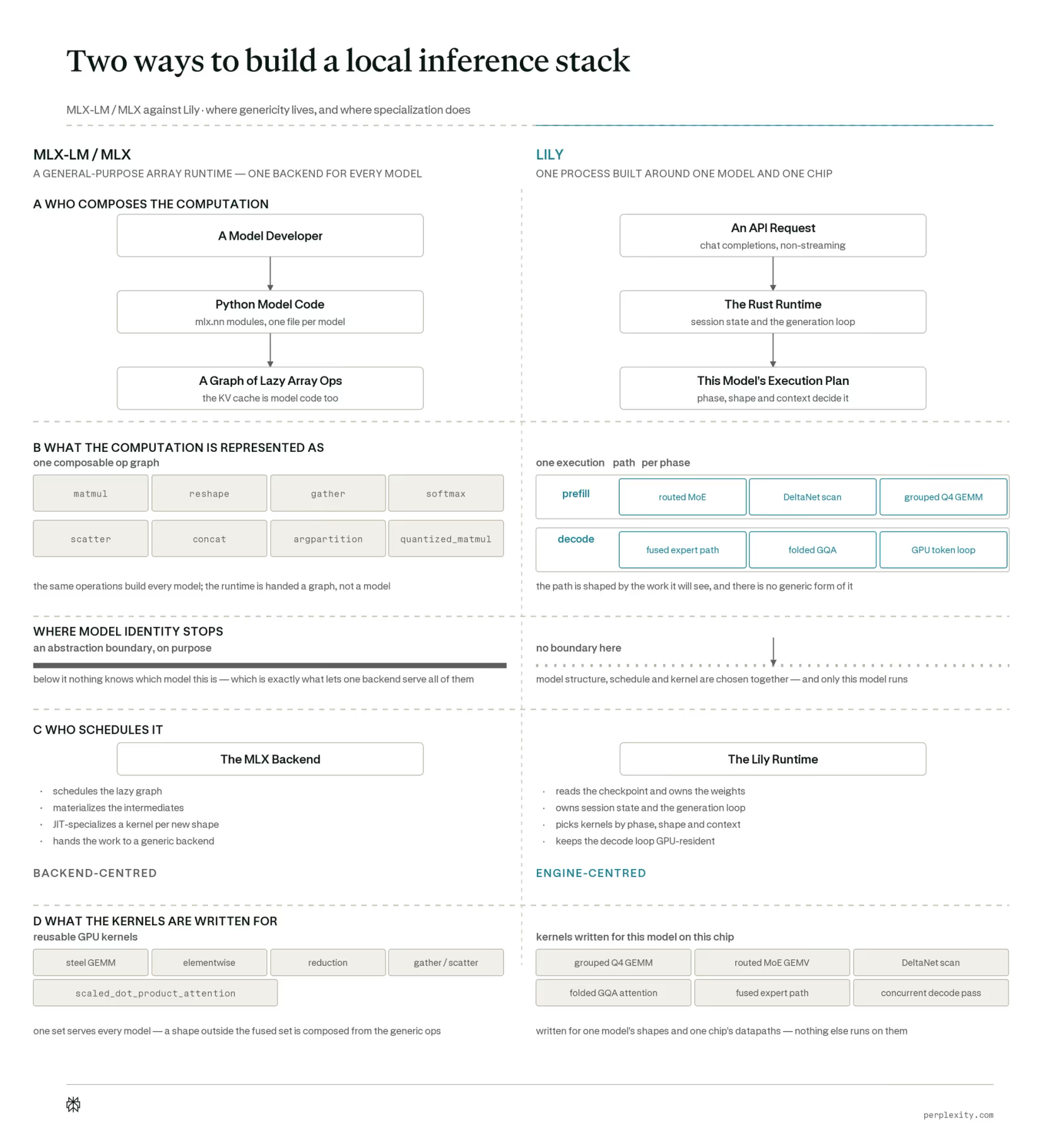
Perplexity Lily is an open-source Rust and Metal inference engine built to run exactly one model, Qwen3.6-35B-A3B, on Apple silicon, and it is the local half of Perplexity's Hybrid Compute feature. We covered it in depth in our Perplexity Lily review. On Perplexity's own benchmark on a 128GB M5 Max, Lily averaged 1.23x MLX-LM's prefill speed and 1.35x its decode speed.
For Mac mini buyers, the important details are the requirements. Lily needs an Apple GPU family 10 Mac (M5 or newer) running macOS 26 or later, and the 4-bit Qwen3.6-35B-A3B checkpoint it loads is 19.4GB. That makes 32GB the realistic floor for running the standalone Lily server; a 16GB M6 simply cannot hold the model. Perplexity's shipping Hybrid Compute feature in its Mac app has a lower stated minimum of 24GB, because it can fall back to smaller local models such as Gemma 4 E4B. We have not seen Perplexity publish M6-specific Lily figures, so do not assume the M5 Max numbers carry over; a Mac mini has a fraction of that machine's memory bandwidth.
Running Always-On Agents on a Mac Mini
An always-on agent is software that runs continuously on your machine, watching inboxes, calendars, files or chat apps and acting for you, and it is the main reason the Mac mini became a cult AI purchase. We explored that trend in Mac Mini Frenzy: The ROI of Local AI Agents, and the agent frameworks themselves in What Is OpenClaw?, OpenClaw 2.0 and our Hermes Agent guide.
Agents change the memory maths in two ways. First, the agent, a browser and any tools it drives also need RAM, which shrinks the model budget. Second, agents send long prompts full of tool definitions, file contents and earlier steps, so prompt processing speed and context capacity matter more than raw chat speed. That plays directly to the M6's strengths, but only if there is memory left for the context.
A common, practical pattern is hybrid: run a small local model for private, routine steps such as classifying emails or reading local files, and route hard reasoning to a cloud model. That is the idea behind Perplexity's Hybrid Compute and behind harnesses like DeepSeek Harness. On a 16GB M6, hybrid is the only sensible way to run a capable agent. On 32GB, a mid-sized local model such as Qwen3.8-27B can handle a much larger share of the work on its own.
When Is Cloud AI Cheaper Than a Mac Mini?
For most people, cloud APIs for the same open models are cheaper per token than buying hardware. Prices below are the lowest per-million-token rates listed on the OpenRouter model API on 29/09/2026, converted at approx. £0.75 per $1.
| Model (hosted) | Input per 1M tokens | Output per 1M tokens | Output tokens for £400 (approx.) |
|---|---|---|---|
| gpt-oss-20b | ~£0.01 ($0.018) | ~£0.07 ($0.09) | ~5.9 billion |
| Gemma 4 26B-A4B | ~£0.07 ($0.09) | ~£0.23 ($0.30) | ~1.8 billion |
| Qwen3.6-35B-A3B | ~£0.11 ($0.15) | ~£0.75 ($1.00) | ~530 million |
| Meta Muse Glimmer 30B | ~£0.23 ($0.30) | ~£0.90 ($1.20) | ~440 million |
| DeepSeek V4 Flash 0731 (cannot run locally) | ~£0.01 ($0.018) | ~£0.24 ($0.32) | ~1.7 billion |
Source: OpenRouter models API, 29/09/2026 (lowest listed provider rate; rates change often, and some models also have free, rate-limited tiers). £400 is roughly the gap between a £899 16GB M6 and a £1,299 24GB/512GB model.
Put the table next to real local speeds and the economics are stark. Even running flat out at 30 tokens per second, 24 hours a day, a Mac mini generates about 2.6 million tokens a day. At Gemma 4 26B-A4B's hosted rate, that is worth about 60p a day in API fees. Electricity is not free either: at MindStudio's measured 38W peak and an assumed 25p per kWh (check your own tariff), a Mac mini at full load around the clock costs about 23p a day, or around £83 a year.
So local AI rarely wins on token cost alone. It wins when:
- Data cannot leave the machine, for example client documents, health or legal material, or anything covered by an NDA or UK GDPR concerns about third-party processors.
- You need offline or predictable availability, with no rate limits, outages or surprise model deprecations.
- You are buying a Mac anyway, so the only extra cost is the memory upgrade.
- You run many small, constant agent steps where latency to local files matters more than frontier intelligence.
- You want to learn: tuning quantisation, context and tooling is far easier with the hardware in front of you.
And for the hardest tasks, no Mac mini competes with frontier cloud models at all. The models in our Claude Sonnet 5.5 vs GPT-6.1 Sol comparison are closed, far larger, and only available via API.
Limitations and Caveats
- Memory is permanent. Unified memory is part of the chip package and cannot be upgraded later. Under-buying is the most expensive mistake.
- Apple's AI claims are about prompt processing. The "4x" and "4.8x" headline figures are not token-generation speeds, and Apple did not name the model it tested.
- Early benchmarks are thin. The independent numbers here come from a company blog and a YouTube channel, one week after launch. Expect more rigorous reviews to refine them.
- No Thunderbolt 5 on M6. The M6 Mac mini has Thunderbolt 4, while the M5 Pro has Thunderbolt 5. MacStories notes this rules out the M6 for the high-speed multi-Mac clustering Apple promotes for distributed inference.
- Quantisation costs quality. Squeezing a 27B model into 2-bit or 3-bit to fit a smaller Mac trades away accuracy. A well-quantised smaller model is often better than a badly quantised bigger one.
- UK upgrade prices are unverified. We confirmed £899 and £1,699 base prices from Apple, and £1,299 for the 24GB/512GB model from UK retailers, but not Apple UK's per-upgrade prices.
Who Should Buy Which Configuration?
| If you want to... | Buy | Why |
|---|---|---|
| Try local AI, run 4B-12B models, use the cloud for heavy work | M6, 16GB (£899) | Gemma 4 12B and Qwen3-8B run well; hybrid agents work fine |
| Run 20B-27B models or fast MoE models locally | M6, 24GB (from ~£1,299 at 512GB) | Unlocks Qwen3.8-27B at Q3, Gemma 4 26B-A4B and gpt-oss-20b, plus 170GB/s bandwidth |
| Run a 27B-30B model at 4-bit with long context and an agent | M6, 32GB | Headroom for Q4-Q5 weights, 32K+ context, the agent and macOS; Lily-capable |
| Faster generation on 27B-30B dense models, or 48-64GB | M5 Pro (from £1,699) | 307GB/s is about 1.8x the M6's bandwidth, plus Thunderbolt 5 |
| Mostly use ChatGPT, Claude or Gemini | Whatever Mac suits your other work | Frontier models run in the cloud; extra memory will not change them |
If you are unsure, the most common regret among local-AI hobbyists is buying too little memory, not too much. Our recommendation for anyone who expects to run agents or 27B-class models is to skip 16GB and choose 24GB at a minimum, ideally 32GB.
The Bottom Line
The M6 Mac mini is the best entry-level Mac Apple has made for local AI, and the reason is prompt processing: Apple's GPU Neural Accelerators make long prompts dramatically quicker, and early independent tests back that up. Generation speed still follows memory bandwidth, and the M6 improves it by a more modest 1.3-1.5x over the M4.
The decision that really matters is memory. 16GB is a good small-model machine; 24GB is where 2026's interesting open models start to fit; 32GB is where they become comfortable. Because the 24GB and 32GB versions also get 170GB/s rather than 153GB/s of bandwidth, the upgrade buys speed as well as capacity. And if your usage is occasional, be honest with the numbers: hosted versions of the same open models cost pennies per million tokens, so local AI is a privacy, control and always-on choice more than a money-saving one.
Sources
- Apple UK Newsroom: Apple unveils a more powerful Mac mini featuring the all-new M6 and M5 Pro (25/08/2026)
- Apple Newsroom: The new Mac mini and Mac Studio are available today (22/09/2026)
- Apple UK: Mac mini technical specifications
- Apple UK Store: Buy Mac mini
- MacRumors: Apple announces new Mac mini with M6 and M5 Pro chips
- Daring Fireball: memory and storage configurations and pricing
- PriceSpy UK: Mac mini (2026) M6 24GB 512GB
- MindStudio: M6 Mac mini for local AI, M4 comparison
- Execute Automation (YouTube): Mac mini M6 First Look, Qwen3.8-27B
- Bart Slodyczka (YouTube): Is the new 16GB M6 Mac Mini good for local AI?
- MacStories: The potential of M6 and M5 Ultra for local AI on macOS
- ModelPiper: iogpu.wired_limit_mb on Mac
- Hugging Face: Qwen/Qwen3.8-27B, unsloth/Qwen3.8-27B-GGUF, google/gemma-4-26B-A4B-it, zai-org/GLM-4.7-Flash, openai/gpt-oss-20b, meta-models/Muse-Glimmer-30B
- OpenRouter models API (prices checked 29/09/2026)
Last updated: 29/09/2026. Specifications and base prices are from Apple's official UK and US pages; tokens-per-second figures are from named independent reviewers and have not been reproduced by AI Tools Review. Memory budgets, KV-cache sizes and speed ceilings are our own calculations and are labelled as such.
Get the free guide: Claude vs ChatGPT, Gemini & Grok
A 20-page playbook covering everything you need to choose and use the big four AI models in 2026, full cost and feature comparisons, what each is best (and worst) at, and how-tos for images, vectors, building a website, Claude Code and more.