 AI Tools Review Editorial Team
Quick Answer:
DeepSeek Harness v0.2 is a preview release that turns DeepSeek's MIT-licensed, plugin-first agent framework into a desktop app for macOS (Apple silicon) and Windows. It adds a plugin manager that installs by package name, an optional scheduled-tasks plugin, an experimental Creator mode, Office-file previews and a trajectory view, and it keeps your earlier session history. Other models connect through built-in providers or OpenAI-compatible endpoints. It is still a preview: the maintainers say it has not been security-audited.
Seven weeks after DeepSeek released an open-source agent harness aimed squarely at the terminal crowd, the company has done the thing that usually decides whether a developer tool escapes developers: it shipped an installer. DeepSeek Harness v0.2 puts the same plugin-first engine behind a window you can open without touching Node, pnpm or a command line.
This article sets out what the preview actually contains, which claims come from DeepSeek and which from secondary coverage, what the safety warnings mean in practice and how it sits against rivals such as Claude Code and Hermes Agent. Where a detail could not be confirmed, we say so. Two creator videos covering the release are embedded below for readers who want to see the interface moving.
Julian Goldie SEO walks through the desktop setup, plugin library, model providers and the scheduled-tasks plugin. Creator enthusiasm is a starting point; the repository is the reference.
Executive Summary
What it is: DeepSeek Harness (command name dsh) is an agent runtime, not a model. Its pitch since launch has been "everything is a plugin": the tools, the loop, the web interface and even the dependency-injection layer underneath are replaceable modules, built on the Cordis framework. Version 0.2 adds the first official graphical shell for that runtime. For the full background, see our earlier explainer, DeepSeek Harness: Open-Source Claude Code Rival.
- Desktop installers: a
.dmgfor Apple silicon Macs and an.exefor Windows, with a bundled Node runtime. No separate Node or pnpm install is needed for the app. - Linux: no official desktop installer was reported. The browser interface still runs with
npx @deepseek-ai/dsh webwherever Node.js is available. - Plugin manager: install by entering a plugin package name, then disable, uninstall or inspect it and see where it came from.
- Automation: an optional, off-by-default scheduled-tasks plugin for recurring jobs that reportedly survive restarts.
- Creator mode: experimental; you describe a need in conversation and the agent writes or modifies a plugin.
- Models: default DeepSeek-V4.1-Flash, with Anthropic, OpenAI, Moonshot (Kimi) and Zai (GLM) providers built in, and custom OpenAI-compatible endpoints.
- Licence and status: MIT, developer preview, explicit warnings of breaking changes and no security audit.
Our view: the desktop app is the right move and genuinely lowers the barrier, and the plugin manager is what makes the "everything is a plugin" claim usable by non-engineers. The same openness is also the main risk, because every third-party plugin runs with the agent's permissions. Treat v0.2 as an excellent thing to try in a disposable environment, and not yet something to point at your only copy of important files.
From v0.1 to v0.2: The Timeline
DeepSeek Harness entered developer preview on 13/08/2026, alongside the V4-Pro update covered in our DeepSeek V4 Pro 0813 review. It arrived as a terminal tool and a browser interface launched with npx @deepseek-ai/dsh web. According to NYU Shanghai's RITS write-up, the repository had passed 240,000 GitHub stars by the time v0.2 appeared. When we checked the repository README for this article it showed roughly 243.6k stars and 29.2k forks, figures that will have moved by the time you read this.
The v0.2 line moved through release candidates quickly. RITS reports v0.2.0-rc.1 on 28/09/2026 and rc.2 on 29/09/2026, and several outlets, including ChainCatcher and RootData, date the preview announcement itself to 29/09/2026. English-language coverage such as MarkTechPost's article on 03/10/2026 followed a few days later, which is why you will see 02/10/2026 and 03/10/2026 quoted as the release date in some places. We could not retrieve the MarkTechPost article directly (the site returned a 403 error to our fetch), so we have relied on the primary repository and on the other reports for the details below. One Chinese-language report we read carried an obviously garbled date, and we have ignored it.
Between 0.1 and 0.2 the project also shipped smaller point releases. RITS credits the 0.1.7 to 0.2 span with the plugin manager, scheduled tasks, background execution, Office previews, better failure handling and the trajectory view. Because the work landed incrementally, some of these features will already be familiar if you followed the project through July and August.
An adoption figure is worth treating carefully. DeepSeek's announcement, as reported by Wall Street CN, ChainCatcher and RootData, says that roughly 60% of Harness users, measured among official API users, have used a third-party plugin. That is a company-supplied statistic with no published methodology, but it matches the product's design: if most users are already extending the tool, a graphical plugin manager is a sensible next step.
The Desktop App
The practical change in v0.2 is that Harness now installs like any other application. You sign in with a DeepSeek account or an API key, pick a local folder as a workspace and hand the agent a task. The app bundles its own Node runtime, and from rc.2 it can install the dsh command-line tool from a menu-bar item, so plugin management no longer depends on a separate Node or pnpm installation. The agent's file work is scoped to the workspace you choose, which is a sensible default for a tool that can write to disk.
Installing and Running It
There are three routes, as reported by RITS and confirmed against the repository README:
- macOS: download the
.dmg. The build targets Apple silicon; we found no mention of an Intel build. - Windows: download the
.exeinstaller. - Browser or Linux: run
npx @deepseek-ai/dsh webif you have Node.js, which launches the original browser UI. To build from source, clonedeepseek-ai/deepseek-harness, runpnpm install,pnpm run buildand thenpnpm dsh web.
So the brief for Linux users is straightforward: there is no polished Linux installer in the reported release, but the npm route is officially supported and is the same engine. If you run Linux on a spare machine, that is arguably the safer place to experiment anyway. A community project, dsh-desktop, also surfaced in our searches as a third-party desktop wrapper; it is not DeepSeek's official app and we have not evaluated it.
Session History and the Trajectory View
Julian Goldie's walkthrough stresses that the desktop app replaces the old terminal-and-browser setup while keeping past session history synced, so earlier work does not vanish when you change interface. That claim is consistent with the product's architecture: sessions are stored locally by the runtime and the front ends are just views onto them. We have not independently tested migration across a large session history, so treat the "nothing is lost" message as the vendor and creator account.
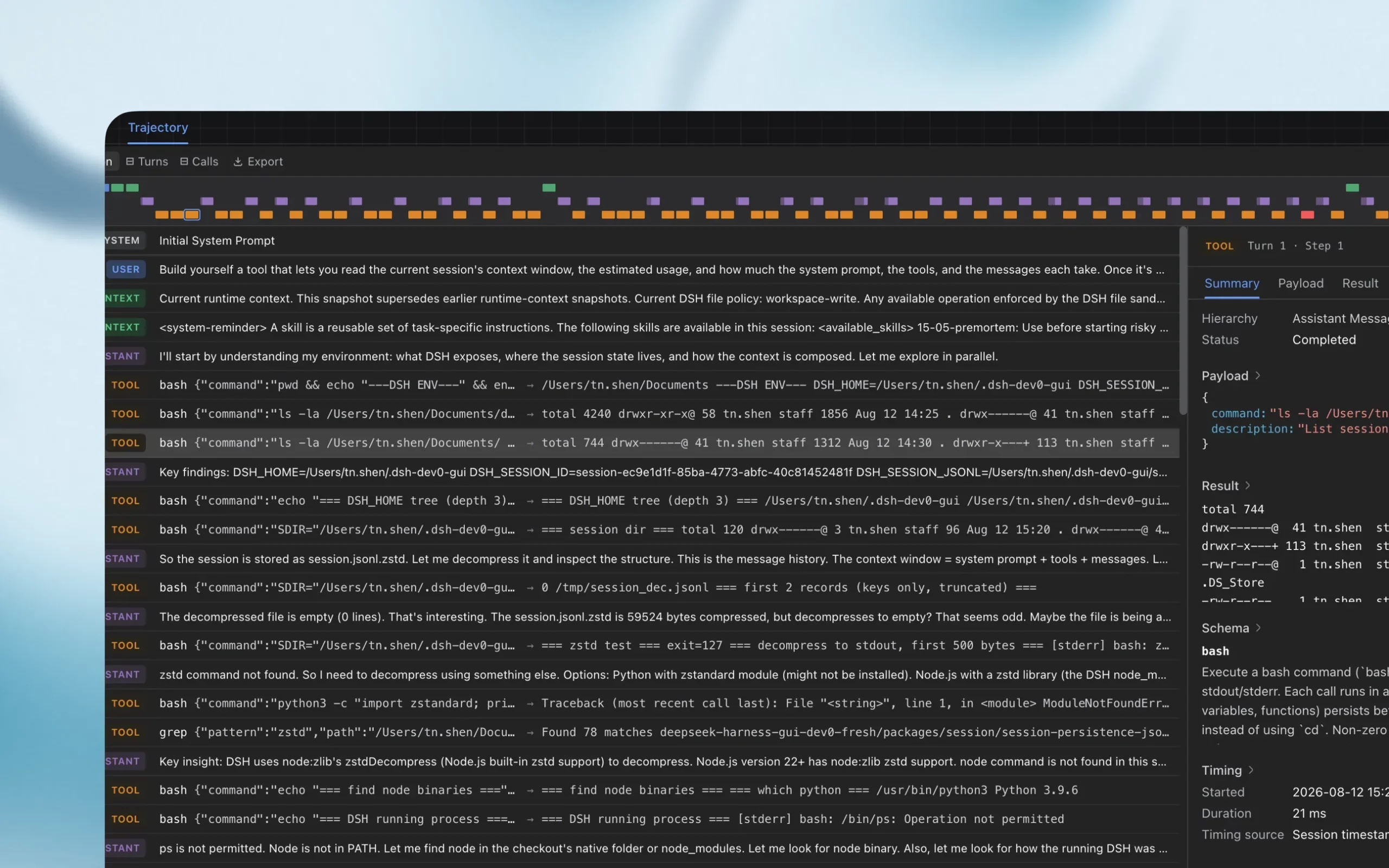
The trajectory view, pictured above, is the most developer-friendly addition. It lays out each system prompt, user message, assistant message and tool call on a colour-coded timeline, with a detail pane showing the payload, result, schema and timing of the selected step. The screenshot DeepSeek published even shows the agent debugging its own environment, which is a neat illustration of how transparent the runtime is. For anyone evaluating an agent, being able to see exactly which commands ran and in what order matters more than any benchmark, and it is the sort of review surface we praised in OpenMuse.
The Plugin Manager
Until now, adding a plugin to Harness meant using the command line. The new manager is a page in the desktop app with an Add plugin button. You enter a plugin's package name, which in practice is an npm package, and the app installs it. You can then disable it, uninstall it, read its description and see its source. The repository also uses the GitHub topic dsh-plugin so that community plugins can be found, which is the discovery mechanism until the official marketplace the maintainers have promised arrives.
Installing by package name is convenient and also the reason to be cautious. An npm package can run arbitrary code at install time and at runtime. The plugin manager shows provenance, but it does not, as far as the published material says, sandbox or vet plugins. We return to this in the security section.
Official Plugins
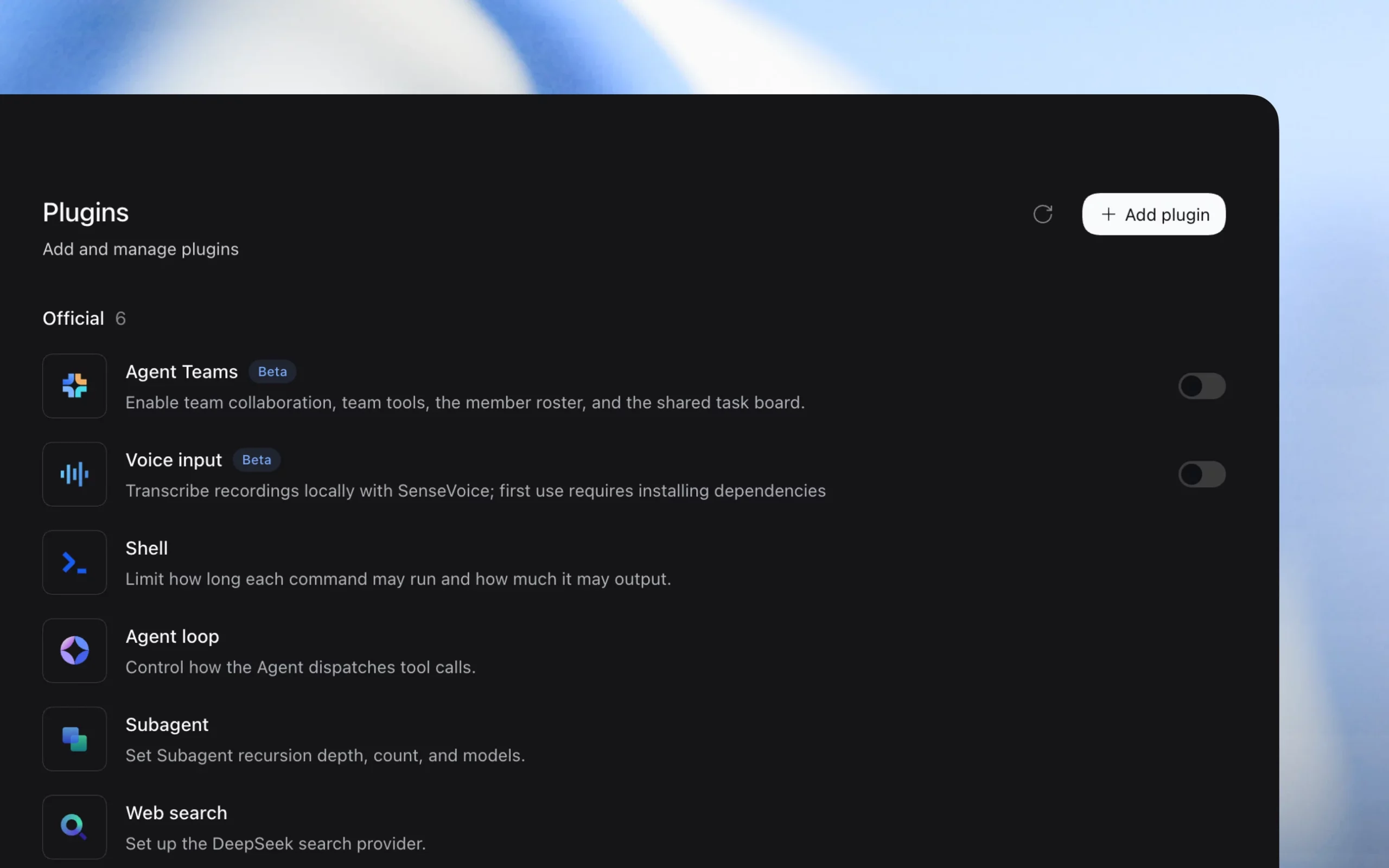
The plugin manager screenshot lists six official plugins, which line up with RITS's description:
- Agent Teams (beta): team collaboration, team tools, a member roster and a shared task board. Off by default.
- Voice input (beta): local transcription with SenseVoice. First use requires installing dependencies. Off by default.
- Shell: limits how long each command may run and how much it may output.
- Agent loop: controls how the agent dispatches tool calls.
- Subagent: sets recursion depth, count and models for subagents.
- Web search: sets up the DeepSeek search provider.
RITS adds the scheduled-tasks plugin (optional and off by default) and Creator mode (experimental) to the official set, which brings the total to eight in its account. The screenshot, taken before those extras, shows six. The shell plugin's limits on runtime and output are a small but meaningful guard rail: a runaway command cannot hold the agent hostage indefinitely.
Creator Mode: Plugins Written by the Agent
The feature that drew the most attention from creators is Creator mode, in which you describe what you want in conversation and the agent writes or modifies a plugin to provide it. It is flagged experimental in every source we read. It is the natural consequence of a runtime where everything is a plugin: if the agent can edit its own plugins, it can extend itself.
The second video embedded here demonstrates the idea from a creator's perspective. We would read it as a demonstration of what is possible, not a statement about reliability.
A second Julian Goldie SEO video focusing on Creator mode and the agent building its own plugins. Treat it as a demonstration, since the feature is labelled experimental.
RITS, for its part, notes that the same release added stronger failure handling: agents now check for side effects before retrying, so a failed step that already changed something is not blindly repeated. Self-modifying behaviour and retry safety are linked concerns, and it is encouraging that both appear in the same release. The trajectory view is also what lets you audit what a self-written plugin actually did.
Scheduled Tasks and Automation
Automation is where Harness moves from an assistant you talk to into something that works while you are away. DeepSeek made it a plugin you switch on when needed. Once enabled, you can ask in natural language, and the example reported from DeepSeek's announcement is "every Friday at 5pm, read the newly added materials in this project folder for the week and sort out a weekly report". Harness creates a periodic task for it. You can then open the task and see the next run time, whether the previous run succeeded, the run records and the instructions, all of which are editable.
Two behaviours matter. First, scheduled tasks are reported to survive restarts and to carry on after you close the desktop window, so background execution is real rather than tied to an open session. Second, RITS reports a minimum interval of about one minute, which is a floor on how aggressive a schedule can be. Because the feature is off by default, nothing runs on a timer until you opt in.
This puts Harness in the same territory as the always-on agents we have covered elsewhere, from Hermes Agent's scheduled jobs in our Hermes Agent guide to the hosted offerings discussed in our OpenMuse piece. The difference is that Harness runs on your own machine. That means automation only runs when the computer is on and awake, and it means the agent acts with your local permissions. For a weekly summary of a project folder, that is a reasonable trade. For anything that touches email, payments or production systems, we would wait for the sandboxing the roadmap promises.
Cost deserves a sentence. An unattended agent running on a schedule spends tokens whether or not you are watching. With DeepSeek's default model priced aggressively (see our DeepSeek V4.1 Flash review for current pricing), a weekly job is trivial, but a poorly written one-minute loop is not. Set a sensible interval and check the run records.
Models and Providers
Despite the name, Harness is not limited to DeepSeek. According to RITS, the default model in v0.2 is DeepSeek-V4.1-Flash, and sign-in is by DeepSeek account or API key. Built-in third-party providers are Anthropic, OpenAI, Moonshot (Kimi) and Zai (GLM), and the runtime speaks three wire protocols: OpenAI Chat Completions, OpenAI Responses and Anthropic Messages. Custom OpenAI-compatible endpoints, which the v0.1 coverage already highlighted, remain the escape hatch for anything else, including local servers and routers.
Julian Goldie's video describes adding other providers and using free models through services such as OpenCode or OpenRouter by pasting in an API key. That is plausible given the OpenAI-compatible support, though free tiers carry their own rate limits and data-handling terms, which are worth reading before you send private code. Note also what is not supported: RITS says OAuth-style sign-in, such as the Codex route, is not available, so you need API keys.
One breaking change is worth knowing before you upgrade. v0.2 updated the third-party model catalogue, so a model you saved under v0.1 may need to be selected again. It is a small friction but it is the project's warning of compatibility-breaking changes made concrete.
For context on the models you might pair with it, see our reviews of DeepSeek V4 Pro GA, DeepSeek V4 Flash, GLM 5.3 and Kimi K2.7 Code, the last two being the sort of non-DeepSeek models the built-in Zai and Moonshot providers make easy to reach. DeepSeek's own model line-up and its history are summarised in our DeepSeek V4 guide, and the harness-and-model pairing claims are tested in DeepSeek V4 Pro and J-Space: Claims Checked. You can also find the model itself in our DeepSeek V4 Pro tool listing.
Office Files and Code Changes
v0.2 positions Harness as a general work tool, not only a coding agent. RITS lists previews for Word, Excel, PDF, HTML, Markdown and code, and Wall Street CN describes a sidebar that shows file previews and code diffs. Julian Goldie's account adds handling for documents, spreadsheets, PDFs, charts and slideshow creation. Our reading is that the previews let you check what the agent produced without leaving the app, while the diffs let you see exactly what it changed in your code.
We have not run these workflows ourselves, and the quality of generated spreadsheets and slides will depend heavily on the model. The preview panel is a convenience for review, not evidence that the output is correct. As with any agent, open the result and check the numbers.
Security and Production Readiness
The project is unusually candid. The README and release notes, as relayed by RITS, say Harness has "not undergone a security audit" and "must not be treated as secure or production-ready". They explain why: it executes model-generated commands and loads third-party plugins, so it can modify or delete files and disclose data or credentials. The recommended mitigations are least privilege, a disposable virtual machine or container and backups of anything you care about. The README also states plainly that compatibility-breaking changes will occur.
Julian Goldie's video raises privacy cautions in the same spirit. We would add a practical checklist:
- Point the workspace at a dedicated folder, not your home directory.
- Back up that folder first, or work in a Git repository so changes are reversible.
- Read a plugin's source before installing it. Prefer official plugins and well-known publishers.
- Leave Creator mode and scheduled tasks off until you need them.
- Keep API keys out of the workspace, and use keys with spend limits.
- Review the trajectory view after any unattended run.
The security story is a work in progress, and sandbox work heads the roadmap. Until it lands, a spare machine or virtual machine is the safest place for experiments, which is the same advice we gave for the earlier release and for other open agents.
Roadmap
DeepSeek's announcement says the product is at an early stage and lists the areas it intends to work on. Per Wall Street CN, ChainCatcher and RootData:
- An official plugin marketplace.
- Sandbox and security improvements.
- Agent teams and long-term memory.
- Browser and GUI software automation.
- Remote and mobile access.
- Session sharing and multi-user collaboration (described as something it is exploring).
- Continuous adaptation to new models.
No dates were given, so treat the list as direction rather than commitment. Wall Street CN also reports a limited-time promotion of 6 yuan of credit for eligible users, which is well under £1 at recent exchange rates; we could not confirm the terms from an official English source, so do not rely on it.
How It Compares
Against Claude Code: Anthropic's tool is a closed, tightly integrated product with its own desktop surface; see our coverage of its built-in browser and function hooks. Harness is MIT-licensed and provider-agnostic, and it now has a comparable windowed experience. Claude Code is the more mature and supported option today. Harness is the more open and modifiable one, and its plugin manager is a more explicit extension story than hooks.
Against Hermes Agent: Hermes is an open agent with a strong emphasis on persistence, messaging channels and scheduled work; our complete guide and v0.20.0 Herald release article cover it. Both now offer scheduling and a plugin or skill ecosystem. Hermes leans towards an always-on personal agent, while Harness leans towards a composable workbench that happens to have a desktop shell.
Against personal-agent apps: products such as the ones in our OpenMuse article give agents a managed browser and account integrations with review gates. Harness gives you a general runtime and leaves most of those guard rails to you and to plugins.
The honest summary is that v0.2 closes the usability gap with commercial competitors faster than it closes the safety and polish gap. That is common for a first desktop release.
Limitations and Open Questions
- Platform coverage: Apple silicon and Windows only for installers. No Intel Mac or Linux installer was reported.
- Unverified adoption claim: the 60% third-party-plugin figure is DeepSeek-reported and unaudited.
- No independent testing yet: most coverage, including the creator videos, relays DeepSeek's announcement. We have not seen a rigorous third-party evaluation of Creator mode, scheduling reliability or Office output quality.
- Release-date discrepancies: the preview is dated 29/09/2026 by RITS, ChainCatcher and RootData, while English coverage appeared on 02/10/2026 and 03/10/2026. We use 29/09/2026 for the release.
- Primary source access: we could not open the MarkTechPost article or DeepSeek's social posts directly, so details attributed to them are via other outlets and the repository.
- Plugin trust: there is no published vetting or sandbox for third-party plugins.
- Breaking changes: the model catalogue change already shows saved settings may need redoing.
Who Should Try It
Developers and tinkerers who already like open agents should install it on a spare machine and explore the plugin manager and trajectory view. Teams evaluating agent runtimes should note the MIT licence and the provider flexibility, but should wait for the sandboxing and a plugin marketplace before any wider rollout. Non-technical users attracted by the Office features and scheduling should be cautious: the interface is friendly, but the safety posture is not yet consumer-grade. Anyone on a tight budget can pair it with a low-cost model, though you should read the data terms of any free provider.
In one line:
A real desktop app, a real plugin manager and optional scheduling make Harness far easier to adopt. The missing audit and sandbox mean you should adopt it carefully.
The Bottom Line
DeepSeek Harness v0.2 is the release that makes the project legible to people who do not live in a terminal. The desktop installers, the plugin manager and the scheduled-tasks plugin are all sensible, and the trajectory view is a genuine transparency feature. What it does not yet offer is the assurance that comes with an audit and a sandbox, and DeepSeek says so itself.
If you try it, do so in a disposable environment, keep the optional features off until you need them, and read every plugin you install. If you wait, the roadmap suggests the next releases will tackle exactly those concerns. Either way, the speed at which this project has moved from a developer preview on 13/08/2026 to a desktop app on 29/09/2026 is worth watching.
Sources
- deepseek-ai/deepseek-harness on GitHub: README, licence, install commands, repository statistics.
- NYU Shanghai RITS: DeepSeek Harness v0.2 Ships as a Desktop App: dates, plugins, providers, safety warnings and the screenshots used here.
- ChainCatcher: release summary and roadmap.
- Wall Street CN: Chinese-language report on plugins, scheduling and the 60% statistic.
- RootData: announcement summary.
- deepseekv4pro.com: independent news write-up (not an official DeepSeek site).
- Julian Goldie SEO: NEW DeepSeek Harness v0.2 is INSANE!
- Julian Goldie SEO: DeepSeek Harness Can Now Build Its Own Plugins
Last updated: 05/10/2026. Sourced from the DeepSeek Harness repository and independent reports. Figures such as GitHub stars change quickly, and we have flagged claims we could not verify.
Get the free guide: Claude vs ChatGPT, Gemini & Grok
A 20-page playbook covering everything you need to choose and use the big four AI models in 2026, full cost and feature comparisons, what each is best (and worst) at, and how-tos for images, vectors, building a website, Claude Code and more.